How to Improve OCR Accuracy: A Practical 2026 Playbook
Learn how to improve OCR accuracy with proven preprocessing, engine tuning, and validation strategies. Boost document extraction quality in production.

You're staring at a document queue that looks simple on paper and messy in production. The scans are inconsistent, the invoice totals are the fields that keep breaking, and the team is still fixing exceptions by hand. If you're trying to improve OCR accuracy, the fastest wins usually come from the pipeline around OCR, not from chasing a prettier benchmark number.
Why OCR Accuracy Is a Pipeline Problem
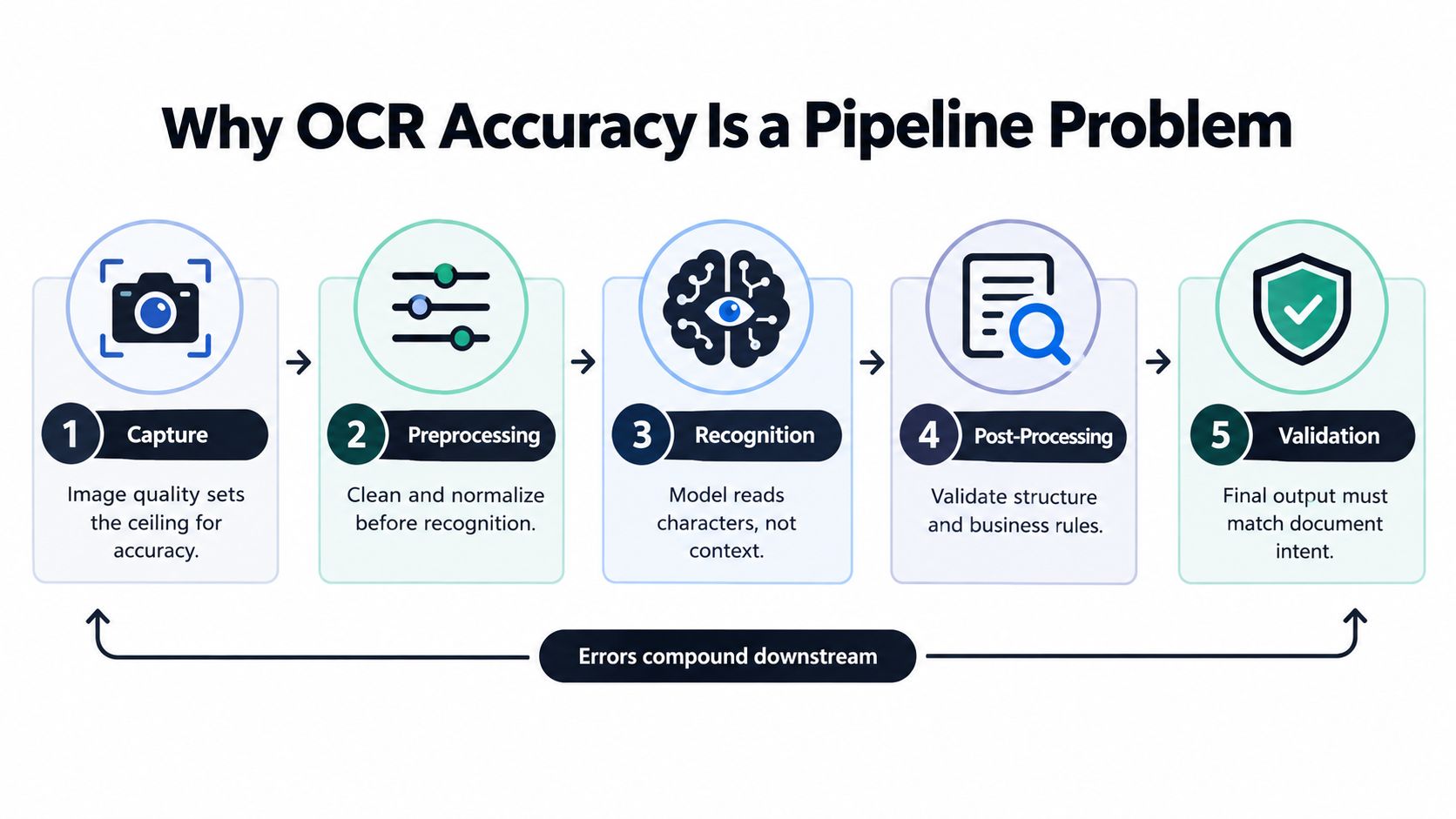
OCR accuracy depends on capture, preprocessing, recognition, post-processing, and validation working together. If one stage is weak, the next stage inherits that error. A clean benchmark on polished images does not predict what happens in finance or logistics, where documents are skewed, faded, multi-zone, and often semi-structured.
The four loss zones that matter
Capture sets the ceiling. A native PDF avoids the extra degradation that comes from printing and rescanning, while poor scan quality forces the engine to guess before it sees the text clearly. The image-quality guidance still points to 300 DPI or higher as the baseline that usually matters most for accuracy (OCR accuracy guidance, scan-quality guidance).
Preprocessing can recover some of that loss with deskewing, noise removal, binarization, and contrast enhancement. The same guidance notes that these steps can improve character accuracy by 3–8% on degraded inputs (OCR accuracy guidance).
Recognition is where the engine reads characters, but it does not understand business intent. Post-processing turns raw text into something a workflow can use. Validation is the final gate, where totals, IDs, dates, and field relationships are checked against rules that reflect the document, not just the glyphs.
Practical rule: if you cannot explain where an error entered the pipeline, you cannot fix it cheaply.
The right question is how to improve OCR accuracy at each stage, not which single engine has the prettiest benchmark. Capture quality, preprocessing choices, engine configuration, and downstream validation all need separate checks. Production teams should also build a small ground-truth set from the actual workflow, not a toy benchmark, then use it to isolate where accuracy is leaking. Document workflow design for mixed files matters because document pipelines fail in the handoffs as much as in the OCR call itself.
Teams that improve fastest ask two questions: where does the error first appear, and what is the cheapest way to stop it there?
Where OCR Actually Fails in Production
In finance and logistics, OCR doesn't usually fail because the model is “bad.” It fails because the input is ugly, the layout is messy, or the extracted text is technically correct but operationally wrong. A sharp invoice scan can still break if the total is in one column, the tax line in another, and a stamp partially covers the payment terms.
Failure modes split into three buckets
Scan-quality failures come first. Low resolution, blur, glare, skew, faded toner, creases, handwritten overlays, and stamp bleed all make the character shapes harder to separate. Recognition failures are the classic confusions, like 0/O, 1/l/I, or touching digits in dense fields. Structural failures are different. They show up in multi-column layouts, tables, checkboxes, rotated stamps, and mixed-language pages where the text is readable but the document's meaning gets lost.
| Common OCR Failure Modes and Their Source Stage | ||
|---|---|---|
| Failure Mode | Source Stage | Typical Fix |
| Low-resolution scan | Capture | Raise DPI, rescan at 300 DPI or higher |
| Skewed page | Capture, preprocessing | Deskew before recognition |
| Faded text | Capture, preprocessing | Improve lighting, contrast, grayscale handling |
| 0 and O confusion | Recognition | Use context, lexicons, validation |
| Table misalignment | Structural analysis | Preserve layout, parse zones separately |
| Wrong field assignment | Post-processing | Add cross-field rules and routing |
The practical trap is assuming all errors are character errors. They aren't. A page can score well on raw character matching and still be useless if a line item lands in the wrong field or a total gets copied into a notes box. That's why field-level review matters more than a single headline accuracy number.
A clean-looking OCR output can still be wrong in the ways that cost the most money.
For a deeper breakdown of error sources, the failure-pattern view in OCR failure mode analysis is the right mental model. It's also where teams stop blaming “the model” for problems that started with the scan or ended with weak validation. In practice, the biggest gains come from fixing whichever failure bucket dominates your own documents, not from tuning every knob at once.
Scan Quality and Preprocessing That Move the Needle
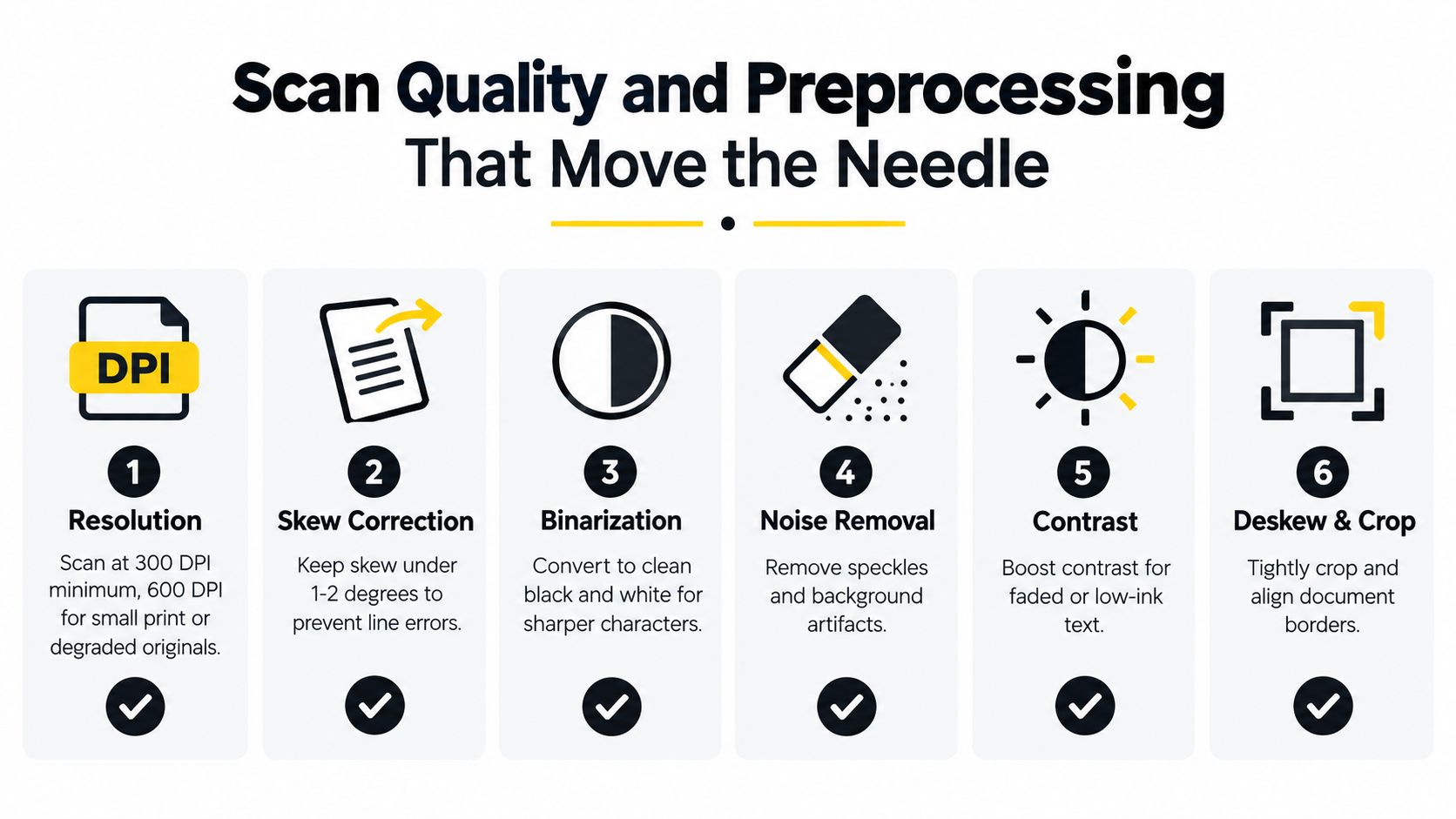
The first OCR gains usually come before recognition. If the scan is weak, every downstream step has less to work with. For source capture, 300 DPI minimum is the baseline I would enforce, and 600 DPI makes sense for small print or degraded originals because fine strokes and low contrast fall apart fast at lower resolution (scan-quality guidance).
Capture settings that are worth enforcing
Keep skew tight. A tilted page raises error rates, and as noted earlier, a 5-degree tilt can hurt Word Error Rate. In production, I would target 1 to 2 degrees after deskewing. For older or discolored documents, scan in grayscale or RGB, not bitonal, because aggressive black-and-white capture strips away useful texture before the OCR engine sees it.
Preprocessing choices that usually help
Use adaptive binarization instead of global thresholding when lighting is uneven. Sauvola or Niblack-style local thresholds usually hold up better on faded paper and noisy backgrounds. Denoise with an edge-preserving filter, such as bilateral filtering, then remove borders and non-text artifacts with connected-component analysis. If the page already looks clean, do not overdo contrast stretching. It can sharpen noise as much as text.
Practical rule: preprocess to rescue bad input, not to make every page look aggressively “clean.”
A simple evaluation set matters more than clever tuning. Build a holdout of 200 to 500 documents covering your top failure types, then measure Character Error Rate before and after each preprocessing change in isolation. Ship a change only if it improves the slices that matter in your own documents. A tweak that helps one vendor's forms but hurts receipts will add churn, not value.
Do not over-tune morphology kernels because they often fit one supplier's scan style and break consistency elsewhere. A short, repeatable preprocessing protocol usually beats constant fiddling. For teams implementing this in code, image preprocessing in Python is a useful reference for the operations that belong in a production pipeline.
If you want a quick visual check on degraded inputs, OCR for sharpened photos can be a handy sanity aid before you commit to a full pipeline change. It is not a replacement for proper evaluation, but it makes the gap between bad capture and bad recognition easier to see.
Choosing and Configuring the Right OCR Engine
Engine choice matters, but less than people think when the input quality is poor. A strong engine on a bad scan still produces bad output. Once the images are decent, the question becomes which recognizer fits the document type and how much control you need over layout, language, and confidence handling.
Compare engines by the job they do
Open-source baselines like Tesseract and EasyOCR are useful when you need control and don't mind doing more integration work. Commercial APIs like Google Document AI, AWS Textract, and Azure Document Intelligence are easier to stand up, especially for general business documents. Transformer and vision-language recognizers such as TrOCR, Qwen-VL, and GOT-OCR2 can be a better fit when layout and context matter more than simple text transcription.
| OCR Engine Categories Compared | |||||
|---|---|---|---|---|---|
| Engine Category | Typical CER on Clean Print | Setup Effort | Customization | Cost per 1k Pages | Best Fit |
| Open-source baselines | Strong on clean text, varies by tuning | High | High | Low | Controlled environments, engineering-heavy teams |
| Commercial APIs | Strong on common business docs | Low to medium | Medium | Medium to high | Fast deployment, mixed document sets |
| Transformer and VLM recognizers | Strong when context matters | Medium to high | High | Varies | Complex layouts, labels, and degraded text |
Configuration levers matter more than most vendor demos admit. Page-segmentation mode, language packs, dictionary activation, confidence thresholds, binarization mode, and region-of-interest hints can all change output quality in a measurable way. For a logistics label stream, I'd pilot a context-aware recognizer with constrained prompts. For an invoice workflow, a tuned classical engine can still win if the template is stable and the labels are repetitive.
A concrete decision example helps. A shipping-label pipeline should prioritize layout recovery and region constraints, because the field positions are often fixed but the print quality isn't. An invoice pipeline may get more lift from a labeled sample set and a fine-tuned OCR model than from swapping to a heavier recognizer. That's where engine choice becomes workflow choice.
Practical rule: freeze a set of 500 representative documents, then A/B engines on that exact set before you commit.
Use pretrained models for generic Latin documents. Move to fine-tuned models for fixed templates. Use custom-trained CRNN or ViT-style models when the script, degradation, or layout mix makes the generic path unreliable. If you're comparing outputs on the same page set, the choice gets clearer fast.
Post-Processing With Validation and Structure
Raw OCR output is only the middle of the job. Production systems need the extracted text to obey the document's structure, not just spell the words correctly. That's why a line that looks right can still be wrong if it breaks the field relationships that downstream systems expect.
Three validation passes that catch expensive mistakes
The first pass is dictionary and lexicon checking. Use a domain trie or word list for vendors, SKUs, and product names, then apply fuzzy thresholds so you don't “correct” legitimate values into nonsense. A reasonable rule is to reject candidates with a Damerau-Levenshtein distance greater than 2 from known SKUs. The second pass is regex and format validation for dates, IDs, tax numbers, and amounts. The third pass is cross-field consistency, where totals must match line-item sums, currency must fit the country context, and dates must stay inside the right fiscal window.
Practical rule: if a corrected field breaks a validation rule, don't trust the correction.
The reason this matters is simple. An OCR line can be 97% character-accurate and still be field-wrong in a way that ruins the workflow. One invoice can look almost perfect and still fail because the total, the PO number, or the payment reference is off by a single character. When you add validation, the output becomes usable for automation instead of just readable to a human.
A confidence-weighted rewrite step helps, but only when validators agree. Low-confidence tokens should be substituted cautiously, and every rejected span should be logged with a reason. That log is how you retrain later without guessing where the failure came from.
The bigger point is that high OCR accuracy is not enough for RAG, compliance, or finance workflows if the structure is broken. Recent industry analysis in ACL Industry 2026 makes the same point from a retrieval angle, OCR quality alone doesn't guarantee useful downstream performance. In practice, the teams that win are the ones that keep structure intact from extraction through validation.
Human-in-the-Loop, Monitoring, and SLAs
Human review is not a sign that automation failed. It's the part of the system that keeps your output trustworthy when the document is messy or the business rule is strict. The goal is routing, not blanket review. High-confidence documents should pass straight through, while low-confidence or business-critical fields go to a reviewer with the original image, the suspect span, and the validation reason already attached.
Route by confidence, not by instinct
A practical routing rule is simple. If the mean token confidence is above your cutoff and all validators are green, the document can auto-approve. If confidence is low or the structure looks inconsistent, send it to the review queue. That queue should be small enough that reviewers can handle it without falling behind, and the target should be tied to turnaround, not to OCR vanity metrics.
For monitoring, the useful signals are field-level accuracy, validator rejection rate, reviewer agreement, and drift in image quality such as DPI, skew, and brightness. Those are the indicators that show whether the pipeline is getting healthier or decaying. For teams that need tooling around this layer, ML performance monitoring tools are worth reviewing because the same discipline that watches model drift also applies to OCR and document pipelines.
| Human-in-the-Loop, Monitoring, and SLAs | ||
|---|---|---|
| Checklist Item | What It Does | Why It Matters |
| Confidence routing | Sends high-confidence docs through automatically | Keeps queues small |
| Review queue | Lets humans fix uncertain fields | Protects critical workflows |
| Monitoring dashboard | Tracks accuracy and drift over time | Surfaces degradation early |
| SLA definition | Sets correctness and turnaround targets | Makes performance measurable |
| Feedback loop | Feeds corrections back into the pipeline | Improves future output |
The biggest SLA mistake is measuring the straight-through rate alone. A very high auto-approve rate means nothing if the wrong invoices still leak into accounting. Set review queues so they cap at a small slice of volume, and trigger retraining when monthly field accuracy drops enough to matter operationally.
Review should be a cost you control, not a surprise you discover after the month closes.
Build vs Buy and Your Next Steps
The build-versus-buy decision is usually not philosophical. It's operational. If your document mix is stable, your error tolerance is tight, and your team can support labeling, tuning, and ongoing monitoring, an in-house stack can make sense. If you need quick integration, mixed document types, and a shorter path to production, a managed API is often the rational move.
Use a simple scoring rubric
Look at monthly document volume, language mix, layout variability, acceptable error budget, ML engineering capacity, and integration timeline. High variability and a short timeline push you toward a managed platform. Stable templates and a strong internal ML team push you toward building. The ultimate test is whether the long-term maintenance burden is lower than the value of the control you gain.
Matil.ai is one option in that managed category, it combines OCR, classification, validation, and workflow orchestration in a single API, so it fits teams that want extraction plus routing without stitching together separate systems. If you're already running manual review and ad hoc parsing, that kind of structure is often the missing layer.
A practical 30-day plan keeps the decision honest:
- Baseline your current pipeline on a labeled sample from real documents.
- Pick one preprocessing lever and one post-processing lever to test.
- Run a controlled A/B against the current workflow.
- Compare field-level correctness, not vendor claims.
- Decide on measured improvement, not on the prettiest demo.
That approach keeps you focused on the system property that matters. OCR accuracy isn't a magic number sitting inside a model. It's the output of a pipeline that either protects the business from bad fields or lets them through.
If you're evaluating how to improve OCR accuracy in a live workflow, Matil.ai is built for the full document pipeline, not just character reading. It combines OCR, classification, validation, and automation through an API, so finance, operations, logistics, legal, and compliance teams can move from manual review to structured extraction with less glue code. Visit Matil to see whether it fits your document process.


