Natural Language Processing for Unstructured Data Explained
Natural language processing for unstructured data turns invoices, IDs and bills of lading into structured fields. Techniques, pipeline, validation.

Natural language processing for unstructured data is the set of techniques that turn free text, scans and images into labeled fields a system can check and use. If your finance team still copies totals from PDFs into an ERP, the useful outcome isn't searchable text, it's a validated record with evidence attached and a clear route for exceptions.
Why Most Business Documents Stay Unused
An accounts payable clerk opens a supplier invoice, retypes the invoice number, checks the VAT amount and enters the due date. Then they open the next PDF and repeat the process. The document is digital, but the work isn't automated.
Unstructured data is information that doesn't arrive in fixed, consistently labeled columns. Emails, contracts, receipts, scanned forms, bills of lading and identity cards all contain useful information, but their layout and wording don't necessarily match the receiving system's fields.
Even an invoice with a neat table presents interpretation problems. A person recognizes that the amount beside “balance payable” belongs in the ERP's total field. Basic text recognition may return every amount on the page without establishing which one the business needs.
The hidden work around each document
The cost extends beyond typing:
- Handling time: Staff locate attachments, identify document types, find missing pages and resolve unclear values.
- Error propagation: An incorrect amount or supplier identifier can enter payment runs, reconciliations and reports.
- Peak-volume backlogs: Month-end work competes with incoming documents, so teams delay processing or add manual capacity.
Finding the right inputs can be harder than extracting their contents. In its 2025 survey of 200 U.S. enterprise IT directors and executives, Komprise found that 54% identified finding and moving the right unstructured data to locations for AI ingestion as their greatest preparation challenge.
A practical automation workflow brings document intake, interpretation and record creation together.

Searchable isn't the same as usable
Traditional OCR can make a scanned invoice searchable without making it safe to post. It doesn't, by itself, establish whether a tax identifier belongs to the buyer or supplier, whether an attachment is a duplicate, or whether a document is complete.
Before choosing a system, settle three practical questions: Which techniques identify meaning? How will OCR, extraction and validation work together? What happens when the system isn't sure? Those decisions determine whether automation removes work or moves it into an exception queue.
The Six NLP Techniques Behind Document Understanding
A document shouldn't be treated as an undifferentiated string of characters. A useful system separates units of text, identifies important spans and establishes relationships between them. It then maps those observations into the fields your application expects.
NLP is the language-processing layer, not the entire document-processing system. OCR supplies readable text from images. Layout analysis preserves spatial relationships. NLP helps interpret the words, while business rules determine whether the proposed record is acceptable.
From text fragments to meaning
The techniques below form a useful conceptual sequence, although production systems don't always run them as separate modules. A contextual model may perform several tasks together, and a fixed-field invoice workflow may not need semantic search at all.
NLP techniques, the question each answers and example output
| Technique | Question it answers | Example input | Example output |
|---|---|---|---|
| Tokenization | Where does each word and symbol start and end? | Total: EUR 125 | Tokens such as Total, :, EUR, 125 |
| Named entity recognition | Which span is a company, date or amount? | Invoice from Acme Ltd, due 3 March | Organization: Acme Ltd; Date: 3 March |
| Parsing | How do the words relate to each other? | Ship 200 cartons to Rotterdam | Action: ship; Quantity: 200 cartons; Destination: Rotterdam |
| Embeddings | Which texts mean similar things? | Net 30; pay within 30 days | Two nearby vectors, read as the same payment term |
| Semantic search | Which passages answer this question? | Which contracts renew in 2026? | Ranked clauses with automatic renewal terms |
| Information extraction | Which values belong in my schema? | Scanned supplier invoice | JSON with invoice_number, total, vat_amount and due_date |
The amounts, dates and quantities in this table are illustrative inputs, not performance measurements.
Tokenization establishes the units a model processes. These may be words, word fragments or symbols, so a model's tokens won't always match the words a person counts.
Named entity recognition identifies candidate values. It can recognize an organization name or date, but recognition alone doesn't establish a business role. An invoice may contain both the buyer's organization and the supplier's organization.
Parsing adds relationships. In running text, it helps connect an action to its object or destination. In document tables, the system also needs layout-aware associations to connect a quantity, description and price to the correct line item.
Similarity isn't proof
Embeddings represent meaning numerically. They can place alternative descriptions of a payment term near each other, helping a system recognize equivalent language without maintaining a dictionary of every possible phrase.
Semantic search uses those representations to retrieve relevant passages. However, finding a renewal clause isn't the same as proving that a contract renews in the requested year. The system must still interpret dates, exceptions and termination conditions.
Contextual representations help separate meanings such as “due date” and “due diligence.” The historical review of NLP development describes how BERT reported state-of-the-art results across 11 NLP tasks in 2018, illustrating the importance of interpreting language in context.
A relevant passage is a candidate source. It isn't automatically a verified answer.
Information extraction turns these interpretations into a defined schema. That schema should specify field names, types, descriptions and how to represent missing values.
Choosing the schema also requires knowing what document has arrived. These document classification techniques explain that upstream decision: an invoice, identity document and payslip shouldn't be interpreted against the same field definition.
No single technique guarantees a correct field. Reliable document understanding combines language, layout, schema constraints and verification.
How a Document Pipeline Turns Scans into Records
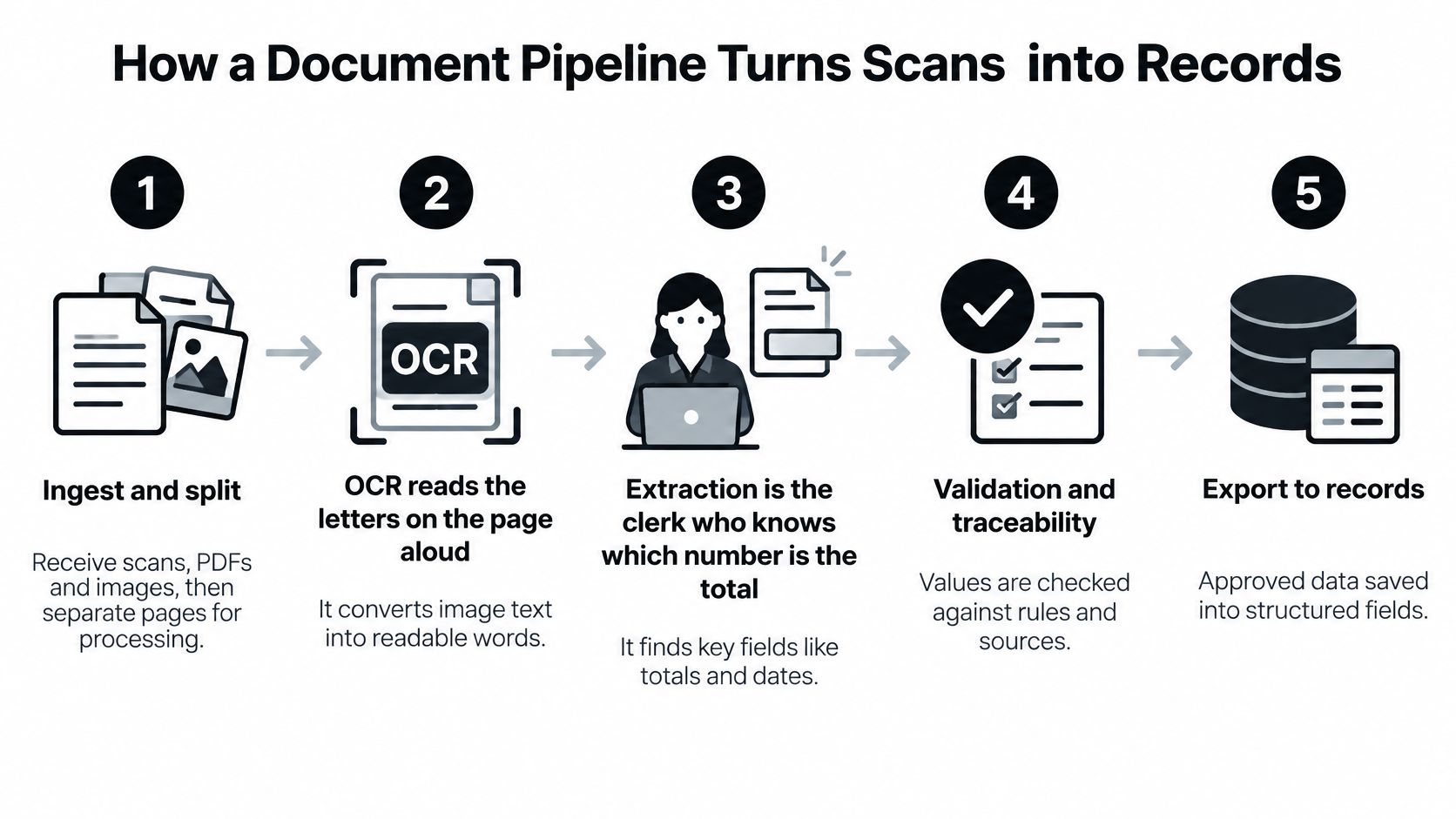
Think of OCR as someone reading the letters on a page aloud. Extraction is the clerk who knows which number is the total, which date controls payment and which identifier belongs to the supplier.
Document data extraction is the process of mapping source content into predefined fields while preserving enough evidence to verify the result. Yes, it's possible to automate invoice data extraction, but recognizing text is only one stage.
The diagram groups the workflow into broad phases. An operational implementation separates those phases into more explicit decisions.
The operational sequence
Ingest and split. Receive the PDF or image, assign a source identifier and detect document boundaries. Keep continuation pages together, but separate distinct documents inside a combined file.
Read the content. Use native text extraction where suitable and OCR for image-based pages, retaining word positions and available confidence scores. Skew, glare, stamps and low resolution need attention before downstream interpretation, as explained in this guide to OCR for scanned documents.
Classify the document. Decide whether the content is an invoice, payslip, bill of lading or another supported category. Classification selects the appropriate schema and prevents unrelated fields from being interpreted as interchangeable.
Extract the fields. Apply language and layout interpretation to populate the selected schema. Preserve distinctions such as supplier versus buyer, invoice date versus due date, and subtotal versus amount payable.
Validate the proposed record. Check field types, identifier patterns and date formats, then apply cross-field rules. Recalculate totals with deterministic code rather than asking a language model whether the arithmetic looks plausible.
Route exceptions. Send uncertain or rule-breaking fields to an authorized reviewer, with the relevant source region visible. Allow straight-through processing only when both confidence and business controls support it.
Deliver the approved result. Return structured JSON or write to the receiving application. Include processing status and evidence references, and use duplicate-safe writes so retries don't create additional invoices.
Why human review belongs inside automation
A NIST document-processing project reported 88.1% overall correct recognition for a page-number field and that OCR automatically validated and excluded more than 83% of images from human adjudication. These are results from that project, not a universal forecast for business documents.
The useful lesson is architectural: assess recognition at the relevant field and reserve human attention for exceptions. A single document-wide confidence score can't tell you whether the payment amount is trustworthy.
Practical rule: A high-confidence reading can still be the wrong business field. Confidence checks and validation rules serve different purposes.
A worked invoice example
Consider a hypothetical three-page supplier invoice. The intake stage keeps the pages together because they belong to the same invoice, rather than treating every page break as a new document.
Suppose OCR reads the total as €1,250.00 with a confidence score of 0.97, while the supplier VAT identifier receives 0.62. Those illustrative scores describe recognition confidence, not guaranteed probabilities that the business values are correct.
Classification selects the invoice schema. Extraction proposes the invoice number, total, VAT amount and due date, each with a source reference; validation then reconciles line amounts, charges, discounts and the stated tax treatment.
The workflow can create a draft ERP record while routing the VAT identifier for review. If that identifier is required for posting, final posting waits for approval. This distinction prevents an implementation from calling a record “automated” while bypassing a required control.
Where Pipelines Fail and How to Fix Them
Strong individual components don't guarantee a usable combined system. In a clinical information-extraction study, researchers found that the combined pipeline remained unacceptable despite good component performance and some improvements from domain adaptation, identifying error propagation and cross-domain distribution shift as major barriers.
For business documents, this means you must test the complete path from incoming file to delivered record. An extraction model evaluated on clean text doesn't reveal what happens when OCR damages an identifier or classification selects the wrong schema.
Diagnose the failure at its origin
Extraction symptoms, likely causes and fixes
| Symptom | Likely cause | Fix |
|---|---|---|
| Totals wrong on phone-photographed invoices | Skew, glare or low resolution | Deskew and enhance images before OCR, then re-check the total field |
| Buyer and supplier names swapped | Layout differs by issuer | Build a schema per document family with issuer examples |
| Dates read backwards | Ambiguous regional date conventions | Preserve the original text, apply document locale and review unresolved ambiguity |
| Fields missing on multi-page PDFs | Documents merged or split incorrectly | Partition the PDF into single documents before extraction |
| Accuracy drops after a supplier changes its template | Domain shift | Track field-level accuracy weekly and retrain on a small new sample |
| Values pass checks but are impossible | No cross-field rules | Add checks: line items reconcile to the total, VAT matches the applicable rate, dates are in order |
| Review queue keeps growing | Thresholds too strict or poor scans | Tune confidence thresholds per field and improve the capture step |
Don't repair every symptom by changing the extraction prompt. If the first page was assigned to the wrong document, more detailed field instructions won't restore the missing context.
Similarly, image enhancement isn't a substitute for recapture when glare has obscured the source. The correct response may be to reject the input and request a readable document.
Evaluate representative document families
Build labeled samples across issuers, geographies, languages and layouts. Include credit notes, unusual currencies, continuation pages and documents with absent fields, not just clean examples that resemble the training material.
A small, representative sample can be more operationally useful than a large homogeneous collection. It exposes the variations your staff handle and makes failure analysis manageable.
Keep development examples separate from the evaluation set. Otherwise, the team may improve performance on familiar documents without discovering whether the change generalizes.
- Precision per field: Of the values returned for a field, how many are correct?
- Recall per field: Of the expected values present in the sources, how many did the system recover?
- Exception rate: How much work reaches reviewers, and which document families generate it?
- Correction rate: How often do reviewers change proposed values rather than approve them?
Use these measures together. A system that avoids difficult fields can appear precise while leaving substantial manual work unfinished.
Invoices, KYC, Logistics and Payslips in Practice
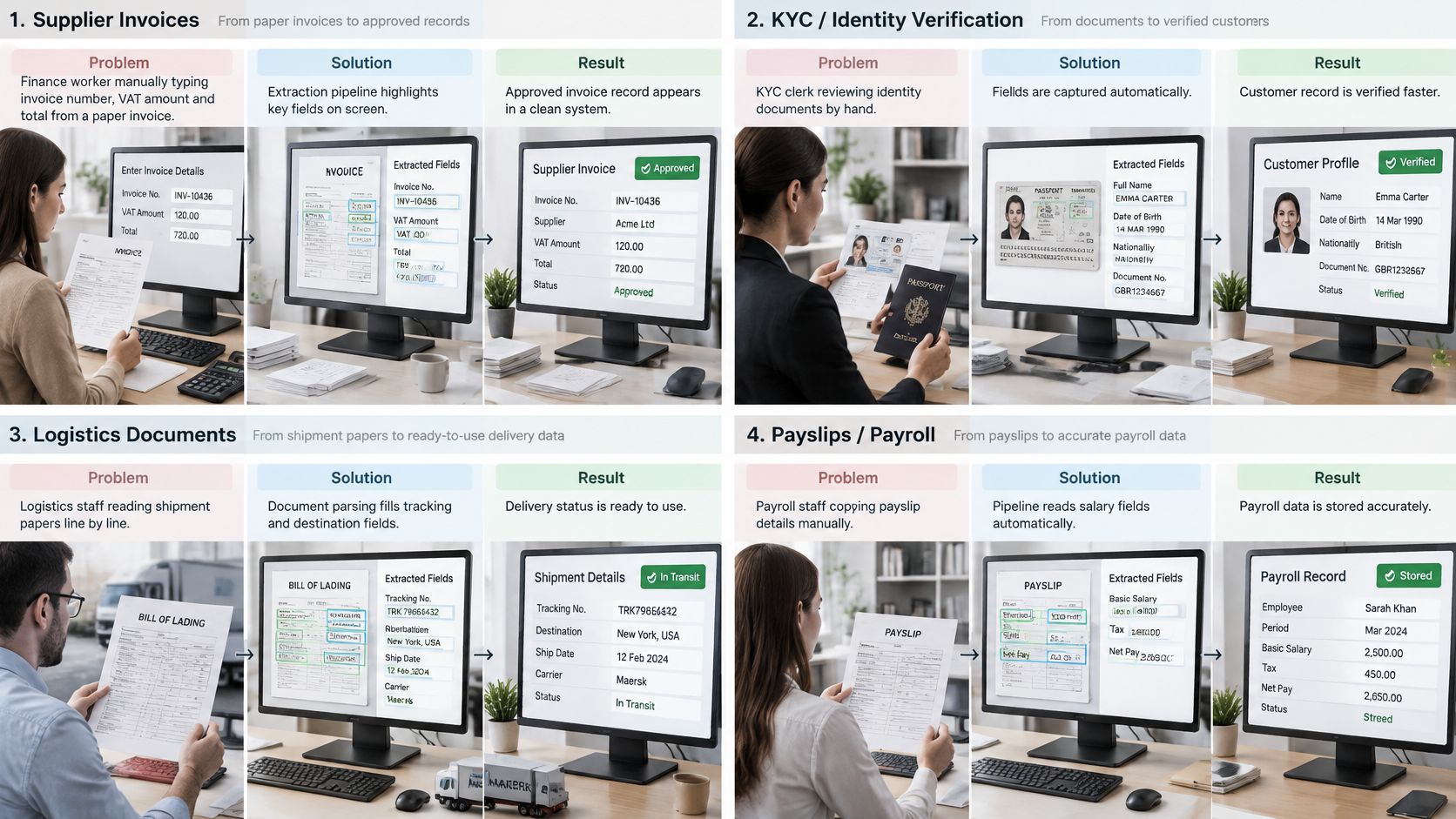
Different teams need different acceptance rules, even when they share the same document-processing architecture.
These workflows show where extracted fields become operational records.
Supplier invoices
Problem: Accounts payable staff key invoice numbers, VAT amounts and totals manually.
Solution: Classify invoices, extract the fields, reconcile amounts and route discrepancies.
Result: Measure minutes per invoice and exception rate, including review time.
Payslips
Problem: Payroll teams retype gross pay, deductions and net pay into reconciliation sheets.
Solution: Extract summary amounts and deduction lines into a fixed schema, then compare them with the payroll ledger.
Result: Track the share reconciled without manual correction.
KYC onboarding
Problem: Capturing a name and identification number doesn't establish identity; FATF's digital-identity guidance requires reliable, independent evidence for customer identification and verification.
Solution: Extract attributes, check formats and expiry dates, support evidence verification and identity resolution, and retain source references.
Result: Measure onboarding time and files accepted by audit without rework, while keeping extraction separate from the identity decision.
Logistics
Problem: Staff re-key shipper, consignee, package counts and tariff codes from bills of lading and customs declarations, including DUA documents.
Solution: Extract fields, reconcile package counts with packing lists and deliver approved records to transport systems.
Result: Track document-arrival-to-release time and document-related holds.
A demonstration can help technical and operations teams discuss the handoffs:
Proving Where Every Extracted Value Came From
A high headline accuracy score can conceal missing evidence, unauthorized retrieval and errors concentrated in difficult documents. The 2025 EMNLP proceedings highlight challenges in copying and citing unstructured evidence, including information effectively lost in the middle of long inputs, alongside gaps in security-policy benchmarks.
Before accepting a value, apply these evidence questions:
- Location: Can a reviewer trace it to the source page and precise region?
- Abstention: Does the system flag ambiguity instead of supplying a plausible guess?
- Authorization: Can the requester access the underlying evidence?
- Consequence: Would an incorrect value alter payment, tax treatment, a KYC decision or shipment release?
Lineage includes changes and ownership
Keep source versions, duplicate decisions and reviewer corrections connected to the resulting record. Assign owners for access, retention and correction workflows, and distinguish an original extraction from a later approved amendment.
A document traceability design should make that history inspectable. Risk-weighted testing should also give rare, high-impact documents explicit acceptance criteria rather than allowing routine examples to dominate the result.
Retention is a contractual control
When processing personal data, we act as data processor under the GDPR, following the client's instructions as data controller. We guarantee that clients' personal or confidential document data isn't used to train public generative AI models or models shared with other clients.
Our published default retains processed documents and results for 12 months for audit, traceability and technical support, then deletes them automatically. Confirm the applicable terms in the contract, and don't describe this default as zero data retention.
Choosing a Pipeline You Can Run in Production
Pick the pipeline that proves its accuracy on your documents, traces every value and routes doubtful cases to people. Evaluate the operating model as carefully as the extraction model.
Use the checklist to turn a demonstration into an acceptance test.
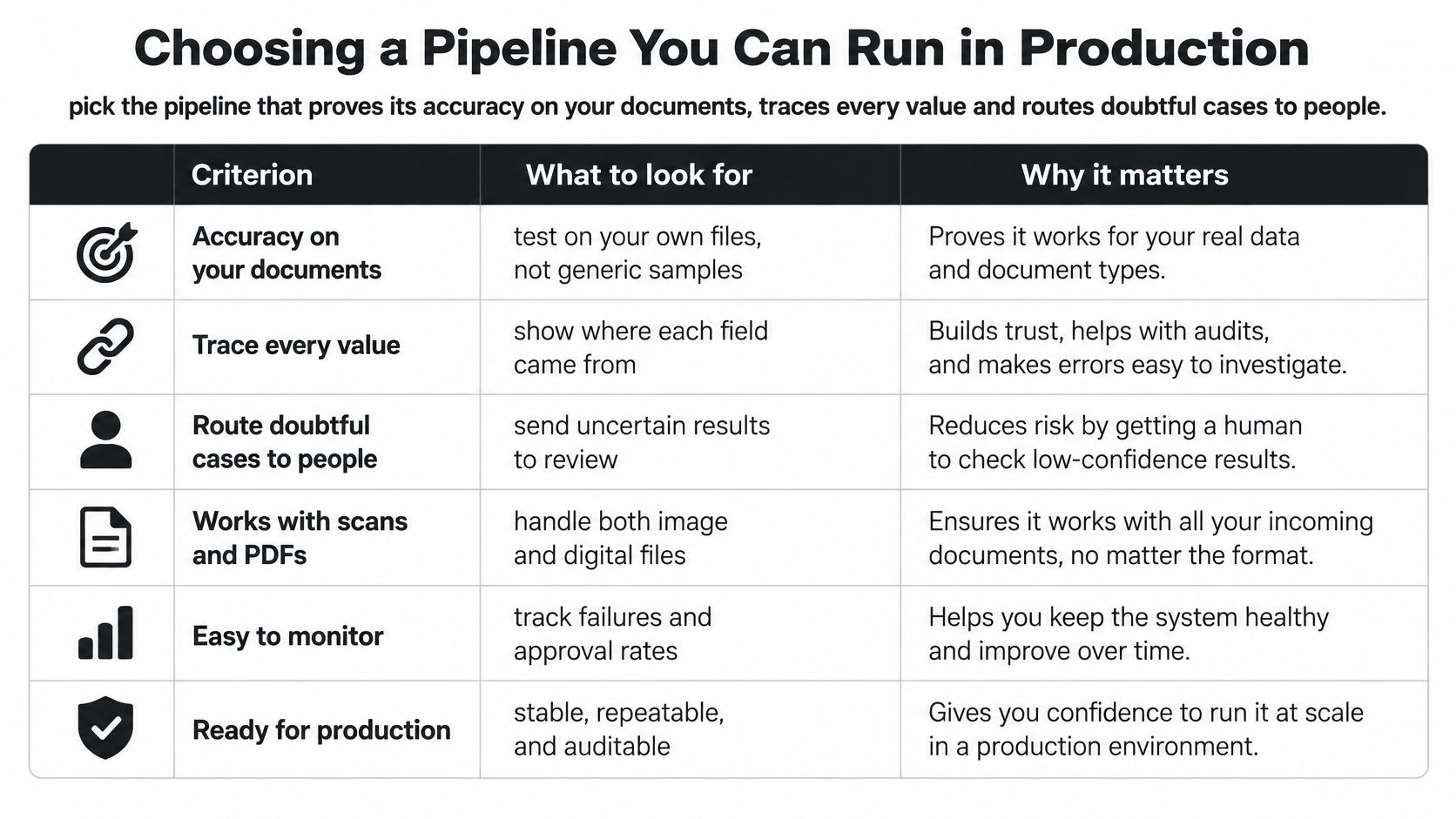
Pipeline selection criteria and what to verify
| Criterion | Why it matters | What to verify |
|---|---|---|
| Field-level accuracy | Headline accuracy hides weak fields | Compare precision and recall against your own labeled sample |
| Evidence traceability | Each value needs its source page and location | Inspect page and bounding-box references in returned results |
| Review routing | Uncertain fields need controlled handling | Test field-specific thresholds, escalation and approval gates |
| Processing mode | Real-time checks differ from nightly imports | Match synchronous, asynchronous and batch behavior to the workflow |
| Custom document types | Standard models may not cover your forms | Supply representative examples and test the delivery timeline |
| Data handling | Retention, region and training use affect compliance | Review contractual retention, processing regions, training clauses and current ISO and SOC documentation |
Run a bounded pilot
- Select the work. Choose the document families carrying the greatest volume or operational risk.
- Prepare ground truth. Label representative samples, including exceptions and missing values.
- Set acceptance criteria. Measure field correctness, review workload and downstream failures before scaling.
Matil isn't just OCR. Our API combines OCR, classification, validation and workflow orchestration, with pretrained document models and configurable schemas. The published accuracy claim is above 99% in multiple use cases, not a guarantee for every field or document; validate it against your sample.
We offer Normal synchronous processing, Async processing with webhook delivery, and Batch processing for hundreds of documents in one request through one API. For custom document types, our team analyzes client examples and trains an optimized model in under a week.
Matil offers a practical way to turn unstructured documents into structured records without building every processing stage yourself. If you're evaluating automation, visit Matil with representative documents, a target schema and clear validation rules, then use a pilot to assess accuracy, evidence quality and the work that still needs human judgment.


