How to Use an API to Get Data with Real-World Examples
Learn how to use an API to get data with this practical 2026 guide covering auth, JSON, pagination, errors, and a document extraction workflow.

At 2 a.m., a developer is switching between four API documentation tabs, a half-finished script, and a Slack thread asking where the customer data lives. The first request eventually returns JSON, but that's only the beginning. How to use an API to get data in production means handling authentication, pagination, retries, rate limits, and sometimes documents that must be uploaded, processed asynchronously, and validated before another system can trust the result.
Why API Data Extraction Matters
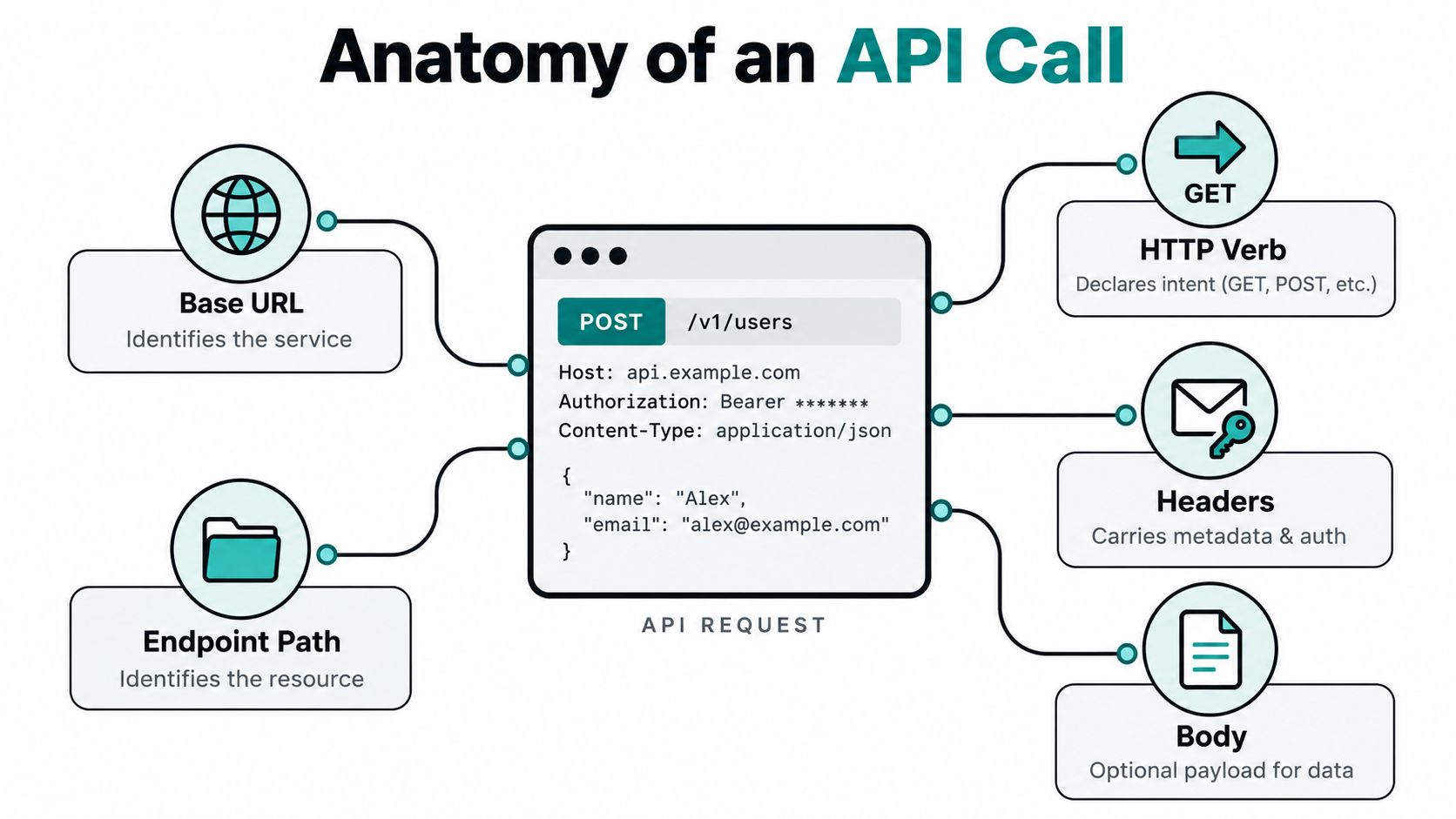
An API call is a structured HTTP request sent from one application to a known endpoint. The server processes the request and returns a structured response, often JSON, that another program can use without a person copying values between screens. The request normally includes a URL, an HTTP method, headers, and optional query parameters or a body.
API data extraction means taking useful fields from that response and routing them into a database, spreadsheet, ERP, CRM, workflow, or analytics system. The source may already be structured, such as a customer endpoint, or it may be unstructured, such as a PDF invoice or an image converted into structured fields by a document extraction API. That distinction matters because a normal GET request and an OCR workflow have very different failure modes.
APIs have become a core enterprise layer. A 2024 industry report found that most large organizations maintain more than 1,000 APIs, while the average API exposed 42 endpoints in 2024, compared with 22 the previous year. That scale changes the engineering task. You're not just calling one URL. You're retrieving related resources, following pagination, validating fields, and preserving state when a request fails. Treblle's 2024 API anatomy report provides the underlying industry context.
Practical rule: The first successful request proves that your credentials and endpoint are correct. It doesn't prove that your integration is reliable.
A landmark academic study found that public firms adopting public APIs grew an additional 38.7% over 16 years relative to similar non-adopters, documenting the rapid expansion of API networks and connected applications after 2005. The study in Management Science helps explain why API-based data access now sits underneath software, analytics, and digital operations.
The rest of the work is operational. You need a repeatable request function, safe credential handling, a clear response contract, and an extraction pipeline that can resume after timeouts or quota errors. For document workflows, you also need classification, validation, and a way to wait for processing without keeping a request open indefinitely. A useful introduction to the broader discipline is this guide to what data extraction means in practice.
Anatomy of an API Call
A useful way to understand any API request is to reduce it to five parts.
The five building blocks
- Base URL identifies the service, such as `
- Endpoint path identifies the resource, such as
/v1/customers. - HTTP verb declares intent.
GETreads,POSTcreates or starts an operation,PUTreplaces,PATCHpartially updates, andDELETEremoves. - Headers carry metadata, authentication, content negotiation, tracing identifiers, and sometimes idempotency keys.
- Query string or body carries filters and parameters. A
GETcommonly uses query parameters, while aPOSTcommonly sends JSON or multipart form data.
Here's a compact request against JSONPlaceholder:
curl -G '' \
  -H 'Accept: application/json' \
  --data-urlencode 'userId=1'
The server returns a status code, response headers, and a body. A parser usually checks the status first, then reads the JSON collection, and finally reaches for fields such as id, userId, title, and body. Never assume a successful transport response means a valid business result. The JSON may be syntactically correct while a required field is missing, a date has the wrong format, or a total fails validation.
Authentication choices
API keys are simple credentials passed in a header, and some services accept them as query parameters.
curl '' \
  -H "X-API-Key: $API_KEY"
Use an environment variable or a managed secret store. Query-string keys can leak through logs, browser history, proxies, and monitoring systems, so a header is generally safer when the provider supports it.
Bearer tokens are common in modern REST APIs, including document extraction endpoints.
curl '' \
  -H "Authorization: Bearer $ACCESS_TOKEN" \
  -H "Accept: application/json"
The token belongs on the server side. It must not ship in front-end JavaScript or a mobile bundle, where users can inspect and exfiltrate it. Scope it to the operations the service needs, and rotate it on a defined schedule.
OAuth 2.0 is appropriate when an application acts on behalf of a user or another delegated resource owner. With a client credentials flow, the backend authenticates as itself. With an authorization code flow, a user grants access and the application receives a token representing that grant.
curl -X POST '' \
  -u "$CLIENT_ID:$CLIENT_SECRET" \
  -d 'grant_type=client_credentials'
The decision rule is straightforward: use API keys for server-to-server access, bearer tokens for APIs your service owns or directly consumes, and OAuth when the request must act on behalf of a human user. For broader design considerations around predictable interfaces and integration behavior, Streamkap's guide to API design patterns is a useful companion.
The next concerns are language-specific request handling, then the reliability layer that determines whether the same call survives real traffic.
Calling an API from Major Languages
The request shape stays the same across languages. What changes is how each runtime handles concurrency, cancellation, connection reuse, and errors.
Python can overlap network waits with a thread pool:
import requests
from concurrent.futures import ThreadPoolExecutor

def get_post(post_id):
    r = requests.get(
        f"https://jsonplaceholder.typicode.com/posts/{post_id}",
        timeout=10
    )
    r.raise_for_status()
    return r.json()

with ThreadPoolExecutor(max_workers=3) as pool:
    posts = list(pool.map(get_post, [1, 2, 3]))
The Python GIL doesn't prevent this pattern from helping with I/O because the worker waits outside the interpreter while the network request is in progress. A production client should still reuse a requests.Session, cap concurrency, and close resources cleanly.
JavaScript uses fetch, with AbortController preventing a slow request from hanging forever:
const getPost = async (id) => {
  const controller = new AbortController();
  const timer = setTimeout(() => controller.abort(), 5000);
  try {
    const r = await fetch(` {
      signal: controller.signal
    });
    if (!r.ok) throw new Error(`HTTP ${r.status}`);
    return await r.json();
  } finally {
    clearTimeout(timer);
  }
};

const posts = await Promise.all([1, 2, 3].map(getPost));
PHP's blocking model needs curl_multi_exec for parallel requests rather than a naive loop:
$mh = curl_multi_init();
$handles = [];

foreach ([1, 2, 3] as $id) {
    $ch = curl_init("https://jsonplaceholder.typicode.com/posts/$id");
    curl_setopt_array($ch, [CURLOPT_RETURNTRANSFER => true, CURLOPT_TIMEOUT => 10]);
    curl_multi_add_handle($mh, $ch);
    $handles[] = $ch;
}

do {
    curl_multi_exec($mh, $running);
    curl_multi_select($mh);
} while ($running);
| Python (requests) | JavaScript (fetch) | PHP (cURL) |
|---|---|---|
| Use a session and thread pool for I/O-bound work | Use Promise.all with AbortController |
Use curl_multi_exec for concurrent handles |
| Raise typed HTTP errors explicitly | Check response.ok before parsing |
Inspect transfer results and close handles |
| Set connection and response timeouts | Cancel stragglers | Avoid sequential loops for independent requests |
A reusable client should accept a base URL, headers, and path, return parsed JSON on success, and raise a typed error on failure. That shape makes it easier to add retries, tracing, and schema validation without rewriting every endpoint call. For a browser-oriented implementation, see this practical guide to an OCR API in JavaScript.
Pagination and Rate Limit Handling
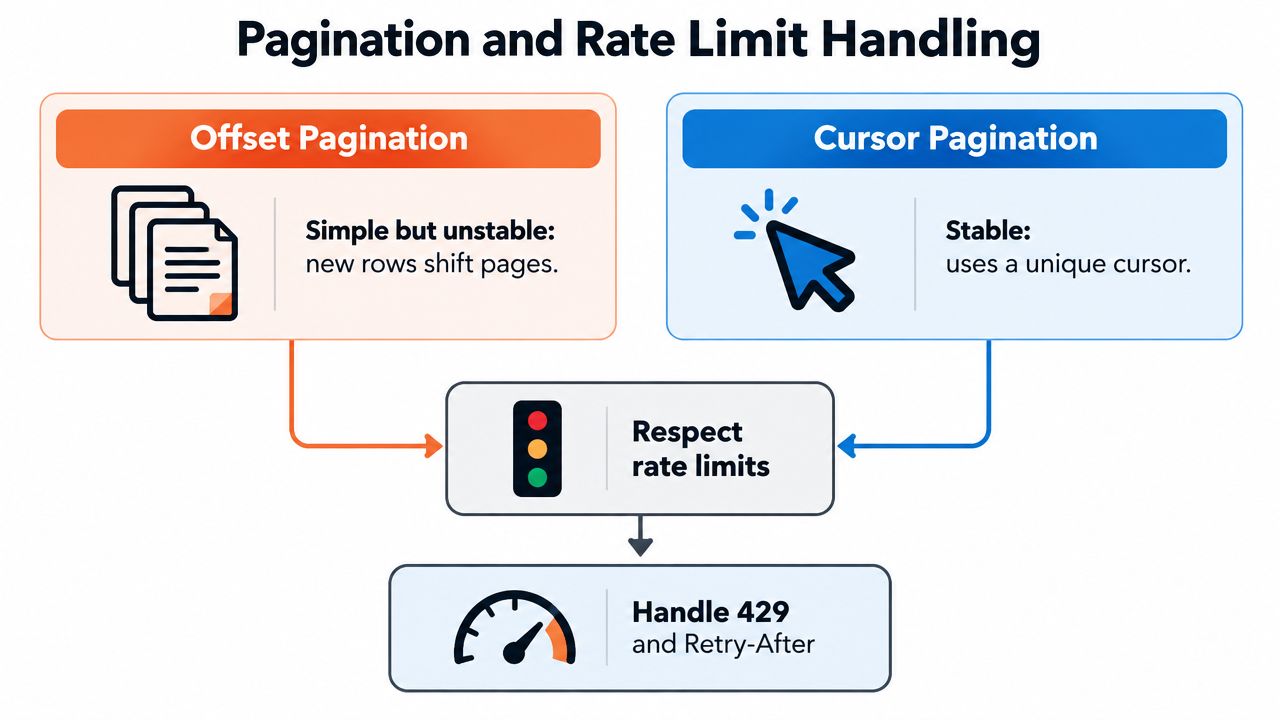
Pagination and rate limits are one reliability problem. A client that fetches every page too aggressively will hit quotas, while a client that uses unstable page numbers can lose or duplicate records as the underlying dataset changes.
Offset pagination is easy to understand:
GET /orders?limit=100&offset=200
It becomes unsafe when rows are inserted or deleted between requests. If a new record appears before the current offset, later pages shift. Your extractor can skip a record or read one twice. Cursor pagination instead asks the server for an opaque position tied to the result set:
GET /orders?limit=100
GET /orders?limit=100&cursor=eyJpZCI6MTAw...
Follow the server-provided cursor or has_more flag. Don't construct page URLs by guessing how the provider encodes its state.
def fetch_all(client, path):
    cursor = None

    while True:
        params = {"limit": 100}
        if cursor:
            params["cursor"] = cursor

        response = client.get(path, params=params)
        response.raise_for_status()
        payload = response.json()

        for record in payload["data"]:
            yield record

        cursor = payload.get("next_cursor")
        if not cursor:
            break
Cursor pagination is the safer default for large or frequently updated datasets because it remains stable under concurrent writes. Guidance on working with APIs also recommends following next or has_more, validating cursor formats, logging progress, and avoiding mixed pagination modes on one endpoint. This practical pagination guidance covers the production details that short request examples usually skip.
Classify failures before retrying
A retry is useful only when the next attempt has a reasonable chance of succeeding.
- 2xx responses: accept the response, then validate its content.
- 4xx responses: treat most as permanent client errors. Fix authentication, permissions, paths, or validation before trying again.
- 429 responses: pause according to
Retry-Afteror the provider's rate-limit headers. - 5xx responses: retry as transient server failures, subject to a limit.
- Network failures: retry known transient conditions such as
ECONNRESETandETIMEDOUT.
Read X-RateLimit-Remaining and Retry-After when the service provides them. Guessing from local counters is weaker because multiple workers, services, or tenants may share the provider's quota.
A practical retry classifier can be small:
const retryable = (status, error) =>
  [408, 429, 500, 502, 503, 504].includes(status) ||
  ["ECONNRESET", "ETIMEDOUT"].includes(error?.code);
Use capped exponential backoff with jitter. A common delay shape is 2^n * base + random(0, jitter), where n is the attempt number. The random component prevents many workers that failed together from retrying together and creating a synchronized retry storm. Retry only transient failures such as HTTP 429 and 5xx, with an attempt ceiling rather than an endless loop.
For high-volume extraction, balance page size, process records in chunks, and checkpoint progress before a timeout. Independent guidance recommends logging pagination progress, keeping page sizes reasonable, validating cursors, and saving checkpoints so a failed job can resume without data loss. CrowdStrike's API pagination guidance is relevant when the pull is large enough to create memory pressure or partial-failure risk.
Retry rule: GET, PUT, and DELETE are generally safe to retry because they're idempotent. POST can create duplicates, so send an idempotency key.
For a document upload, derive a stable key from your internal document identifier and processing version:
POST /v1/extractions
Authorization: Bearer $TOKEN
Idempotency-Key: invoice-8472-v3
Content-Type: multipart/form-data
If the client times out after the server accepted the upload, retrying with the same key lets a provider return the existing job rather than creating another one. Confirm the provider's exact idempotency semantics before relying on this behavior.
Libraries such as bottleneck, aiolimiter, or Guzzle's RateLimitSubscriber are usually safer than hand-rolled counters because they coordinate waiting and concurrency. Keep the concurrency cap below the documented provider ceiling. A useful starting estimate is roughly limit_per_minute / 60 requests per second, then adjust from observed latency and response headers rather than treating the formula as a guarantee. For server-side protection and implementation examples, Portreeve's Express.js rate limit guide adds useful context.
Log the HTTP status, elapsed time, attempt number, request ID, and a short error body. Redact tokens, document contents, identity data, invoice line items, and other PII. This is also a good place to apply the exception patterns described in Matil's API exception-handling guidance.
End-to-End Document Extraction Workflow
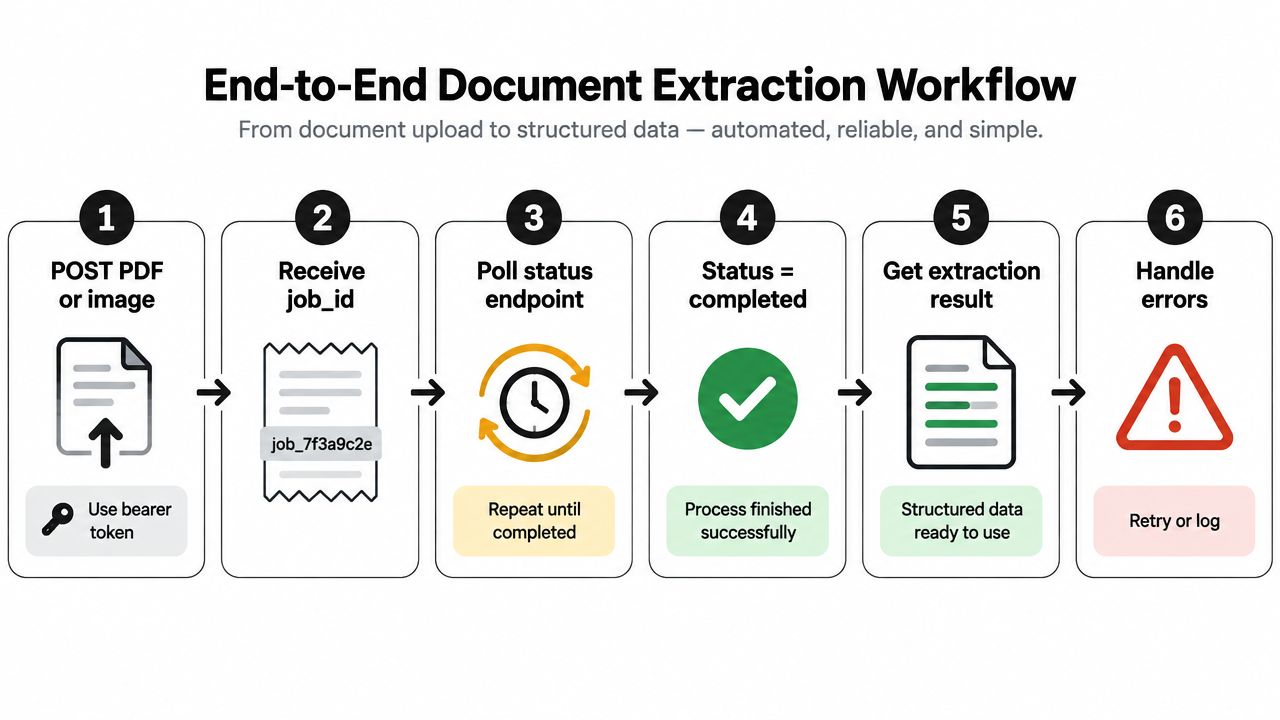
Document intelligence APIs don't always return the extracted fields in the first HTTP response. The reliable pattern is asynchronous:
- POST the PDF or image with a bearer token.
- Receive a
job_idand persist it with your internal document ID. - Poll the status endpoint with backoff, or register a webhook.
- Wait for a completed state before consuming the result.
- Read structured JSON field by field.
- Validate and route the result to the downstream system, or send it to review.
This workflow suits invoices, payslips, KYC documents, contracts, receipts, Bills of Lading, and customs declarations. The extractor should return fields such as dates, totals, identifiers, and line items in a predictable schema, alongside confidence information and validation outcomes. A low-confidence or structurally invalid field shouldn't enter an ERP.
Tools such as Matil.ai combine OCR, document classification, field validation, and workflow automation through an API. Its production positioning includes pre-trained models, rapid customization, structured JSON output, webhook and polling options, and zero data retention, with security and compliance controls covering GDPR, ISO 27001, and AICPA SOC. The platform describes extraction accuracy above 99% in multiple use cases, but teams should still test their own document variants, scan quality, languages, and validation rules before setting an automation policy.
async function extractDocument(file, token) {
  const upload = await fetch("https://api.example.com/v1/extractions", {
    method: "POST",
    headers: { Authorization: `Bearer ${token}` },
    body: file
  });

  if (!upload.ok) throw new Error(`Upload failed: ${upload.status}`);
  const { job_id } = await upload.json();

  for (;;) {
    const status = await fetch(` {
      headers: { Authorization: `Bearer ${token}` }
    });
    if (!status.ok) throw new Error(`Status failed: ${status.status}`);

    const result = await status.json();
    if (result.status === "succeeded") {
      return {
        invoiceDate: result.fields.invoice_date?.value,
        total: result.fields.total?.value,
        lines: result.fields.line_items?.value ?? []
      };
    }
    if (result.status === "failed") throw new Error("Extraction failed");
    await new Promise(resolve => setTimeout(resolve, 2000));
  }
}
For long-running jobs, webhooks usually avoid unnecessary polling. Verify the webhook signature, make the handler idempotent, acknowledge quickly, and process the payload through a durable queue.
Real-World Scenarios Where This Pays Off
An accounts payable team receives invoices in email attachments, shared folders, and supplier portals. A document extraction workflow classifies each file, reads supplier details, invoice dates, totals, tax fields, and line items, then sends validated JSON to the ERP. The team can measure fit by comparing manual review time, exception volume, and the percentage of invoices that still need human approval.
A fintech KYC pipeline faces a different problem. Analysts need to identify whether an uploaded identity document is a passport, ID card, or driving licence, extract identity fields, validate the expected structure, and route uncertain results for review. The API pattern stays similar, but the downstream decision must include auditability, retention controls, and a clear distinction between extracted text and verified identity.
Logistics teams process mixed-format paperwork such as delivery notes, Bills of Lading, and customs declarations. Extracting reference numbers, dates, parties, packages, and quantities removes re-keying and makes exceptions visible before a shipment reaches the next operational step.
| Scenario | Manual Time/Doc | API Time/Doc | Error Rate | Monthly Volume |
|---|---|---|---|---|
| Invoices | Variable, often dependent on layout and review | Automated first pass with exception handling | Depends on source quality and validation | Depends on supplier volume |
| KYC documents | Manual inspection and transcription | Automated classification and field extraction | Depends on document quality and review policy | Depends on onboarding volume |
| Logistics paperwork | Re-keying across systems | Structured fields routed into operations | Depends on PDF quality and field rules | Depends on shipment volume |
OCR quality varies with the input. A comparative review reported 98% to 99.5% accuracy for high-quality printed documents, while traditional OCR for handwriting fell to 60% to 70% and AI-based handwriting systems were reported around 85% to 95%. The comparative OCR review supports a practical conclusion: test representative files, not a clean sample chosen for a demo.
Field-level results also differ by document type. One benchmark reported 99% or higher for digital PDFs, 91% to 97% for invoices, 87% to 94% for utility bills, 80% to 93% for receipts, and 62% to 85% for handwritten documents. The OCR accuracy benchmark by document type is useful when deciding which fields can flow automatically and which need review.
Performance and Security Best Practices
A production API client should be designed as an observable, bounded system. Use this checklist when moving beyond a proof of concept.
Performance decisions
- Compress responses: Enable gzip or Brotli where the provider supports it, especially for large JSON payloads.
- Reuse connections: Keep HTTP connections alive through a session, agent, or connection pool. Repeated handshakes add latency and load.
- Cache safe reads: Cache idempotent
GETresponses with a short TTL when the data can tolerate slight staleness. Don't cache permissions, balances, or rapidly changing records without an explicit consistency decision. - Bound concurrency: Parallelize independent requests only up to the provider's documented ceiling. More workers can increase throttling instead of increasing throughput.
- Prefer webhooks for long jobs: For extraction jobs that take longer than a few seconds, a signed webhook avoids wasteful polling and gives the backend an event to process.
A bulk workflow may also impose separate quotas, page-size limits, byte limits, or asynchronous query requirements. That means “keep requesting the next page” isn't a universal architecture. Some providers expect a job submission followed by chunk downloads, incremental cursors, or cached responses. Design the ingestion state explicitly so it can resume from a checkpoint.
Security decisions
- Enforce HTTPS: Never send credentials or documents over an unencrypted transport.
- Use least privilege: Create separate credentials for development, ingestion, administration, and webhooks where possible.
- Rotate secrets: Replace keys on a fixed schedule and immediately after suspected exposure.
- Use a managed vault: A secret manager is preferable to committing credentials or distributing them through local environment files.
- Protect webhook intake: Validate the provider's signature, timestamp, and event identifier before trusting the payload. Make event handling idempotent.
- Keep keys off clients: Browser and mobile applications should call your backend, not expose the provider credential.
- Validate before persistence: Check types, required fields, allowed values, totals, dates, and document identifiers before downstream systems consume the data.
Security is part of extraction quality. A correctly parsed invoice that enters the wrong account, or a KYC document retained beyond policy, is still a failed integration.
The same discipline applies to adjacent validation services. If your workflow checks contact data before creating records, a service such as BillionVerify's Email Validation API can sit behind the same authentication, timeout, retry, logging, and redaction controls.
OCR alone isn't a complete document process. Document structure changes outcomes materially, and research on archival records concluded that format heterogeneity was the main determinant of OCR accuracy rather than document age. The archival OCR evaluation reinforces why classification and validation belong beside text recognition.
Reliable API integration is less about receiving the first 200 OK and more about what happens at scale. Authenticate with scoped credentials, use cursor pagination, retry only transient failures with jittered backoff, checkpoint large pulls, and use signed webhooks for asynchronous extraction. The skeleton works for a public REST endpoint, a payments API, or a document intelligence pipeline: authenticate, upload or query, persist the response, validate it, and expose enough telemetry to understand failures.
Pick one real endpoint and instrument it before expanding the integration. Record request IDs, latency, status codes, retry attempts, and validation failures, then connect a document extraction workflow for one document class, such as invoices or delivery notes. Matil provides OCR, classification, validation, and document automation through an API, so you can send PDFs or images and route structured results into the systems your team already uses.
If you're evaluating how to use an API to get data from invoices, payslips, KYC files, or logistics documents, explore Matil to test a structured extraction workflow with pre-trained models, customization, webhooks, and zero data retention. Start with one document type, define the fields and validation rules that matter, and measure the exceptions your team still needs to review.


