Vision Language Model Explained for Document AI
Learn how a vision language model aligns images and text, its architectures, training, metrics, and how to use it for OCR and document automation.

Your finance team receives a mixed folder of invoices, receipts, and delivery notes. Some are searchable PDFs, others are scans or phone images. A person opens each file, finds the relevant fields, checks them against business rules, and retypes the results into an ERP. The process is slow, field-level errors can occur even with trained staff, and complex or time-pressured workflows create more risk, as documented in manual data-entry error-rate reporting.
That's why a vision language model matters for document AI. It doesn't only recognize characters. It connects text with page structure, visual regions, document type, and the question your workflow needs answered. This guide explains how VLMs work, where they outperform traditional OCR documents workflows, why grounding and validation determine production reliability, and how to evaluate them before automating invoices, payslips, KYC files, or logistics documents.
Introduction Why Documents Still Break Automation
A document pipeline usually fails in a predictable place. OCR reads a supplier name, but assigns it to the wrong line. It detects a total, but can't distinguish the invoice total from a tax subtotal. It recognizes a passport number, but doesn't prove that the value came from the correct field. The text may look accurate while the structured output is unusable.
Traditional OCR is designed primarily to convert visual characters into text. That's valuable, but document processing needs more than transcription. A finance workflow needs to know which page is an invoice, where the invoice number is located, whether the total is mathematically consistent, and whether the extracted value can be traced to evidence on the source page. A logistics workflow may also need to distinguish a Bill of Lading from a customs declaration, even when both contain dates, parties, quantities, and reference numbers.
The business cost appears in several forms:
- Manual effort: Staff spend time opening, reading, copying, and checking documents instead of handling exceptions or higher-value work.
- Data quality risk: A single misplaced field can affect payment approval, reconciliation, compliance, or shipment release.
- Slow throughput: Review queues grow when document volume changes faster than headcount.
- Poor scalability: Adding suppliers, countries, formats, or document types creates more exceptions for the same team.
OCR accuracy varies sharply by source quality and layout. Invoice reporting places field accuracy as low as 76% for scanned or complex invoices and as high as 99% for cleaner digital invoices, while mixed pipelines are often reported in the low-to-mid 90s before human review, according to OCR accuracy reporting by document type. That spread explains why a demo on a clean PDF says little about a production queue containing rotated scans, stamps, tables, handwritten notes, and multi-page attachments.
Practical rule: If your process needs a value plus its location, document type, and validation status, plain OCR is only one component of the solution.
Teams searching for how to extract data from invoices automatically should therefore ask a broader question: can the system understand the document well enough to produce structured, traceable, validated data? The answer depends on the relationship between vision, language, grounding, and workflow controls. The introduction to optical character recognition helps clarify the role of OCR, but the production problem extends beyond reading text.
What a Vision Language Model Really Is
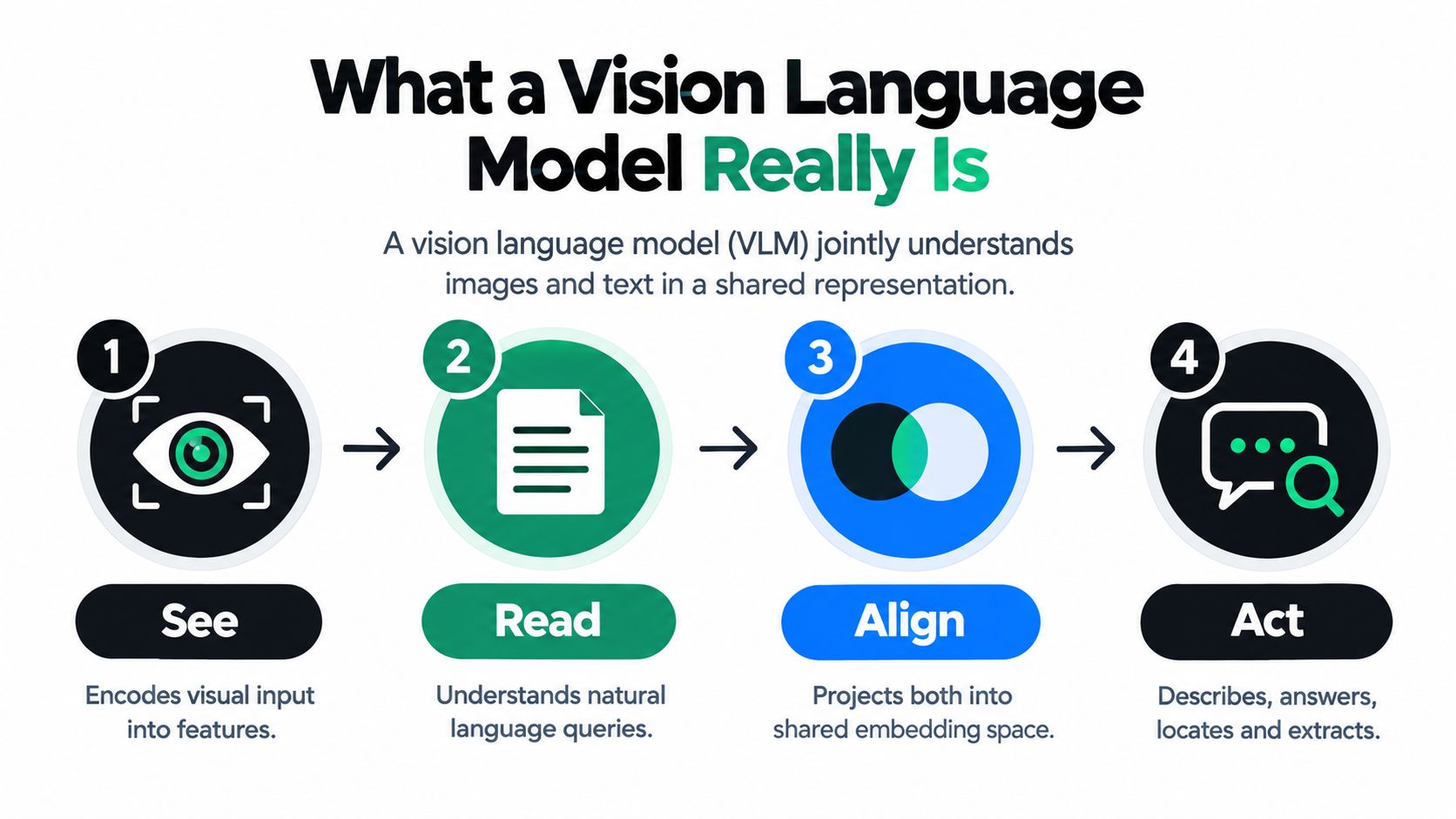
A vision language model is an AI system that processes visual information and natural language together, using aligned representations to describe images, answer questions, locate content, and extract structured information. In document processing, that means the model can relate a phrase such as “invoice total” to the visual region where the total appears, rather than treating the page as an unstructured stream of characters.
A useful analogy is a bilingual translator. One side understands pixels, positions, lines, tables, logos, and visual patterns. The other side understands words, questions, instructions, and output formats. The model learns a shared vocabulary between them. When you ask, “What is the due date?” it maps the question to relevant visual evidence, interprets the surrounding context, and generates an answer.
The difference from OCR and text-only models
An OCR engine mainly answers, “Which characters appear in this image?” A text-only large language model answers, “What does this text mean?” A VLM combines both questions and adds a third: “Where in the visual input does that meaning come from?”
That distinction matters in a form. Consider a payslip with several monetary values. OCR may identify every number correctly. A VLM can use nearby labels, alignment, table structure, and page regions to infer which number represents gross salary, deductions, or net pay. An extraction system should still validate the result, because interpretation doesn't guarantee correctness.
Technically, the vision encoder converts image content into visual features. Text is tokenized into language representations. A projection layer and attention mechanism connect both modalities, allowing words to attend to relevant visual features. The details differ by architecture, but the operational consequence is simple: the model can reason over text and layout at the same time.
Why shared understanding helps documents
Documents contain meaning in their arrangement. A value may be identified by:
- Its relationship to a label.
- Its position inside a table.
- Its alignment with a column.
- Its proximity to a signature or stamp.
- Its presence on a specific page.
- Its relationship to other values.
VLMs become useful for OCR invoices, PDFs, KYC forms, contracts, and logistics paperwork. They can support visual question answering, document classification, field extraction, and region-level grounding. They can also produce flexible outputs when document layouts vary, although output quality still depends on training data, prompt design, source quality, and validation.
A VLM can read a field without reliably proving that it read the right field. Production systems must measure and control that distinction.
How Vision Language Model Architectures Compare
A claims-processing pipeline may need to identify a document, retrieve similar pages, extract fields, and explain evidence for a reviewer. One VLM architecture rarely performs all of those jobs equally well. The useful comparison is therefore about where visual and textual information meet, and how that choice affects retrieval, generation, latency, and validation.
The first family is the contrastive dual-encoder. A vision encoder and a text encoder process inputs separately, then map them into a shared embedding space. Training places matching image-text pairs closer together and unrelated pairs farther apart. CLIP established this direction in 2021, using about 400 million image-text pairs, as described in the historical overview of VLM development.
For an enterprise document pipeline, a dual encoder works like a fast filing clerk. It can compare a page with descriptions such as “invoice,” “receipt,” or “customs declaration,” making it useful for classification and retrieval. It is less suited to producing a detailed JSON object or explaining why a particular field was selected. A similarity score can find the right document family, but it does not by itself validate extracted values.
The second family includes encoder-decoder or multimodal transformer designs. Visual and language representations interact through mechanisms such as cross-attention. That interaction supports richer relationships between page regions and words, which helps with visual question answering, structured interpretation, and generation. The trade-off is higher processing complexity than embedding-based retrieval, along with more integration work around schemas, evidence, and review.
The third family is the decoder-only instruction-tuned VLM. Visual features connect to an autoregressive language model that generates responses token by token. Flamingo, introduced in 2022 with an 80B-parameter decoder-only design, and LLaVA-1.5, released in 2023 at 13B parameters, illustrate the progression toward instruction-following multimodal systems, according to the historical overview cited above. These models accept flexible requests and can generate structured outputs, but open-ended generation also creates more opportunities for unsupported answers. Production use requires grounding, field-level checks, and a path to human review.
| Architecture | Best fit | Main strength | Document trade-off |
|---|---|---|---|
| Contrastive dual-encoder | Classification and retrieval | Fast similarity matching | Limited direct extraction and explanation |
| Encoder-decoder or multimodal transformer | Deep visual-language reasoning | Strong interaction between regions and words | More complex inference and integration |
| Decoder-only instruction-tuned VLM | Question answering and flexible extraction | Natural instructions and structured generation | Requires careful grounding and hallucination controls |
Choosing for a document pipeline
Choose architecture by pipeline stage. Retrieval-oriented components suit page classification and document matching. Generative multimodal components suit variable-field extraction, questions, and layouts that do not fit a fixed template.
A practical system can combine several model types. Classification, OCR, extraction, validation, and workflow orchestration may each use different models or services. The target is a controlled process that returns the right answer, records its supporting evidence, and routes uncertainty to review.
How Vision Language Models Align Images and Text
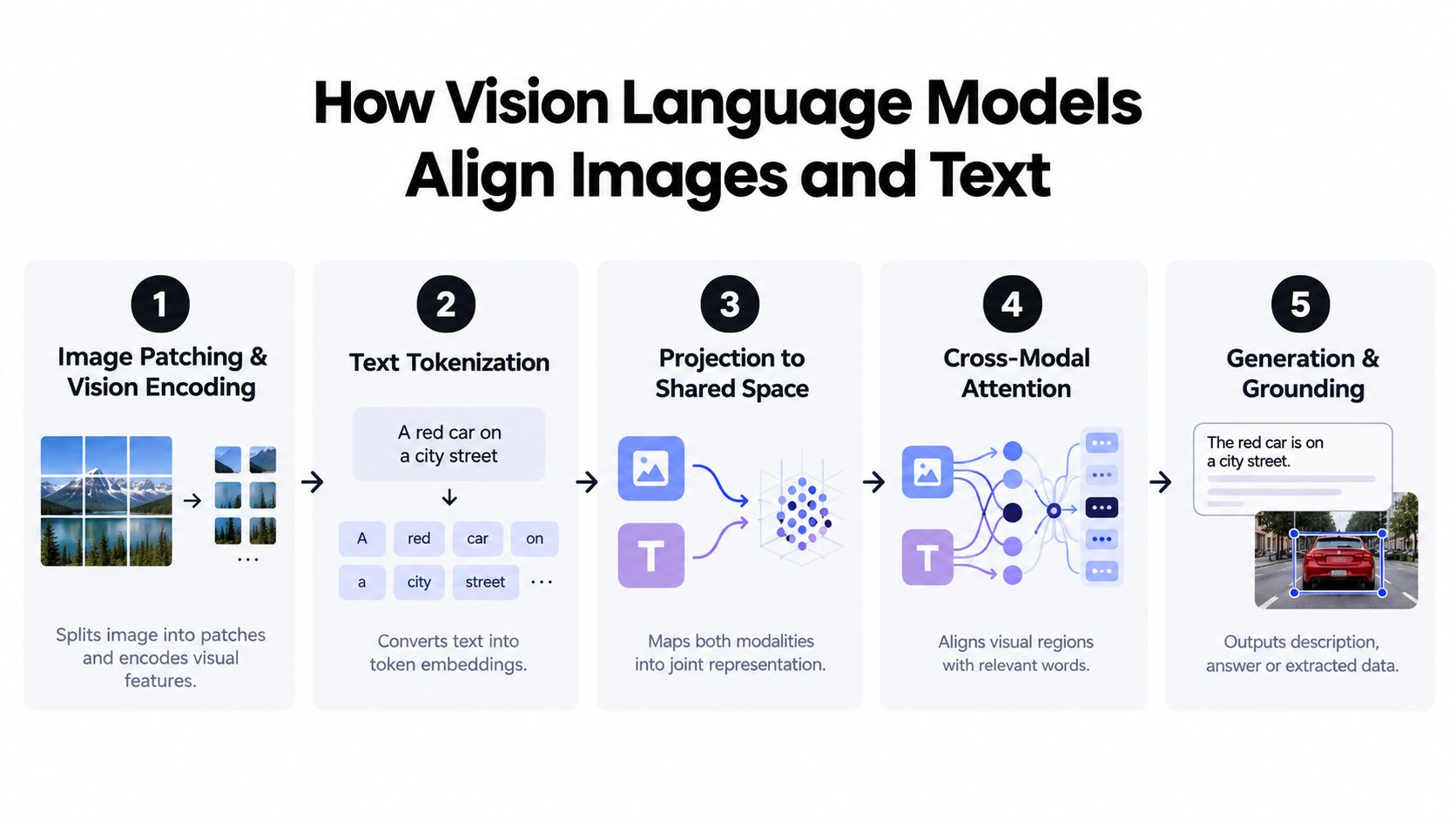
Alignment is the mechanism that turns visual recognition into useful document understanding. The model must connect a word such as “VAT number” with the correct text region, surrounding label, and page position. Without that connection, it may generate a plausible value from the wrong part of the document.
A practical processing flow
Step 1, image patching and vision encoding. The model divides an image into visual regions or patches and converts them into features. Those features can represent characters, lines, table cells, logos, signatures, and spatial relationships.
Step 2, text tokenization. The user's question, instruction, or expected schema becomes language tokens. A request such as “extract invoice number, supplier, tax, and total” gives the model a semantic target.
Step 3, projection into a shared space. Visual and language features are transformed so the model can compare and connect them. This shared representation lets the instruction influence which regions receive attention.
Step 4, cross-modal attention. Attention mechanisms weigh relationships between words and visual regions. For a table, the model may need to connect a row label, a number, a unit, and a column heading before producing an answer.
Step 5, generation and grounding. The model generates text or structured data. A production system should also retain coordinates, page references, or source snippets so reviewers can verify the answer.
The accompanying guide to extracting data from images provides useful context for the relationship between visual input and structured output.
What training teaches the model
Different objectives teach different behaviors:
- Contrastive learning teaches the system which images and text belong together.
- Image-text matching teaches it to distinguish a valid visual-language relationship from an incorrect one.
- Masked modeling teaches the model to reconstruct missing information from surrounding visual or textual context.
- Instruction tuning teaches it to follow requests such as extracting fields, answering questions, or returning a specific schema.
- Grounded training teaches the model to connect an answer with the region that supports it.
For documents, grounding is especially important. A model that reads “€1,250” but can't identify whether it came from the subtotal, tax, or total has produced text recognition without dependable extraction. GutenOCR demonstrates this distinction directly. In its study, GutenOCR-7B more than doubled the composite grounded OCR score of its Qwen2.5-VL-7B backbone on 10.5K held-out business and scientific pages, increasing the score from 0.40 to 0.82 across reading, detection, and grounding metrics, as reported in the GutenOCR study.
Alignment doesn't eliminate the need for rules. It gives the system a stronger basis for interpreting the page. Validation remains responsible for checking totals, dates, required fields, permitted formats, and relationships between extracted values.
Real Document Use Cases Where Vision Language Models Help
Document automation becomes easier to evaluate when each use case starts with a failure mode rather than a model feature. The relevant question is always: what did the old process miss, what does visual-language understanding add, and what result should the business measure?
Invoices and receipts
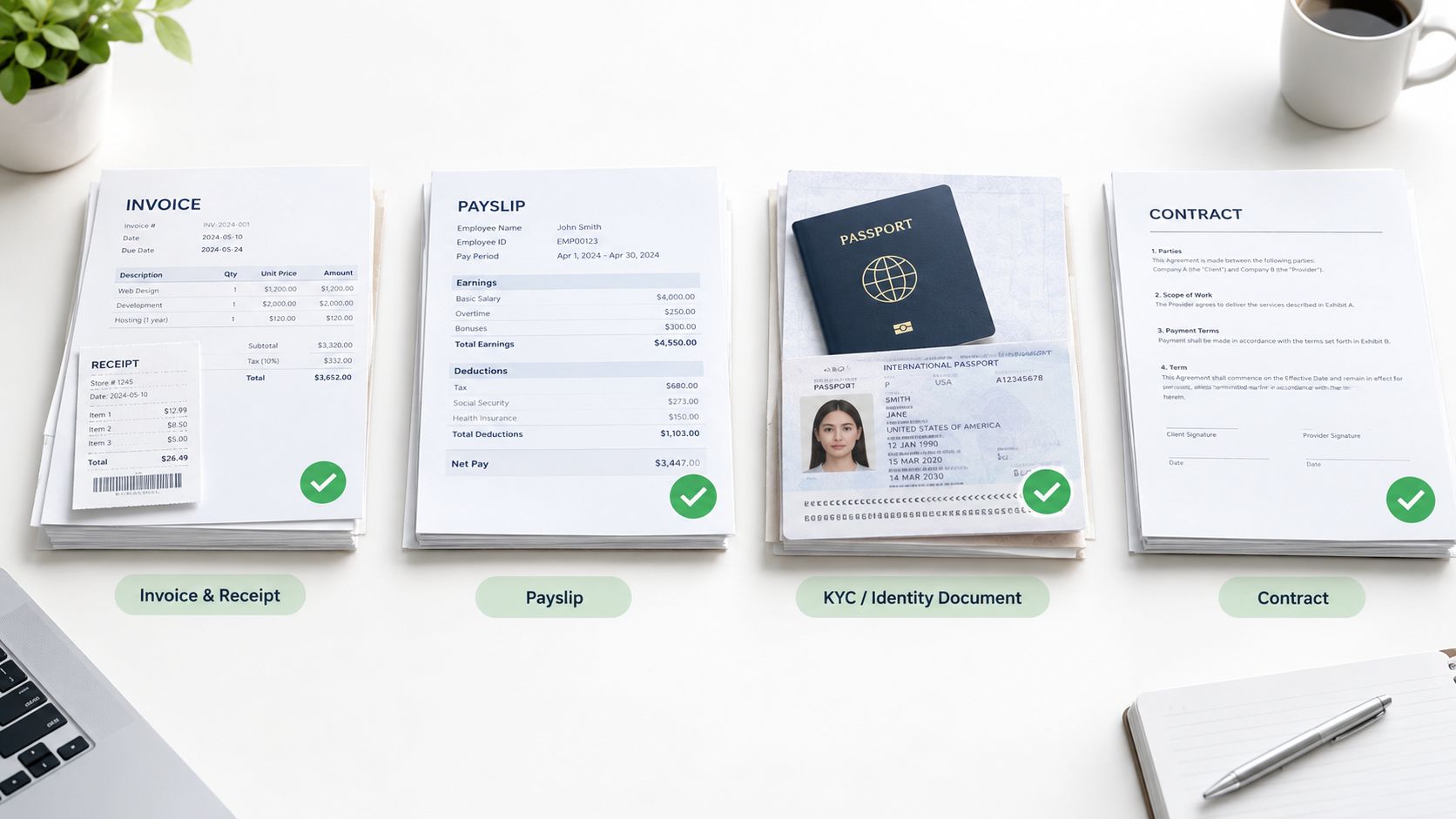
Problem: Invoice layouts vary by supplier. A traditional OCR pipeline may read text accurately but lose the relationship between labels, line items, tax columns, and totals. Receipts add more variability through low-quality images, unusual fonts, and compressed layouts.
Solution: Combine OCR with document classification, layout-aware extraction, and validation. The model can identify an invoice or receipt, locate fields by their visual context, extract line items, and return evidence for each value. Business rules can then compare subtotal, tax, and total, or flag missing purchase-order references.
Result: The workflow produces structured data for accounts payable while routing uncertain or inconsistent records to human review. Benchmark-style reporting places OCR-only invoice systems in the 85% to 95% accuracy range, while AI-assisted workflows improve overall extraction by about 9.25 percentage points, with the largest gains on low-quality receipts, according to invoice OCR benchmark reporting.
Payslips
Problem: Payslips contain repeated monetary values, deductions, employer information, employee identifiers, and period dates. A text-only extraction can confuse similarly formatted fields or combine values from different sections.
Solution: Use the document's layout and labels to distinguish gross pay, deductions, benefits, and net pay. Validation can check required fields, date formats, and relationships between values before sending the result to payroll or finance systems.
Result: Finance teams receive structured payroll data with a clearer audit path. The important control isn't just whether a number was extracted. It's whether the number can be tied to the correct label and page region.
KYC identity documents
Problem: Identity documents differ by country, document type, orientation, language, and field arrangement. Manual onboarding teams must read identifiers and verify that extracted values belong to the person and document being processed.
Solution: Classify the document first, extract the relevant identity fields, and validate formats and required combinations. A VLM can help interpret the relationship between portrait areas, labels, machine-readable zones, and document text, while a compliance workflow applies the organization's verification rules.
Result: The system can reduce repetitive entry and help reviewers focus on exceptions. KYC automation guides report that automated onboarding can cut individual onboarding time by 45% to 60% and reduce manual data entry by 70% to 80%, as described in the KYC automation guide.
Logistics documents
Problem: Bills of Lading, customs declarations such as DUAs, delivery notes, and freight documents combine parties, ports, references, packages, weights, dates, and product details. The same concept may appear in different positions, tables, or page sections.
Solution: Classify and split multi-page files, extract fields with layout context, and validate values against shipment or ERP records. Grounded output lets an operator trace a container number, SKU, quantity, or consignee back to the source region.
Result: Logistics teams spend less time searching documents and more time handling exceptions. The measurable target should be operational, such as reduced review time, fewer corrections, faster handoffs, and a lower rate of records rejected by downstream systems.
Limitations Evaluation Metrics and Hallucination Risks
A VLM may return a fluent answer that the page does not support. In an enterprise document pipeline, that failure can turn an uncertain reading into an incorrect invoice field, shipment reference, or compliance record. Language priors can outweigh weak visual evidence when a scan is blurry, the prompt implies an answer, or several fields look alike.
Hallucination remains an open research problem. A 2025 study examines token-probability features for detecting unsupported outputs, showing that dependable built-in trust signals are not yet solved, as discussed in research on token-level hallucination detection. Another mechanistic study found that removing a small set of attention heads reduced prompt-induced hallucination by at least 40% without extra training. It also reports up to 2.7x hallucination reduction with a 1.8x throughput improvement, illustrating that model changes can affect both reliability and processing speed, according to research on reducing prompt-induced hallucination.
What to measure
General benchmarks help map broad capability. MMT-Bench, introduced in 2024, contains 31,325 curated multiple-choice visual questions across 32 core meta-tasks and 162 subtasks, according to the MMT-Bench repository. ViLaBench evaluates 46 single-image, 20 multi-image, and 33 video tasks, reflecting evaluation beyond basic image recognition.
Enterprise teams should also build a private test set from representative documents and difficult exceptions. Measure:
- Field accuracy: Did the system return the correct value?
- Grounding accuracy: Does the cited page region support that value?
- Document classification accuracy: Did it identify the correct document type?
- Validation pass rate: Did extracted fields satisfy business rules?
- Human review rate: How often must an operator intervene?
- Downstream acceptance: Does the ERP, CRM, or compliance system accept the output?
A high answer rate is insufficient. Measure whether each answer is correct, grounded, validated, and usable downstream.
Input quality changes results. Skewed scans, handwriting, stamps, missing pages, unusual tables, and multilingual content can all alter model behavior. A production evaluation should therefore separate clean samples from the conditions that cause review failures, then track which document regions and fields require correction.
For logistics teams, haulage document extraction tips can help identify relevant fields, exceptions, and source-quality problems for a realistic evaluation set. The same principle applies across enterprise workflows: validation rules and traceable evidence determine whether a plausible answer is safe to use.
Integrating Vision Language Models Into Enterprise Document Pipelines
A reliable pipeline treats the VLM as one layer, not the entire product.
- Ingest and split: Accept PDFs and images, separate mixed document bundles, and preserve page order.
- Classify: Identify invoices, receipts, payslips, KYC documents, contracts, Bills of Lading, and DUAs.
- Extract: Combine OCR with visual-language reasoning for fields, tables, and flexible layouts.
- Validate: Apply schemas, arithmetic checks, permitted formats, cross-field rules, and confidence thresholds.
- Orchestrate: Send approved data to an ERP, CRM, spreadsheet, compliance queue, or logistics workflow.
- Retain traceability: Store page and region references so reviewers can verify every important value.
This approach delivers the main business benefits without hiding the trade-offs. Automation reduces repetitive work, error exposure, and review queues, while classification and orchestration make mixed-document processing scalable. For a broader view of this operating model, see the intelligent document processing platform guide. Teams building document workflows around cloud storage can also examine how a Google Drive AI agent fits into ingestion and retrieval processes.
Matil.ai is designed as more than OCR. It combines OCR, classification, validation, and automation, with claimed precision above 99% in multiple use cases, pre-trained models, rapid personalization, and a simple API. Its enterprise positioning includes GDPR, ISO, and SOC security controls, plus zero data retention. Those capabilities matter because document automation succeeds only when extraction, evidence, validation, and delivery work together.
If you're evaluating how to extract data from invoices automatically or automate KYC, payroll, and logistics documents, start with a representative sample and measure field accuracy, grounding, review rate, and downstream acceptance. Visit Matil to explore an API-based approach that combines OCR, classification, validation, and workflow automation for production document pipelines.


