Invoice Data Capture: A Practical Guide to Automation
Learn how invoice data capture works, why manual processing still fails, and how AI-powered extraction delivers accuracy, speed, and ROI for AP teams.

A finance team can receive invoices through email, portals, scans, and shared folders, then spend hours opening files, reading fields, keying values into an ERP, matching purchase orders, and chasing approvals. Invoice data capture turns that fragmented work into structured information, but reliable automation requires more than reading text from a page. The practical question is whether the workflow can validate data, handle exceptions, and post clean records without creating a new review queue.
The Manual Invoice Problem Most AP Teams Still Face
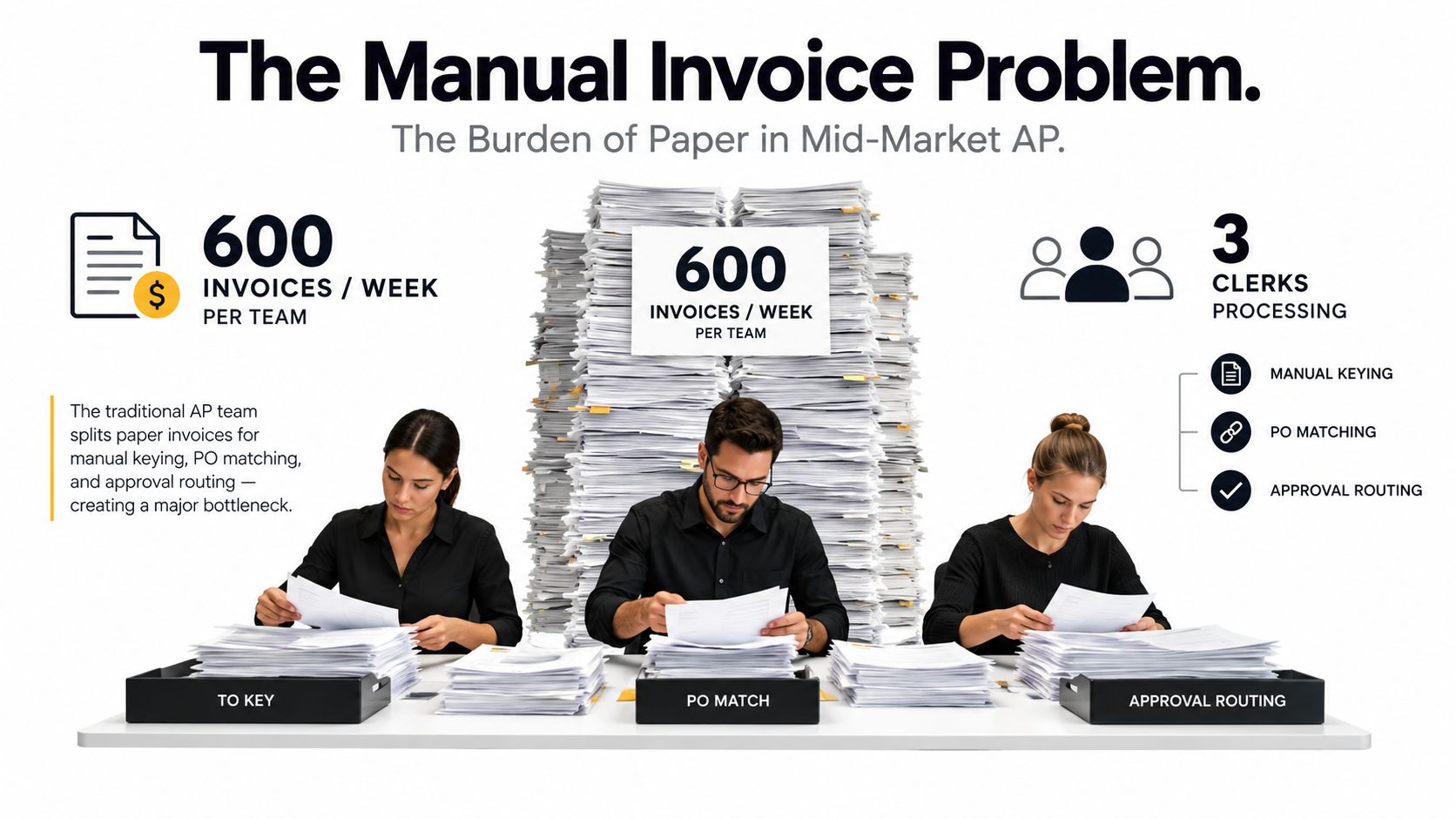
Monday morning exposes the weakness in a manual AP process. The inbox holds PDF invoices, paper documents wait in a tray, and suppliers ask when payment will be released. Three clerks split the workload: one opens invoices, another keys supplier and payment data into the ERP, and a third checks purchase orders and routes approvals. By month-end, the team is clearing a backlog instead of managing a controlled process.
That pattern remains common. A global IFOL survey cited by NetSuite found that more than 68% of businesses still manually key invoice data into ERP and accounting software. Another AP benchmark reported that 66% of respondents manually enter invoices, while 27% have no automation in place. The same reporting cycle found that 63% of AP teams spend more than 10 hours per week on invoice processing (IFOL Accounts Payable Automation Trends report).
The cost is more than keystrokes
Manual entry creates financial leakage and operational delays:
- Processing cost: AP benchmark data places the average invoice cost at $9.40, compared with $2.78 for best-in-class teams and $19.83 for manual teams (invoice processing benchmarks). The staffing implication is direct: adding clerks may absorb volume, but it preserves a costly transaction model.
- Cycle time: The same benchmark reports an average invoice cycle time of 9.2 days, versus 3.1 days for best-in-class teams. Longer cycles increase pressure on approvers and make late-payment follow-up harder.
- Exceptions: 14% of invoices still require exception handling, and only 32.6% are processed without human intervention. A strong field accuracy score therefore does not guarantee a low review workload. Exception routing determines whether automation improves throughput or moves work into a queue.
These figures explain why hiring another clerk often treats the symptom rather than the cause. More staff can enter more data, but they do not remove duplicate detection, approval routing, matching, or document-quality problems. They also cannot make invoice volume predictable during acquisitions, seasonal peaks, or month-end close.
Practical rule: Treat invoice capture as a control point in the AP process, not as a faster version of typing.
The useful question is whether the workflow can produce a high touchless-processing rate while sending uncertain invoices to the right reviewer. A system may extract fields accurately in a demonstration, yet leave AP with the same bottleneck if every low-confidence value requires manual inspection. Production results depend on the balance between extraction accuracy, validation controls, processing speed, and exception design.
Why Traditional Invoice OCR Keeps Falling Short
A supplier changes its invoice template, sends a low-resolution PDF, or places the total on a later page. A fixed OCR rule can still read characters from that document, yet assign them to the wrong fields or miss the relationship between them. That distinction explains why traditional OCR for documents often produces disappointing AP results.
OCR converts visible characters into machine-readable text. Invoice processing requires more. The system must connect supplier details, invoice identifiers, tax values, purchase orders, line items, and totals according to their roles in the document.
Why invoice layouts defeat fixed rules
Template-based OCR depends on familiar coordinates. Supplier traffic rarely stays consistent:
- Document quality: Skewed scans, blur, low resolution, and background noise reduce recognition reliability.
- Layout variation: Logos, tables, footers, and multiple columns can confuse fixed zones.
- Line items: Wrapped descriptions can separate quantities, unit prices, tax values, and totals from the rows they belong to.
- Identifier ambiguity: A purchase order number may resemble an invoice number, particularly when both follow similar formats.
- Supplier changes: A vendor redesign can invalidate coordinate-based rules without changing the underlying business data.
- Mixed traffic: Structured e-invoices, scanned paper, emailed PDFs, and documents in different languages may enter the same queue.
Line items create a particularly difficult trade-off. Header fields usually have clearer labels and positions. Tables require the system to preserve row structure, match values to descriptions, and distinguish tax or subtotal amounts from the payable total.
A high character-recognition result can therefore hide a field-mapping error. The system may read a PO reference correctly but label it as an invoice number. It may capture a total accurately without determining whether that amount includes tax. AP staff then correct data that appeared reliable at the OCR layer.
Template libraries can perform well during an initial rollout, especially with a stable supplier base. Their maintenance burden grows as vendors, formats, languages, and document-quality problems increase. Production performance depends on classification, context, validation, and exception routing, not OCR alone. The practical measure is how many invoices reach posting without review, while uncertain cases go to the right person instead of creating another manual queue.
How Modern Invoice Data Capture Actually Works
The extraction process works best as a sequence of controlled stages. Invoice data capture is the process of converting invoice documents into structured, validated information that downstream accounting systems can use. OCR is one stage in that process, not the finished product.
A standard intelligent document processing workflow includes document input, preprocessing, OCR, layout analysis, information extraction, validation, and structured storage (IDP workflow overview).
The production sequence
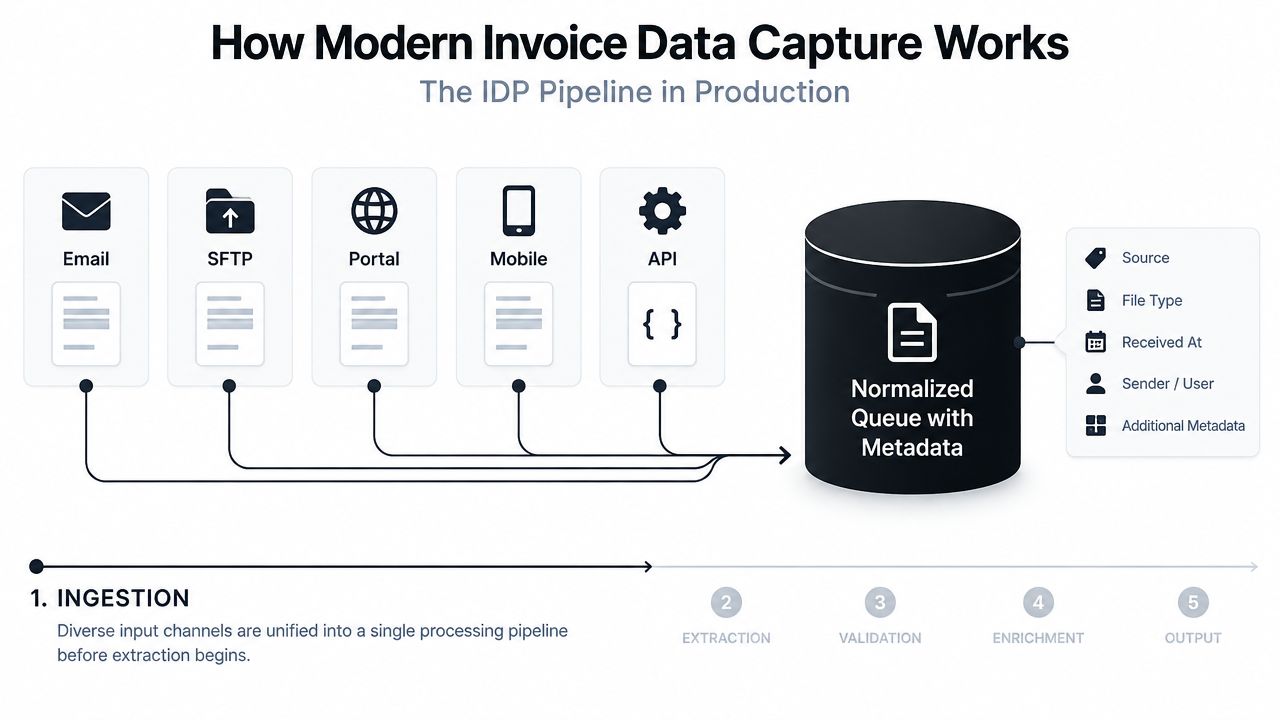
Ingestion: Email attachments, SFTP drops, supplier portals, mobile scans, and API uploads enter a common queue. Metadata such as source, timestamp, and document type travels with the file.
Preprocessing: The system improves the input through deskewing, denoising, resolution normalization, and language detection. Better input quality gives later stages a stronger starting point.
Classification: The workflow identifies whether the document is an invoice, credit note, receipt, purchase order, or another document type. Mixed batches can then follow different extraction rules.
Layout analysis: A vision model identifies regions such as the header, supplier block, line-item table, totals, tax area, and footer. It interprets relationships rather than depending only on fixed coordinates.
Field extraction: Specialized extractors and language-aware models produce structured output. A useful payload can include the field name, extracted value, confidence score, and source location on the document.
Normalization: Dates, currencies, tax codes, supplier identifiers, and payment terms are converted into the formats expected by the finance system.
Validation and delivery: The workflow checks the result against vendor data, purchase orders, goods receipts, and business rules before sending approved records to the ERP or AP platform.
Accuracy is engineered across this chain. An excellent OCR engine can't repair a classification error, and a strong extractor can't compensate for missing validation. Teams that want a deeper explanation of the broader workflow can review automatic document processing.
When invoices feed other operational processes, document control also matters. Teams handling medical, compliance, or referral records may find practical guidance on how to manage referrals and results useful because the same principles apply: centralize inputs, preserve traceability, and route uncertain records deliberately.
This video illustrates the kind of staged workflow that separates document reading from business processing:
Field Accuracy and What the Numbers Actually Show
A finance team can receive an invoice with nearly every field correct and still send it to manual review. One uncertain tax value, mismatched purchase order, or broken line-item relationship may block posting. That is why OCR invoices should be measured at both field and document level.
Field-level accuracy evaluates individual values. Document-level accuracy requires every required value on one invoice to pass. If a document contains many extracted fields, the chance of at least one exception rises even when each field performs well. A benchmark therefore describes reading quality, not the percentage of invoices that reach the ERP without intervention.
Header fields and line items behave differently
Header fields such as supplier name, invoice number, invoice date, and total usually perform better because they appear in predictable locations and often carry clear labels. Line items require the system to preserve row relationships while separating descriptions, quantities, unit prices, discounts, taxes, and totals.
| Field | Typical Accuracy Range | Why It Varies |
|---|---|---|
| Supplier name and invoice header fields | 95% to 99.5% | Usually prominent and repeated in predictable document regions |
| Invoice number, date, and total | 95% to 99.5% | Often labeled clearly, but identifiers can be confused with PO references |
| Tax and payment fields | 95% to 97% | Formatting, jurisdiction, and placement vary by supplier |
| Line-item descriptions, quantities, and prices | 95% to 97% | Tables wrap, split across pages, and contain more relational ambiguity |
The multiplication effect matters in production. A 98% field accuracy result does not mean 98% of invoices are ready to post. Each invoice may contain multiple extracted values, so a small error rate can create a substantial review queue across a large accounts payable workload. The workflow needs confidence scores and field-specific controls to identify which records require attention.
Measure outcomes, not only extraction
AP leaders should track:
- Touchless processing, the proportion of invoices completed without human intervention.
- Exception rate, including missing fields, failed matches, and duplicate candidates.
- Exception aging, which shows whether review work is becoming a new queue.
- Posting quality, including ERP rejections and correction frequency.
Independent benchmark content reports state-of-the-art invoice OCR at about 95% to 98% accuracy on printed invoices, with line items trailing header fields. AP benchmarks describe touchless processing at around 52.8% for top performers, compared with roughly 25% on average, while only 28% achieve full touchless processing for at least some categories (invoice OCR competitor benchmark).
The practical conclusion is simple: extraction produces a candidate set, not a finished accounting record. High field accuracy can reduce corrections, but exception design determines how many invoices complete the process without human work. The strongest evaluation pairs benchmark accuracy with touchless rate, exception volume, and posting outcomes.
Validation, Exceptions, and Human-in-the-Loop Design
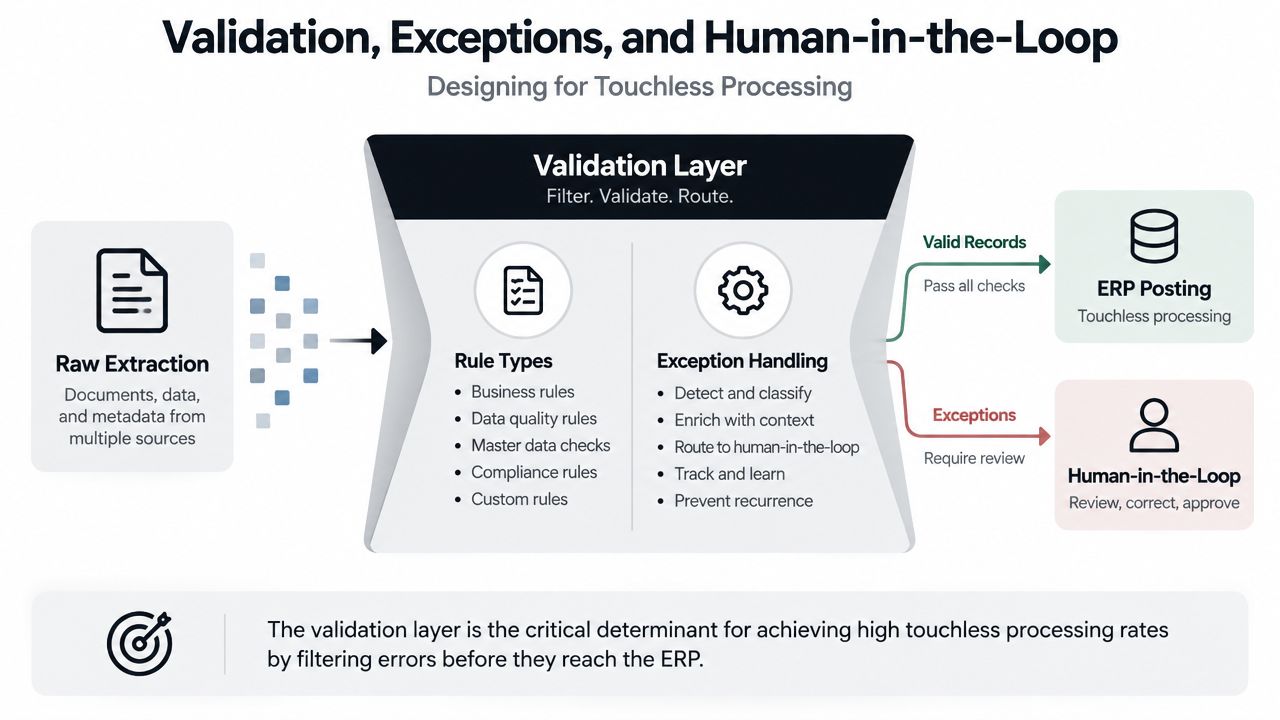
The validation layer determines whether invoice automation reduces work or merely relocates it. A two-stage pattern works well in production. First, the system normalizes the document and extracts candidate values. Second, rules qualify those values, and exceptions move to a reviewer before ERP posting.
A documented invoice workflow follows this pattern by checking mandatory fields, routing missing or uncertain cases to human validation, and writing approved output to Excel or another destination (invoice processing with document understanding).
Build rules in layers
Format checks come first. Validate invoice number patterns, parse dates, check currency formats, and confirm that numeric fields contain usable values. These checks are cheap and catch obvious defects before the workflow spends time on business matching.
Business rules add context. Compare the supplier against the vendor master, detect duplicate invoice keys, and apply tolerance rules to invoice totals against purchase orders. A value can look plausible and still fail the accounting policy.
Cross-document checks protect against posting the wrong transaction. Compare the invoice with the PO and goods receipt where a three-way match is required. Extraction quality becomes a finance control rather than a text-processing feature.
ERP feedback closes the loop. Rejected postings, missing vendor records, invalid tax codes, and master-data mismatches should return a clear status to the capture workflow. Without that feedback, the system may mark a record complete even though the ERP has rejected it.
Route confidence deliberately
Use confidence as a routing signal, not as a decorative score:
- High confidence: Auto-post fields or invoices that pass every required rule.
- Medium confidence: Send the specific field or discrepancy to a reviewer for a focused check.
- Low confidence: Route the document for full correction before it reaches the ERP.
The reviewer interface should show the extracted value alongside its document location and highlight only what needs attention. It should surface missing mandatory fields, suspected duplicates, and failed matches without forcing the reviewer to retype the entire invoice.
Validation systems can reduce error rates to below 1%, while organizations with no automation and inconsistent processes may spend about four times more per invoice, $6.30 versus $1.45 (2026 invoice automation report). The exact outcome depends on document quality, rules, integrations, and review design.
Corrections should feed back into model refinement and threshold tuning. If reviewers repeatedly correct the same supplier field, the team has evidence for a rule, a model adjustment, or a vendor-master cleanup. More detail on this control can be found in field-level validation.
Integration, APIs, and Measuring Real ROI
An extraction system becomes useful only when its output reaches the system of record reliably. AP teams generally choose between a native connector and an API-led integration.
Native connectors can shorten deployment for common ERP environments such as SAP, Oracle, NetSuite, Dynamics, or Sage. They're practical when the business follows standard invoice and approval objects. A REST API is more flexible for custom back-office systems, vertical SaaS products, supplier portals, and high-volume ingestion services.
Define the data contract before choosing the connector
A dependable integration should support:
- Idempotent submission: Retrying an upload shouldn't create a second invoice.
- Field-level confidence: Downstream systems need to know which values passed with certainty and which require review.
- Duplicate keys: Supplier, invoice number, date, and amount should support duplicate detection.
- Posting callbacks: ERP acceptance or rejection should return to the capture workflow.
- Traceability: The original file, extracted values, corrections, and final payload should remain linked.
Teams building or extending an ERP may also need specialist support for enterprise ERP software development, especially when invoice capture must fit bespoke approval logic rather than a standard connector.
Use a complete ROI scorecard
Cost per invoice matters, but it isn't enough. Track:
- Invoices processed per FTE, to see whether capacity grows without proportional hiring.
- Cost per invoice, including review time, corrections, and operational overhead.
- Straight-through processing, which shows whether the workflow removes touches.
- Exception aging, because unresolved exceptions delay payment and consume attention.
- Days payable outstanding impact, balanced against supplier relationships and policy.
- Early-payment discount capture, where reliable routing allows finance to act within the discount window.
The benchmarks show why the target should be operational. Best-in-class teams reduce cycle time and processing cost, while average teams continue to rely heavily on manual work. Touchless processing is the bridge between the two because it captures the combined effect of extraction, validation, matching, approval, and posting.
A sensible rollout starts with a contained pilot. Tune rules against representative supplier traffic, measure exception categories, then expand the vendor set. The right sequence is not “deploy OCR everywhere and hope.” It's “measure the current workflow, automate a controlled slice, fix the failure modes, and scale what survives real documents.”
For teams that need an API-first approach, the API for data extraction provides a useful reference point for thinking about upload, structured output, and downstream integration boundaries.
Best Practices and a Practical Evaluation Checklist
A vendor demonstration can make invoice extraction look effortless. Your own documents are less forgiving. Evaluation should focus on whether the system produces validated, usable records from the formats your AP team receives, including scans, emailed PDFs, multi-page files, and inconsistent supplier layouts.
Run a pilot with representative traffic before signing. A practical test uses at least 500 mixed-format invoices over two weeks, including scanned documents, emailed PDFs, and portal-supplied files. Measure the entire path from ingestion to ERP-ready output, not just the extracted text.
Questions that expose production fit
| Evaluation area | Question for the vendor |
|---|---|
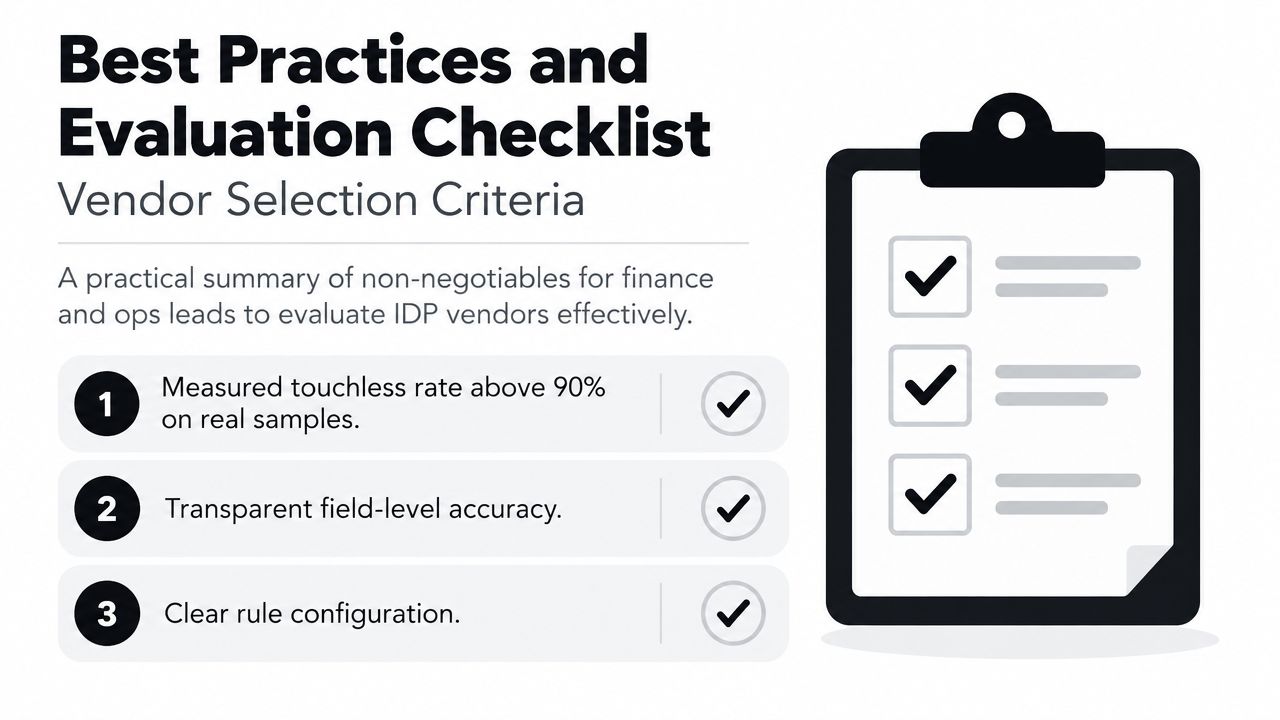
| Touchless performance | Can you demonstrate a measured touchless rate above 90% on our own sample documents? |
| Accuracy reporting | Will you disclose accuracy by field, especially for line items, tax, totals, and PO references? |
| Validation | Can our team configure mandatory fields, duplicate checks, matching tolerances, and exception routes without rebuilding the workflow? |
| Auditability | Does every correction retain the original document, extracted value, reviewer action, and final posted value? |
| Integration | Can the system support our ERP, API payloads, callbacks, retries, and rejection handling? |
| Commercial model | Is pricing aligned to invoices or pages rather than seats, so cost follows document volume? |
| Security | Are GDPR, ISO, SOC, retention, access, and audit requirements documented for our deployment? |
Platforms such as Matil combine OCR, classification, validation, and workflow automation in one document-processing flow. Its capabilities include pre-trained models, rapid customization, a simple API, structured JSON output, and enterprise controls described around GDPR, ISO 27001, AICPA SOC, and zero data retention. Those claims still need to be tested against your own documents and controls.
The strongest evaluation doesn't ask, “How accurate is your OCR?” It asks, “How many of our invoices can you validate, approve, and post without human intervention, and what happens to the rest?” That question exposes the actual trade-off between accuracy, speed, review effort, and control.
If you're evaluating invoice data capture, Matil offers OCR, classification, validation, and workflow orchestration for invoices and other business documents through an API. Visit Matil to review the platform and assess whether its structured extraction and validation workflow fits your AP process.


