What Is Invoice Automation and How It Works
Learn what is invoice automation, how OCR and AI capture works, benefits, ROI and how to implement it securely with Matil.ai.

Invoice automation is the end-to-end capture, validation, approval routing, and posting of invoices without manual keying. It matters because manual processing still costs about $9.40 to $19.83 per invoice and often takes 8.2 to 14.6 days, while best-in-class automated teams can get closer to $2.78 to $3.00 per invoice and about 3.1 days.
At month-end, this usually doesn't look like a strategy problem. It looks like a shared inbox full of PDFs, forwarded emails, supplier attachments, and a finance team copying invoice numbers, dates, totals, and VAT details into an ERP one field at a time. Someone spots a mismatch. Someone else chases an approval. A payment sits in limbo because the purchase order wasn't linked correctly.
Introduction to Invoice Automation
If you're asking what is invoice automation, the simplest answer is this: it's the process of taking an invoice from receipt to posting in your finance system with as little manual handling as possible.
That definition matters because many teams still confuse invoice automation with scanning. Scanning is only the first step. A scanned PDF that still needs a person to read it, type fields into accounting software, check supplier data, route it for approval, and fix exceptions isn't really automated. It's digitized manual work.
What invoice automation includes
A practical invoice automation workflow usually covers four core jobs:
- Capture: Receive invoices from email, PDF uploads, scans, or structured electronic formats.
- Validation: Check whether the invoice is complete, readable, matched to the right supplier, and consistent with your business rules.
- Approval routing: Send the invoice to the right person or team based on amount, department, entity, or purchase order status.
- Posting: Push approved data into the ERP or accounting system with traceability.
Practical rule: If a team still retypes invoice fields into the ERP, they haven't automated the process end to end.
Many teams get stuck. They buy OCR, but OCR alone only reads text. It doesn't decide whether the supplier exists in the vendor master, whether the total matches the purchase order, or whether the invoice should go to procurement, operations, or a department head.
For smaller finance teams that want a broader process overview, this find an AP automation guide for SMBs article gives useful context on how AP automation fits into daily payable work.
What invoice automation is not
It isn't only about data extraction. It also isn't the same thing as full purchase-to-pay automation. Invoice automation focuses on the invoice stage itself. Purchase-to-pay goes further, covering requisitions, purchasing, purchase orders, receipts, invoices, payments, and reporting across the full spend cycle.
That boundary matters more now because finance teams aren't only trying to save time. They're also trying to improve compliance, keep audit trails clean, reduce fraud risk, and prepare for structured e-invoicing requirements.
Why Manual Invoice Processing Breaks at Scale
Monday morning is a good stress test for any AP process.
Invoices have arrived through shared inboxes, supplier portals, scans from branch offices, and a few forwarded messages from managers who approved something last week but forgot to send it on. At low volume, a person can sort that pile. At higher volume, the process starts to behave like a busy loading dock with no traffic control. Documents queue up, exceptions get parked to the side, and nobody has a clean view of what is waiting, what is approved, and what is risky to pay.
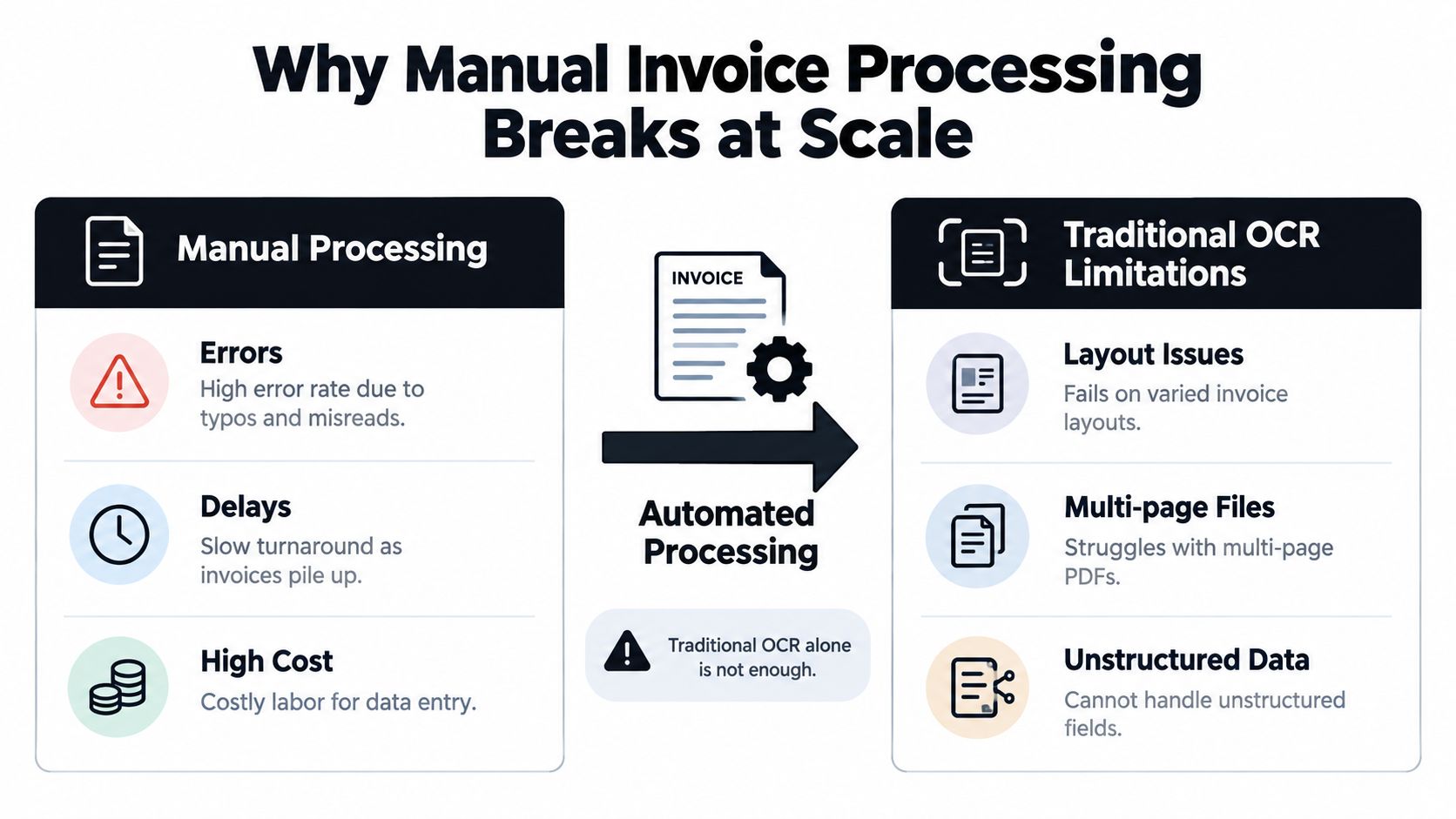
Scale exposes every weak handoff
The breaking point is rarely data entry alone.
It is the accumulation of small handoffs. Someone downloads an attachment. Someone renames the file. Someone checks whether the supplier exists. Someone emails procurement for a missing PO. Someone else routes the invoice for approval because the amount is above a threshold. Then accounting rekeys the same fields into the ERP.
Each step may look reasonable on its own. Together, they create delays, duplicate effort, and a process that depends on people remembering what to do next.
That is why many teams stay stuck in partial automation. They add OCR and expect the whole process to improve, but OCR only helps with reading the document. The harder work starts after capture. The invoice still needs to be validated, matched, routed, approved, and posted.
Why OCR alone hits a ceiling
Traditional OCR is useful in the same way a scanner is useful. It converts a document into text that software can work with. It does not decide whether the invoice belongs to an approved supplier, whether tax fields are complete, or whether the total should be blocked because it exceeds a contract or PO.
A few common problems show up fast:
- Supplier layouts vary: The same field appears in different places, labels, languages, or date formats.
- Files arrive in bundles: One PDF may include the invoice, terms, packing slips, and backup pages.
- Context matters: A system may read a number correctly and still assign it to the wrong field.
- Exceptions are normal: Missing PO numbers, duplicate invoice numbers, tax mismatches, and approval thresholds require rule-based decisions.
This is the key distinction many teams miss. Invoice automation is not just document reading. It is a capture, validate, route, and post workflow. If any of those stages still rely on inbox chasing or spreadsheet tracking, scale will expose it.
Partial automation still leaves the expensive work behind
Earlier benchmark data in this article showed that full automation remains uncommon. That lines up with what finance teams see in practice. The first 60% of the job gets attention because extracting header fields is visible and easy to demo. The last 40% causes the operational drag because it lives in exceptions, approvals, matching logic, and ERP posting rules.
Analysts at Medius describe the cost gap clearly in this AP invoice cost analysis. Manual processing stays expensive because the labor is not limited to typing. Teams spend time correcting fields, following up on approvals, resolving duplicates, and handling invoices that fall outside the happy path.
That is often the business case behind a broader accounts payable system overhaul. The value comes from controlling the full flow, not from extracting text a little faster.
Compliance pressure makes the gap harder to ignore
There is also a second scaling problem. Regulation is changing the shape of the process.
As structured e-invoicing rules expand in the EU and other markets, finance teams need more than a readable PDF and an email approval chain. They need clean data, reliable validation, audit trails, and posting logic that stands up to review. A manual process can handle occasional exceptions. It struggles when compliance itself becomes a workflow requirement.
That is why manual invoice processing breaks at scale. Volume is only part of the story. Complexity, control, and compliance are what turn a workable small-team process into a bottleneck.
How Invoice Automation Works Step by Step
The easiest way to understand invoice automation is to think of it as a relay race. One system takes the baton at each stage, but the baton is the same invoice moving from arrival to posting.
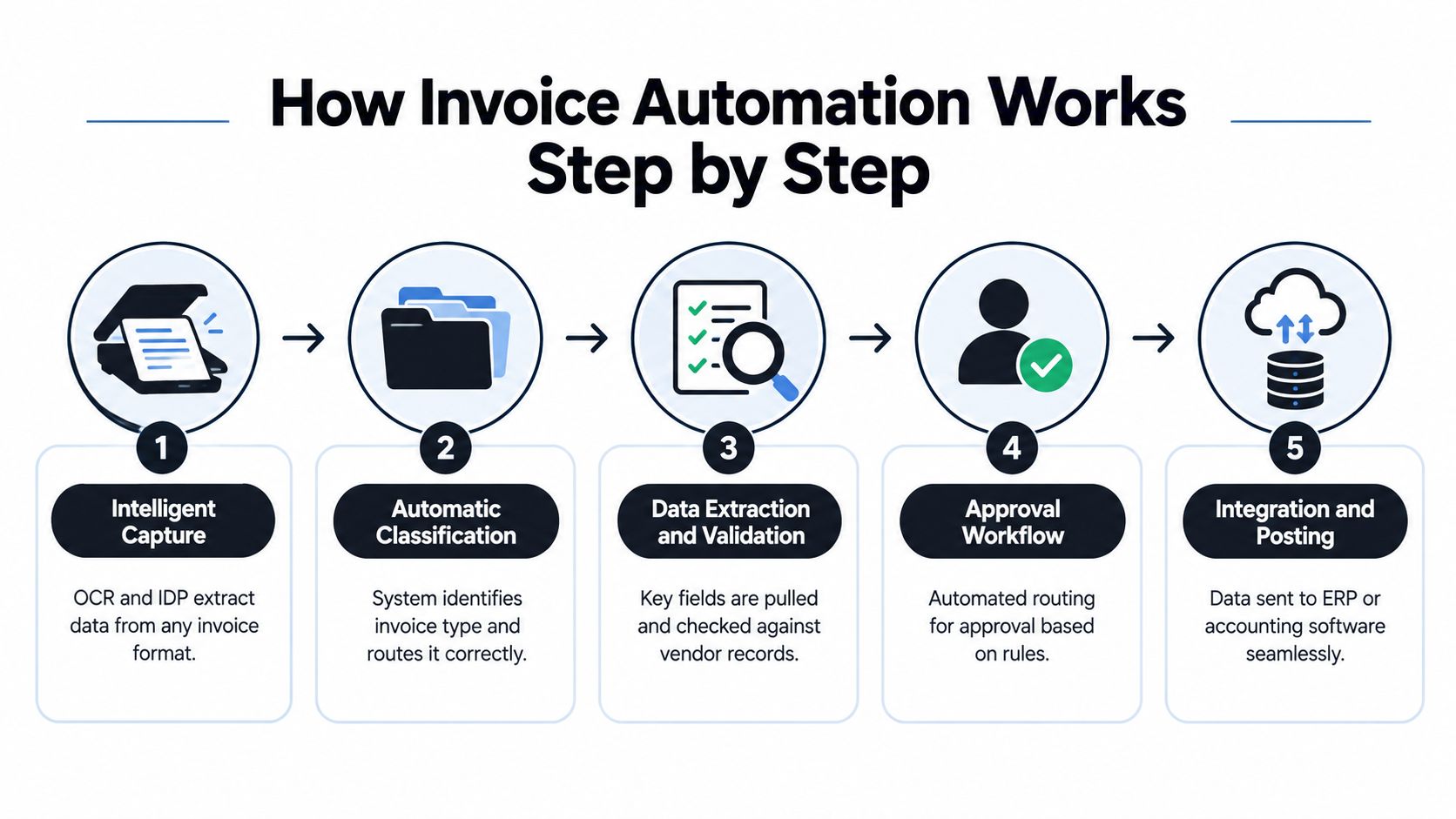
Step 1 Intelligent capture
Invoices enter the process through email inboxes, supplier portals, scans, PDFs, or structured electronic feeds. The system ingests those files and prepares them for extraction.
OCR documents technology starts to help. It turns the file into machine-readable text so software can work with it. If the input is a mixed PDF packet, the system may also split documents apart before doing anything else.
Step 2 Classification
Not every incoming file is an invoice. Some are credit notes, receipts, delivery notes, contracts, or backup pages.
Classification answers a simple operational question: what is this document, and where should it go? That matters because the extraction rules for a utility bill, a supplier invoice, and a customs declaration won't be the same.
Step 3 Data extraction into structure
Once the system knows the document type, it extracts the fields that matter. For invoice processing, that often includes supplier name, invoice number, invoice date, due date, line items, tax amounts, currency, total, and purchase order reference.
A good way to think about this is translation. The software is translating a human-facing PDF into structured data, often JSON, so another system can use it.
For teams that want a broader view of how document pipelines fit together beyond invoice intake, this overview of document process workflow is a practical companion.
Step 4 Validation and matching
This is the stage many people underestimate.
The system checks whether required fields are present, whether totals add up, whether the vendor exists, whether the PO number is valid, and whether the invoice should pass to approval or be held for review. Technical quality matters here. A peer-reviewed invoice recognition study reported roughly 99% character-level accuracy, 98.5% word-level accuracy, and 97% line-level accuracy, while another paper reported 0.96 accuracy on electronic invoices and over 0.97 for key fields such as invoice numbers and dates, as summarized in this invoice recognition research paper.
Those numbers are encouraging, but they don't eliminate exceptions. A readable invoice can still fail validation if it lacks PO data or doesn't match supplier records.
Human review should focus on exceptions, not on retyping clean invoices.
Step 5 Approval workflow and posting
If validation passes, the invoice moves automatically to the right approver. That route may depend on amount, department, legal entity, cost center, or invoice type.
After approval, the structured data posts into the ERP or accounting platform. That's the moment many teams care about most, because it's where manual re-entry finally disappears. If you're exploring ways to save time with invoice automation, this end-to-end handoff is what usually creates the operational win.
The full pipeline isn't just OCR facturas. It's OCR, classification, rules, routing, and system integration working together.
Modern Invoice Automation With Intelligent Document Processing
There's a big difference between legacy OCR and modern intelligent document processing.
Legacy OCR reads. Intelligent document processing reads, identifies, validates, and triggers the next action. That difference is why many finance teams no longer evaluate automation tools on extraction alone.
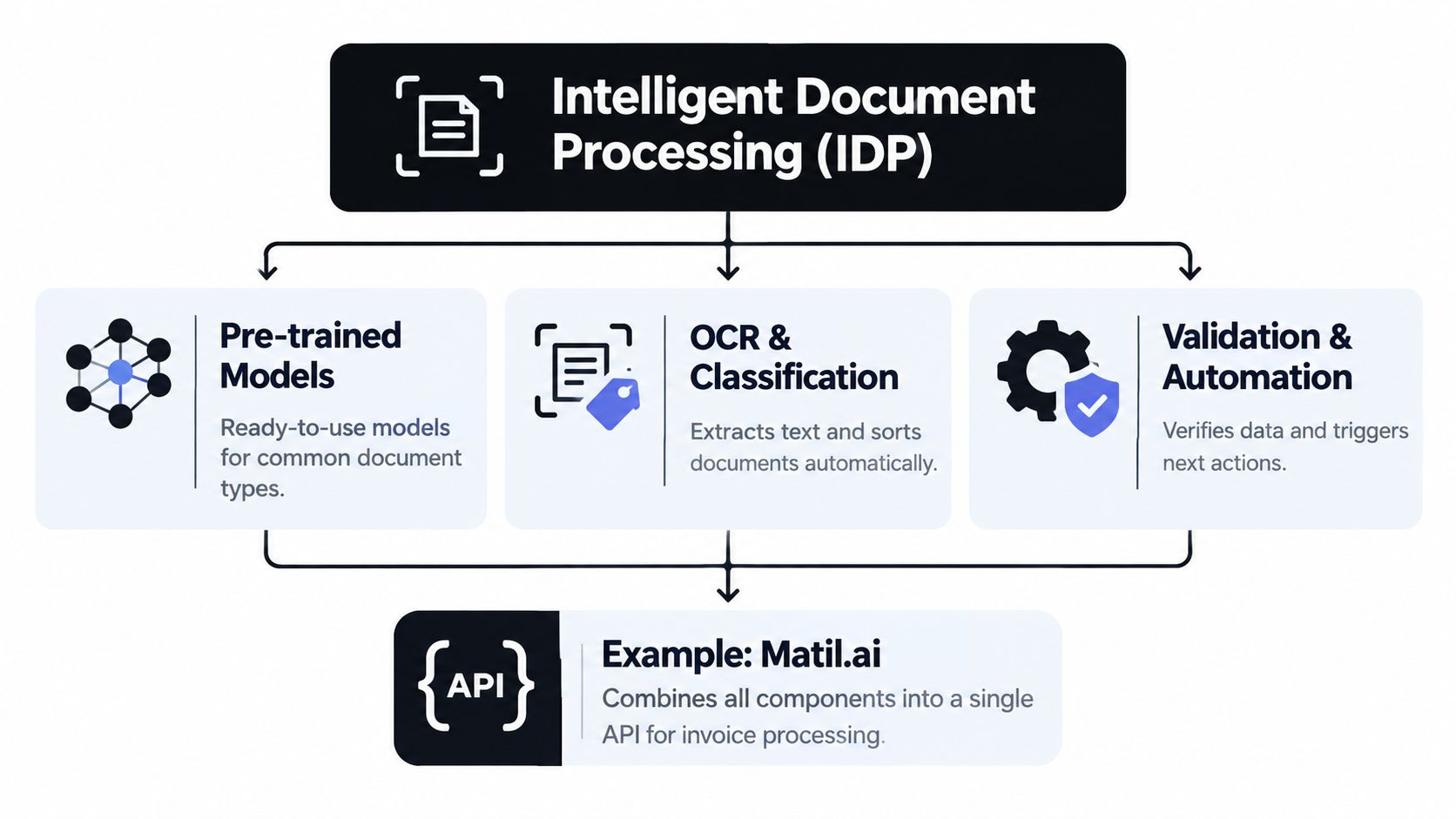
Legacy OCR versus modern document processing
A basic OCR tool helps you extraer datos de PDF. A modern platform handles automatización documental across the full invoice flow.
Here's the practical difference:
- Legacy OCR: extracts text from a file.
- Modern IDP: extracts fields, classifies the document, validates content, and routes the result into a workflow.
- Workflow automation layer: pushes approved data into accounting systems and leaves a traceable record.
Recent AP commentary has moved in this direction too. The center of gravity is no longer scanning alone. It's touchless processing, AI-powered capture, digital payments, fraud controls, and broader AP workflow coverage, as discussed in this invoice automation overview.
Where tools like Matil.ai fit
Tools like Matil.ai sit in that modern category. Rather than acting as OCR only, it combines OCR + classification + validation + automation through an API, supports pre-trained models for common document types, allows rapid customization, and is designed for enterprise controls such as GDPR, ISO 27001, SOC, and zero data retention. Its stated positioning also includes accuracy above 99% in multiple use cases and support for mixed PDFs, invoice extraction, and workflow orchestration.
If you're comparing concepts first, this explanation of what is intelligent document processing is a useful reference point.
The useful question isn't "Does the tool read invoices?" It's "Does it turn invoices into validated, usable data inside the process I already run?"
That distinction matters for technical and business teams alike. CTOs care about API simplicity and integration. Finance leaders care about exception handling, auditability, and whether staff still need to babysit inboxes.
Benefits and ROI You Can Measure
A finance leader usually feels the value of invoice automation before they calculates it. Fewer supplier chasers. Fewer approval bottlenecks at month end. Fewer invoices sitting in an inbox because no one knew who owned the next step.
That matters because invoice automation changes more than data entry. It improves the full capture, validate, route, and post workflow. ROI shows up across the process, not just at the OCR step.
The benchmark view
Cycle time is one of the clearest measures because it reflects several process problems at once. Slow capture, missing fields, approval delays, and posting backlogs all show up in the same number.
Manual invoice processing averages 9.2 days, while best-in-class AP teams complete invoices in about 3.1 days, according to this invoice processing time benchmark.
Earlier benchmarks cited in this article also show a wide gap between manual or partially automated AP and stronger automated workflows. The pattern is consistent. Teams that still rely on email attachments, rekeying, and manual approval chasing take longer and spend more per invoice.
| Metric | Manual / Mixed Workflow | Best-in-Class Automated |
|---|---|---|
| Cost per invoice | Higher | Lower |
| Cycle time | Slower | Faster |
| Human intervention | More frequent | Less frequent |
| Exceptions | More correction work | Fewer invoices routed for review |
What the savings actually come from
The gains usually come from small steps removed at scale. One typed field does not look expensive. Ten typed fields across thousands of invoices every month does.
A practical way to read ROI is to follow the invoice like a package moving through a warehouse. If every handoff needs a person to stop, read, correct, and forward it, throughput drops. If the package is labeled correctly, checked against the order, and sent to the right station automatically, staff only step in when something is off.
That is why measurable savings usually come from four places:
- Less manual entry. AP staff spend less time keying supplier, amount, tax, and line data into the ERP.
- Earlier error detection. Validation catches missing PO numbers, duplicate invoices, or mismatched totals before they create rework.
- Faster approvals. Routing rules send invoices to the right approver based on entity, department, amount, or supplier.
- Cleaner posting and reporting. Structured data reaches finance systems sooner, which improves cash visibility and accrual timing.
This is also why many teams stay stuck in partial automation. They automate capture, but not validation rules. Or they route approvals digitally, but still post manually. The ROI is real, but it is smaller when one manual checkpoint keeps forcing people back into the process.
For teams building the business case, this guide to accounts payable automation ROI shows how to translate time, exception rates, and labor effort into internal finance metrics.
Why ROI now includes compliance
Labor savings still matter. Compliance pressure now matters just as much.
Analysts in this AP transformation research summary found that many organizations still rely heavily on manual invoice entry, while only a smaller share describe AP as mostly or fully automated. That gap helps explain why finance teams talk about automation so often but still struggle to get to touchless processing in practice.
The reason is simple. Requirements have expanded. Teams are no longer trying to read invoices faster only. They also need audit trails, approval controls, fraud checks, tax handling, and support for e-invoicing mandates, including changes rolling out across parts of the EU.
So the ROI case has widened. A stronger workflow can reduce processing effort, shorten cycle time, and lower compliance risk at the same time.
Real World Use Cases and Results
The same document-processing pattern shows up outside classic AP. The document changes. The workflow logic stays similar.
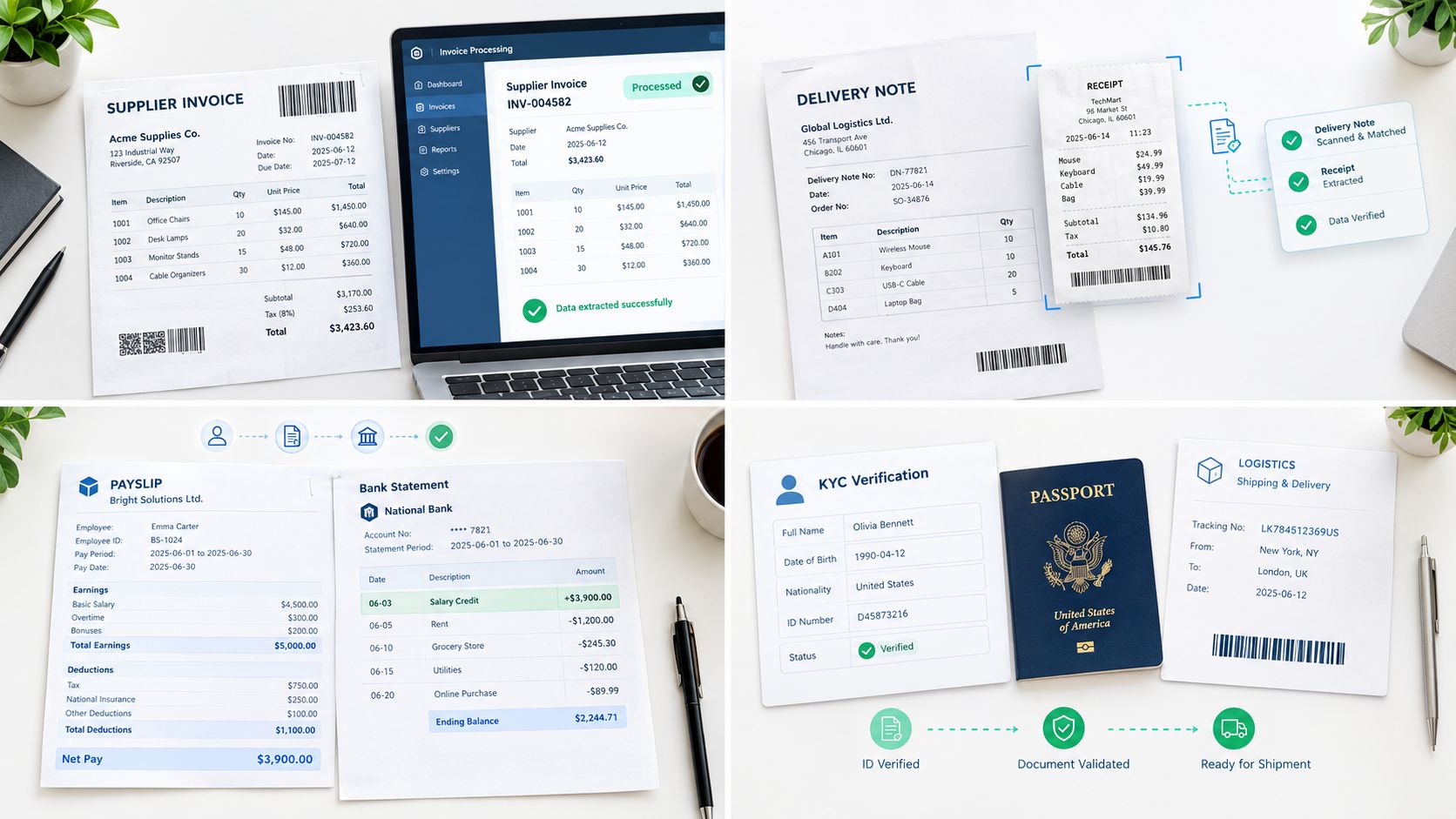
Supplier invoices
Problem: Finance receives invoices in different layouts, often by email, and staff manually enter header fields and line items.
Solution: The system classifies the file as an invoice, extracts supplier and amount data, validates required fields, and routes only exceptions for review.
Result: AP spends less time on repetitive entry and more time on mismatches, duplicate checks, and payment timing.
Delivery notes and receipts
Problem: Operations teams often need SKU, quantity, date, and reference data from delivery notes or tickets, but those documents arrive in mixed formats.
Solution: Intelligent extraction maps key fields into a standard structure and links them to internal records.
Result: Teams can compare what was ordered, shipped, and invoiced without manually reading every page.
A short demo helps make that workflow more concrete:
Payslips and bank statements
Problem: HR, payroll, and finance teams often need to extract data from recurring but variable PDF documents.
Solution: Document classification and field validation turn these files into structured records instead of one-off manual tasks.
Result: Reconciliation, recordkeeping, and downstream reporting become more consistent.
KYC and logistics documents
Problem: Compliance and logistics teams deal with passports, identity cards, Bills of Lading, and customs documents such as DUA. These documents are information-dense and often mixed into larger document packets.
Solution: A modern processing workflow separates document types, extracts the needed fields, and validates required identifiers before handing off to the next system or reviewer.
Result: Teams get better traceability and faster handling without turning every document into a manual review job.
The broader lesson is simple: invoice automation is one important use case inside a larger document automation stack.
Implementation Checklist Security and Next Steps
A team can buy a strong OCR tool and still end up with slow approvals, posting errors, and manual workarounds.
The reason is simple. Invoice automation is a workflow, not just a reading task. Capturing a PDF is only the front door. The harder part is deciding what counts as a valid invoice, where it should go next, and when it is safe to post into the ERP.
That is why many AP teams get stuck in partial automation. They automate extraction, then leave validation, routing, exception handling, and posting to email threads or spreadsheets. The result looks modern on paper but still depends on people to push each invoice through the process.
What to evaluate first
Before you choose a platform or launch a pilot, map the process like you would map a warehouse receiving line. First the package arrives. Then someone checks it, labels it, sends it to the right shelf, and records it in the system. Invoice automation follows the same logic.
Use this checklist:
- Document intake audit: list every intake channel you use now, including shared inboxes, supplier portals, scans, PDFs, and structured e-invoice feeds. Each source creates different capture and monitoring needs.
- Field definition: define the data you need in a standard structure. Basic header fields are straightforward. Line items, tax treatment, cost-center rules, and exception fields usually need more design work.
- Validation logic: document the rules that should stop an invoice from posting. Common examples include missing PO references, unknown suppliers, duplicate invoice numbers, tax mismatches, and amount thresholds.
- Workflow mapping: set the routing logic. Who approves non-PO invoices? What happens when a match fails? Which cases go back to AP, and which go to the business owner?
- ERP integration: check that the output matches the accounting or AP system you already run. A clean extraction result is not enough if the posting format does not fit your chart of accounts, vendor master, or approval objects.
- Pilot scope: start with a narrow slice, such as one entity, one supplier group, or one invoice type. That makes exception patterns easier to see before you expand.
One point causes confusion for many teams. A pilot should not test only whether the system can read invoices. It should test whether invoices can pass from capture to validation to routing to posting with fewer touches.
Security and compliance checks
Security review matters because invoice files often contain more than totals and supplier names. They can include bank details, employee information, addresses, tax identifiers, and supporting documents.
Check for:
- GDPR alignment: especially when invoices or attachments contain personal data.
- ISO 27001 and SOC controls: useful signals that the vendor has formal security and control processes.
- Zero data retention options: helpful when documents contain sensitive financial or identity data.
- Audit trail quality: finance teams need a record of what was extracted, what failed validation, what was changed, who approved it, and what was posted.
- Service reliability: uptime and SLA matter when invoice intake feeds month-end close and payment runs.
Compliance pressure is also changing what teams need from automation. In Europe, the requirement is shifting from "read whatever PDF arrives" to "accept, validate, and process structured invoice data correctly." Belgium requires B2B e-invoicing for all businesses from 1 January 2026, while France requires all businesses to be able to receive e-invoices from 1 September 2026, and large and mid-sized firms must issue them from the same date, according to this European e-invoicing compliance overview. At the EU level, structured e-invoicing is tied to EN 16931, and the ViDA package is scheduled to make structured e-invoicing mandatory for intra-EU B2B transactions from 1 July 2030, as explained in this guide to European e-invoicing compliance for 2026.
This changes the buying criteria. Teams do not just need OCR accuracy. They need a system that can capture multiple formats, validate structured fields, route exceptions, preserve an audit trail, and post clean data into the ERP.
If you're evaluating how to turn invoice PDFs, mixed document packets, or structured e-invoices into validated data, Matil offers an API-based approach that combines OCR, classification, validation, and workflow automation in one system. It's a practical fit for teams that want to reduce manual document handling without stitching together separate tools for capture, extraction, and routing.


