Key Value Pair Extraction for Document Automation
Learn how key value pair extraction turns unstructured documents into structured data using AI. Explore methods, accuracy validation, and API integration.

A key value pair links a field name to the exact piece of information that belongs to it. On an invoice, the key might be "Invoice Date" and the value "15 March 2026". That simple pairing is what turns a scanned page or PDF into data a computer can actually work with.
Understanding Key Value Pairs in Document Data
Picture a document as a room full of labelled boxes. OCR documents can read the writing on every box, but key value pair extraction goes a step further — it knows what each box contains and where it belongs.
In document intelligence, a key value pair is a semantic field label tied directly to the content extracted for it.
An invoice, for instance, typically yields pairs like these:
- Vendor Name → Northstar Supplies Ltd.
- Invoice Number → INV-10482
- Invoice Date → 15 March 2026
- Total Amount → €1,248.50
- Tax ID → ESB12345678
This distinction matters more than it might seem. Accounting software has no use for a wall of recognised text — it needs specific values slotted into fields like supplier, due date, currency, and total. Once the data is structured that way, it can flow straight into an ERP, an approval workflow, or a payment run without anyone retyping it.
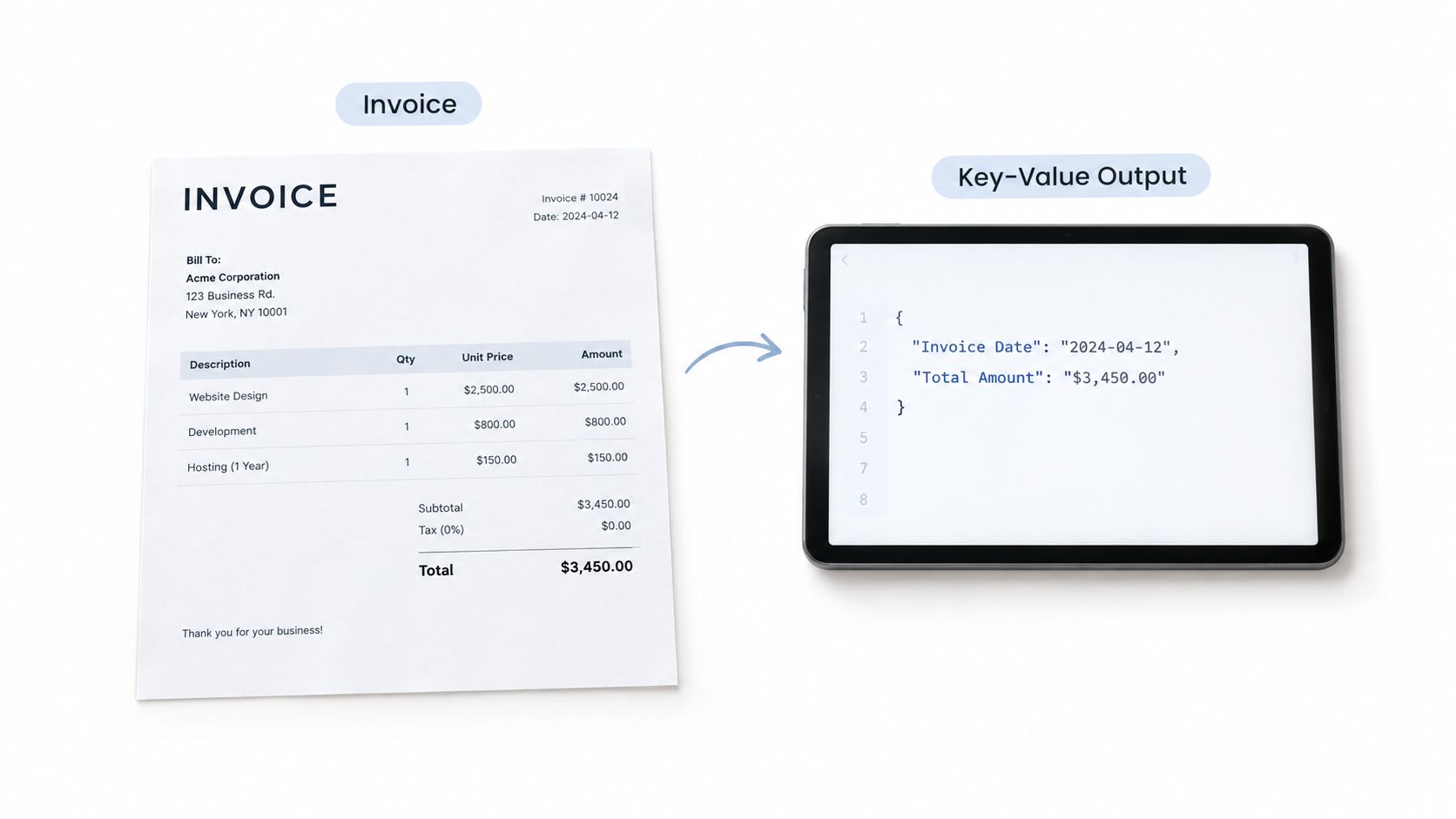
OCR Text Versus Structured Extraction
Basic OCR reads characters, nothing more. It might recognise "€1,248.50" on a page, but that string alone tells you little — is it the invoice total, a subtotal, a discount, or the price of a single line item? Semantic extraction is what attaches text to its business meaning.
| Output type | Example | Business usefulness |
|---|---|---|
| Raw OCR | INV-10482 15/03/2026 €1,248.50 |
Requires interpretation and manual mapping |
| Key value pair | invoice_number: INV-10482 |
Ready for software and workflow rules |
The same logic carries over to receipts, payslips, identity documents, and bills of lading. A receipt might yield Merchant, Purchase Date, and Total. A passport yields Full Name, Document Number, and Expiry Date.
Key value pairs are not the same thing as table extraction, either. Tables hold repeated rows and columns — products, quantities, unit prices. A key value pair captures a single labelled attribute, such as the invoice total.
Matil.ai pairs OCR with classification, validation, and automation, returning structured information at above 99% accuracy across multiple use cases. Its API outputs JSON with traceability, so teams can feed extracted data into existing systems while keeping the source context intact.
If you're weighing options for extracting data from PDFs, the real question is whether a tool merely reads text or produces reliable, validated fields. You can explore Matil.ai's document extraction platform to see how key value pairs might fit your workflow.
Traditional OCR is good at recognising characters. It can read a scanned invoice and identify strings like "Madrid," "B-10482," or "€1,248.50." But it usually can't tell which business field each string represents. That gap is the difference between simply reading a document and actually extracting usable key-value pairs.
Consider a single page that contains a vendor address, a billing address, a delivery address, a tax ID, and a phone number. Basic OCR might capture all of these, but it typically returns one flat block of text without indicating which value belongs to which field.
OCR identifies what the page says. Semantic extraction identifies what each piece of information means.
This limitation creates significant work after recognition. A finance employee still has to review the output, map values to accounting fields, and correct formatting before the data can enter an ERP or payment workflow.
Where Manual Review Creates Hidden Costs
Manual validation isn't just an inconvenience — it introduces several operational risks:
- Slower processing, especially when invoices or receipts arrive in large batches.
- Data entry errors that can affect tax calculations, supplier records, or financial reporting.
- Inconsistent decisions, because different reviewers may interpret ambiguous fields in different ways.
- Limited scalability, since volume spikes require hiring more staff rather than improving automation.
A single misidentified number can trigger a failed payment, an incorrect supplier profile, or a reconciliation delay. These problems compound when documents arrive as mixed PDFs, photographs, scans, or multi-page files.
The underlying technical issue is that legacy OCR operates primarily at the pixel and character level. It doesn't reliably analyse layout, nearby labels, document type, or relationships between fields. A number next to "VAT" should be treated differently from a number next to "Telephone," even when both look nearly identical.
Adding Layout and Semantic Understanding
Reliable document processing requires additional layers on top of OCR:
- Layout analysis identifies sections, labels, tables, headers, and positions.
- Document classification determines whether the file is an invoice, payslip, receipt, or delivery note.
- Semantic modelling connects each extracted value with its business meaning.
- Validation checks formats, totals, and relationships before the data flows into another system.
Read how optical character recognition works and where it fits in document automation. Platforms like Matil.ai combine OCR, classification, validation, and automation to help teams produce structured data rather than unlabelled text. This approach can support above 99% accuracy, reduce repetitive manual checking, and handle higher document volumes without adding headcount.
A dependable key value pair does far more than recognise characters on a page. It tells you what kind of document you are holding, what each field actually means, and whether the extracted data holds up before anything moves downstream to another system.
Three stages work together here:
- Classification figures out the document type — an electricity bill, invoice, payslip, or delivery note.
- Extraction tracks down the relevant fields despite differences in layout, font, scan quality, and formatting.
- Validation tests the results against business rules and the relationships between fields.
Think of it like sorting mail. First you decide what kind of envelope has landed on your desk, then you open it and read the contents, and only then do you check that everything is complete and consistent.
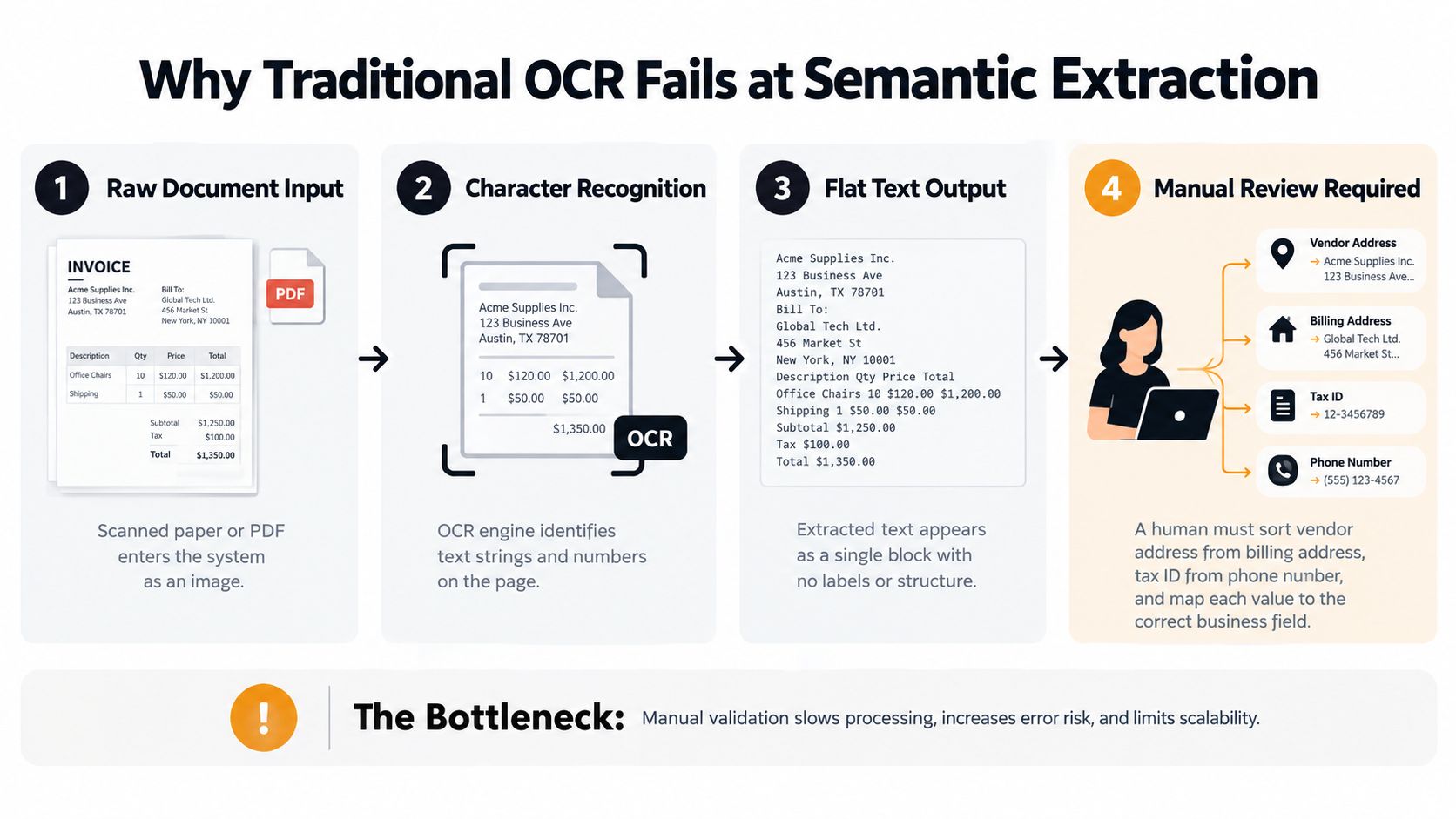
The diagram above shows exactly where traditional OCR runs out of road. It stops at flat text, leaving a person to connect labels with values by hand. The hard part was never reading the page — it is understanding the relationships sitting inside it.
Classification Sets the Right Context
Classification stops a single extraction model from treating every file the same way. An electricity bill calls for fields like a CUPS code, power capacity, and consumption figures. A delivery note, by contrast, needs SKUs, quantities, and delivery dates.
Once the document type is known, the platform can apply the right structure and validation rules. That matters a great deal when a shared inbox receives invoices, receipts, identity documents, and sprawling multi-page PDFs all at once.
AI Finds Meaning Across Layouts
Modern models can pin down a value even when its position keeps shifting. €1,248.50 might sit beside "Total" on one invoice, below a summary block on another, or somewhere else entirely on a third supplier's template. Position alone tells you very little.
Matil.ai brings OCR, classification, extraction, validation, and workflow orchestration together behind a single API endpoint. Pre-trained models cover the common document types, and custom structures can be defined quickly, with results returned as JSON and full traceability.
The difference comes down to this: OCR reads text. Intelligent document processing connects that text to business meaning — and to an action.
Validation might compare invoice totals against line items, check date formats, or flag a missing tax identifier. Anything with low confidence gets routed for human review rather than slipping into an accounting system unnoticed.
For a fuller picture, read Matil.ai's guide to intelligent document processing. Teams weighing production deployments can also look at Matil.ai's stated above 99% accuracy, along with GDPR, ISO 27001, AICPA SOC, and zero data retention controls.
Handled this way, document images become usable records faster — with fewer manual corrections along the way and a cleaner route into ERP, CRM, finance, or compliance workflows.
A key–value pair connects a labeled field to its actual content — Total → €1,248.50, Supplier → Northstar Supplies Ltd., or Expiry Date → 2027-03-15. Instead of leaving meaningful fields buried inside a block of raw OCR text, extraction places each value where a finance, compliance, or operations workflow can actually act on it.
That simple shift — from recognised text to structured, field-level data — is what makes documents useful beyond storage.
Automate Invoice Processing
Problem: Accounts payable teams open invoices that rarely look alike. Layouts change, labels vary, currencies shift, and tax formats differ from one supplier to the next. Manual entry slows down three-way matching between the purchase order, goods receipt, and invoice, while a single incorrect total or date can stall approval and trigger late payment fees.
Solution: Extraction pulls pairs like Supplier → Northstar Supplies Ltd., Invoice Number → INV-10482, and Total Amount → €1,248.50. Validation then compares totals, purchase-order references, tax values, and due dates before the approved data moves into the ERP.
Result: The team spends less time retyping fields and more time resolving genuine exceptions. The same idea supports document management for real estate teams, where leases, addendums, and shared files also need organised, searchable information rather than static PDFs.
Accelerate KYC Verification
Problem: Compliance teams review identity cards, passports, and other KYC documents while needing a clear audit trail. Manual copying drags out onboarding and makes it harder to prove which source document supported a given customer record.
Solution: Extraction identifies pairs such as Full Name, Document Number, Nationality, and Expiry Date, while recording the exact location of each value in the original image. Validation can flag expired documents, missing fields, or inconsistent dates for human review before the record is approved.
Result: Onboarding moves faster without removing oversight. Each extracted result stays traceable, so reviewers can verify the value against the source document when needed.
Improve Logistics Visibility
Problem: A Bill of Lading or customs declaration carries shipment references, ports, package counts, weights, and tariff details — all of which can appear in slightly different positions. One incorrect value may delay border clearance, break tracking, or create costly follow-up work.
Solution: Extraction pulls Container Number, Port of Loading, Gross Weight, and Customs Reference from PDFs, scans, or photographs, while classification selects the right structure for Bills of Lading, DUAs, delivery notes, or freight-rate documents.
Result: Operations teams receive consistent shipment data earlier, which makes exceptions easier to spot before cargo reaches a clearance point.
Process Payslips Safely
Problem: HR and payroll teams handle sensitive payslips in high volumes, often across different employee templates. Manual entry not only slows the process but also exposes personal or financial information to unnecessary handling.
Solution: A model extracts Employee ID, Pay Period, Gross Pay, Tax Withheld, and Net Pay, then applies format and cross-field checks. Matil combines OCR, classification, validation, and automation through one API, with pre-trained models, rapid customisation, above 99% accuracy in multiple use cases, and enterprise controls including GDPR, ISO 27001, SOC, and zero data retention.
Result: Payroll data reaches internal systems with fewer manual touches, and low-confidence fields are routed for review rather than silently accepted.
Accurate key value pair extraction is about more than pulling text off an invoice. Every result needs to be checked, explained, and tied back to where it came from — otherwise, nobody reviewing the output will trust it.
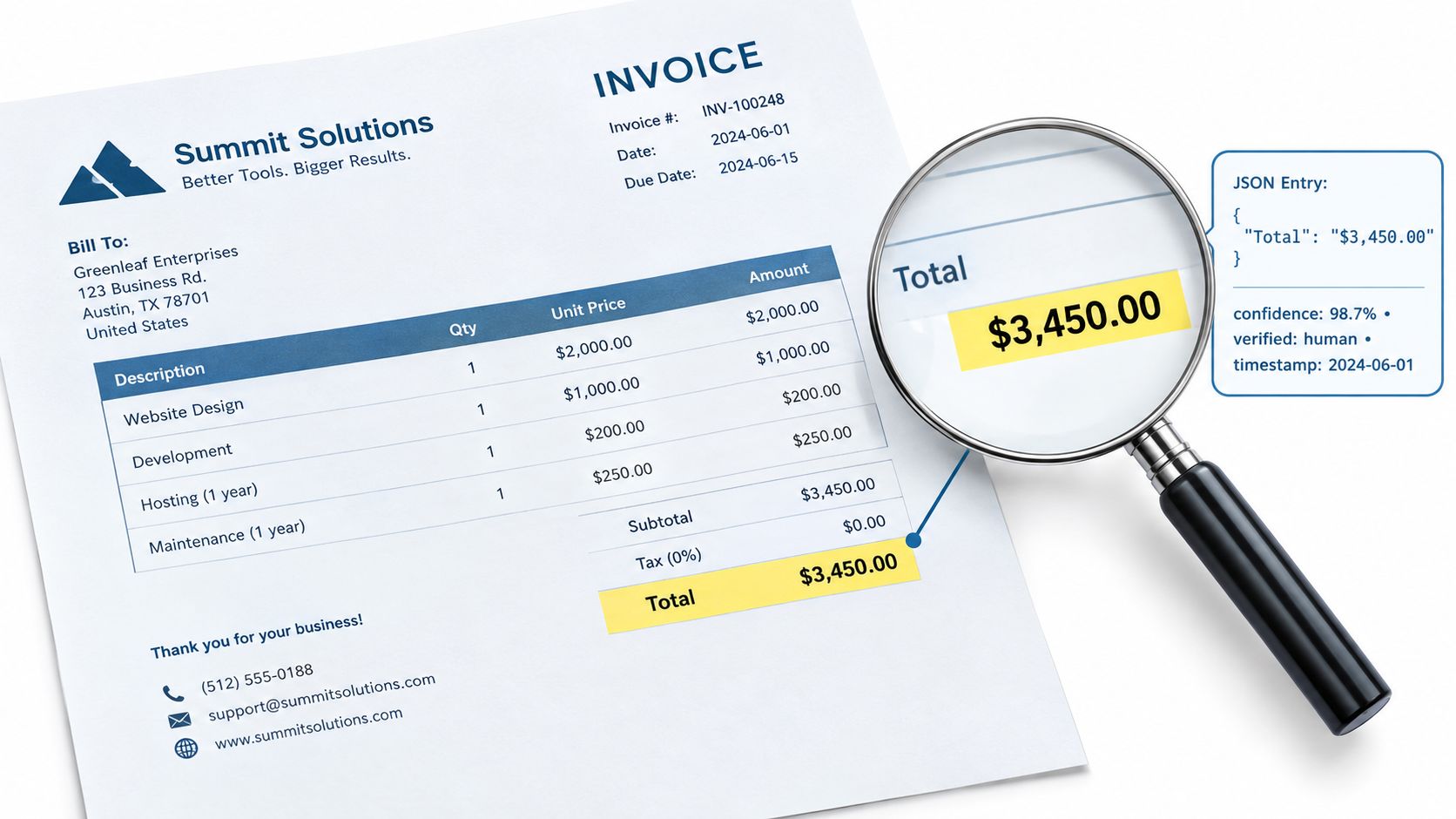
How Validation Protects Accuracy
A model might confidently read Total Amount → €3,450, but real automation demands more than that. You also need to confirm the value makes sense in context — correct format, correct business meaning, correct relationship to everything else on the page.
Validation rules can cross-check invoice totals against line items, verify tax calculations, confirm dates are plausible, and flag when required identifiers go missing.
Hitting above 99% accuracy across multiple use cases doesn't come from one magic technique. It comes from layering several controls:
- Confidence scoring — Flags fields where the model wasn't sure.
- Business rules — Checks formats and relationships between extracted values.
- Human review — Steps in for low-confidence or conflicting results.
- Exception workflows — Stops questionable data from auto-entering an ERP.
Reliable automation doesn't pretend to be certain. It spots uncertainty and routes the tricky cases to a person.
Say a scan leaves the final digit of a tax ID blurry. A good system keeps the extracted value, marks the confidence as low, and triggers a verification step. That's far safer than pushing a wrong number through and hoping nobody notices.
Traceability Creates an Audit Trail
Traceability means every extracted field links directly to its exact location on the original document. So a reviewer clicking Invoice Date → 15 March 2026 can jump straight to the text region, page, and coordinates where that date lives.
This matters enormously in finance, healthcare, legal, and compliance environments. It supports audits, dispute resolution, approval controls, and investigations — all without someone digging through the original PDF manually.
| Control | What It Provides |
|---|---|
| Confidence score | Indicates how certain the extraction is |
| Source coordinates | Shows exactly where the value appears |
| Original document reference | Preserves evidence for later review |
| Validation result | Records whether business rules passed |
Matil.ai brings OCR, classification, validation, and workflow automation together through a single API. Its pre-trained models and configurable custom structures return JSON with full traceability, so teams can verify results before they trigger anything downstream.
Security Supports Enterprise Use
Accuracy isn't the finish line. When documents contain bank details, identity data, payroll figures, or medical records, organisations need clear governance over how that material is processed and stored.
Matil.ai addresses this with GDPR, ISO 27001, AICPA SOC, and zero data retention. These safeguards help teams reduce exposure while keeping automated document processing fully auditable.
If you're exploring automated extraction, test both the output and the evidence behind it. Take a look at Matil.ai's document extraction platform to see how validated, traceable key value pairs could slot into your workflows.
{ "document_type": "invoice", "invoice_number": "INV-10482", "invoice_date": "2026-03-15", "total_amount": "1248.50" }
How Does OCR Differ From Key Value Pair Extraction
OCR reads characters. Key value pair extraction reads meaning. The first can transcribe every symbol on a page without knowing what any of it means; the second connects that text to a label the rest of your stack can actually act on.
Picture a receipt total. Here's the same value, two ways:
- OCR output: raw text — "€1,248.50"
- Extraction output: structured data —
total_amount: 1248.50
Only the second one can drop straight into accounting software or an API workflow without anyone retyping it.
How Quickly Can a Custom Model Be Created
Not every document fits a pre-trained template, and that's fine. Matil.ai lets teams define structures and validation rules visually, so a custom model comes together in a matter of days — no lengthy training cycles, no data science project on the side.
Can It Process Handwritten or Poor Scans
It can, but honesty matters here: output quality tracks document quality. Clean, high-contrast scans produce strong results. Handwriting, faded ink, and damaged fields tend to return lower confidence scores, which is exactly when a second pair of eyes earns its keep.
What Happens When Confidence Is Low
Nothing gets silently passed downstream. The system flags the uncertain field, a reviewer opens the original document, checks the value, and corrects it if needed. Every step is logged, so the human-in-the-loop workflow preserves full traceability from source document to final output.
For more questions in this vein, understanding executive analysis gathers additional answers in one place.
Reliable automation isn't OCR alone. It's OCR plus semantic extraction, plus validation, plus human review whenever certainty runs short.
Matil turns unstructured documents into validated, structured data. Explore Matil.ai and put your extraction workflow to the test.


