OCR Scanner API: How It Works, Inputs and JSON Output
Developer reference for the OCR scanner API: input rules, sync and batch calls, JSON output, accuracy metrics, error handling and security checks.

The usual advice is to pick the OCR scanner API with the biggest accuracy number and pipe the text straight into your ERP. That advice fails the first time a rotated invoice, a phone photo, or a mixed PDF hits production. A score from a clean printed page does not tell you whether the VAT amount, the document number, or an expiry date is safe to post.
Production accuracy is decided by per-field confidence, validation failures, and traceability back to the page. Without those three, wrong values land in the ledger and stay there until a customer or an auditor finds them.
What an OCR Scanner API Does and How IDP Differs
An OCR scanner API is a network service that takes an image or PDF and returns machine-readable text, and in modern systems structured fields. OCR only reads characters and the positions where they sit. Intelligent document processing (IDP) adds four layers on top: classification, extraction against a schema, validation, and orchestration.
Document data extraction is the conversion of a file into named fields that software can check and post. Character reading is the start of that conversion, not the finish.
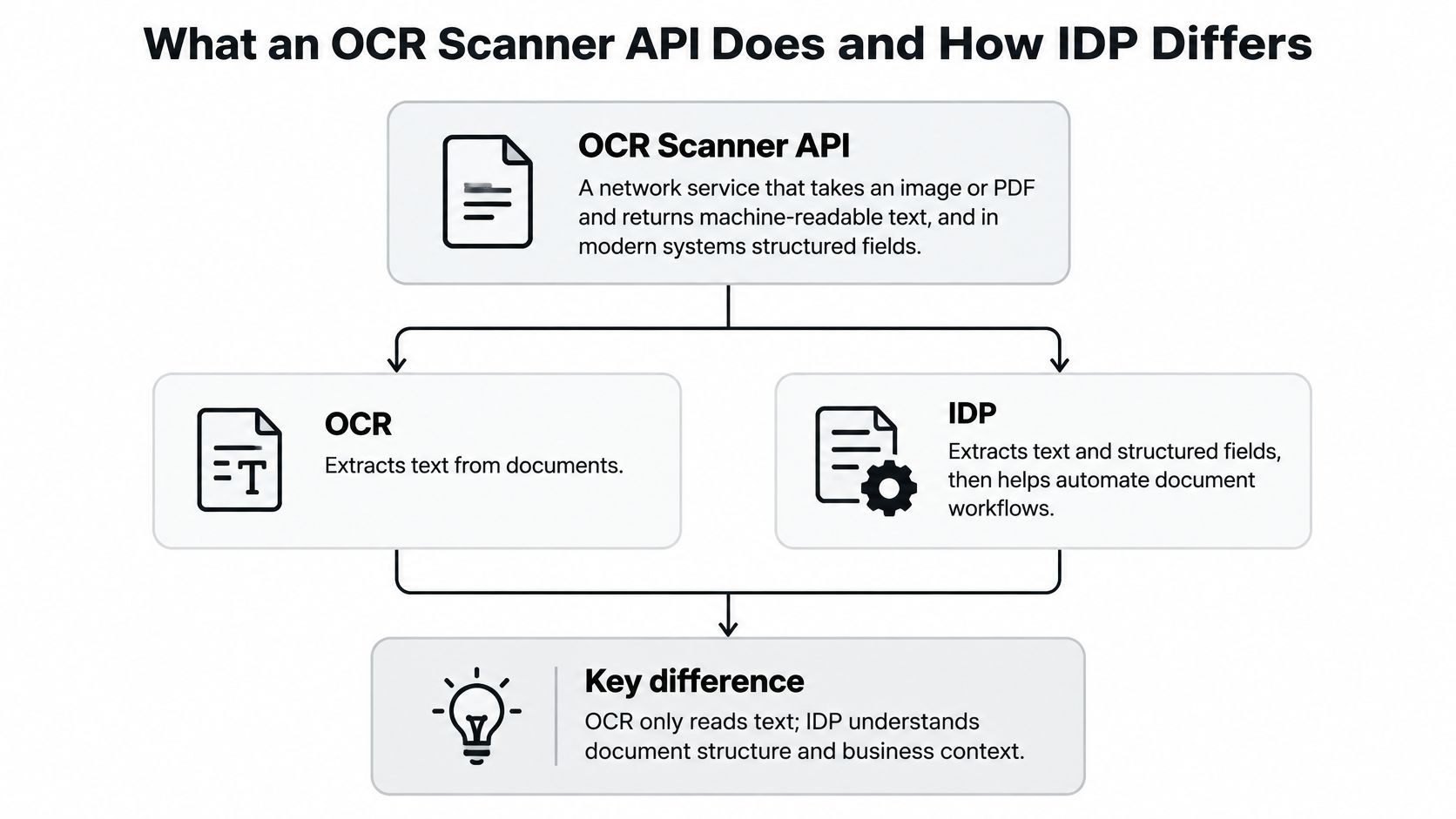
Each layer answers a different question. If the endpoint stops early, your application inherits the rest.
| Layer | Question it answers | Typical output | Example |
|---|---|---|---|
| OCR | What characters and positions are on the page? | Text with bounding boxes | A line reading Total due and its value |
| Classification | What type of document is this? | Document label | A file labelled invoice, contract or payslip |
| Extraction | Where is each named field? | Key and value per field | invoice_number, issue_date, total |
| Validation | Does the data pass the rules? | Pass or fail flag per rule | Line items must add up to the total |
| Orchestration | Which step runs next? | Routed pipeline result | Invoices and bills of lading sent to different schemas |
A raw-text API leaves labelling, mapping, and rule checks to your code. An API that returns validated JSON against a schema removes much of that work. Matil.ai converts any document, regardless of format, into structured data through one API, so you receive fields rather than a text dump. The stack that matters is OCR plus classification, validation, and automation. Pretrained models cover common files, and you can describe a custom schema by field name, type, and description when the document is specific to your process. A mixed batch can be classified first and each category routed to its own schema in that same call.
Search is a narrower job than posting a total. A clear walkthrough of making scanned legal documents searchable shows when a text layer is the whole requirement. Invoices, payslips, identity files, and logistics packets are not that job.
Practical rule: Decide which layers you need before you choose an endpoint. If you cannot name the validation rules, you are still buying OCR.
Input Rules for Clean Extraction
Recognition quality starts with the file you upload. NIST testing cited in a government digitization and scanning standard found character-recognition error rates can range from about 1% to 74% as print and image quality drops. The spread is wide because OCR does not fail evenly: a clean 300 ppi invoice is a different input from a skewed phone photo with compression artifacts.
| Input type | Minimum resolution | Recommended resolution | Notes |
|---|---|---|---|
| Black-and-white text documents (invoices, letters) | 300 ppi, bi-tonal | 600 ppi upper target | Bi-tonal scanning suits predominantly textual pages |
| Color documents with color-dependent information | 300 ppi, 24-bit RGB | 300-400 ppi, 24-bit RGB | Do not convert to bi-tonal, because color carries meaning |
| Phone photos of documents | 300 ppi equivalent | 300-400 ppi equivalent | Resample to that floor, then reject blur, skew, or low contrast |
| Multi-page PDFs | 300 ppi per page | 600 ppi per page | Split files that hold several documents before extraction |
Black-and-white text such as invoices and letters should be bi-tonal at 300 ppi minimum, with 600 ppi as the upper target. Color documents, including forms where color carries meaning, should stay 24-bit RGB at 300-400 ppi. Converting those to black and white removes the signal the form was printed to show. Phone photos have no separate published threshold. Resample to the 300 ppi equivalent and treat blur, skew, and contrast as your rejection gates.
Clean the page before you read it
Run these steps before recognition, in the client or inside the pipeline:
- Deskew: Straighten a page that was fed at an angle.
- Correct orientation: Rotate sideways scans and upside-down phone shots.
- Normalize contrast: Lift faint print without blowing out stamps.
- Remove noise: Drop speckles from old copiers and compression.
- Crop borders: Cut scanner edges so they are not read as characters.
The API should reject or flag images below the floor and return an image-quality warning per page. Output should keep page, bounding box, token, line, and confidence, so a finance or KYC check can follow a value back to the exact region. Traceability makes exception review fast. Treat low-confidence fields as exceptions for review, and do not post a low-confidence total without a human check. That confidence signal is what separates a demo from a production integration. A single headline accuracy number hides the page that failed.
On a multi-page PDF, judge every page on its own. A sharp cover and a muddy page three are not one quality score. Split a file that holds several documents before extraction, or the schema for the first document will be applied to the rest. A page can clear the resolution check and still fail field-level validation, so keep image quality and data quality as separate gates.
Set a minimum resolution in the integration and log every file that falls under it. That log is your cheapest accuracy tool.
Send a Document and Read the JSON Response
A 200 is not a finished extraction. Check the file, post it with a schema, and leave every value unread until processing status and validation failures are known. Traceability is what lets you defend a number in an ERP later. A headline accuracy percentage does not.
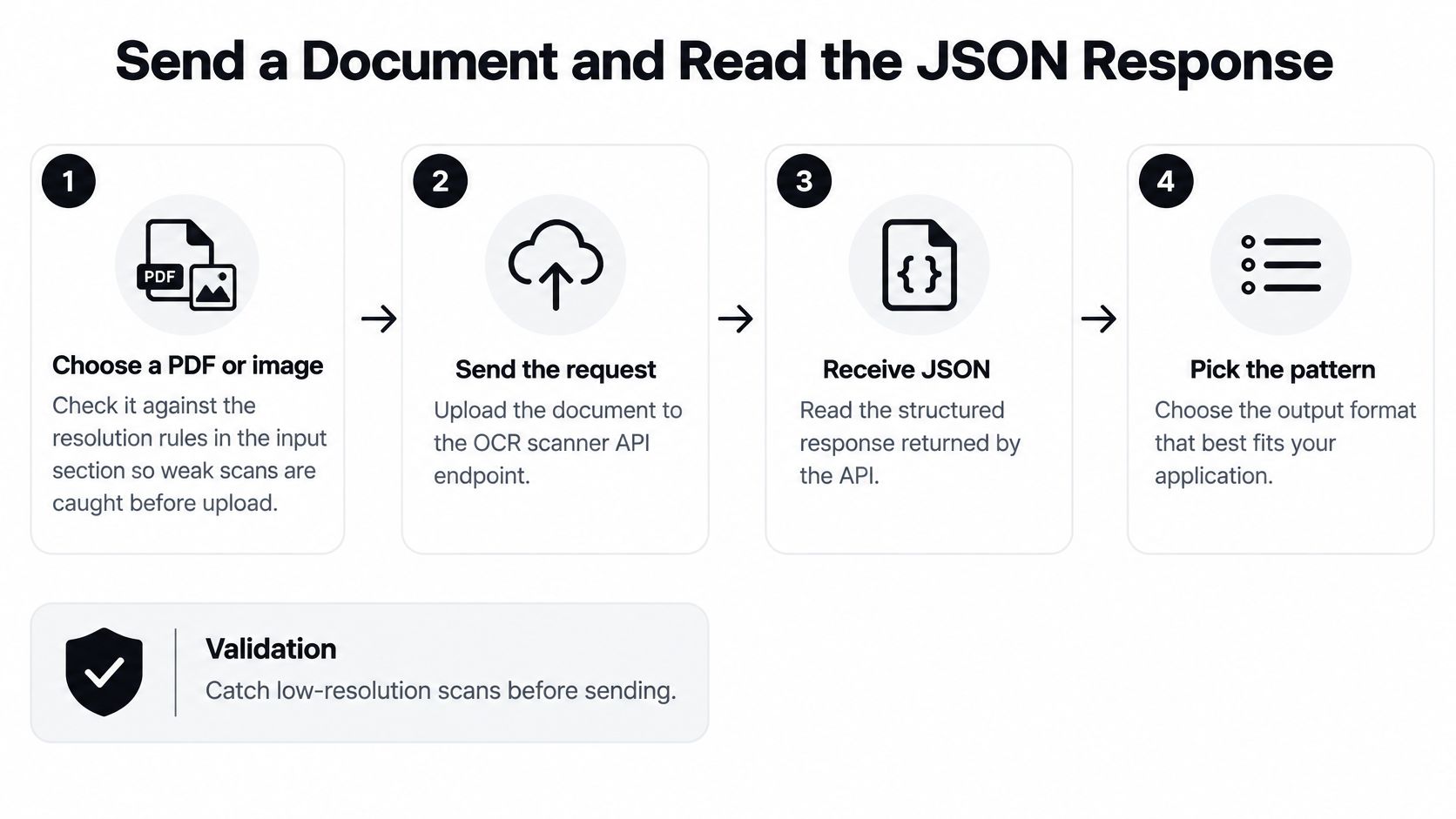
One call in seven steps
- Choose a PDF or image and check it against your resolution rules before upload. A file you should have rejected only wastes the call.
- Create an API key and send it in a request header over HTTPS only. Keys and tokens do not belong in query strings or in clear text.
- Send one multipart POST to the single processing endpoint, with the file and the schema name. That schema is the field names, types, and descriptions you defined, and the JSON should follow it. A missing schema name is how a generic text dump gets treated as a record.
- Read how the result arrives before you read values. A synchronous call returns structured data in the same response. An asynchronous call delivers results by webhook when they are ready. Exact body fields are in the official reference at docs.matil.ai. Do not hard-code a payload from a guess.
- Check processing status and validation failures before any field is mapped. A 200 that still contains a failed total is not a success. I would not write a row into the ERP until those checks pass.
- Map returned keys to ERP, CRM, or database columns from the schema you sent, not from a label printed on the page.
- Send failed validations to a review queue. Retrying the same pixels will not repair a value that broke a business rule.
Three modes share that path. Normal processing is synchronous: one document in, structured data back immediately, which suits a person waiting on a form. Async processing accepts the file and delivers results by webhook when they are ready, so the caller does not have to block. Batch processing accepts hundreds of documents in one request, the right shape for a nightly import or a migration. In a batch, each distinct document unit is its own request, so a failure stays attached to one file. Several files or pages still count as one request when they are a single document under the structure you chose.
The short version of the call looks like this.
This walkthrough shows the same path from upload to a JSON body you can branch on.
Which pattern to pick
| Pattern | Best for | How results arrive | Main trade-off |
|---|---|---|---|
| Synchronous | Onboarding checks, forms, real-time validation | In the same response | Caller waits; a long document can hit the HTTP timeout |
| Asynchronous | Multi-page documents, callers that cannot block | Webhook when processing is ready | Your system must accept callbacks and handle retries |
| Batch | Nightly imports, migrations, backlogs of hundreds of files | One result per document unit after the batch | Results need reconciliation against the source list |
Use synchronous calls when a person is waiting and the file is small. Use asynchronous calls when the caller cannot sit on the connection. Use batch for nightly imports and backlogs, then reconcile every result against the source list so a missing file is visible.
If the credit balance cannot cover the request, the API rejects it and processing stops until you reload. That rejection is cheaper than a partial write nobody notices.
Output Schemas and Fields to Validate
Yes, you can automate invoice data extraction with an OCR scanner API that returns structured fields, confidence, and rule results. The schema is what makes that sentence true. A text blob cannot tell an ERP whether a delivery reference belongs to this invoice.
For an EU VAT invoice, the European Commission specifies a full invoice should include the issue date, a unique sequential invoice number, supplier and customer names and addresses, the customer's VAT identification number when applicable, a description and quantity of goods or services, unit prices excluding tax, the transaction or payment date when it differs from the invoice date, the VAT rate and amount, and a breakdown of VAT by rate or exemption. Electronic invoices are equivalent to paper invoices, and public administrations must accept structured electronic invoices for business-to-government transactions.
| Document type | Fields to extract | Validation check | Why it matters |
|---|---|---|---|
| EU VAT invoice | Issue date, invoice number, supplier and customer details, customer VAT number, line items, VAT rate and amount | Line items sum to the net total; VAT breakdown matches total VAT | The European Commission sets the content of a full VAT invoice |
| Bill of lading | Shipper, consignee, ports, goods description, quantities | Quantities match the packing list; parties match the invoice | Trade documents link through shared data elements |
| KYC identity document | Full name, date of birth, document number, expiry date | Expiry date is valid; evidence is stored for review | Digital identity needs assurance beyond text reading |
| Payslip | Gross pay, net pay, contribution bases | Gross pay minus deductions equals net pay | Salary breakdowns must reconcile |
The same shape works beyond tax invoices. A bill of lading should yield shipper, consignee, ports, goods description, and quantities, then be checked against the invoice and packing list. The World Customs Organization Data Model treats those trade documents as linked data, not as isolated scans. For KYC, FATF guidance says traditional verification tools do not automatically apply in a digital context. Read the name, date of birth, document number, and expiry date, and keep evidence a reviewer can open. A payslip should reconcile: gross pay minus deductions equals net pay.
How to write the schema
Define every field by name, type, and description. Mark required fields, and reject an output that omits them. A missing VAT number is a failed document, not a null you can ignore.
Checks sit next to the fields. Totals equal the sum of line items. The VAT breakdown matches total VAT. An expiry date is still valid. If you want the mechanics of those checks, see how to apply schema validation to extracted JSON.
Write one schema for the document you ship first, list its required fields, and list the two or three checks that would catch a bad post. That page is your integration spec.
Measuring Accuracy and Latency in Production
A single headline percentage is a sales slide, not a test plan. A Computer Weekly analysis cautions that claims around 99.5% accuracy may be achievable on standardized invoices while becoming unreliable with scribbled notes and varied formats. Handwriting, low-resolution scans, rotated pages, tables, and multilingual batches are different problems. Matil reports accuracy above 99% in multiple use cases. Reproduce that on your own files before you treat it as your production rate.
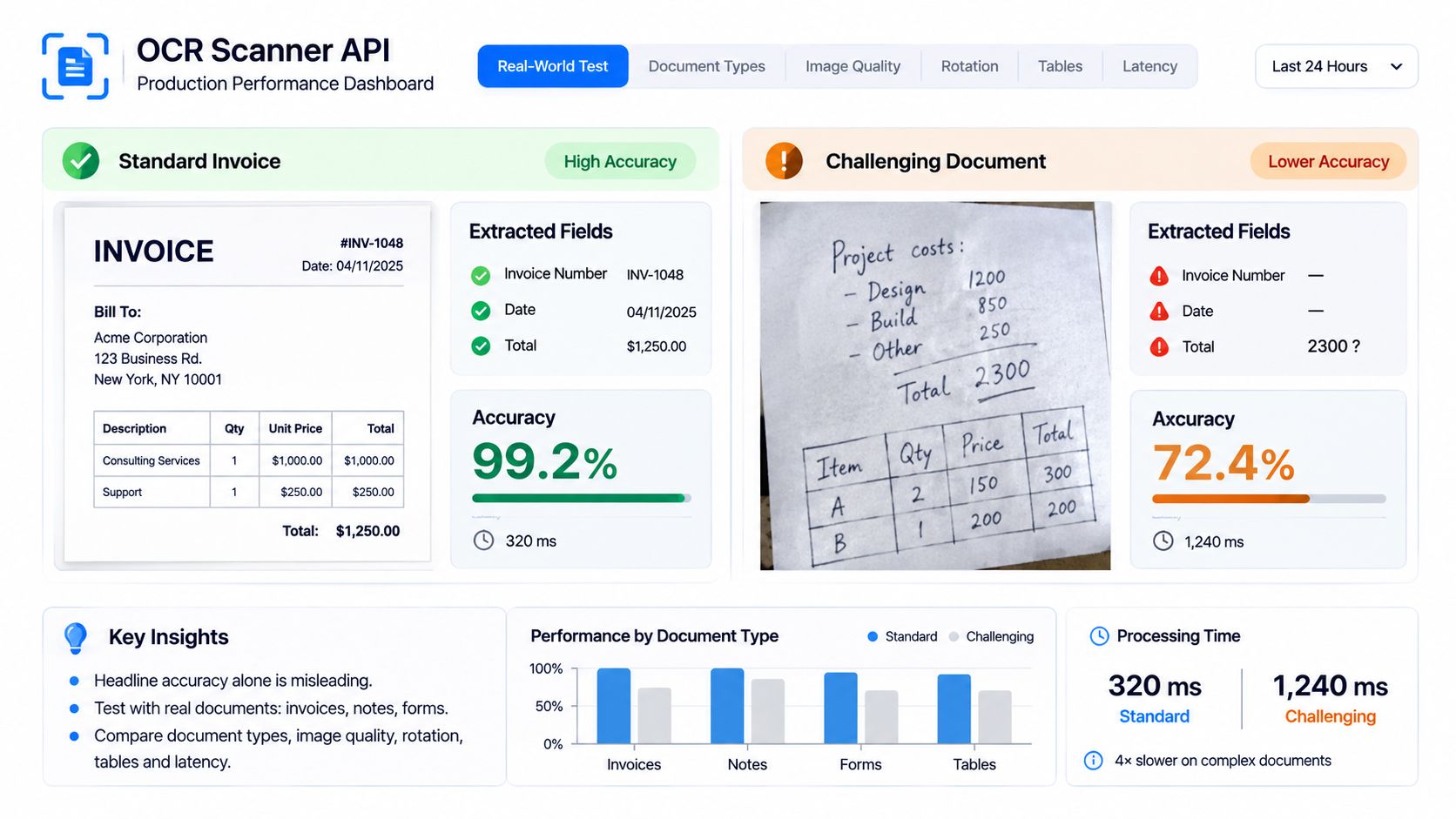
A 2021 benchmarking study compared Tesseract, Amazon Textract, and Google Document AI on 322 English-language book scans and 100 Arabic-language article scans, then built noisy variants into roughly 18,568 documents. Server-based processors beat Tesseract once artificial noise appeared. Clean, single-language samples will not predict your queue.
Four metrics, in order
- Character accuracy and word accuracy compare raw text with a verified transcription.
- Field-level exact match checks each extracted value, not the page average.
- Document-level success counts files where every required field is correct.
- False-accept rate counts wrong values that passed validation. That is the damaging error in finance and KYC.
Build a ground-truth set from your own documents. Split it by document type and by failure mode, then measure each slice on its own. A perfect stack of laser-printed invoices will hide a broken phone-photo path. If you need the formulas, use a consistent way to calculate error rate on each slice.
Latency and the review threshold
Measure latency as percentiles for each page count, not as one average. A p95 on a 12-page PDF is what your timeout should be built from. Test throughput at the concurrency you expect, because a quiet demo and a Monday morning queue are different loads.
A stricter confidence threshold lowers false accepts and sends more documents to a person. Measure the automation rate at each threshold and pick the one you can defend to finance or compliance. The better API is the one that exposes confidence, provenance, validation failures, and page-level traceability, not the one with the roundest homepage number.
Error Codes, Retries and Failure Handling
Retrying a bad request makes a bad request louder. Split statuses into "change the call" and "try again later" before you write a loop.
| Status | Meaning in an OCR API | What your code should do |
|---|---|---|
| 400 | Malformed request or missing field | Fix the request; do not retry as is |
| 5xx | Server-side error | Retry a limited number of times with increasing delay, then alert |
| 402 | Insufficient credit; processing stops | Monitor the balance and top up before it reaches zero |
4xx means the request must change. A 400 is a malformed body or a missing field. A 401 or 403 means the key is invalid or lacks rights, so check the key before anything else in the request. A 413 means the file exceeds size limits. Split the PDF by page range or by document and resend the pieces. A 415 means the format is unsupported. Check the supported formats in the official reference at docs.matil.ai instead of wrapping the same bytes again. A 422 usually means the file arrived but extraction or validation failed. Route it to review. Sending the identical file again will fail the same rule.
429 and 5xx are worth a retry. Use exponential backoff, cap the number of attempts, and alert when the cap is hit. Jitter the delay so a whole batch does not retry on the same second.
Credits, idempotency, and the log
If the credit balance is insufficient, the API rejects the request and processing stops until the account is topped up. Monitor the balance and alert well before zero. A surprise stop in the middle of a payroll run is an operations incident, not a model issue.
Send one idempotency key per document. A retry after a timeout should return the original job, not create a duplicate posting. Log the job ID, status, page count, and error body for every failure. That log is what you hand to the reviewer and what you use to see whether failures cluster on one document type.
For the queue design around these branches, follow exception handling practices that keep failed documents visible.
Retry transient errors a limited number of times with increasing delay. Stop on validation errors. Never retry a 4xx unchanged.
Security and Compliance Checks Before Launch
Uploaded PDFs and images are untrusted input. Treat them that way before any identity document, bank statement, invoice, or legal record is sent.
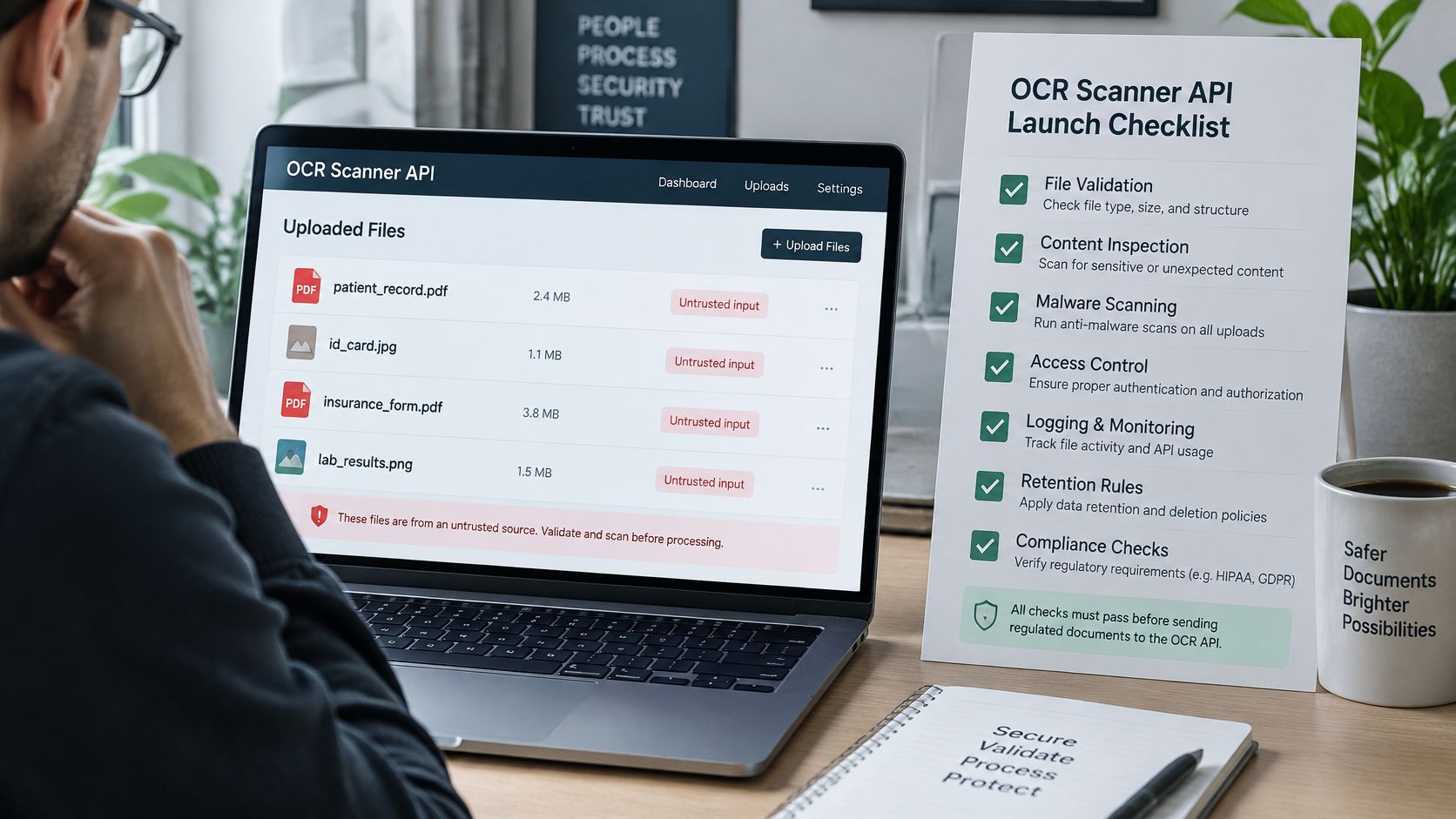
The OWASP File Upload Cheat Sheet is the right baseline for this endpoint. Allow only the file types the business needs. Validate file content rather than trusting the spoofable Content-Type header. Generate application-controlled filenames. Authenticate and authorize every uploader.
Controls to confirm
- Size and page limits: Enforce them at the reverse proxy before multipart parsing, including decompression limits, so a bomb never reaches a worker.
- Malware scan: Scan uploads before OCR workers open them. Antivirus, sandboxing, or content disarm belongs in front of recognition.
- Storage: Keep files in tenant-isolated storage outside the web root, and give retrieval links a short lifetime.
- Transport: Require HTTPS on every endpoint so API keys and tokens are not exposed in transit.
- Audit: Keep immutable events for each upload, result, and deletion.
Separate "we accepted the upload" from "OCR finished." Return a job identifier for multi-page work, and expose per-page status, extraction confidence, validation errors, and traceability metadata.
Contract points
Confirm three terms in writing. The client keeps all rights over uploaded documents and the structured JSON results. The client grants Matil a worldwide, non-exclusive, non-transferable, royalty-free license to host, copy, and process documents only to provide the contracted service, solve technical problems, and keep operation traceability. Prohibited uses apply to your team too: no illegal or offensive documents, no reverse engineering the API or algorithms, no reselling access or sharing credentials with unauthorized third parties, and no denial-of-service attacks.
Matil states GDPR, ISO 27001, and AICPA SOC compliance, plus a zero data retention policy. Verify each claim against the current contract and your own risk review before a regulated file moves. A policy page is not a substitute for that check.
Launch only after file-type checks, size limits, malware scanning, short-lived retrieval links, HTTPS, and the audit trail are all on.
Run a One-Week Pilot Before You Commit
A week of your own files beats another vendor demo. I would not sign a volume commitment on a homepage accuracy figure.
- Pick one document type, such as invoices, KYC files, or bills of lading, and write down the fields it must return.
- Assemble a representative set, including weak scans, rotated pages, and multi-page files, and record the expected value for each field.
- Run the set through one call, using synchronous, asynchronous, or batch to match the workload.
- Measure field-level exact match and false accepts, then set a confidence threshold and a review route for each field.
- Have legal or compliance confirm the security checklist and the data terms before any regulated file is sent.
Consumption rates for each document structure and its volume scales are published and updated in real time at admin.matil.ai, so you can estimate cost before you commit. If you are evaluating this for invoices, KYC, or logistics documents, explore how Matil.ai handles those files through its API and run your test set against it. Let the decision rest on those results.
Matil combines OCR, classification, validation, and automation in one API, so an invoice, a KYC file, or a bill of lading comes back as structured fields with confidence and rule results rather than a raw text dump. If you are evaluating that path, start with one document type and your own ground truth. Visit Matil to see the API and run that set before you commit.


