Agentic Document Processing: What It Is and How It Works
Agentic document processing explained: how it works, how it differs from OCR and rules-based automation, and where it pays off in finance and logistics.

Agentic document processing adds classification, validation, routing and next-step actions to document reading. OCR can capture text, but it cannot decide whether an invoice total matches a purchase order or which team should review a mismatch. An agent routes the document according to defined rules, while people retain decisions that require judgment or authorization.
If the software can read the page, why does the invoice still sit with a person? Clean text alone does not resolve discrepancies, identify the right reviewer or authorize a payment. Those decisions need checks and clear limits on what the automation can do.
What Agentic Document Processing Means
Agentic document processing is a decision router with bounded autonomy. The agent reads the file, checks it, and sends it to the right desk. It does not pay the supplier on its own.
The lineage is short and practical. OCR turns pixels into text and stops. Intelligent document processing adds classification, field extraction and validation rules. An agentic pipeline adds the next decision, such as sending an invoice toward approval or flagging a shipment that does not match.
Think of OCR as a typist who copies the page. The agent is the clerk who reads the page, checks it against the file and walks it to the right desk. Documind's AI document processing guide is a useful companion if you want the wider map of how teams move from raw capture to governed document automation.
A 2025 ACM-published study collected 1,372,846 real government documents from 237 departments and ran a 12-month pilot with 50 departments. Its intelligent approval system reached 95.7% overall accuracy. Connected extraction, classification and approval beat standalone OCR.
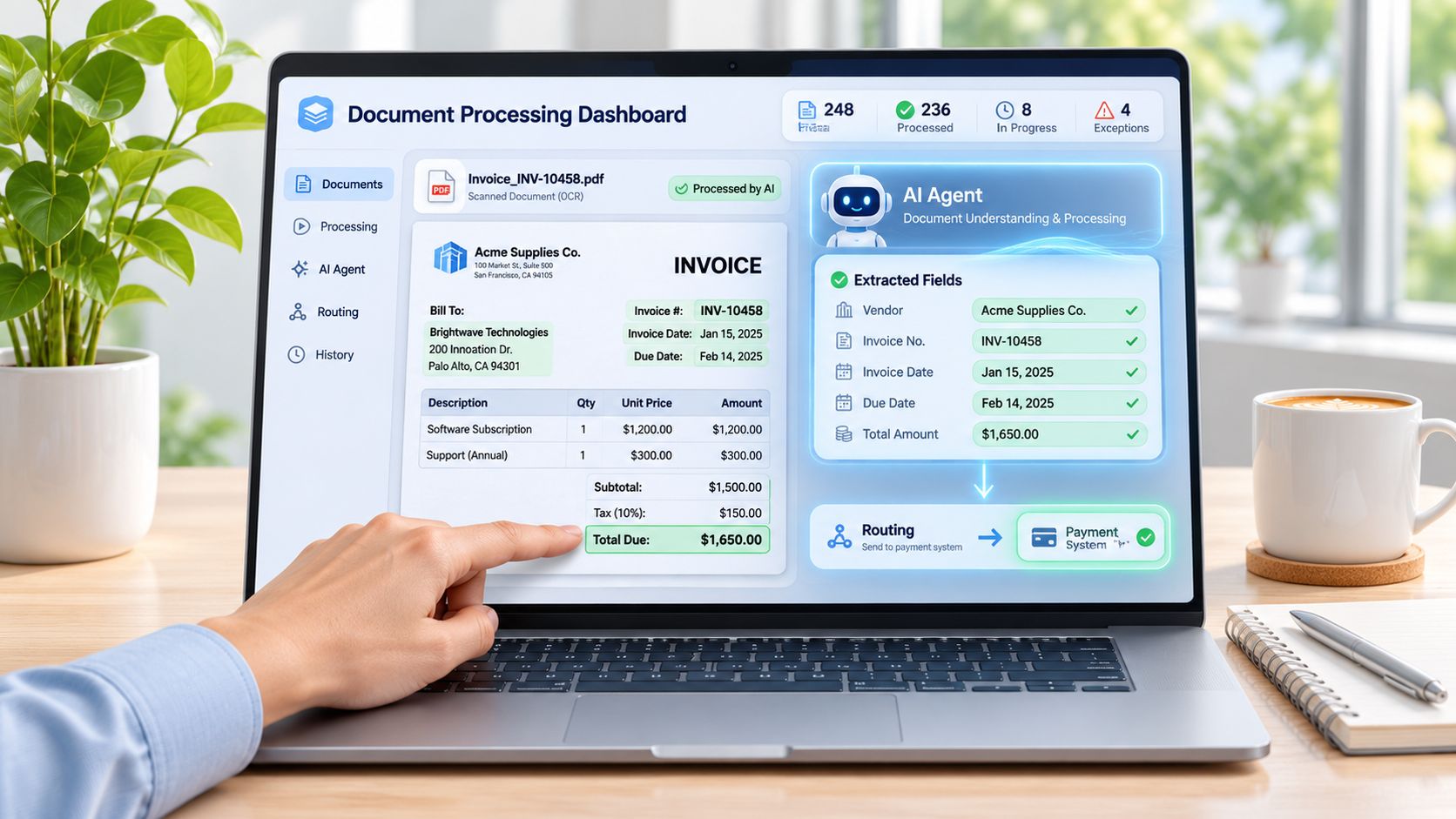
How the three approaches differ
Rules-based automation adds fixed logic, but it depends on a known layout. Change the supplier template and someone rewrites the parser.
Say a supplier invoice arrives in a new layout. OCR returns clean text. The rules engine rejects the file because the total is not in the old box. An agentic pipeline labels it as an invoice, extracts the supplier and total, and flags that the total does not match the purchase order. A person sees the mismatch, not a blank failure.
| Capability | Traditional OCR | Rules-based automation | Agentic document processing |
|---|---|---|---|
| Reads text from scans and PDFs | Yes | Relies on OCR output | Yes, combined with layout and context |
| Handles layouts it has not seen | Limited | No, breaks on template change | Yes, through schema-based extraction |
| Classifies document type | No | Only through fixed rules | Yes, before extraction |
| Splits multi-document PDFs | No | No | Yes, page-level detection |
| Validates fields against business logic | No | Yes, fixed rules only | Yes, including cross-document checks |
| Chooses the next step | No | Fixed branch only | Yes, based on confidence and evidence |
| Handles exceptions | No | Fails or sends to a queue | Escalates with evidence attached |
| Maintenance effort | Template or model per layout | Rule rewrite per change | Schema updates, fewer template rebuilds |
Practical rule: OCR suits plain text capture, rules suit stable forms with fixed fields, and agentic processing suits mixed documents, varied layouts and real decisions.
Document data extraction is the step that turns a PDF or scan into named fields a system can store. It is not the whole workflow. Mark which of your document types need a decision, not just a transcription. Those are the ones that should not stop at invoice OCR.
Four Parts That Make Up the System
A single extraction prompt is a weak design. A staged workflow keeps bad JSON out of the ERP. A documented agentic contract-review design separates coordination, specialist agents and a knowledge layer. In that evaluation, the information-extraction agent scored 92.1% on average across party names, amounts, validity periods and obligations, against 87.7% for a vanilla LLM, 82.4% for BERT-CRF and 62.8% for a rule-based baseline, as reported in an ACM paper on agentic contract review.
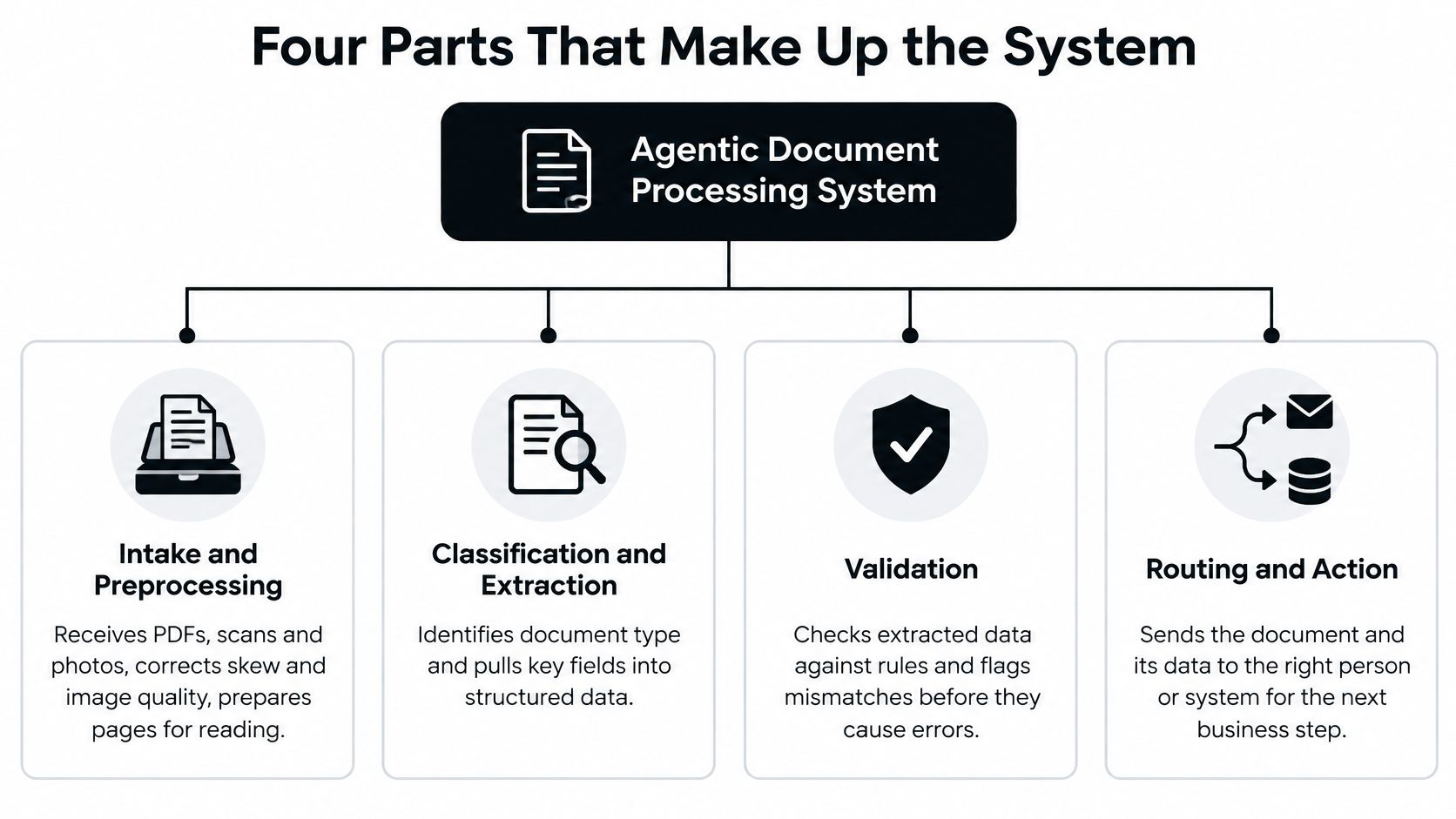
Intake and preprocessing receives PDFs, scans and phone photos, corrects skew and prepares pages. On a crumpled delivery note, this stops the reader from treating a tilted stamp as a quantity.
Classification and splitting labels each file, such as invoice, payslip, bill of lading or ID card, and cuts a mixed PDF where each document starts and ends. Skip this and a passport schema lands on a utility bill.
Schema-based extraction uses a defined structure. An electricity invoice might carry supplier, meter, consumption and billing period, and each value gets a confidence score. A weak meter reading cannot hide inside a pretty average.
Validation and orchestration checks whether line items sum to the total, whether the customer ID exists in the ERP, and whether the packet may move forward. This coordinating layer is what stops partially validated JSON from reaching downstream systems. Teams that want the coordination patterns spelled out can review orchestrator patterns for multi-agent systems. Parallel specialists can run extraction and risk checks together. A final stage still has to enforce one schema.
Map your current pipeline onto these four parts and mark the one with no owner. That unmarked step is where exceptions disappear.
How a Document Moves Through an Agentic Workflow
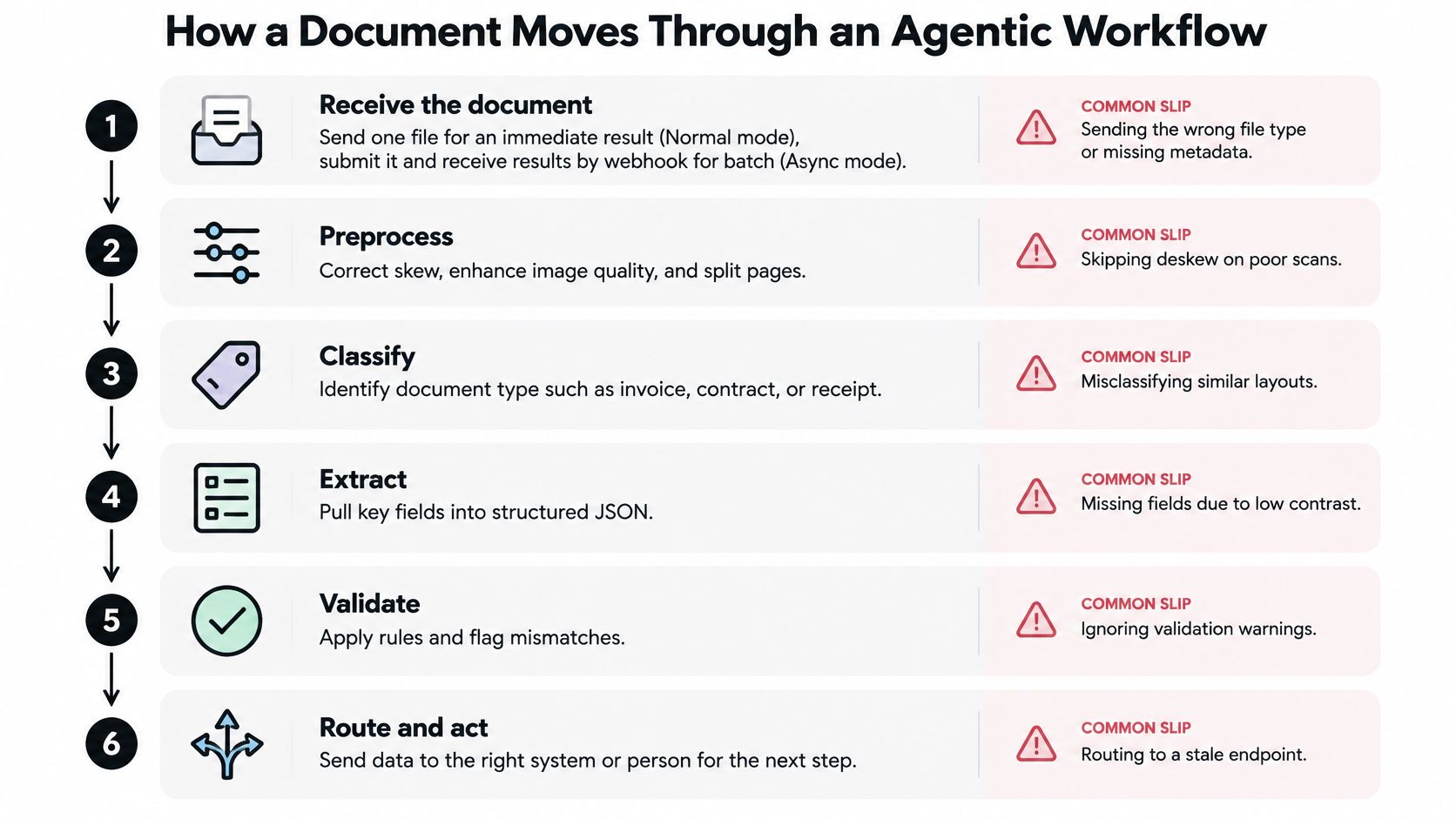
A document workflow is a sequence of decisions, not just an extraction step. Each stage should either prepare information for the next stage or decide whether the document is safe to move forward.
Receive the document. Choose the processing mode based on how results will be used. Normal processing returns structured data immediately for real-time integrations. Async processing sends results by webhook when they are ready. Batch processing accepts hundreds of documents in one request, which suits nightly imports and migrations.
Split and classify. If a PDF contains several documents, page-level detection identifies where each one starts and ends. A classifier then assigns a category, such as invoice or payslip. Matil's compositor can classify first and route each category to its own extraction schema in a single API call. See the AI agent workflow and routing pattern.
Route to the right schema. A Document Structure defines what information to extract. An electricity invoice and a payslip need different structures, just as two forms can ask for different answers.
Extract and check confidence. The system returns structured fields with confidence scores. A high average can conceal one uncertain field, so a low-confidence total or account number should remain visible for review.
Validate against rules and records. Check dates, arithmetic and matches against approved business records. An extracted value can be formatted correctly and still fail a business rule.
Act or escalate. Let the workflow continue when the result meets defined checks. Route uncertain fields, conflicting evidence or policy exceptions to a person before taking consequential action. The agent is a decision router with bounded autonomy, not a substitute for approval where the cost of error is high.
Human oversight belongs at specific decision points. The OECD study of organizations and the Capgemini Research Institute survey cited in the linked research describe human approval for consequential actions such as payments and data deletion. Relevant high-risk AI systems in Europe also have requirements concerning data governance, transparency, documentation and human oversight, with major provisions applying from August 2026. August 2027 is not a date to present as an established application milestone.
This walkthrough shows the six stages on a document packet.
| Document Type | Business Consequence | Escalate When | Required Approval |
|---|---|---|---|
| Supplier invoices | Payment release | Total does not match the purchase order, or a required field is below the chosen confidence cutoff | Human approval before payment |
| Payslips | Payroll import | Totals fail a cross-field check | HR reviewer before import |
| KYC identity documents | Customer onboarding decision | A field has low confidence or evidence conflicts | Compliance reviewer |
| Bills of lading and customs declarations | Customs filing | Quantity or code does not match | Logistics owner before filing |
| Legal records and contracts | Contract obligations | Versions conflict or a clause is unclear | Legal reviewer |
Set review triggers around uncertainty, conflicting evidence, policy exceptions, sensitive attributes and unusual supplier or customer behavior. Keep an audit trail, versioned schemas, a named approver, rollback and a kill switch.
How to Measure Whether the Workflow Works
An agent can extract every field correctly from the wrong invoice. Field-level accuracy will still look excellent while accounts payable pays the wrong supplier. The AGORA benchmark holds 9,664 documents, 362 questions and eight professional domains. Even its strongest evaluated model reached only 59.4% overall accuracy on archive-grounded questions. Picking the right file, keeping provenance and doing the arithmetic are the hard parts.
A separate OCR robustness benchmark used 570 real business documents across 11 structural types. Layout diversity is a test variable, not a footnote. Build a set with one sample of every document type, multi-document packets, blurred scans and files the system has not seen. Set a target for each metric before go-live. For the first month, review the escalation queue weekly so reviewers are not drowning in noise. Our note on how to calculate an error rate is the worksheet for that review.
| Metric | What It Reveals | Failure It Catches |
|---|---|---|
| Packet-level accuracy | Whether all documents in a multi-page packet were grouped correctly | An invoice is paired with the wrong purchase order |
| Evidence-grounded accuracy | Whether each value traces to the right page or region | A correct amount is taken from a different document |
| Abstention quality | Whether the system refuses to guess on unclear inputs | A blurred total is forced into a value |
| Escalation precision | Whether flagged items truly needed a person | Reviewers receive noise and stop reading the queue |
| Cost per document | Total processing cost divided by documents completed | Automation adds hidden review work |
| End-to-end cycle time | Time from receipt to posted result or approved exception | Fast extraction hides slow exception handling |
| Harmful autonomous actions | Actions taken without required approval or with a wrong value | A wrong value triggers a payment or KYC decision |
Every extracted value should carry page or region evidence, the source document, a validation status and a route to a person. Straight-through processing can fall when the system escalates intelligently. That drop is often safer than forcing a guess through.
Where Agentic Document Processing Pays Off
Where does document automation create value beyond reading fields from a page? It helps when a workflow must connect documents, route decisions and leave uncertain cases to a person.
Linking the documents in a purchase can save more than automating invoice capture alone. A Council of the EU working document estimates benefits of about €5.28 per electronic invoice issued and €8.40 per electronic invoice received. When purchase orders, transport documents, invoices and payment notices are linked, it estimates €25 to €65 per purchase-to-pay cycle, according to the Council of the EU working document.
Adoption remains uneven. The share of EU enterprises sending or receiving eInvoices rose from 10.3% in 2013 to 38.6% in 2023, ranging from 14.8% of enterprises in Poland to 97.5% in Italy, according to a Council overview of eInvoicing. Many teams still handle PDFs or scans alongside structured files.
Supplier invoices. Manual accounts payable adds data-entry work, delays and exception handling. A workflow can extract invoice fields, compare them with a purchase order and route mismatches to a person. Track cost per invoice and the share completed without manual intervention. Keep payment approval with a person when a mismatch or other uncertainty could lead to an incorrect payment.
Payslips. A schema can extract salary, tax and deduction fields, then check totals before payroll import. The aim is to reduce hours spent on each payroll run and corrections after import. A person should review discrepancies rather than letting the workflow force a value through.
KYC documents. Identity checks may involve ID cards, NIE documents and passports. The workflow can return extracted fields with page evidence and route low-confidence or conflicting results to a compliance reviewer. Track review rate and time to decision, while leaving the final judgment on unclear identity evidence to the reviewer.
Logistics documents. Bills of lading, customs declarations (DUA) and delivery notes contain quantities and codes that may need to agree before filing. Extract the data and flag mismatches for review. Track exception rate and cycle time, and keep a person responsible for filing when the documents conflict.
| Document Type | Manual Problem | Pipeline Output | Metric to Track |
|---|---|---|---|
| Supplier invoices | Keying errors and matching delays | Extracted totals matched to purchase orders | Cost per invoice and touchless rate |
| Payslips | Hand entry of pay, tax and deduction fields | Structured fields checked against totals | Hours per payroll run and correction count |
| KYC identity documents | Manual checks of ID card, NIE and passport | Extracted fields with page evidence, with uncertain cases routed for review | Review rate and time to decision |
| Bills of lading and customs declarations | Mismatched quantities and codes found late | Shipment data checked for mismatches before filing | Exception rate and cycle time |
Set expectations around the work the system can safely complete, not a fixed percentage lift. The agent can route routine cases and surface exceptions; a person should approve consequential actions such as payments or filings when evidence is unclear.
Check Your Document Mix Before You Choose a Platform
Before scheduling a demo, write down what the workflow must handle and where a person should take over.
- Document types and volume: Record each type and its monthly volume.
- Layout variation: Estimate how often templates change.
- Decisions: Identify which documents require judgment, not just data capture.
- Actions with consequences: List payments, filings and deletions, then name who approves each one.
- Current performance: Record the exception rate and end-to-end cycle time.
- Data rules: Confirm GDPR roles, retention periods and whether document data may be used to train models.
Mixed packets, changing layouts and decisions that need review call for a pilot that tests classification, splitting and validation together. A scan of top IDP software for small businesses can help you compare options. Matil's intelligent document processing platform combines OCR, classification, validation and workflow orchestration through one API. Define what the system may process automatically, and where it must route an uncertain result to a person.
For personal data, Matil acts as data processor under the GDPR and follows the client's instructions as data controller. Clients retain rights to their documents and structured results. Matil does not use personal or confidential document data to train public generative AI models or models shared with other clients. By default, processed documents and results are kept for 12 months for audit, traceability and technical support, then deleted automatically. For a document type that needs a custom model, the client sends examples for Matil's team to analyze and optimize in less than a week.
Export ten real documents of each type and run a pilot. Compare the results with your baseline, including exceptions and cycle time, and check whether the workflow sends uncertain cases to a person before an irreversible action. For documents containing personal data, include the 12-month default retention period in your data review.
If you are assessing document automation for invoices, payslips, KYC files or logistics packets, Matil combines classification, schema-based extraction, validation and routing in one API. The pilot should show which steps can run automatically and which need human approval. You can explore the platform at Matil.


