AI for Document Analysis: A Complete Guide for 2026
Learn how AI for document analysis works, from OCR and layout understanding to validation and ROI, plus how to evaluate and deploy it in your workflows.

AI document analysis combines OCR, document classification, layout understanding, entity extraction, and validation to turn unstructured documents into structured, trustworthy data. For invoice workflows, the average manual processing cost is $12.88 per invoice, and manual processing has a 22% exception rate, compared with 9% with AP automation, according to an Ardent Partners benchmark cited by Xero's accounts payable automation guide.
Someone in your finance or operations team may still be opening PDFs, reading scans, copying invoice totals, checking delivery notes, and retyping identity-document details into another system. The work looks simple until a blurred image, table, missing page, or inconsistent supplier format turns a quick task into a correction queue.
What AI Document Analysis Means in 2026
A finance team may receive invoices by email, delivery notes from a warehouse, payslips from an HR system, and KYC documents through a customer portal. Each file contains useful information, but its structure is designed for human reading rather than software. An ERP, CRM, or compliance platform needs predictable fields and reliable values.
AI for document analysis turns visual and textual content into structured records. The system identifies the document type, interprets its layout, extracts relevant entities, checks whether the values fit business rules, and sends the result to another system. Recognition is only the first layer.
AI document analysis is the process of converting documents and images into structured, validated, machine-readable data through recognition, interpretation, and workflow automation.
That definition distinguishes document intelligence from a basic OCR feature. OCR may return text from an invoice. Document analysis should return the supplier name, invoice number, issue date, taxable amount, VAT amount, total, currency, and line items, while retaining evidence for each extracted value.
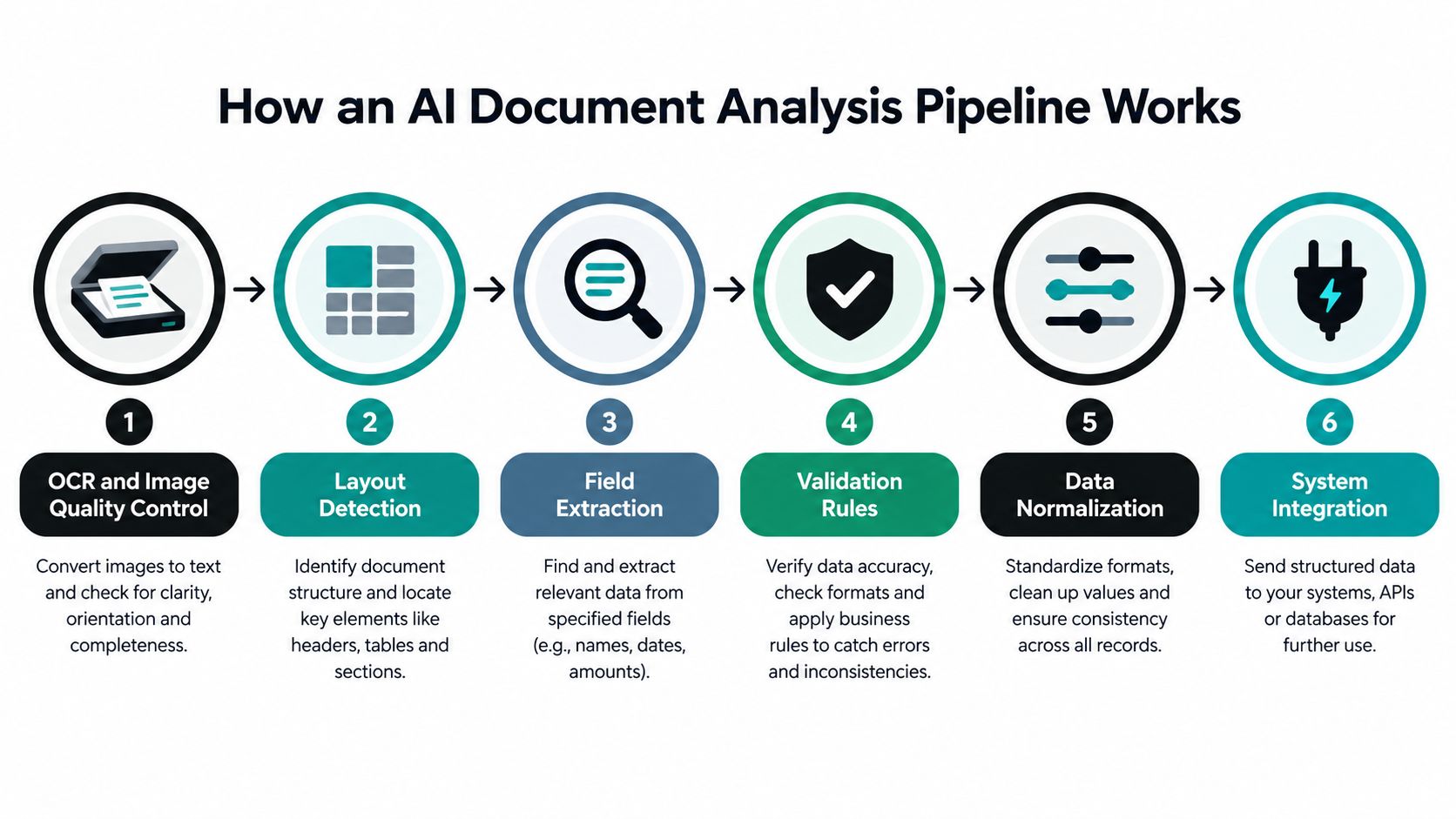
A practical pipeline contains six connected layers:
- OCR and image quality control: Reads text while handling skew, resolution, blur, language, and script differences.
- Classification: Identifies an invoice, payslip, identity document, delivery note, or another file type.
- Layout understanding: Preserves tables, columns, headers, footers, and links between labels and values.
- Entity extraction: Maps content to named fields and repeated structures.
- Validation: Tests totals, dates, identifiers, and relationships against business rules.
- Orchestration: Splits files, routes exceptions, and delivers structured output to operational systems.
These layers matter because each one protects a different business outcome. Better image handling reduces unreadable inputs. Layout analysis keeps a quantity attached to the correct line item. Validation catches a total that does not reconcile. Orchestration makes uncertain cases visible instead of allowing bad data to enter an ERP or compliance record.
The category includes intelligent document processing, which describes this broader combination of recognition, interpretation, and workflow automation. Industrial examples are collected in the AI for Manufacturing case library, where document processing supports operational workflows rather than isolated text capture.
The practical test is simple: can the system show what a value is, where it came from, how confident the extraction is, and what happened when validation failed? If it can, AI document analysis becomes a controlled data process. If it only produces a block of text, it remains OCR with a new label.
Why Traditional OCR Keeps Breaking Down
A photographed invoice can look readable to a person and still produce unsafe accounting data. A coffee stain across the lower-right corner may cause OCR to misread the decimal separator in the total. A delivery note may place quantities inside a table without a nearby label. A passport may combine a hologram, several scripts, and fields whose meaning depends on position. Recognizing characters is only the first layer.
OCR answers one narrow question: which characters appear in this image? Document processing must also identify the document, preserve its structure, map values to fields, check relationships, and route uncertainty for review. Without those layers, a system can return accurate-looking text while attaching a quantity to the wrong product row or accepting an invalid account identifier.
Historical evaluations show why one accuracy figure can mislead. An archival study found an average 18% error rate for individual words in body text, with higher error rates in advertisements and complex layouts. Searchability may survive an error that would be unacceptable in an invoice total or identity number.
Character accuracy isn't field accuracy
Digitized scholarly collections have reported character accuracy ranging from approximately 97% to 99.95% for some journals. A Making of America evaluation found that roughly nine out of ten OCR-processed pages reached at least 99% character accuracy without manual correction, while a Harvard evaluation measured search success at 96.6% overall, including 96.9% for twentieth-century texts and 95.1% for nineteenth-century texts, as reported by George Mason University's digital history resource.
These figures describe searchable text, not dependable business fields. A single wrong character can invalidate a tax identifier, change a payment amount, or break a match against a supplier record even when the page remains easy to search.
The same analysis estimated that improving uncorrected OCR to 99.995% accuracy could raise digitization costs by roughly eight to ten times. That trade-off points to a practical operating model: apply confidence thresholds, validate important fields, and send uncertain cases to a person instead of forcing every document through automatic approval.
Practical rule: The safest target is reliable automation, with human review reserved for documents the system cannot validate confidently.
A large benchmark processed approximately 18,500 English and Arabic documents under 43 artificial-noise conditions, generating 51,304 requests. Server-based processors outperformed open-source Tesseract as degradation increased, and Google Document AI achieved the strongest overall results in that experiment, according to the published benchmarking study. The operational lesson is to test blur, compression, skew, multilingual content, and poor scans separately rather than trusting one aggregate score.
How an AI Document Analysis Pipeline Works
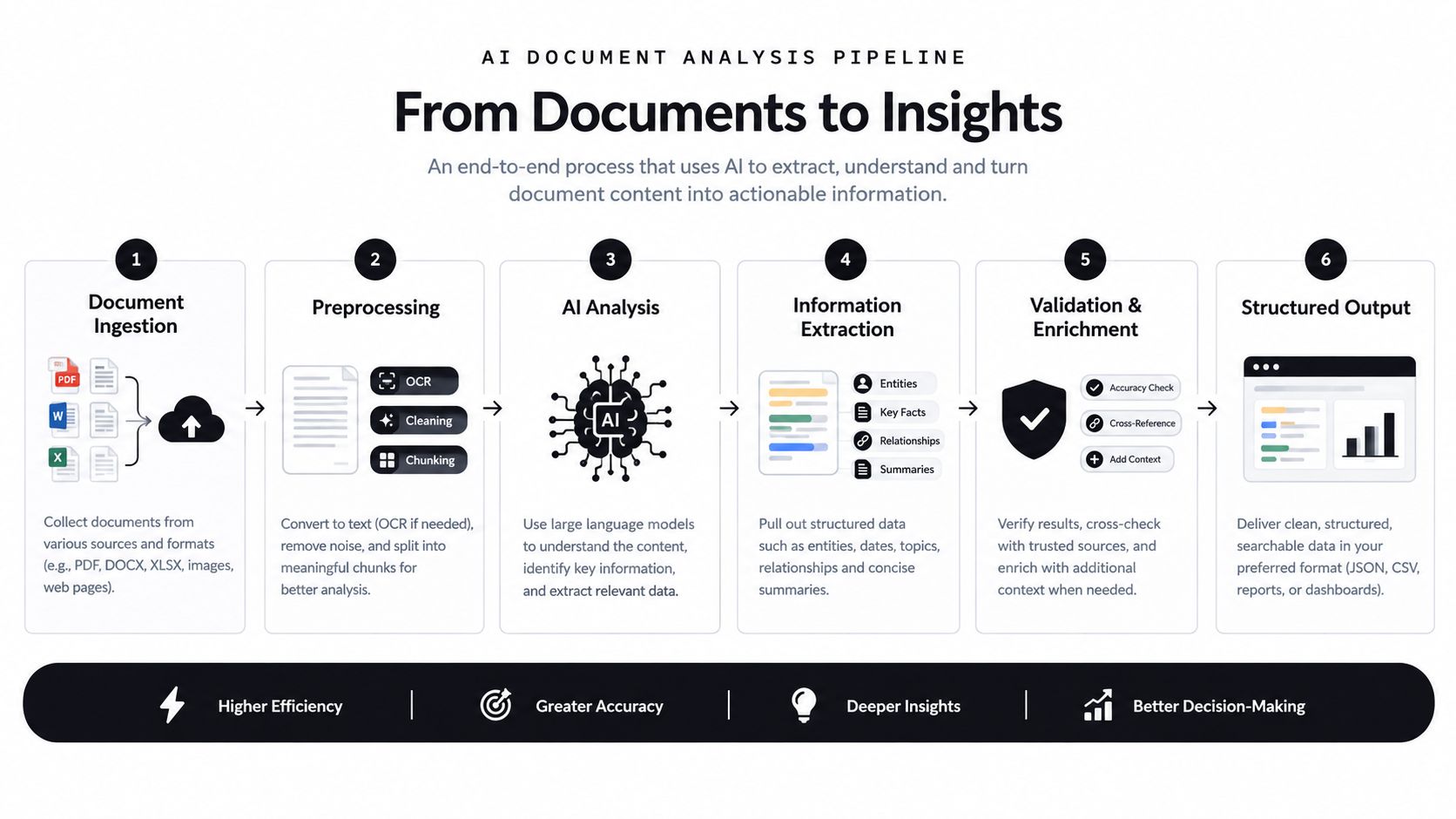
Take one supplier invoice and follow it through a production pipeline. The invoice arrives as a scanned PDF, contains a table of line items, and must ultimately become a record in the accounting system.
Step 1 starts with OCR and image quality control
The system first checks whether the page is usable. Deskewing corrects a tilted scan. Resolution normalization creates a more consistent input. Language and script detection helps the recognition layer interpret multilingual content correctly.
This step matters because downstream models can't recover information that was corrupted at the image stage. A pipeline should retain page-level confidence and identify pages that require review before extraction continues.
Step 2 identifies the document type
Classification routes the invoice to an invoice schema instead of a payslip, delivery-note, or KYC workflow. A mixed PDF might contain several document types, so classification can also identify page boundaries and split the file into separate logical documents.
The schema determines what the system should look for. An invoice needs tax and payment fields. A bill of lading needs shipment and cargo information. A payslip requires a different structure entirely.
Step 3 preserves layout and reading order
A plain text stream loses spatial meaning. Layout-aware systems associate tokens with page identity and bounding-box coordinates, allowing the model to distinguish a total from a line-item amount and a customer address from a supplier address.
Research using the SROIE receipt benchmark included 626 training receipts and 347 test receipts, alongside a purchase-order dataset containing 51,000 purchase orders. The work showed why combining text with two-dimensional position and visual structure supports information extraction with comparatively limited labeled data, as described in this LayoutLM study.
Step 4 extracts named entities
The extraction layer maps the invoice into fields such as supplier, invoice number, date, VAT number, currency, taxable amount, VAT amount, total, and line items. It can also preserve the source location for each field, which makes later review faster.
The output should be structured JSON or another defined schema, not a text dump. That distinction is what turns OCR documents into usable data.
Step 5 validates values and relationships
Validation checks whether the total reconciles with line items, whether dates are plausible, and whether identifiers follow expected formats. A system can also compare supplier details with master data or flag a tax amount that doesn't match the configured rule.
Validation doesn't guarantee truth. It catches contradictions and uncertainty so people can resolve the cases that deserve attention.
Step 6 orchestrates the next action
Finally, the workflow sends valid records to an ERP or accounting system, places uncertain records in a review queue, and logs the evidence needed for audit. It can also split multi-page files, retry transient failures, and notify an operator when required information is missing.
This pattern applies beyond finance. Teams working with health records, claims, referrals, or regulated forms can explore practical examples in AI document workflows for healthtech. The broader design principle is also covered in this guide to turning unstructured data into structured data.
The following video provides a visual introduction to the relationship between document inputs, extraction, and downstream automation.
Architecture and Integration Patterns That Actually Work
The right architecture depends on how much control your team needs and how quickly it must reach production. Building a document model internally can provide deep control over data and behavior, but it requires labeled examples, evaluation infrastructure, and ongoing maintenance. A packaged intelligent document processing product can launch faster, although its schemas and exception handling may be less flexible.
An API-first approach sits between those options. A REST endpoint can receive a PDF or image and return structured JSON for an ERP, CRM, accounting platform, or vertical SaaS product. Developers control the surrounding workflow while the extraction service supplies pre-trained models and a path for adding document-specific fields.
No-code and low-code interfaces serve a different audience. Operations teams can create upload pages, generate completed Excel or PDF templates, and test a process before engineering builds a deeper integration. That can reduce the gap between a successful proof of concept and daily use.
| Pattern | Approach | Best fit |
|---|---|---|
| API endpoint | Send documents and receive validated structured data | Product teams, ERP integrations, vertical SaaS |
| No-code or low-code | Create upload interfaces and document templates | Operations teams and fast pilots |
| Orchestrated workflow | Combine classification, splitting, extraction, validation, and system writes | Mixed document sets and high-control processes |
| Internal build | Train and maintain models, schemas, and evaluation tools | Teams with specialized data and substantial engineering capacity |

A flexible API with pre-trained models and rapid customization often gives technical teams a practical balance between speed and control. The important questions aren't limited to extraction quality:
- Latency: How quickly does a document move from upload to usable output?
- Retention: Are files, prompts, outputs, and logs deleted according to policy?
- Security posture: How are access, encryption, regional processing, and subprocessors managed?
- Change management: How quickly can a new supplier layout or document type be added?
- Failure handling: Can the workflow abstain, retry, and route exceptions without losing evidence?
Tools such as Matil combine OCR, classification, validation, and workflow orchestration through an API, with pre-trained models, customizable schemas, no-code interfaces, and structured JSON output. Any vendor should still be evaluated against your own documents, field definitions, security requirements, and exception policy.
Real World Use Cases and ROI Outcomes
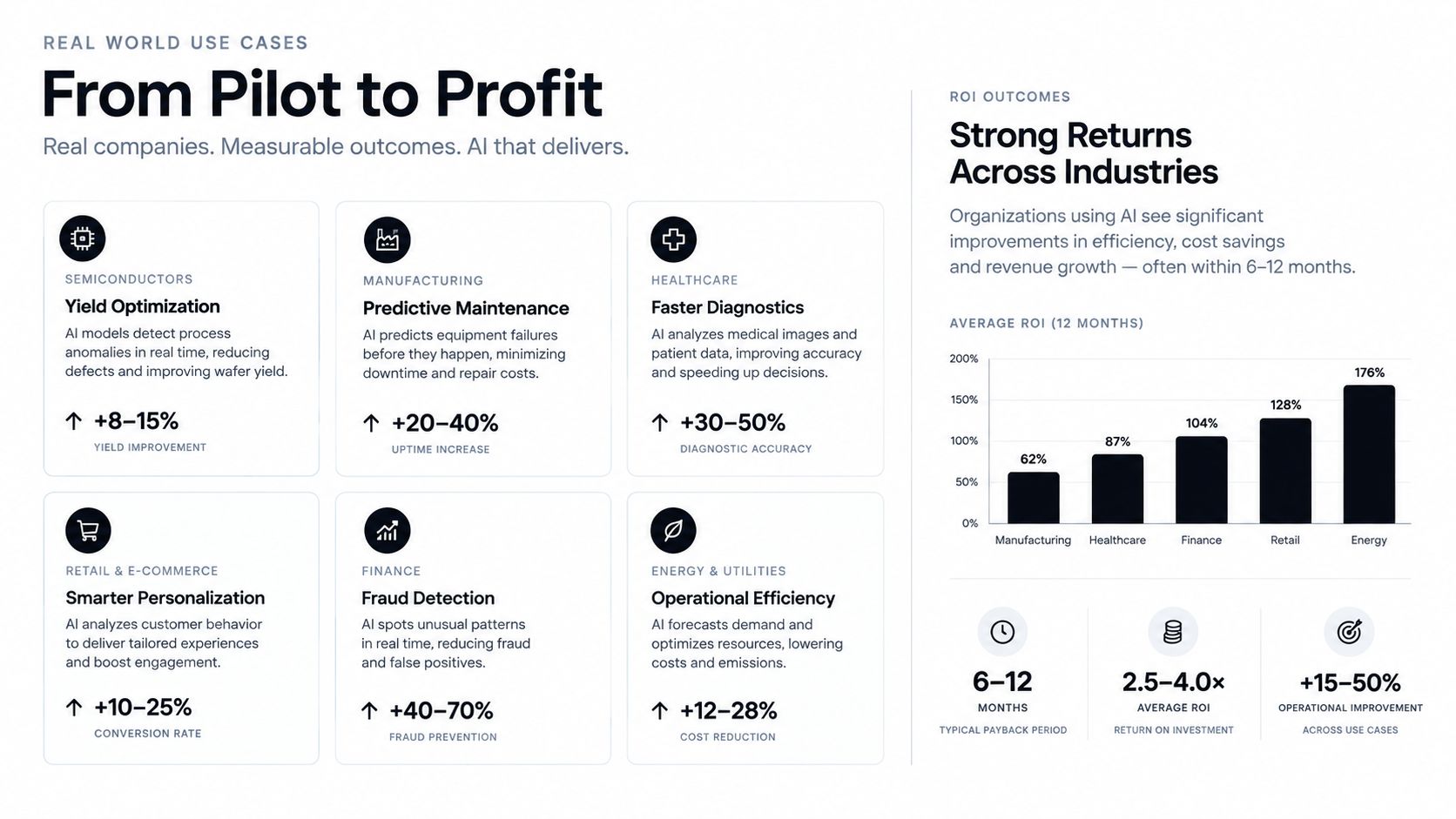
Document AI creates value when each workflow connects extraction to validation, review, and a measurable business outcome. The right design depends on the document type and on what an incorrect field could cost.
Invoices for finance and accounts payable
Problem: Accounts payable teams receive supplier PDFs and scans with inconsistent layouts. Manual entry causes rework, slows approvals, and returns exceptions to the same staff who entered the data.
Solution: Classify incoming documents, extract supplier details, invoice identifiers, dates, tax values, totals, currencies, and line items, then validate the result. Reconcile totals with line items, check required fields, and route uncertain records to review instead of writing them directly to the ledger.
Result: The Ardent Partners benchmark cited by Xero provides a reference point for comparing manual processing with AP automation. At 10,000 invoices per month, reducing exceptions from 22% to 9% would leave roughly 1,300 fewer invoices requiring intervention each month. Apply the organization's own handling cost to those avoided reviews to estimate annual savings. Benchmark figures are not a universal rate.
Payslips for HR and payroll operations
Problem: Payslips differ by employer and country. Payroll teams may need employee identifiers, pay periods, gross pay, deductions, taxes, and net pay, while limiting exposure of sensitive personal data.
Solution: Route payslips to a dedicated schema, normalize dates and amounts, and validate relationships between gross pay and deductions. Restrict access by role, retain the source region for each field, and send questionable records to authorized reviewers.
Result: Payroll systems receive consistent records rather than manually transcribed values. Faster handling and fewer avoidable corrections improve operations, while access controls and review history support governance.
KYC documents for regulated teams
Problem: Identity documents arrive as photos, scans, or mixed packets and contain sensitive information. A plausible-looking character can still invalidate an identifier or create a compliance issue.
Solution: Classify passports, identity cards, and related documents before extracting named fields. Preserve page references and source regions, apply format and plausibility checks, and place low-confidence cases in a documented review queue.
Result: Compliance analysts spend less time copying values and more time resolving genuine exceptions. Traceable evidence also shows how a value entered the customer record, which supports investigation and controlled approval.
Logistics documents
Problem: Bills of lading, customs declarations, delivery notes, and freight documents combine multilingual text, tables, shipment identifiers, quantities, and inconsistent layouts.
Solution: Detect document boundaries, preserve table structure, extract shipment and cargo fields, normalize units and dates, and validate identifiers before writing to transport or customs systems.
Result: Operations teams reduce manual lookup and data-entry work while giving downstream systems more consistent information. Schemas and validation rules can change by document class without rebuilding the entire orchestration flow.
Evaluation Metrics, Traceability, and Compliance Controls
A vendor demo can show a clean document and an impressive output. Production evaluation must answer four separate questions: Did the system extract the right value? Can a reviewer trace it? Is the data protected? Does the output satisfy the workflow's regulatory obligations?
Accuracy needs field-level measurement
Character accuracy is useful for understanding OCR, but finance and compliance teams need field-level precision, recall, normalized exact match, completeness, and confidence calibration. An invoice total deserves more attention than a harmless punctuation difference in an address. A missing page or misclassified document can also matter more than a small recognition error.
Create a representative gold dataset that includes clear scans, photos, multilingual documents, tables, unusual layouts, and known edge cases. Segment results by document type and field criticality. Measure how often the system extracts a value, how often that value is correct, and how often the system appropriately abstains.
This error-rate calculation guide can help teams define the metric before comparing vendors.
Traceability connects output to evidence
A flat JSON value isn't enough for a high-stakes workflow. Each extracted field should retain its page, source region, confidence, and validation status. Reviewers need to see why the system produced a value and what evidence supports it.
This also improves debugging. If an invoice total fails, the team can determine whether the problem came from image quality, layout interpretation, entity extraction, or a business rule.
Security covers the entire data path
Evaluate upload channels, processing regions, encryption, role-based access, subprocessors, retention, deletion, logs, and human-review queues. Derived JSON inherits the sensitivity of the original document. A redacted image and an extracted identity number shouldn't automatically receive different treatment.
Enterprise telemetry reported that 26.38% of files uploaded to generative-AI tools contained sensitive information in Q3 2025, up from 22% in Q2, while 21.81% of sensitive data was sent to tools that train on user inputs. The same report found that 57.25% of sensitive uploads involved business or legal data, according to Harmonic Security. Those figures concern generative-AI tools broadly, but they illustrate why document governance must cover shadow usage, retention, training terms, and derived outputs.
Compliance increasingly requires structure
The EU's VAT in the Digital Age package was adopted on 11 March 2025. For cross-border business-to-business transactions, its Digital Reporting Requirements are scheduled to apply from 1 July 2030, and Member States with domestic real-time reporting systems must align them with EU standards by 1 January 2035, according to the European Commission's ViDA materials.
The European Commission estimates that e-invoicing could reduce VAT fraud by up to €11 billion annually and reduce administrative and compliance costs for EU traders by more than €4.1 billion per year over the following decade. The practical implication is clear. OCR text alone isn't enough. Invoice data must become structured, validated, and ready for automated transmission.
Implementation Steps and Vendor Selection Checklist
Start with one document type and a workflow where the business value is visible. Invoices are common, but a delivery-note or KYC pilot may be better if those documents create the largest operational bottleneck.
A practical rollout sequence
- Choose representative inputs: Include born-digital PDFs, scans, photos, multi-page files, difficult layouts, and known exceptions.
- Build a gold dataset: Label the fields that matter, preserve the expected values, and define acceptable normalization for dates, currency, whitespace, and identifiers.
- Set review rules: Decide which confidence levels, validation failures, missing fields, and document types require human intervention.
- Integrate the output: Use an API, no-code interface, or orchestrated workflow to write validated records into the target system.
- Measure end to end: Track field accuracy, completeness, exception volume, review time, failed integrations, and correction causes.
- Scale carefully: Add mixed document sets only after the pilot remains reliable across document conditions and edge cases.
- Monitor continuously: Watch for supplier layout changes, new languages, degraded scans, model drift, and changes in business rules.
A vendor checklist should include evidence rather than slogans:
- Accuracy evidence: Ask for field-level results on documents resembling yours, not only headline OCR scores.
- Customization speed: Confirm how new fields, schemas, and layouts are added.
- Integration simplicity: Test the API, authentication, output format, retries, and error handling.
- Security controls: Verify GDPR alignment, ISO controls, access management, regional processing, and zero-data-retention terms.
- Operational reliability: Review the SLA, monitoring, incident process, and support model.
- Governance: Check whether source regions, confidence values, validations, and review decisions are retained.
- Expansion path: Ask how the platform handles new document types without forcing a full rebuild.
A broader AI cyber security checklist for small businesses is also useful when security teams assess access, data exposure, and vendor controls around AI-enabled workflows.
Turning Documents Into a Reliable Workflow
AI for document analysis is a workflow discipline, not a single OCR model. The reliable design combines image quality checks, classification, layout understanding, extraction, validation, orchestration, traceability, and governance.
It isn't a magic black box, and it isn't safe to deploy without an exception path. The strongest business case usually comes from reducing avoidable exceptions, rework, processing delays, and compliance exposure, not from trying to remove every human task. Human review becomes a designed control for uncertain or high-impact documents.
If you're evaluating the next step, begin with one document type, define the fields that matter, and measure the complete path from upload to system update. That approach gives finance, operations, and technical teams a shared basis for deciding whether automation is reliable enough to expand.
Matil combines OCR, classification, validation, and workflow orchestration to turn PDFs and images into structured, traceable data through an API or no-code workflow. If you're assessing document automation for invoices, KYC, payroll, logistics, or mixed files, visit Matil to explore an implementation path suited to your process.


