Business Document Processing: How Modern Teams Automate
A practical guide to business document processing: OCR, classification, extraction, validation, integration, security, and how

In 2026, business document processing is still manual at the point where finance teams feel it most. A 2025 AP benchmark found that 66% of respondents manually key invoices into an ERP or finance system, while 63% spend more than 10 hours each week processing invoices. The same benchmark reports that 36% process more than 5,000 invoices per month, showing why extracting data from invoices automatically has become an operational priority.
Business document processing means transforming unstructured documents, such as PDFs, scans, and images, into structured, usable data for business systems. The hard part isn't just OCR. Production teams need classification, field extraction, validation, exception routing, ERP or CRM integration, and governance.
This guide is for finance, operations, logistics, legal, compliance, and technical teams evaluating OCR documents, PDF data extraction, and broader document automation. It focuses on what works beyond a polished demo, and gives you a practical framework for choosing and deploying a reliable pipeline.
Why Business Document Processing Still Eats So Much Time
A finance analyst may receive invoices through email, a supplier portal, and a shared mailbox. Some arrive as searchable PDFs. Others are scans, photographs, or multi-page files containing several documents. The analyst identifies each file, finds the supplier and total, copies values into the ERP, checks tax information, and sends exceptions for approval.
That sequence repeats across accounts payable, logistics, HR, KYC, legal operations, and customer onboarding. Each task is familiar, yet the handoffs create delays, rework, and an audit trail assembled from scattered actions. Volume increases the pressure because every new document adds another opportunity for a field to be entered incorrectly or routed to the wrong person.
The problem persists because document automation is often judged by OCR accuracy alone. A demo may read a clean invoice convincingly, while production inputs include rotated pages, unfamiliar templates, handwritten notes, missing fields, and files that combine several document types. Reliable processing requires confidence thresholds, validation rules, exception queues, and a clear owner for unresolved cases.
A shared definition for business and technical teams
Business document processing is the conversion of unstructured or semi-structured documents into validated, structured data that people and software can use.
OCR reads characters. A working pipeline must also determine what the document is, locate the relevant fields, check whether the values make business sense, and deliver approved data to the right system or person. Integration matters as much as extraction. A value that never reaches the ERP or CRM, or arrives without its source page and review history, has limited operational value.
Teams assessing automation also need to understand how document workflows connect with broader robotic process automation. An overview of RPA development services for 2026 helps technical and operations leaders distinguish between automating data movement and interpreting document content.
A production pipeline normally covers:
- Capture: Accept PDFs, scans, images, email attachments, and portal uploads.
- Recognition: Convert visual content into machine-readable text.
- Classification: Identify invoices, IDs, delivery notes, contracts, payslips, or other document types.
- Extraction: Return required values in a consistent structure.
- Validation: Apply business rules, confidence thresholds, and cross-checks.
- Orchestration: Split files, route exceptions, and trigger downstream actions.
- Governance: Preserve traceability, access controls, security, and retention policies.
The practical test is what happens after recognition. Ask how the system handles a changed supplier layout, a failed tax check, a three-document PDF, or an extraction that falls below the confidence threshold. Those answers reveal end-to-end reliability more clearly than a polished OCR demonstration.
The Hidden Costs of Manual Document Workflows
Manual document work consumes more than staff time. It creates rework, slows approvals, and makes growth depend on adding people. Even trained operators mistype fields when they repeatedly copy values from inconsistent layouts, especially under deadline pressure.

Why small field errors become document errors
A 1% field-level error rate across 10 fields implies roughly a 9.6% probability that a record contains at least one error, based on the calculation described in the data-entry error analysis. Longer forms and invoices increase the exposure. At 97% field-level accuracy across roughly 15 invoice fields, about 36% of invoices still contain at least one error, according to Mindsprint's invoice OCR analysis.
Field accuracy and production reliability measure different things. A demo can show strong recognition while the live workflow still sends incorrect tax numbers, totals, currencies, or supplier identifiers into an ERP. A reviewer then has to reopen the document, verify the source, correct the record, and explain the exception.
Traditional OCR handles recognition, not the full control process. Standalone OCR is typically 85% to 90% accurate and still needs human involvement 10% to 15% of the time. OCR paired with validation can reach about 98% to 99% accuracy on standard invoice fields, according to Statrys' explanation of invoice OCR. Those results depend on document quality, field rules, supplier variation, and a clear route for low-confidence cases.
The operational bill
Manual work shows up across the workflow:
- Time: Finance data entry commonly takes 5 to 10 minutes per invoice. Processing 1,000 invoices at a 3% manual error rate creates about 30 errors per month, according to invoice data-entry guidance.
- Cycle time: The average manual invoice takes 14.6 days to process, compared with 3.1 days for high-performing teams, based on industry benchmarks cited in 2026 reporting.
- Rework: A rejected or incorrectly entered document creates another task for finance, procurement, operations, or the supplier.
- Scaling pressure: Volume often arrives in bursts, while manual capacity requires staffing for the peak.
A document that reaches the wrong system can cost more than one that remains in a queue. Without validation, exception routing, source-page traceability, and posting controls, automation moves errors faster.
Practical rule: Measure document-level accuracy, exception workload, time to posting, and the percentage of records accepted without correction. Field accuracy alone cannot show whether the workflow is economically reliable.
The business case is reducing the documents that require a person to inspect, correct, and transfer between systems. Production automation must be designed around validation, integration, and exceptions from the start.
How Modern Document Processing Pipelines Work
Production document automation is a chain of controls, not an OCR feature. A file enters through a defined channel, gets classified and read, passes validation, and reaches the correct business system. Each handoff affects reliability. A model can read a field correctly in a demo while the complete workflow still fails on split PDFs, unfamiliar layouts, missing master data, or an exception that has nowhere to go.
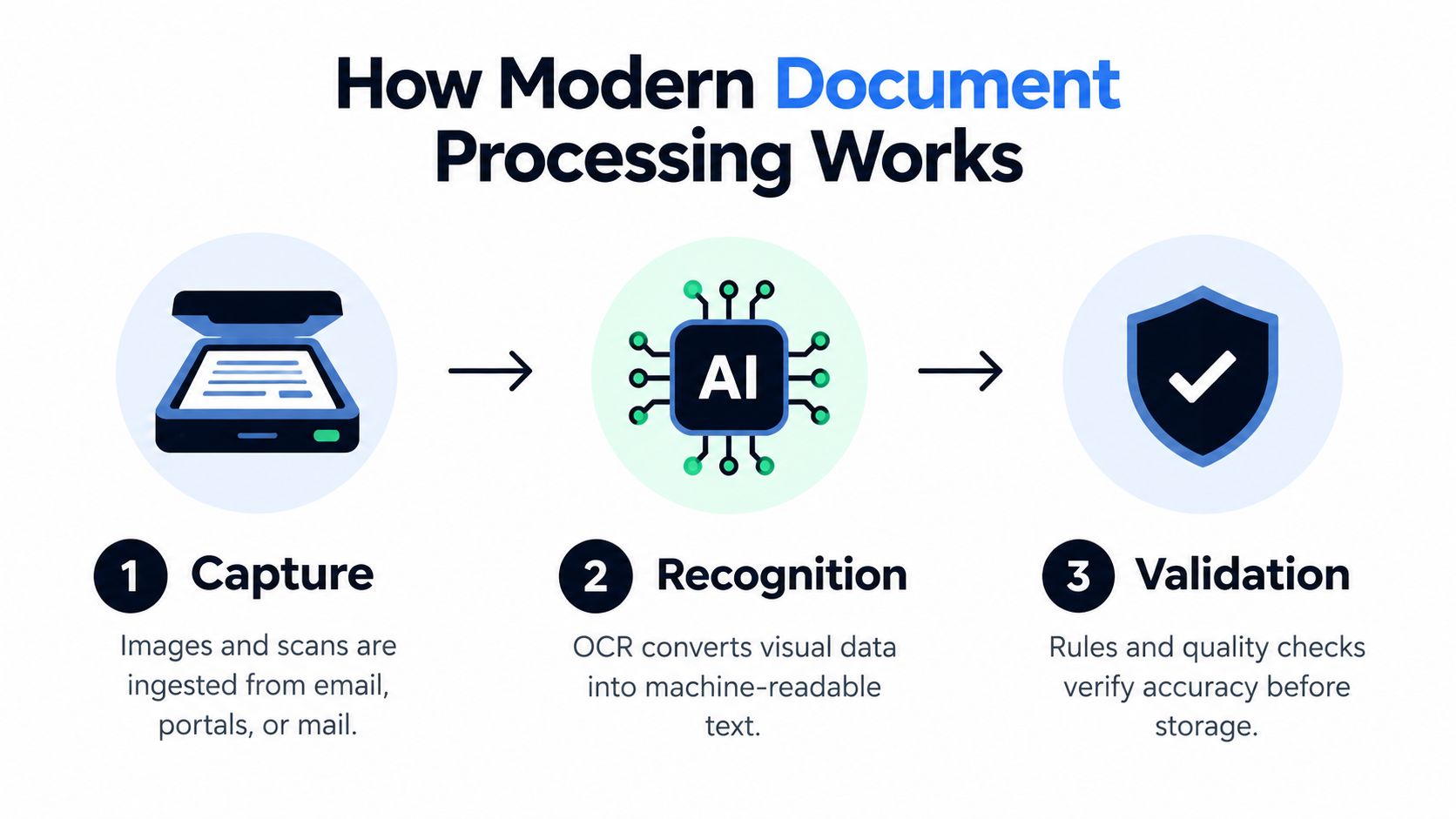
Definition: Intelligent document processing combines OCR, classification, extraction, validation, and workflow automation to turn document content into verified data and downstream actions.
Step 1, capture and ingestion
The pipeline accepts files from email, portals, scanners, shared folders, APIs, or application uploads. It should retain the original document, page structure, and metadata so a reviewer can trace an extracted value back to its source.
Ingestion must also handle operational variation. One PDF may contain several documents, pages may arrive out of order, and a batch may combine invoices, delivery notes, and identity documents. If users must separate or rename files manually before processing, the workflow has already introduced avoidable labor.
Step 2, OCR and recognition
OCR converts scans, photographs, and image-based PDFs into machine-readable text. Recognition adds layout context, linking values to labels and preserving relationships across tables, pages, and sections. A number alone has little meaning. Its position and surrounding content determine whether it represents a total, a tax amount, or a line item.
Demo accuracy often reflects clean samples. Production reliability also depends on image quality, document variation, language, handwriting, and whether the system preserves enough context for later validation.
Step 3, classification and extraction
Classification identifies the document type and selects the extraction structure. An intake stream may contain an invoice, purchase order, passport, Bill of Lading, or contract. Extraction returns fields such as supplier name, invoice number, tax amount, currency, SKU, quantity, identity number, or contract date.
The useful result is structured data, commonly JSON, that applications can consume. For a practical explanation of processing stages and handoffs, see this guide to document processing workflows.
Step 4, validation and confidence control
Validation checks whether extracted data is fit for a business action. Rules can compare totals, verify formats, require specific fields, detect duplicate invoice numbers, and match supplier identifiers against a master record.
Confidence scores help route uncertain fields or documents to human review. The review queue needs the original page, highlighted evidence, the failed rule, and a clear correction path. Otherwise, staff spend time searching for the cause rather than resolving the exception.
Step 5, orchestration and integration
Orchestration determines what happens after validation. It can split a multi-page PDF, send an exception to a queue, start an approval, populate a CRM, or trigger a logistics update. ERP and CRM integration also needs field mapping, authentication, retry handling, status synchronization, and controls that prevent an uncertain record from posting twice.
A 2026 digital-invoice benchmark found field accuracy ranging from the mid-80s to above 90%, with per-document latency ranging from about 4 seconds to more than 30 seconds, depending on the AI document model, as reported by Businessware Technologies. The result depends on document quality, layout handling, model choice, and post-processing.
Validation and exception routing turn recognition into a dependable business process. Governance completes that process through access controls, audit trails, review policies, and monitoring for recurring extraction failures.
Real-World Use Cases and the ROI They Deliver
The strongest use cases have a clear document bottleneck, a repeatable data structure, and a defined downstream action. Invoices are a familiar starting point, but regulated and exception-heavy workflows often expose the value of classification, traceability, and validation more clearly.
| Document Type | Key Data Extracted | Primary Outcome |
|---|---|---|
| Invoices | Supplier, invoice number, dates, totals, tax, line items | ERP posting and exception routing |
| KYC documents | Name, identity number, expiry date, address | Faster onboarding with traceable verification |
| Logistics documents | SKU, quantities, shipment details, customs data | Fewer manual handoffs in transport and customs workflows |
| Payslips and receipts | Employee, pay components, amounts, dates | Structured HR, finance, and reimbursement processing |
Accounts payable
The manual problem is familiar. An AP analyst opens an invoice, searches for the supplier, retypes the values, checks purchase-order information, and resolves mismatches. The automated solution ingests the file, classifies it as an invoice, extracts the fields, validates totals and required data, and posts clean records to the ERP.
The result is fewer documents entering a human queue unnecessarily. That matters because average invoice exception rates are around 22%, while top-performing teams are near 9%, according to invoice processing benchmark material. The practical target isn't zero review. It is a smaller, better-defined exception queue.
A useful financial evaluation should include the cost of rework, delayed approvals, and exception ownership. This accounts payable automation ROI guide provides a relevant framework for structuring that analysis.
KYC and customer onboarding
KYC teams handle identity cards, passports, and other supporting documents that vary by country, issuer, and image quality. Manual review can capture names and document numbers, but it often leaves audit trails fragmented across spreadsheets, email threads, and case-management systems.
A structured KYC pipeline extracts identity fields, classifies the document, checks formats and expiry dates, and records the source page or image region for review. The result is a more traceable onboarding process, not merely faster typing. Human reviewers can focus on ambiguous cases and policy decisions instead of copying obvious values.
Logistics and customs
Logistics teams work with Bills of Lading, delivery notes, customs declarations such as DUA, and shipment paperwork. These documents may contain item tables, quantities, references, ports, and carrier information in layouts that change between suppliers.
An automated workflow classifies each document, extracts SKU and quantity data, splits mixed PDFs, and routes missing or inconsistent values to an operations queue. The result is better continuity between transport, warehouse, procurement, and customs systems. It also reduces the need for staff to re-enter the same shipment information in multiple places.
HR and back-office processing
Payslips, bank statements, receipts, contracts, and expense documents create a different pattern. The documents may be lower volume than invoices, but they contain sensitive data and often require careful validation.
A pipeline can extract employee identifiers, dates, amounts, and relevant line items, then pass structured values into payroll, reimbursement, or compliance workflows. The result is a repeatable process with clearer ownership and fewer disconnected manual files.
Across all four cases, ROI comes from less rekeying, fewer avoidable exceptions, faster handoffs, and stronger traceability. Speed matters, but reliable routing is what makes the saving durable.
Integration Patterns, Security, and Compliance
A document workflow can achieve high OCR accuracy in a demo and still fail in production. The failures usually appear after extraction: uncertain values are not routed for review, validation rules are incomplete, or structured data cannot enter the ERP, CRM, case-management platform, or compliance record. Integration design determines whether automation produces usable transactions or another queue of files to fix.
Two practical integration patterns
An API-first pattern suits engineering teams embedding OCR and structured extraction in an ERP, CRM, vertical SaaS product, or internal workflow. The application controls authentication, document submission, field mapping, retries, validation, exception routing, and the response it stores. That control supports end-to-end reliability, but it also leaves the team responsible for monitoring failures and maintaining mappings as systems change.
A no-code pattern suits business teams that need an upload interface, automated extraction, and output in an Excel or PDF template without building a full integration. It can reduce initial implementation work for a focused process. The team still needs clear ownership, validation rules, review thresholds, and a way to preserve the original document beside corrected values.
The choice reflects operational trade-offs. API integration offers deeper orchestration and control. No-code deployment can shorten setup for a contained workflow. Mature programs may use both, with no-code tools for operational processes and APIs for embedded product or ERP integrations. In either model, test the handoff, not only the extracted fields.
The governance gate
Before approval, buyers should require clear answers about:
- Data protection: How are files encrypted, accessed, and processed?
- Retention: Can the vendor provide zero data retention where required?
- Compliance: Does the service support GDPR, ISO 27001, and AICPA SOC requirements?
- Traceability: Can reviewers see the source document and history for each extracted field?
- Availability: What SLA applies to the production API and workflow?
- Isolation: How are customer documents separated and protected?
- Human review: Can uncertain results be routed without losing context?
These requirements affect whether finance, legal, and compliance teams can use the system in daily operations. Teams comparing connected vendors can review CertSeal system integrations for context on organizing integration and compliance information.
The cited market research reports data-silo problems, legacy compatibility issues, and security concerns as significant barriers to scaling AI, according to the cited document automation market research.
Security belongs in the same evaluation as data quality. If a workflow cannot show why a value was accepted, corrected, or rejected, it has automated input without creating a trustworthy record. Teams should also understand what SOC 2 compliance covers before comparing vendor claims.
Implementation Roadmap and How to Choose a Solution
Successful deployments usually start narrower than stakeholders expect. Choose one document type with enough volume to expose real variation, but not so many workflows that the team can't diagnose failures.
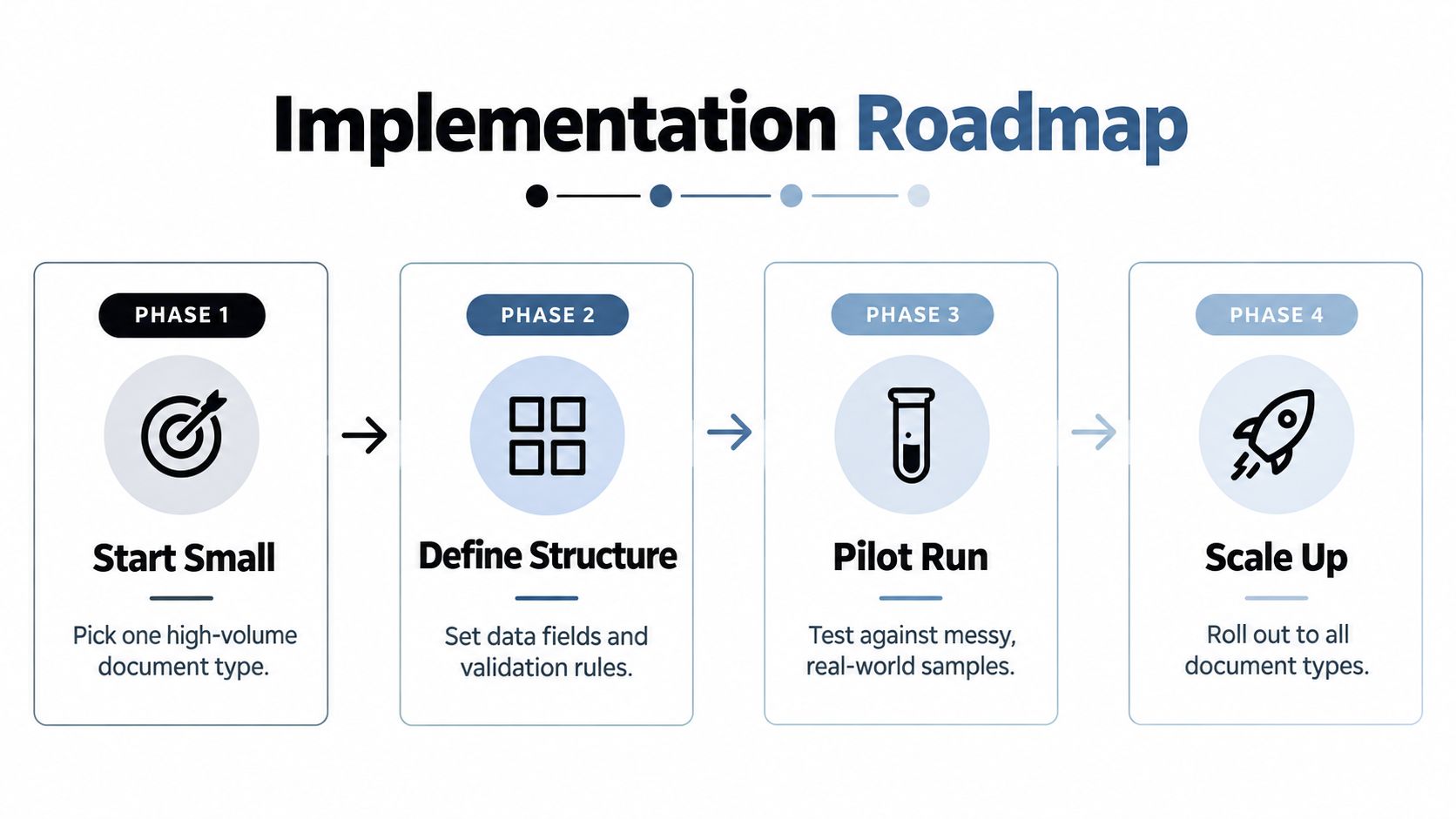
A four-phase rollout
- Start with one high-volume document type. Invoices, delivery notes, or identity documents are common candidates. Define the exact business outcome, such as ERP-ready records or a completed onboarding case.
- Define the structure and rules. List required fields, allowed formats, relationships, mandatory values, duplicate checks, and conditions that require human review.
- Run a representative pilot. Include clean files, poor scans, multi-page documents, unusual layouts, missing fields, and mixed batches. A demo set of ideal PDFs won't reveal production risk.
- Scale the workflow. Add classification, PDF splitting, additional document types, downstream integrations, and monitored exception queues only after the first process is measurable.
Measure more than extraction accuracy. Track document-level accuracy, straight-through processing, exception rate, review time, processing latency, integration failures, and the reasons humans override results.
What to test in a vendor
A serious evaluation should include:
- Pre-trained structures: Common models for invoices, payslips, IDs, bank statements, receipts, contracts, and logistics documents reduce initial configuration.
- Fast customization: Teams should be able to create or visually define custom structures without a long model-training cycle.
- Structured output: JSON should include predictable fields, validation results, and traceability.
- Flexible validation: Rules must support formats, cross-field checks, confidence thresholds, and external master data.
- Multiple integration routes: Look for both a practical API and no-code options where business teams need them.
- Operational controls: Confirm classification, PDF splitting, retries, exception routing, audit history, retention, and availability.
- Security evidence: Check GDPR, ISO 27001, AICPA SOC, zero data retention, and the specific contractual commitments behind each claim.
Matil.ai is one example of a platform that combines OCR, classification, validation, and workflow orchestration in a single API. Its product information describes pre-trained document structures, custom models that can be created in days, structured JSON output, no-code upload interfaces, and above-99% accuracy in multiple use cases. The relevant distinction is that Matil is not only OCR, although any buyer should test those capabilities against representative documents and its own exception policy.
The adoption gap deserves attention. 78% of organizations say they already use intelligent document processing, yet an industry leader argues that much of this adoption remains rule-based automation in disguise. Separately, 62.8% of respondents still experience document quality issues occasionally or frequently, according to the cited IDP analysis. A vendor demo should therefore include failure routing, validation, and integration tests, not just a clean upload and attractive field overlay.
Turning Document Chaos Into a Reliable Workflow
Reliable business document processing depends on what happens after OCR. Extraction, validation, exception routing, integration, and governance must work together. A demo can show impressive field recognition while production users still face unsplit PDFs, unclear review queues, failed ERP mappings, and supplier formats the system has not seen.
Use this decision framework before scaling:
- Choose accuracy when errors create financial or compliance exposure. Require stronger validation, duplicate checks, and human review for invoices, identity records, and regulated documents.
- Choose speed when volume and turnaround matter more than perfect automation. Set confidence thresholds that allow low-risk records to pass, while routing ambiguous fields for review.
- Measure the full transaction, not the extracted field alone. Track document-level accuracy, exception rate, time to resolution, posting success, and corrections after ERP or CRM synchronization.
- Assign ownership for every failure. Operations should manage queues and service levels, IT should own integrations and access, and compliance should define retention and audit requirements.
Production testing should use representative files, including scans, handwritten notes, multi-document PDFs, missing fields, and supplier variations. Review whether the system preserves the original document, explains why a field was rejected, records changes, retries failed integrations, and prevents unapproved values from reaching downstream systems.
After launch, monitor exception categories rather than treating them as one queue. Rising exceptions from a single supplier may require a template or master-data change. Repeated validation failures may indicate a weak rule, while successful extraction followed by posting errors points to integration mapping.
Matil combines OCR, classification, validation, structured JSON extraction, and workflow orchestration for business documents. Test one representative workflow first, then expand only when its controls and ownership model work under real operating conditions.


