Bank Statements to Excel: Automate Extraction
Convert bank statements to Excel automatically. Learn how AI extraction, field validation, and Matil.ai eliminate manual data entry and reconciliation errors.

At month-end, someone opens a bank statement PDF, copies transaction rows into Excel, fixes shifted columns, and checks the totals by hand. The workbook may look clean when it's finished, but a missing negative sign or a duplicated row can distort reconciliation without leaving an obvious visual clue. Converting bank statements to Excel is therefore not just an OCR task. It's a controlled process for extracting, structuring, validating, and tracing financial data.
The Hidden Costs of Manual Statement Processing
Manual statement processing creates a bottleneck precisely when finance teams need reliable information most. A reconciliation analyst may work through digital PDFs, scanned pages, different bank layouts, and transaction tables that continue across page breaks. Copying each row into a spreadsheet feels manageable for one statement, but the process becomes difficult to control across a mixed document set.
The direct cost is time spent entering dates, descriptions, debits, credits, and balances. The hidden cost is the review work that follows. A single misplaced amount can force an analyst to compare the spreadsheet against the source document line by line, delaying cash-flow reporting and month-end close. Guidance on improving the broader reconciliation process is available in Jumpstart Partners' practical guide to a faster month-end close.
Practical rule: A spreadsheet that looks complete isn't necessarily a reconciled spreadsheet.
Why legacy OCR breaks
Traditional OCR recognizes characters. It doesn't necessarily understand that a number belongs to the transaction above it, that a wrapped description continues on the next line, or that a table on the next page is part of the same sequence.
Common failure points include:
- Borderless tables: Without visible lines, extracted text can lose its column relationships.
- Wrapped descriptions: A merchant description may be split across lines and attached to the wrong transaction.
- Page continuation: Repeated headers can be imported as transactions, while rows at the page boundary may be dropped or duplicated.
- Signs and separators: Negative values, currency symbols, decimal separators, and characters such as “O” and “0” are easy to confuse.
- Mixed page quality: A born-digital PDF and a low-quality scan need different preprocessing before extraction.
The operational issue isn't always an obvious failure. A conversion can produce readable text while assigning a debit to the wrong row. That makes structural accuracy more important than character accuracy.
Teams evaluating this work should treat operational efficiency as a measurable process concern, not merely an administrative task. The Matil guide to operational efficiency provides useful context for assessing repetitive document workflows, review effort, and process capacity.
How AI Extraction Transforms Unstructured PDFs
A reliable bank-statement-to-Excel workflow treats extraction as a pipeline. OCR is one stage, not the finished product. The system must preserve the relationship between account metadata, statement-level totals, and individual transaction rows.
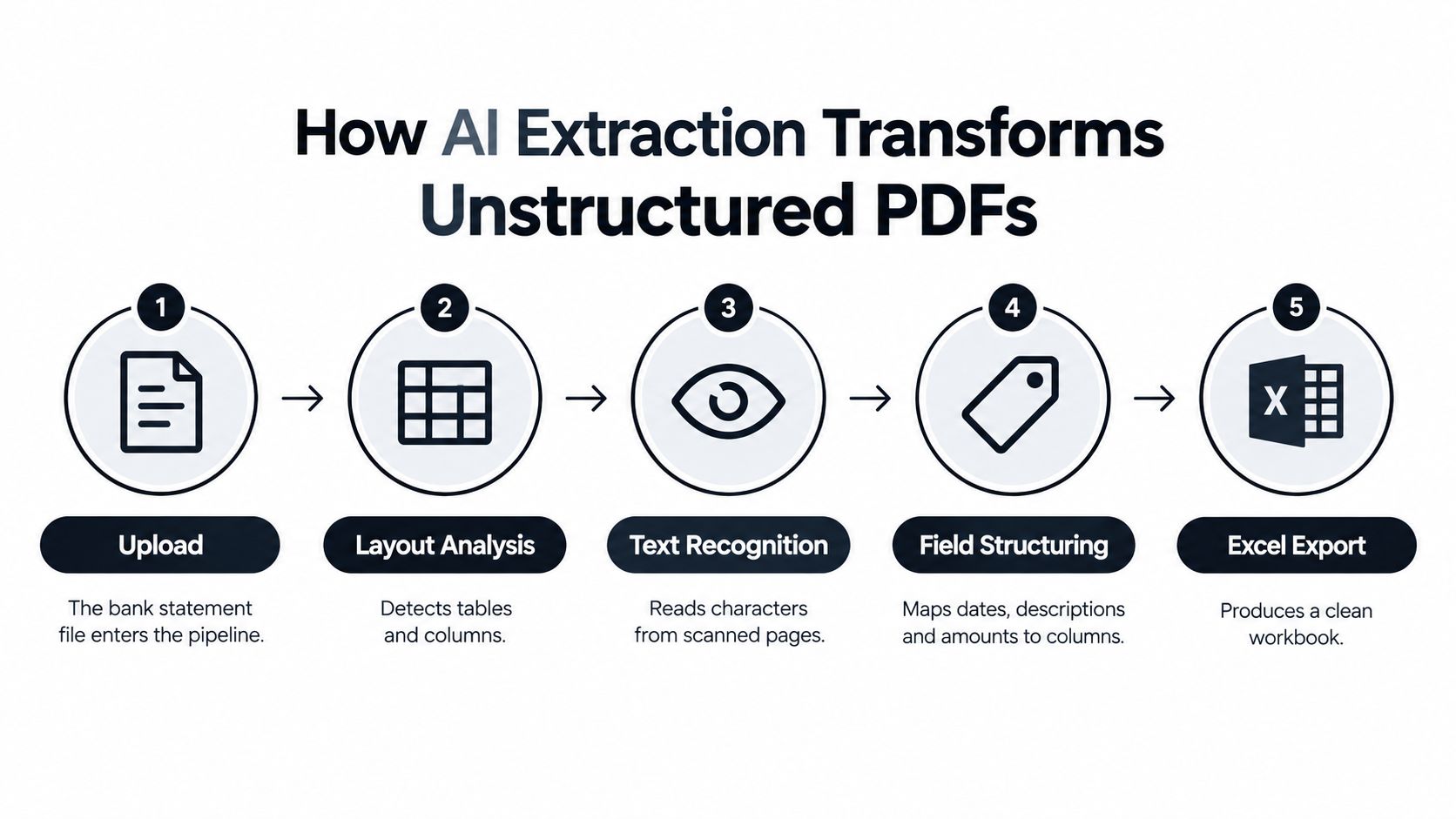
The five stages that matter
Step 1, classify the document.
First determine whether the file is a bank statement, card statement, payslip, invoice, or another document type. Page-level classification also helps distinguish born-digital pages from scanned images, so the workflow can apply the right extraction method.
Step 2, prepare the page.
Scanned pages may need rotation correction, deskewing, noise reduction, and normalization. These actions improve recognition, but they don't solve the harder problem of mapping content into financial fields.
Step 3, locate the transaction structure.
The pipeline identifies the transaction-table region, column boundaries, headers, and repeating row patterns. It must recognize multi-line entries and understand that a table continues when the next page repeats a header.
Step 4, normalize the fields.
Dates need a consistent format. Debit and credit signs must be represented consistently. Currency values require preserved decimal precision, and account identifiers must remain associated with the correct statement period.
Step 5, validate before export.
Only after extraction and normalization should the system create Excel rows or structured JSON. A useful guide to extracting data from PDF files should lead to the same conclusion: the destination format is less important than the integrity of the structured data.
A basic PDF converter often stops after reading visible text. A production workflow continues until it can identify exceptions, preserve source references, and route uncertain records for review.
Implementing Automated Workflows with Matil.ai
A practical implementation begins with the destination schema, not with the OCR engine. Define the columns finance needs, such as statement period, account identifier, transaction date, description, debit, credit, currency, and running balance. Then define which fields are mandatory and which checks should reject an export.

Tools such as Matil.ai combine OCR, document classification, field validation, and workflow automation rather than treating OCR as a standalone utility. Its document extraction platform supports bank statements and other document types, with models that can produce structured outputs for API workflows and auto-filled Excel templates. The platform describes precision above 99% in multiple use cases, but any team should still test its own bank formats and establish review thresholds before relying on automated exports.
A no-code pilot can start with a small set of representative statements. For a technical integration, the logic is straightforward:
- Receive the file. Accept a PDF or image through an upload interface, email workflow, or API.
- Classify and extract. Identify the document and map account, statement, and transaction fields.
- Apply business rules. Check required fields, date ranges, signs, balances, duplicates, and page continuity.
- Return structured data. Produce JSON for an accounting system or populate an Excel template for finance review.
- Store the evidence trail. Keep the original file reference, page location, confidence value, and correction history.
The Excel destination should reflect the review process. A useful workbook can separate statement metadata, transaction rows, validation results, and exceptions instead of presenting one undifferentiated table. Teams comparing this approach with broader document workflows may also find automated invoice processing explained by Smart Receipts useful, because the same principle applies across invoices, receipts, and statements.
For teams that already work in spreadsheets, Matil's Excel integration guidance is relevant to mapping extracted fields into an existing template rather than forcing finance users to change their reporting format.
The API should not hide uncertainty. It should return enough information for a reviewer to understand what was extracted, what failed validation, and what requires a decision.
Validating Data and Preserving Audit Trails
A visually perfect Excel export can still be financially wrong. Structured financial data has a long history of quality problems. The SEC describes the progression from voluntary XBRL programs beginning in 2005, to mandatory requirements in 2009, and Inline XBRL requirements introduced in 2018, while also warning that extracted datasets can contain errors introduced by filer information and the extraction or compilation process. The SEC's statement on structured data supports a practical lesson for bank statements: digitization requires verification.
Academic review evidence covering 99 working papers and articles across 16 journals from 2004 through 2020 identified recurring financial-data problems, including inaccurate monetary or percentage values and incorrect scaling between thousands and millions. The same risk appears in statement conversion when a system recognizes a value correctly but places it in the wrong column.
Accounting invariants should decide acceptance
The central balance check is:
Opening balance + credits - debits = closing balance
That equation won't identify every issue, but it can expose omitted transactions, duplicated rows, and sign errors. Add complementary rules:
- Date validation: Transaction dates must fit the statement period.
- Column validation: Debit and credit fields should be mutually exclusive unless the source format explicitly says otherwise.
- Row reconciliation: Extracted row counts should remain consistent with the source table, after removing repeated headers.
- Duplicate detection: Repeated transaction identifiers, page headers, or identical rows should be flagged.
- Totals verification: Statement totals should agree with the extracted transaction values.
- Exception routing: Failed balance checks and low-confidence fields should go to human review.
Confidence scores help prioritize review, but they can't replace structural checks. A model may be confident about a number that it has assigned to the wrong transaction. Independent benchmark reporting has described 91% row-level accuracy for one commercial engine on multi-page bank-statement tables, compared with 76% and 71% for other tested engines, but that benchmark is vendor-published and should be treated as directional, not as a universal rate. The safer approach is to measure performance against your own bank formats.
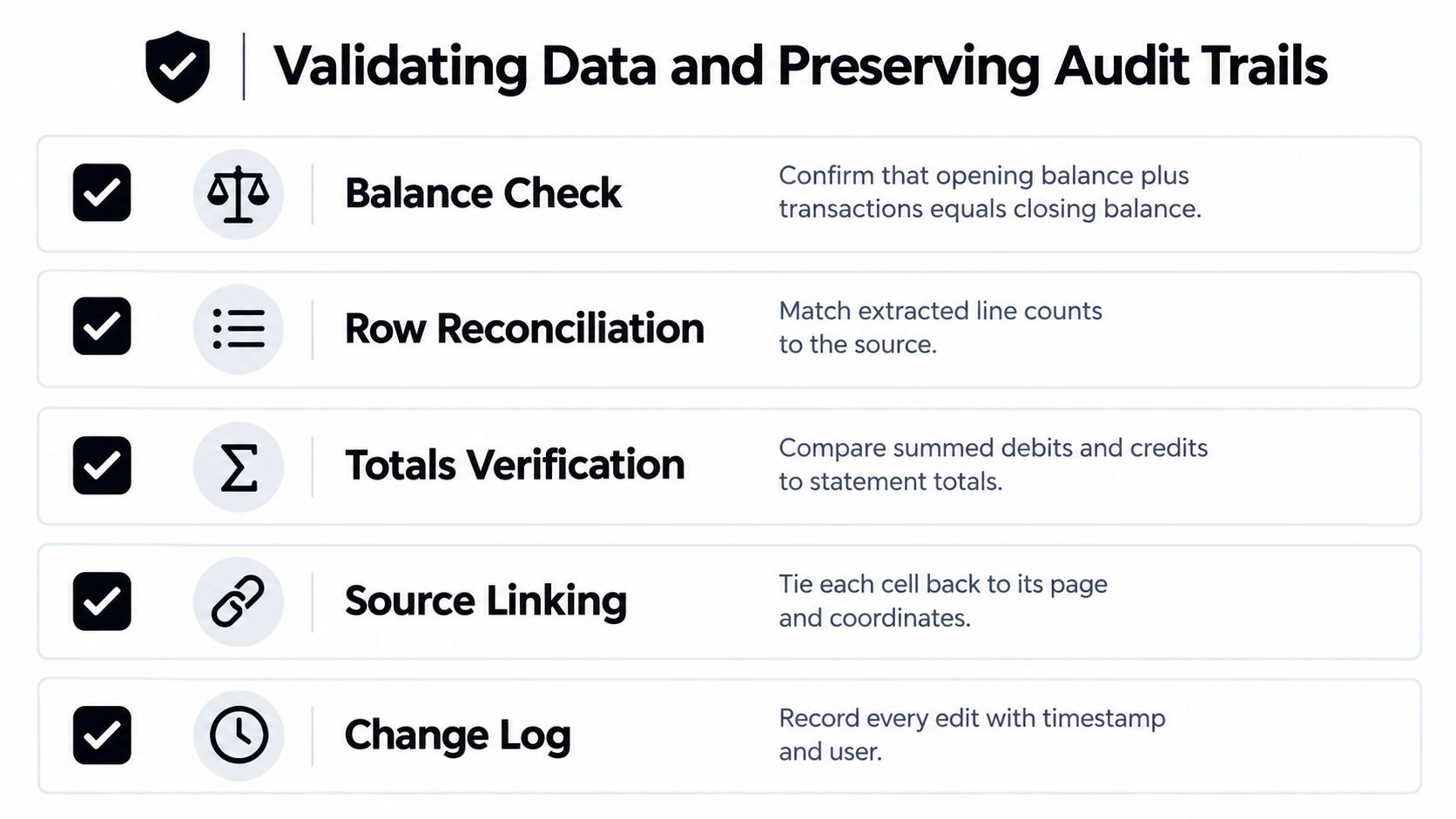
The spreadsheet is evidence of a process, not the source
The original PDF should remain authoritative. The workbook is a derived working file, so it needs a clear link to the source statement through the filename, account identifier, statement period, and reconciliation record.
For each extracted cell or transaction, retain:
- Page reference: Identify the source page.
- Location data: Preserve the bounding box or source coordinates where available.
- Extraction value: Store the original recognized value.
- Confidence information: Record the system's confidence score.
- Transformation history: Show normalization, corrections, and manual edits.
- Review status: Distinguish imported, corrected, approved, rejected, and unresolved values.
Never overwrite an imported value without recording the change. For lending, KYC, compliance, and audit workflows, reviewers need to see what came from the statement and what a person changed later.
Real-World Applications Across Finance and Operations
The value of automated extraction depends on the decision that follows the spreadsheet. A clean transaction table is useful when it shortens reconciliation, supports cash-flow analysis, or helps a reviewer assess financial evidence. It isn't useful if the organization can't explain where the rows came from.
Accounts payable and reconciliation
Problem: Finance teams reconcile bank activity against invoices, receipts, and expense records. Manual entry creates delays when descriptions vary, statements span pages, or transaction amounts use inconsistent signs.
Solution: Extract transaction dates, descriptions, debit and credit values, currencies, and identifiers into a standard schema. Match those records against the accounting ledger, then send exceptions to a reviewer.
Result: The team gets a repeatable reconciliation queue instead of a workbook that requires manual rechecking from the first row onward. The same architecture can support invoice and receipt extraction, where layouts and line-item structures also vary. Deloitte's finance automation comparison places invoice processing at approximately €2–3 per invoice for best-in-class organizations and €10–15 for other organizations, with cycle times of roughly three days versus more than two weeks. Those figures concern accounts payable, not bank statements, but they show why document automation can have a financial impact beyond reducing keystrokes.
Treasury and cash-flow analysis
Problem: Treasury teams need transaction histories from multiple accounts, but each bank may present different columns, date formats, and balance conventions.
Solution: Normalize statement data into a common structure and preserve account-level metadata. The team can then filter deposits, withdrawals, fees, and balances without rebuilding the spreadsheet for every institution.
Result: Analysts spend more time interpreting cash movement and less time formatting source documents. Validation remains essential because an apparently complete history can still contain a missing page or duplicated header.
Lending and KYC
Problem: Underwriters and compliance teams often receive statements as PDFs or images from applicants. The files may be scanned, incomplete, or formatted differently from one another.
Solution: Extract income-related transactions and balances, link every record to its source page, and reject or review files that fail balance checks. Keep the original document and the derived workbook together in the case record.
Result: Reviewers can work from structured information without treating the spreadsheet as independent evidence. That distinction helps prevent a manually altered workbook from becoming the only record used in a lending or compliance decision.
Operations and logistics
Problem: Finance operations rarely process bank statements alone. The same teams may also handle invoices, payslips, identity documents, delivery notes, Bills of Lading, customs declarations, receipts, contracts, and insurance policies.
Solution: Use document classification to route mixed files, then apply document-specific schemas and validations. A single workflow can separate statement transactions from unrelated documents before sending each output to its destination.
Result: Teams reduce manual sorting and avoid building a separate intake process for every document type. The control model stays consistent, extraction, validation, exception handling, and traceability.
Scaling Document Processing Without Adding Headcount
Automation changes the capacity model. Manual entry adds work in proportion to document volume, while a validated pipeline can process additional files without requiring a matching increase in repetitive data-entry effort. That doesn't eliminate human involvement. It moves people toward exception handling, reconciliation decisions, and investigation.
The strongest implementations combine four controls:
- Structured extraction: Convert PDFs and images into consistent fields and rows.
- Validation: Reject files when balance equations, mandatory fields, or date rules fail.
- Traceability: Link every derived record to the original document and its page location.
- Security: Control consent, retention, access, deletion, encryption, and audit logs.
Security needs more than a warning banner. An XLSX file contains the same sensitive account identifiers, balances, transaction history, and spending patterns as the source statement. Depending on the use case, local processing, an enterprise API, or regulated open-banking access may be appropriate. Direct connectivity still requires careful handling of status semantics such as pending versus booked, while PDF conversion remains necessary for historical statements and documents received outside a bank connection.
Matil.ai offers OCR, classification, validation, workflow orchestration, API access, and Excel-oriented outputs for document workflows. Its enterprise positioning includes GDPR, ISO 27001, AICPA SOC, zero data retention, and an availability SLA above 99.99%, as described by the platform. Teams should verify contractual terms, retention behavior, and integration controls against their own compliance requirements before deployment.
The right benchmark isn't a visually impressive workbook. It's a process that produces usable rows, catches structural errors, preserves evidence, and scales review without allowing silent financial mistakes.
If you're evaluating bank-statement automation, Matil provides extraction for digital and scanned documents, structured transaction data, validation workflows, and Excel-ready outputs through API or no-code integrations. Visit Matil to assess how it can connect statement processing with your finance, operations, lending, or compliance workflow.


