How to Improve Logistics Efficiency: The Complete Roadmap
A practical roadmap to improve logistics efficiency through baseline assessments, document automation, and workflow orchestration. Learn actionable steps

Your routes are optimized, your tracking platform is live, and your warehouse team is moving orders at a steady pace. Yet invoices sit in shared inboxes, delivery notes wait for manual entry, and customs documents still pass from one spreadsheet to another. To improve logistics efficiency, you need to optimize not only how goods move, but also how their data moves.
The Hidden Cost of Manual Processes
A shipment can arrive on time and still create avoidable work. The carrier sends a Bill of Lading as a PDF, the warehouse receives a delivery note as a scan, and finance gets an invoice with a different layout. Someone then opens each file, searches for the relevant fields, copies values into an ERP or spreadsheet, and checks whether the numbers look right.
That process creates a gap between physical logistics performance and administrative performance. The warehouse may have efficient picking routes, but the back office can still delay goods receipt, invoice approval, customs clearance, and payment reconciliation.

Manual invoice and document handling is widely described as time-consuming, error-prone, and inefficient because staff must process unstructured documents by hand. Errors often affect practical fields such as invoice numbers, dates, tax amounts, and payable totals, as documented in this review of manual invoice data handling.
Where the friction appears
The hidden workload usually accumulates at handoff points:
- Receiving: Employees compare delivery notes with purchase orders and enter quantities manually.
- Transport administration: Teams retype shipment references, weights, package details, and carrier information from freight documents.
- Customs: Staff extract values from customs declarations and check them against commercial invoices and packing lists.
- Finance: Accounts payable validates vendor details, tax values, payment terms, and totals before approval.
- Compliance: KYC and contractual documents require careful review because a missing or incorrect field can trigger an exception.
The problem isn't just that these tasks take time. Manual entry also creates rework. A single incorrect SKU, currency, tax amount, or shipment reference can force warehouse, transport, and finance teams to investigate the same transaction again.
Practical rule: If employees repeatedly read a document, copy its fields, and compare the result with another system, the process is a candidate for automation.
Custom software can help when the problem extends beyond document capture into dispatch, inventory, routing, or customer communication. A useful overview of the broader technology environment is this logistics guide from Magnitude Marketing. The important operational insight is that document extraction shouldn't sit apart from logistics planning. It should feed the systems that control receiving, inventory, transport, billing, and compliance.
Establishing a Data-Driven Baseline
You can't improve logistics efficiency by measuring only delivery speed or warehouse throughput. Start by tracing the complete transaction, from document arrival to the moment validated data reaches the system that needs it.
A baseline gives managers something more useful than a general complaint such as “the team spends too much time on paperwork.” It shows which document types create the most manual effort, where errors originate, and which handoff causes the longest delay.
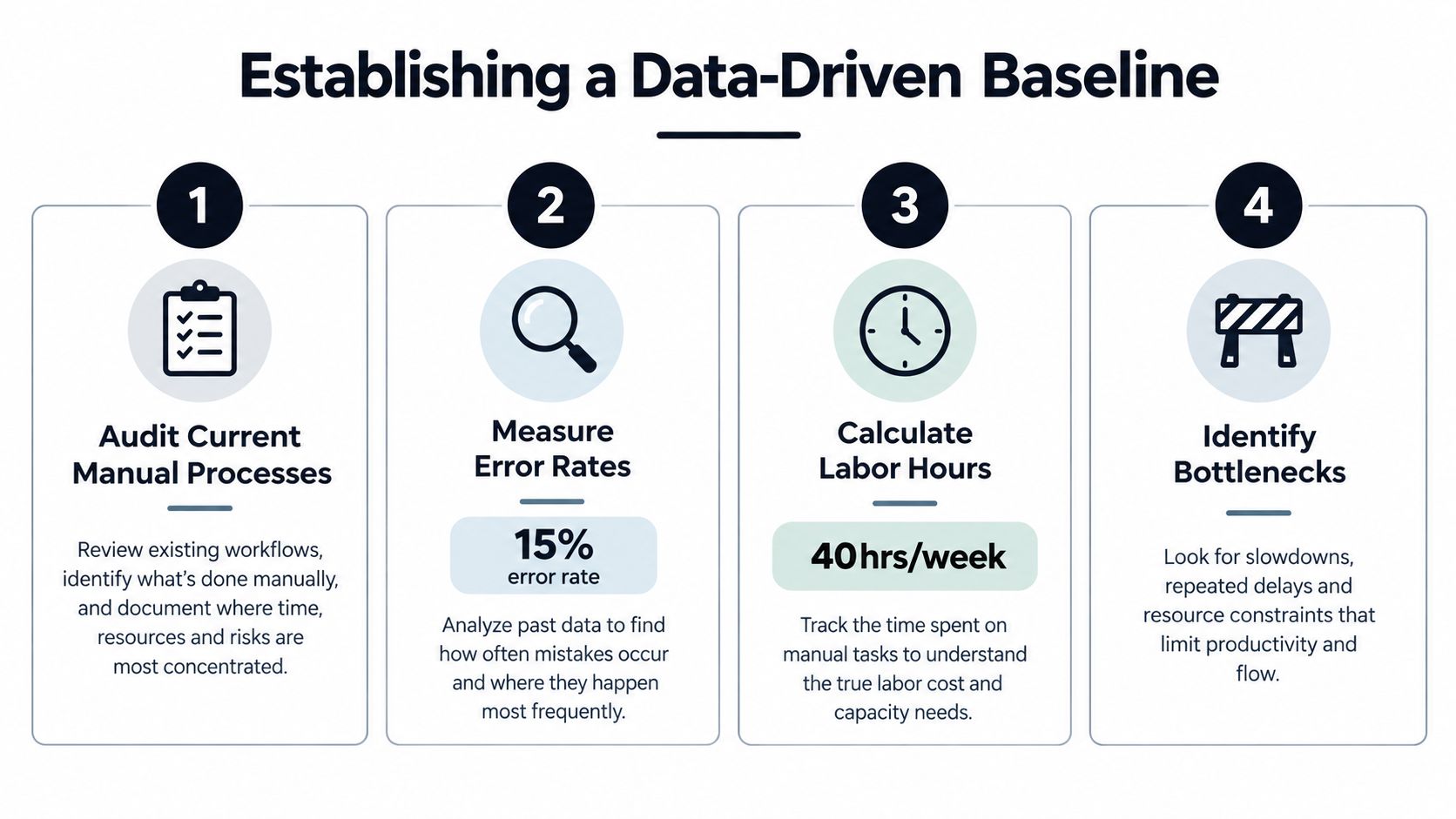
A practical baseline process
Step 1, audit the workflow. Follow several representative documents through the operation. Record who receives them, where they are stored, which fields employees read, where they type the values, and what checks happen afterward. Include exceptions, not only the ideal path.
Step 2, measure errors by field. Don't use a single “document accuracy” label. Separate errors in invoice totals, supplier identifiers, dates, tax values, SKUs, quantities, shipment references, and customs codes. Field-level analysis tells you whether the underlying issue is poor scan quality, inconsistent layouts, unclear ownership, or weak validation.
Step 3, calculate labor effort. Track the time spent opening files, extracting data, checking values, correcting mistakes, requesting missing information, and updating downstream systems. Include the time spent by supervisors and other departments when an error returns for correction.
Step 4, identify the constraint. A warehouse may process goods quickly while finance creates the queue. Alternatively, finance may approve invoices promptly while receiving teams wait for delivery-note reconciliation. Separate transportation constraints from warehouse and back-office constraints before choosing a solution.
Independent benchmarking guidance recommends measuring logistics KPIs such as route utilization, freight cost, fuel consumption, warehouse throughput, and order fulfillment speed, then acting on a small number of priorities rather than trying to optimize everything at once. The same guidance describes potential operational efficiency gains of roughly 15% to 26% when companies systematically measure and act on relevant logistics KPIs, as reported in this logistics network performance benchmarking guidance.
A good review cadence is simple. Assign two or three measures to each role, compare current results with an internal trailing-period baseline, and discuss variance regularly. Teams evaluating wider AI analytics for supply chains should use that same discipline. More data won't fix a process if nobody has agreed which decision the data should support.
Quick Wins Through Standardization
A supplier emails a delivery note with the purchase order number in the header. Another puts it in the footer. A third leaves it out. Receiving staff may resolve all three cases, but each variation creates another rule for reconciliation, filing, or later document extraction.
Standardization removes avoidable work before a larger system change begins. Start with the documents that generate the most repeated handling, then agree with suppliers on a consistent field set: purchase order number, supplier identifier, delivery date, SKU, quantity, unit price, and tax information. A shared template will not remove every exception, but it gives people and software a reliable starting point.
The back office also needs clear operating rules. Use one intake channel: direct invoices, delivery notes, and freight documents to controlled mailboxes, upload forms, or shared folders rather than personal inboxes. This creates an auditable entry point and makes unprocessed files easier to find.
Apply clear naming rules where employees still access files manually. Supplier, document type, reference, and date should appear in a consistent order. Then define exception ownership. Someone must be responsible for missing pages, unreadable scans, quantity mismatches, and duplicate documents. Without that assignment, exceptions remain in a queue while staff assume another team is handling them.
Keep the data request proportional to the decision. Capture only useful fields. If a value does not feed a system, support a control, or inform a decision, requiring staff to enter it adds handling time without improving the workflow. Separate document types early by routing invoices, delivery notes, customs files, and identity documents into distinct queues.
These changes produce operational gains before advanced automation arrives. Staff spend less time searching, supervisors can see where exceptions are waiting, and technical teams receive cleaner inputs for integration work. The trade-off is that supplier onboarding takes coordination, and some partners will resist changing familiar formats. Set a clear transition rule, monitor recurring exceptions, and offer a fallback process until compliance improves.
Standardization reduces unnecessary variation. It does not replace intelligent extraction. It lets extraction tools focus on the document differences that still require interpretation.
Document the target workflow and its ownership before selecting technology. The supply chain automation guide from Matil offers context for connecting document handling with wider operational workflows. A practical sequence is to remove avoidable variation, automate repeatable capture, and reserve human attention for decisions that require judgment.
Implementing Intelligent Document Extraction
A delivery note arrives as a scan, an invoice follows as a PDF, and a Bill of Lading comes through as a phone image. The warehouse may be ready to receive the shipment, but the back office still has to identify each file, find the right fields, and enter them into operational systems. Document extraction turns PDFs, scans, images, and multi-page files into structured fields that another system can use. In logistics, those fields may include a Bill of Lading number, consignee, container reference, SKU, quantity, customs value, delivery date, or carrier.
Traditional OCR for documents recognizes characters. It does not determine whether a number is an invoice total, purchase order, tax amount, or shipment reference. It also performs poorly when suppliers place the same field in different positions, or when documents vary by country, language, format, or scan quality.
That distinction matters in production. A document can look clear to a person while the extracted value is wrong in a field that controls receiving, payment, or shipment records. A review of OCR evaluation and document structure variability identifies layout diversity as a major OCR failure mode and describes character error rate and word error rate as standard measures of recognition performance. Clean templates therefore provide an incomplete test environment for logistics operations.
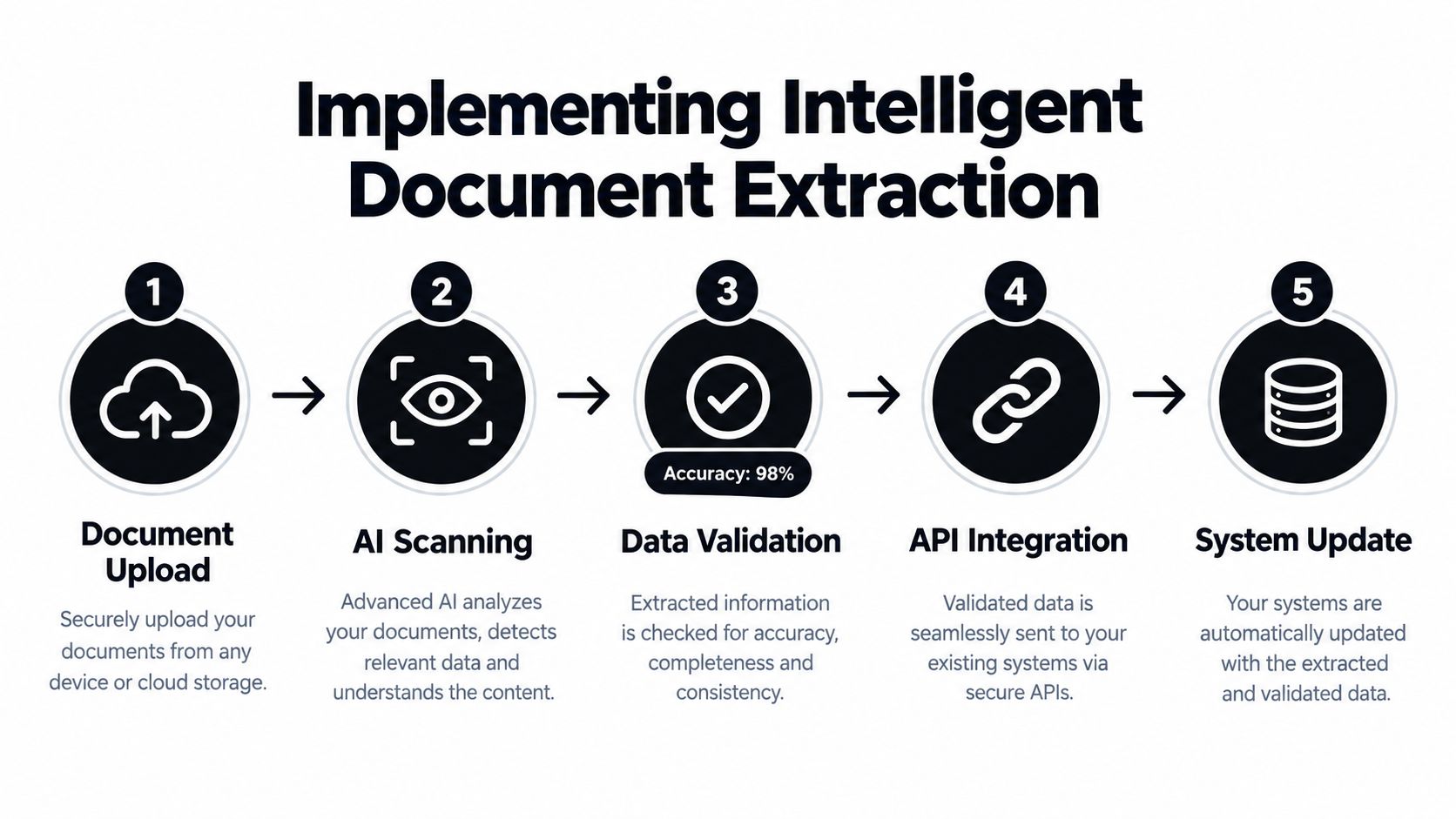
A production workflow needs more than text recognition. It should:
- Read the document with OCR, whether the source is a digital file, scan, or image.
- Classify the file as an invoice, delivery note, Bill of Lading, customs declaration, payslip, receipt, or another document type.
- Map values into a defined structure, such as JSON fields prepared for an ERP or WMS.
- Validate the result against formats, required fields, totals, relationships, and business rules before downstream processing.
This sequence supports automated invoice data extraction, but field-level performance remains the practical test. Exception handling and validation rules determine whether an inaccurate value is stopped, corrected, or passed into an operational system.
Reported invoice-field accuracy is generally around 85% to 95% for traditional OCR-only approaches and around 95% to 99% for advanced AI extraction systems, according to this summary of AI invoice-processing benchmarks. A separate study of 510 diverse invoice samples reported 97.4% field extraction accuracy, 99.1% total computation accuracy, and an average processing time of 1.8 seconds per invoice, as described in this invoice data extraction developer guide. These figures are not a guarantee for every supplier or document set. Ask providers how they define accuracy, which fields they test, and whether the test documents resemble your own.
Matil.ai combines advanced OCR, classification, validation, and workflow orchestration through an API. Its platform provides pre-trained models for invoices, delivery notes, payslips, KYC identity documents, Bills of Lading, customs declarations, and other business documents. Teams can define custom structures and validations for more specific workflows. The publisher describes accuracy above 99% in multiple use cases, a simple API, rapid customization, GDPR, ISO 27001, and AICPA SOC coverage, along with zero data retention for enterprise processing.
For a logistics team, the buying question is whether the system can handle mixed documents, split multi-page files, check extracted values, and produce traceable results for the right workflow. The Bill of Lading OCR extraction example helps identify the fields and checks a shipping process may require.
Building Your Integration Architecture
Extracting a value is only useful when the value reaches the correct operational system. A validated delivery note that remains in an extraction dashboard won't update inventory. An invoice that never reaches the approval workflow won't reduce accounts payable effort.
The right architecture depends on document volume, technical capability, exception complexity, and the systems already in place.
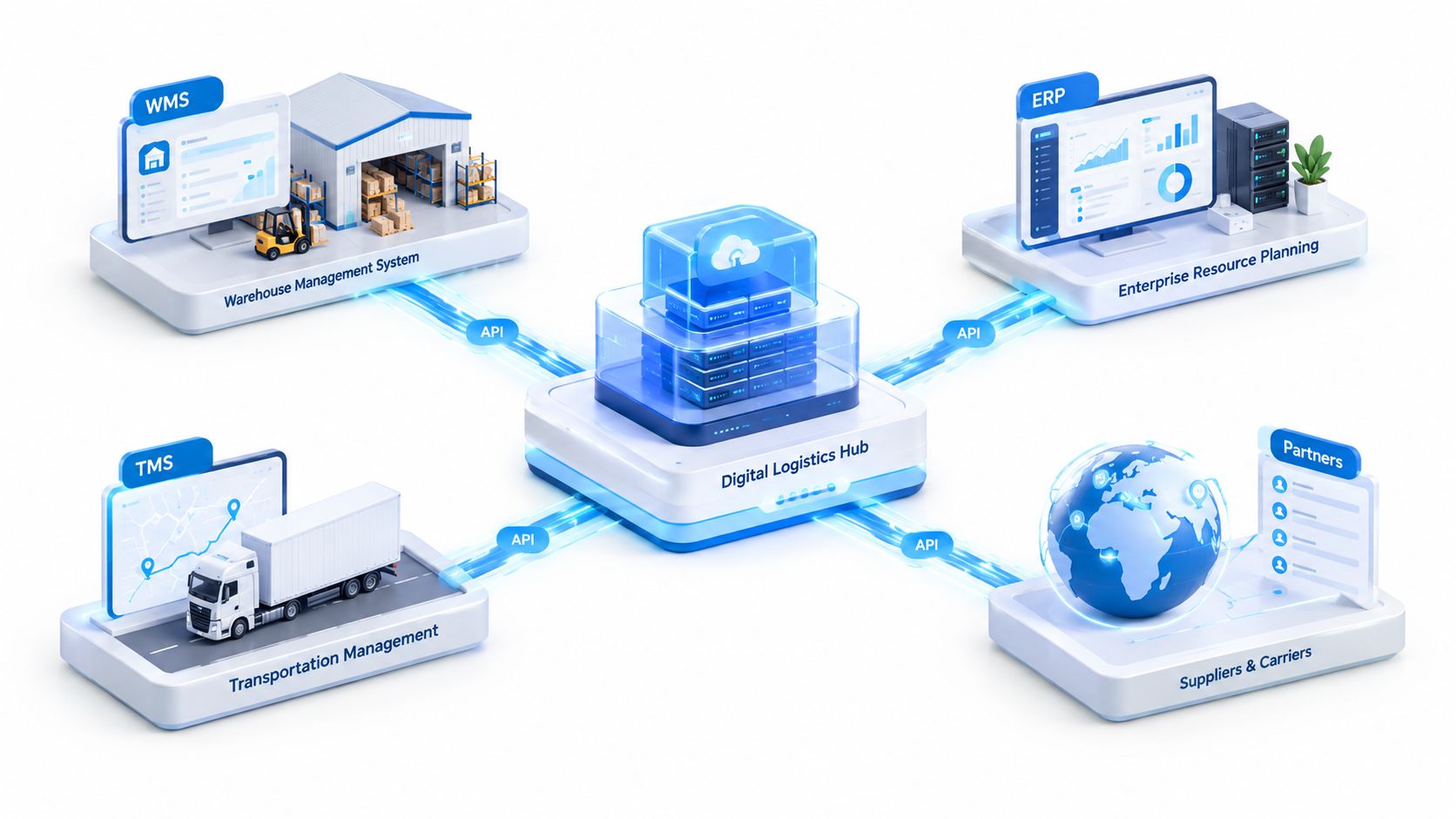
Choosing the connection method
| Approach | Where it fits | Main trade-off |
|---|---|---|
| Direct API connection | A technical team needs structured data in an ERP, WMS, TMS, or internal application | Requires development and ownership of authentication, mapping, monitoring, and errors |
| No-code connector | A team needs to launch a defined workflow without building a full integration | Faster to configure, but complex branching and reconciliation may become difficult |
| ERP or WMS overlay | The organization needs document events embedded into established receiving, inventory, or finance processes | Offers stronger process control, but requires more coordination and testing |
| Orchestrated pipeline | Multiple document types feed several systems with different validation and approval paths | Scales across departments, but needs clear governance and operational support |
Start with the smallest connection that closes the bottleneck. For example, a delivery-note workflow might send validated SKU and quantity data to the WMS, flag mismatches for a receiving supervisor, and retain the original file for traceability. An invoice workflow may route supplier and tax data to the ERP while sending exceptions to accounts payable.
Define ownership for every failure state. Someone must know what happens when a document is unreadable, a required field is missing, a purchase order doesn't match, or the same file arrives twice. The guide to ERP integration offers useful background for thinking about those system boundaries.
Integration test: Don't test only whether data arrives. Test whether the right user sees the right exception, whether the original document remains traceable, and whether a correction can be reprocessed safely.
Designing Pilots and Measuring ROI
A pilot should remove a specific bottleneck, not demonstrate every capability of a document platform. Start with one high-volume document type, a stable business owner, a visible manual burden, and a defined destination system. This keeps the test close to the operational workflow instead of turning it into a broad technology project.
Invoices often make a practical first pilot because finance already has approval rules and reconciliation steps. Delivery notes can produce similar value when receiving staff repeatedly compare quantities with purchase orders. Bills of Lading and customs documents may affect operations more directly, but they usually require field-level validation and checks across several documents.
Before configuring extraction, record what the current process costs:
- Manual effort: Time spent capturing, checking, correcting, and routing each document.
- Data quality: Errors by field and documents sent back for rework.
- Cycle time: Time from receipt to a validated system update.
- Exception rate: Documents requiring human review, including the reason for each review.
- Business effect: Delays affecting receiving, invoice approval, customs handling, or customer response.
Use the baseline to set acceptance rules for individual fields. Extracted text alone should not trigger an automatic posting. Required values must pass agreed validation rules. Uncertain cases should go to a named reviewer, with the decision recorded so the team can adjust the extraction structure or rule later.
The ROI calculation should include the full workflow: implementation, integration, review time, and exception handling. Independent guidance describes operational gains of roughly 15% to 26% from systematic logistics KPI measurement and action, but those figures do not predict the result of a document project. They support a practical discipline, measure a small improvement repeatedly rather than declaring success after launch. The transportation productivity data from the U.S. Bureau of Transportation Statistics provides broader context on the relationship between labor utilization and process performance.
Review the pilot weekly. Fix recurring extraction or validation failures, confirm that reviewers can resolve exceptions, and expand only after the workflow performs reliably under normal operating conditions. Scaling a broken process only produces errors faster.
Ensuring Governance and Compliance
Document automation handles information that can affect payments, customs decisions, employee privacy, customer identity, and contractual obligations. Governance therefore belongs in the process design from the start, not as a security review after deployment.
Require clear answers on:
- Data handling: Where documents and extracted fields are processed and stored.
- Retention: Whether files and outputs are retained, for how long, and under whose control.
- Access: Which users and systems can view original documents or sensitive fields.
- Traceability: How the team connects each output to its source file, model decision, validation result, and correction.
- Resilience: What happens when an API, ERP, carrier feed, or warehouse system is unavailable.
Matil.ai is described by its publisher as supporting GDPR, ISO 27001, and AICPA SOC requirements, with a zero data retention policy and enterprise availability commitments. Those controls matter for finance, KYC, legal, and logistics documents, but each company should still validate the provider's current terms, security documentation, contractual responsibilities, and regional requirements.
Efficiency also has a resilience trade-off. The World Bank Logistics Performance Index research shows that logistics performance is shaped by structural factors such as infrastructure, digitalization, customs, and timeliness. Current supply chain commentary also emphasizes visibility, scenario planning, shared transportation data, and governance rather than treating efficiency as simple headcount reduction, as discussed in this supply chain outlook from KPMG.
Automate repetitive capture, but keep accountable review for high-risk exceptions. That balance helps logistics teams move faster without losing control when suppliers change formats, regulations shift, or disruptions expose weak dependencies.
If you're evaluating how to improve logistics efficiency, Matil provides API-based extraction for invoices, delivery notes, Bills of Lading, customs declarations, KYC documents, and other unstructured files, with classification, validation, workflow orchestration, and structured outputs. Visit Matil to assess whether its document automation can remove a specific manual bottleneck in your warehouse, transport, finance, or compliance workflow.


