Document Intelligence API: A Practical Guide
A document intelligence API turns PDFs and scans into checked JSON. See how OCR, classification, extraction and validation fit a workflow.

The highest headline accuracy score is often the wrong buying question. What matters is whether the API returns the fields your workflow needs, how it handles uncertain values, and whether a person can review exceptions.
A single percentage can hide meaningful differences between clean digital files, scans, and phone photos. It can also treat a miss on a low-risk field as equal to an incorrect total or tax ID. For finance and operations teams, field-level confidence, validation rules, and a clear human review path matter more than one overall score.
What a Document Intelligence API Returns and How Its Stages Work
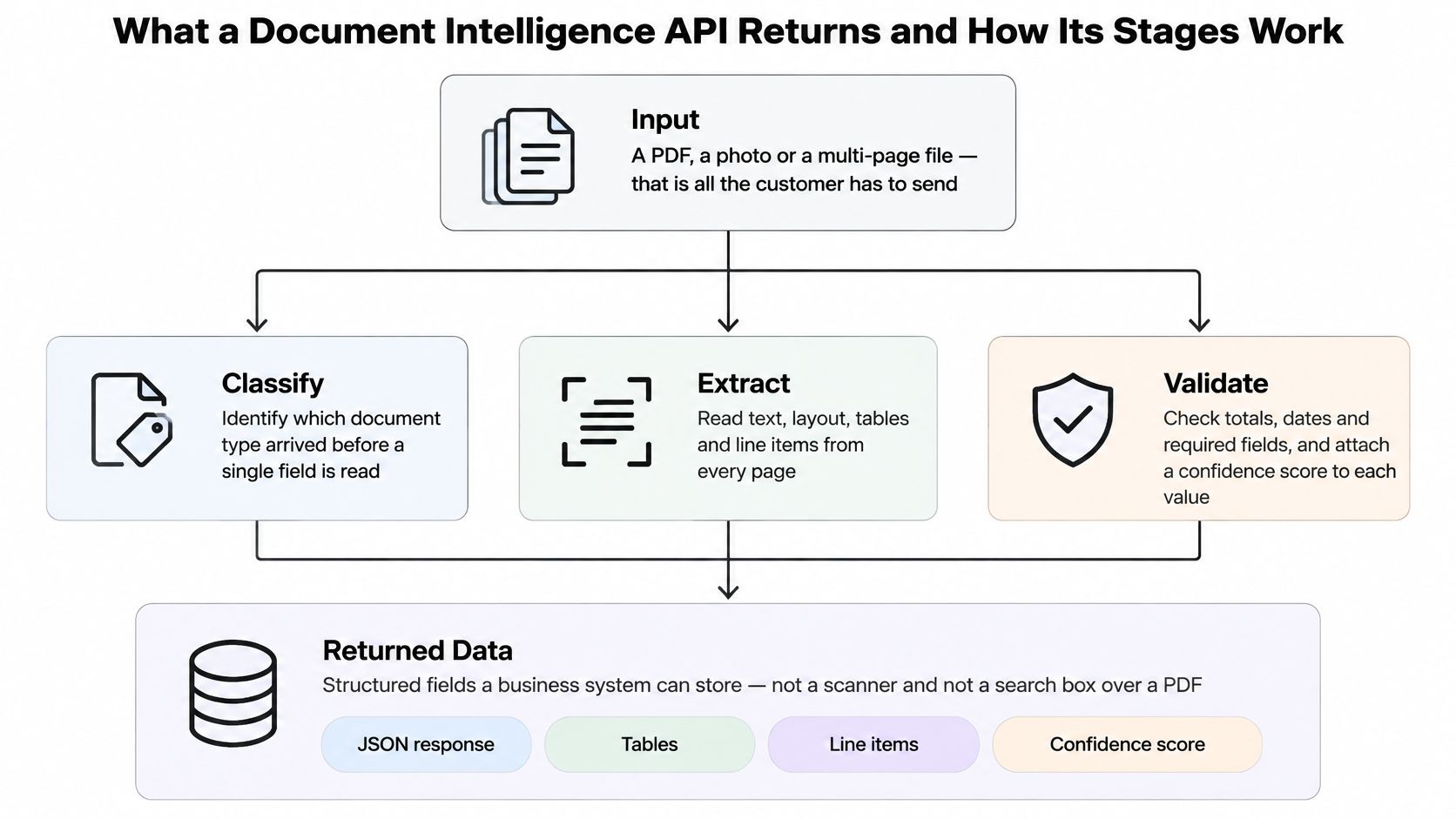
A document intelligence API is neither a scanner nor a search box laid over a PDF. It accepts a file and returns values a business system can store: a document type, a JSON object that follows a schema you named, a status per field, and a pointer to the page each value came from. The call itself is trivial. What the response commits to is the product.
Spending in this category is now substantial. The document AI market was valued at USD 14.7 billion in 2025, according to Grand View Research, and a slice of that buys services that return text with coordinates and stop there.
The diagram below shows the handoffs in order, from a single uploaded file to records your ERP will accept.
What Every Response Should Contain
Four elements separate a working API from an OCR dump. Test for all four during a trial, not in a demo.
- A document type. The response names what arrived, so a delivery note isn't parsed with an invoice schema and a payslip isn't read as a bank statement.
- A schema-bound JSON body. Fields come back with the names and types you defined, not whatever keys the vendor felt like emitting that quarter.
- A per-field status. Every value is marked as passed, flagged for review or rejected. One confidence score for the whole file tells you nothing about which line item to distrust.
- Provenance. Each field carries its source page and, ideally, its bounding box, so a reviewer can look at the exact pixels the number came from.
The Four Stages and What Each One Owes You
| Stage | Input | Output | If you skip it |
|---|---|---|---|
| OCR | Page image, scan or photo | Text with positions on the page | Nothing downstream can read a paper original |
| Classification | Mixed inbox of files | Document type such as invoice, payslip or ID | The wrong field schema is applied |
| Extraction | Classified document plus a schema | JSON fields such as totals, tax IDs and line items | Staff still retype values into the ERP |
| Validation | Extracted JSON and business rules | Pass, flag for review, or reject | A wrong total or ID enters the system of record |
OCR reads the page aloud, and that is the entire scope of the job. Classification labels the file before a single field is read. Extraction fills the schema with supplier, tax ID, invoice number, dates, totals and line items. Validation is the stage buyers underweight most: it checks the stated total against the sum of the lines, flags a missing tax ID, catches a duplicate invoice number, and holds a bank account change that doesn't match previous records.
Reading characters was never the hard part. A World Bank analysis of electronic files of Bank reports found that in 1992 fewer than 1% of the Bank's reports were available in complete electronic form, and that without document-services staff stepping in, only about 1 in 10 reports submitted by business units was expected to be suitable for immediate inclusion in its ImageBank database. The other nine needed scanning, OCR or conversion work. Every one of those reports was already a document. What was missing was a dependable way to turn a heterogeneous pile into records a database would accept.
Document data extraction is the conversion of an unstructured file into schema-bound fields with a recorded pass, flag or reject.
Why the Model Has To Be Allowed To Abstain
Ask a direct question about invoice automation and you get a direct answer: yes, invoice data can be extracted automatically, but only when classification, a field schema and validation run after OCR. Skip any of those and you've bought character recognition with a marketing page.
The behaviour that separates a production system is abstention. When the model reaches a bank account number it can only half read, or a total that contradicts the line items, it should flag the field rather than fill it with a plausible guess. Confidence belongs per field, not per file, because a file-level score of 94% can hide one catastrophic value.
That has an operational consequence. Low-confidence fields need somewhere to go: an exception queue with a named owner, a threshold that decides what gets reviewed, and a log of who corrected what. Teams that plan for that queue get straight-through processing on the easy majority and a short review list on the rest. Teams that don't get silent errors.
The Retyping Test
Here's the cheapest diagnostic you can run on any document intelligence API, including a homegrown one. Ask whether staff still retype the supplier name, invoice number, tax amount, date and line items into the ERP after the tool has run. If the answer is yes, you have plain OCR with better branding.
The same test applies to output quality. If the returned JSON doesn't follow a schema your developers can lock and version, every downstream integration becomes a custom mapping job. Defining fields by name, type and description, the way you'd specify a database column, is what makes the output stable enough to validate against business rules instead of eyeballing.
Why a Single Accuracy Score Misleads Buyers
An accounts payable inbox is not a tidy set of PDFs. Clean supplier invoices sit next to phone photos of receipts, multi-page packs where page four is upside down, and the occasional contract that arrived in an invoice folder. Someone opens each one, finds the supplier, the number, the tax, the dates and the line items, and types them into the ERP. That person is your current integration layer. Plain OCR returns characters instead of a checked invoice, and it treats a clean digital PDF the same as a skewed scan in the sales story.
Published results don't blur that line.
| Document condition | Reported accuracy | What it means in production |
|---|---|---|
| Clean digital invoices | 96.50% | Strong on tidy files, still not safe for unreviewed payment fields |
| Scanned invoices | 92.71% | More exceptions from skew, stamps and poor contrast |
| Scanned receipts | 87.46% | Expect a larger human review queue |
| Separate invoice evaluation | 63% overall | Dataset, fields and method can collapse a headline score |
Those figures come from published AI invoice processing benchmarks, and the last row is the one worth pinning above your desk. A different evaluation of invoice information extraction reported 63% overall accuracy, not because the engine was broken but because dataset, field set and scoring method change the answer.
Read the table as a warning about scope, not a scoreboard. Document-level accuracy and exact-match field accuracy are different measures, and vendors quote whichever flatters them. A system that nails 95% of fields on a document is useless if the five it misses include the total, the tax ID, the currency or the bank account. One wrong total outweighs a dozen correct low-risk fields.
The cost of that asymmetry is measurable. A study of 20,872,182 Nordic purchase invoices processed in 2020 found that invoice-handling errors cost 100 large organizations €12,347,183, an average loss of €0.59 per invoice. Once internally corrected errors were counted, erroneous invoices represented an estimated 0.52% of all handled invoices, and each organization spent about 22.5 working days correcting them, according to Qvalia's cost of accounts payable errors analysis.
Half a percent sounds tolerable until you multiply it by your own volume and add the working days. Field validation, duplicate detection, exception routing and traceability exist to stop that half percent from reaching the ledger unnoticed.
So the question to put to any vendor isn't which API prints the highest percentage. It's what accuracy you should expect per field on your own document mix, and at what point a human sees the result. Model your own numbers with a step-by-step error rate calculation rather than borrowing someone else's headline.
How to Wire the API into a Live Workflow
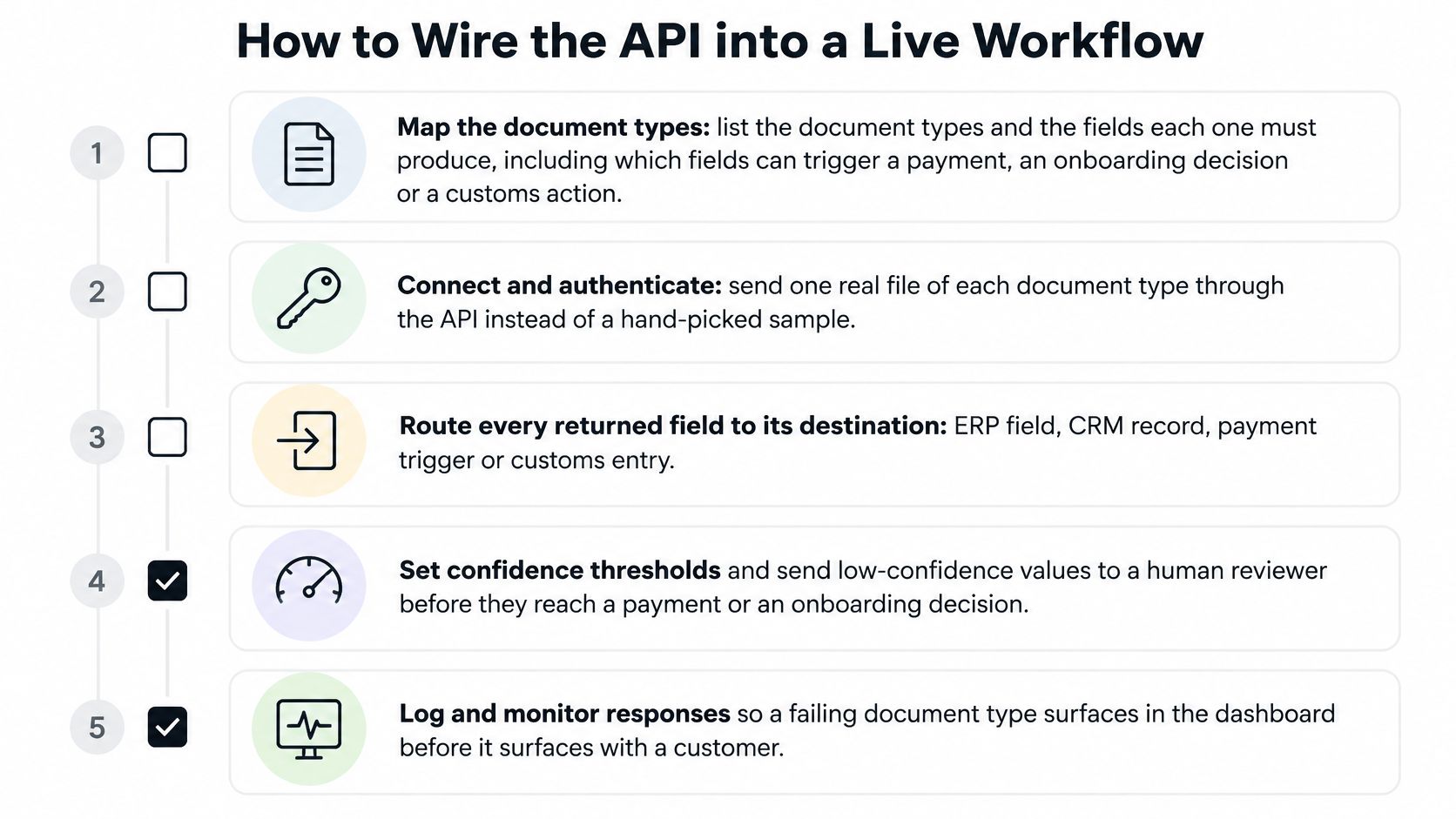
A pilot that runs on twenty clean PDFs proves nothing about a Tuesday in month-end close. The sequence below is the order that survives contact with real files, and it assumes the API has already passed a technical trial.
What the Response Looks Like Before You Map It
Mapping starts from the response shape, so look at it first. A field-level response for one invoice line item might return a value, a confidence score, the source page and a status, and that quadruple is what your ERP connector consumes.
| Field | Value | Confidence | Page | Status |
|---|---|---|---|---|
| Supplier name | Nordwind Logistik GmbH | High | 1 | Pass |
| Invoice total | 14,208.50 | Medium | 2 | Flag (does not equal the sum of line items) |
| Tax ID | Matches supplier master | High | 1 | Pass |
| Bank account | New, no history | Low | 2 | Flag for review before payment |
Seven Steps from Sample File to Live Workflow
- List the document types and the fields each must produce. Include which fields can trigger a payment, an onboarding decision or a customs action. Those are the ones that need a review threshold.
- Send a sample of real files. Scans, phone photos, multi-page packs and a badly cropped receipt. A hand-picked clean set tells you what the vendor's demo told you already.
- Choose a call pattern. A synchronous response for a user waiting on screen, a webhook when processing takes longer than a screen wait, or a batch job for nightly imports. Wrong pattern choice shows up later as timeouts and duplicate submissions.
- Map the JSON into the ERP, HR or case system and reject on rule failure. A value that fails validation should stop the record, not land in a notes field for someone to notice next week.
- Log the source file, page, schema version, validation result and who corrected a field. Without the schema version, replaying a decision six months later is guesswork.
- Route low-confidence or rule-fail documents to a named reviewer with a stated threshold. Humans should see exceptions, not every page, or the automation saving disappears into a review line.
- Set a retention period by document category, review it, and delete on schedule. Invoices, payslips and identity documents don't share a lifecycle.
Steps 5 through 7 are where audits are won. The ICO guidance on the storage limitation principle asks organizations to establish and document standard retention periods for different categories of information, follow them in practice, and review them at intervals. For a system handling invoices, payslips, identity documents, contracts or bank statements, that means retention defined by category and purpose, never left as an indefinite default.
The same discipline sits behind EU thinking on automated decisions. The European Commission's regulatory framework for AI lists risk assessment, dataset quality, activity logging, technical documentation, human oversight, resilience, cybersecurity and accuracy among the obligations for high-risk systems. Even when your use case isn't high-risk AI, that list is a good operational checklist: log the extraction, preserve page provenance, keep a human in the loop for consequential values, and test accuracy on a schedule.
Governance test: an auditor should be able to take any accepted value and replay why it was accepted, on which page, against which schema version, and who touched it afterwards.
A single endpoint that classifies, extracts and validates in one call, which is how Matil's API is built, removes one integration hop. The controls, thresholds and logs around it stay yours. If you're still deciding between a managed API and a hand-rolled pipeline, this walkthrough of how to use an API to get data covers the plumbing decisions in more depth.
Invoices Payroll KYC and Freight Documents
Four document families drive most of the demand, and each arrives as a mix of born-digital files and legacy scans. The schema changes by type. The four stages never do.
Invoices That Arrive as Both PDF and Scan
The problem: supplier identity, invoice number, tax amounts, dates, totals and line items get rekeyed, and duplicates slip through. Fields extracted: supplier, invoice number, tax, dates, totals and line items. The result: mismatched totals and low-confidence bank details become exceptions while the rest posts as a file accounts payable can approve. That matters at policy level too. A World Bank assessment of digitalization in Bulgaria, Poland and Slovakia, built on more than 70 statistical indicators including 2022 Eurostat measures, notes that tax rules have pushed firms to generate financial documents in machine-readable formats. It also makes the distinction that catches teams out: sending an invoice electronically doesn't mean it's formatted for automated processing.
Payroll Tables Where a Digit Hides
Salary lines and contribution bases sit inside dense tables where a misread digit is invisible until someone queries their payslip. Extraction pulls the gross, deductions and bases. Validation compares them against the expected contribution rules for that period, which catches the silent errors that payroll teams otherwise absorb.
KYC Documents That Gate Onboarding
An ID card, NIE or passport yields name, number, document type and expiry for onboarding. A human still decides a refusal: a solely automated rejection raises data-protection issues, and identity verification isn't the same thing as remote biometric identification. Flagging low-confidence reads keeps a human in the loop where the law expects one. Legal teams face the same evidence question when the document is a contract, which is why secure document review for legal teams is built around seeing the clause rather than trusting an extracted value.
Freight Paperwork That Holds a Shipment
A bill of lading or a customs declaration (DUA) carries parties, references and quantities that gate a shipment. A missing required box should produce an exception, not a silent gap that surfaces at the port. Extraction here is less about reading text and more about confirming that every mandatory field exists before the container moves.
What Automation Saves in Time and Errors
Start with the number a business case can be built on. A 2023 European Commission study estimated that automating the invoicing process delivers approximately €5.28 to €8.40 in benefits for every electronic invoice received and processed, using a labour-cost assumption of €46 per hour, as set out in the European Commission's invoicing automation study.
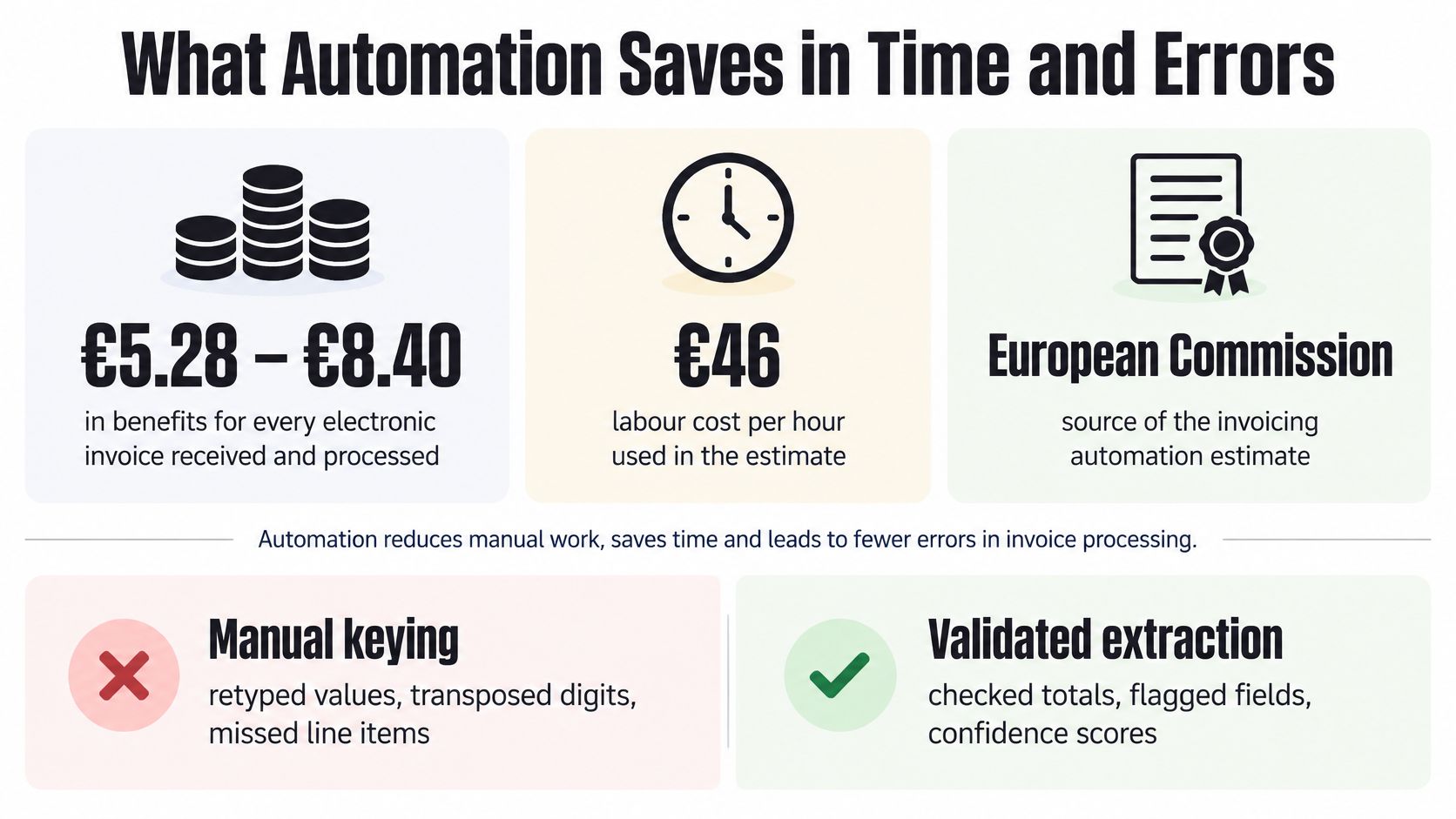
That range isn't a vague efficiency claim. The same study attributes the value to reduced manual data entry, fewer entry errors, and savings in printing, postage, routing, archiving, invoice review and approval. Map each bucket to a stage you've already specified and the arithmetic becomes concrete.
- Manual entry falls when extraction fills the schema instead of a clerk reading a scan.
- Entry errors fall when validation blocks a total that contradicts its line items before posting.
- Routing and review shrink when classification and an exception queue replace a shared inbox.
- Archiving turns into a retention rule per document category rather than a shared drive nobody audits.
The European Commission's eInvoicing guidance names manual entry as a specific source of invoice-data errors and lists paper, printing, mailing, manual handling during sending or receipt, review, approval and archiving among the costs automation can remove.
What Scale Actually Means
Volume grows by adding documents to the same endpoint, not by hiring another clerk per hundred invoices, payslips or bills of lading. Straight-through processing for files that pass, and a short queue for files that don't, is the whole operating model.
That's also where the automation promise breaks. Those euro figures assume the process is automated end to end. A tool that OCRs the page and leaves retyping in place doesn't earn €5.28, because the expensive step never left.
The savings live in the fields nobody has to type again, not in the characters the system managed to read.
For a finance lead building the case, three numbers carry the argument: hours removed from data entry and review, errors caught before posting rather than reconciled after, and throughput that grows without a matching rise in headcount.
Decide Whether Matil Fits Your Document Stack
Choose a document intelligence API when the pain is retyping plus bad data in the system of record, and when you need classification, a schema, validation and an exception path rather than OCR alone. If your only requirement is searchable PDFs, a cheaper tool will do.
Matil is one way to run that stack. It isn't only OCR: one endpoint combines OCR, classification, extraction, validation and workflow steps, with pre-trained structures for energy bills, delivery notes, payslips, identity documents, bank statements, receipts, insurance policies, and logistics documents including bills of lading and customs declarations. Custom schemas are defined by field name, type and description, or built from sample documents in under a week. The stated production accuracy is above 99% on multiple of those use cases.
That number doesn't remove the earlier caveat. Review low-confidence payment and identity fields anyway.
Three Call Modes and Where Each Fits
| Call mode | Best for | How results return |
|---|---|---|
| Normal | Live screen where a user is waiting | JSON returned immediately |
| Async | Processing that takes longer than a screen wait | Results delivered by webhook |
| Batch | Nightly imports of hundreds of documents | Documents accepted for a scheduled load |
The data rules are worth reading before the feature list. The client keeps all rights over uploaded documents and the structured JSON derived from them. Matil acts as a data processor under GDPR on the client's instructions, holds ISO 27001 and AICPA SOC credentials, and doesn't use client documents to train public models or models shared with other clients. By default, documents and results are kept 12 months for audit, traceability and technical support, then deleted automatically. That's a bounded retention period, not zero retention, and describing it as anything else would be inaccurate.
If you're evaluating this process, run a sample of your own scans through those three modes at matil.ai, and read the API reference at docs.matil.ai before you commit a workflow.
Matil turns PDFs, photos and multi-page packs into validated JSON through a single endpoint, so a finance, payroll, KYC or logistics team can post the clean files and review only the exceptions. If you're weighing up how much of your document handling is still manual, a short trial on your own scanned invoices and delivery notes will tell you more than any accuracy claim on a comparison page. Start at Matil and see what comes back from the files you already have.


