Form Validation Best Practices for Reliable, Secure Forms
Learn form validation best practices that improve UX, security, and data quality. Practical patterns for client, server, accessibility, and integrations.

Your finance team is rekeying an invoice that the supplier already submitted. The form accepted it, but the ERP rejected the currency, reconciliation flagged an inconsistent total, and nobody can tell which value was changed. Form validation best practices should prevent that handoff failure, not just turn a field border green.
Why Most Form Validation Fails Before It Starts
Consider a supplier-invoice form with a required invoice number and a total. Both fields pass the browser's checks. An operations specialist submits the record, then finance discovers that the supplier reference doesn't match an approved account and the total excludes a charge shown elsewhere in the document.
Nothing necessarily broke in the interface. The team defined “valid” too narrowly.
A nonempty invoice number isn't necessarily a usable identifier. A correctly formatted amount isn't necessarily the amount finance should pay. Syntax, business meaning, and permission are different questions, and a single validation function shouldn't pretend to answer all of them.
The failures that survive a green checkmark
Common implementation mistakes include:
- Browser-only rules: The interface rejects malformed values, but another client can send those same values directly to the endpoint.
- Generic rejection messages: Users see “Submission failed” without knowing whether to correct a field, request permission, or retry later.
- Unowned business rules: Engineering implements a requirement, but nobody maintains it when finance changes its acceptance criteria.
- Untracked corrections: An operator fixes an extracted value without leaving enough context for another reviewer to understand the change.
The operational stakes aren't hypothetical. A European Commission thematic report on e-invoicing cites research finding that incorrect information caused payment delays for 15.1% of invoices transacted in Europe. That figure concerns invoice information, not the effectiveness of any particular form library.
Practical rule: Define what a downstream team needs to trust before deciding what the browser should reject.
Treat validation as a layered contract. UX helps people enter information. Security establishes what the system will accept. Accessibility makes correction possible. Data-quality rules determine whether accepted information is useful for the workflow.
Assign an owner to each business rule, including its error message and exception process. Otherwise, the team will eventually have to choose between blocking legitimate work and accepting questionable records.
The Client and Server Split in Form Validation
The browser helps people succeed. The server decides whether a request is acceptable. Think of a parking entrance: the guidance display and opening gate speed entry for honest drivers, while the controlled barrier enforces access.
The diagram separates those responsibilities:
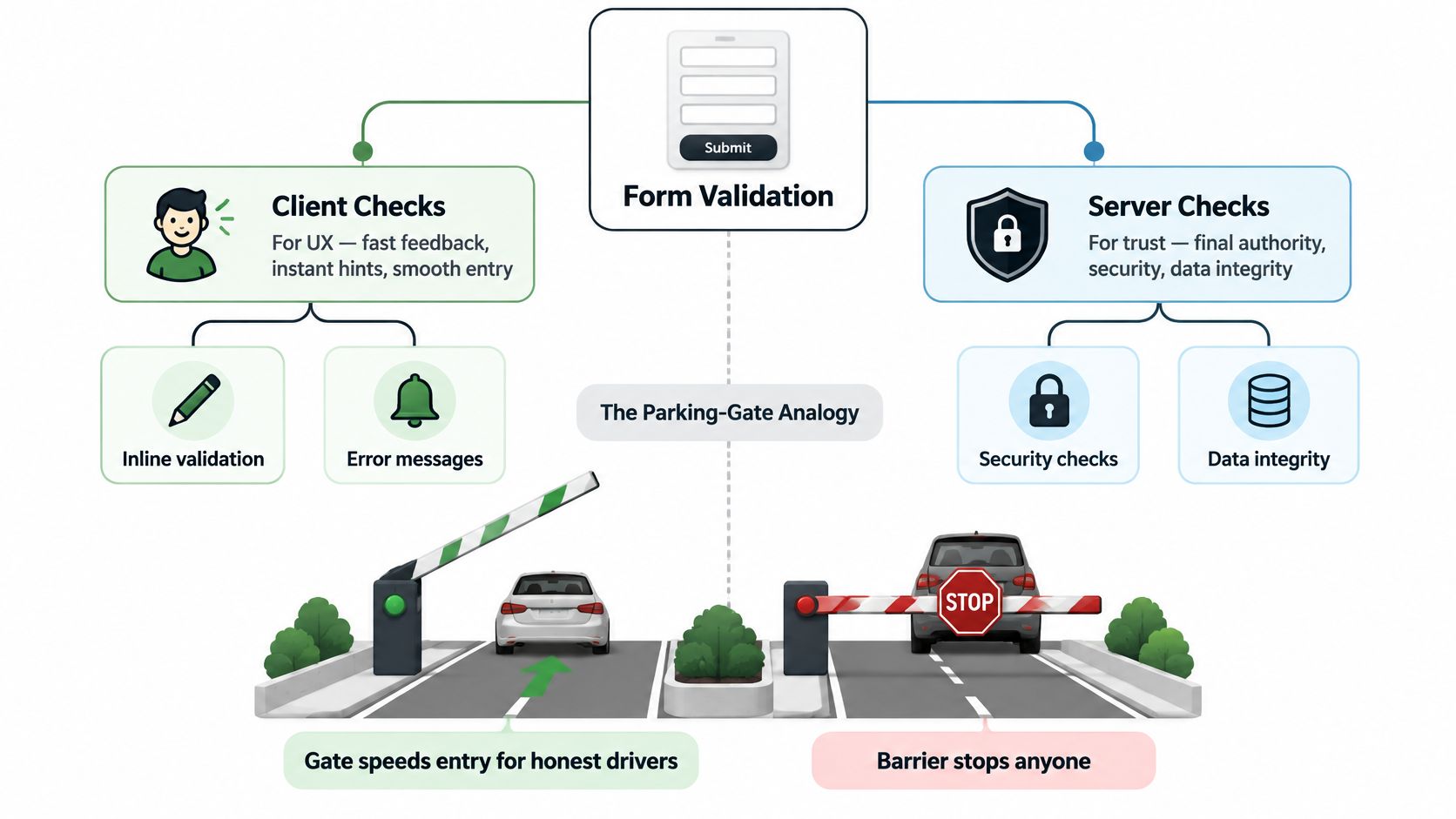
Put each check at its actual boundary
| Responsibility | Browser | Server |
|---|---|---|
| Format guidance | Show accepted formats and helpful examples | Independently verify submitted formats |
| Field feedback | Explain correctable mistakes near the control | Return stable field-level error identifiers |
| Business decisions | Preview likely outcomes | Enforce cross-field and workflow rules |
| Access and persistence | Present available actions | Check authorization before committing changes |
Client-side constraints are useful, but requesters control their clients. Removing an HTML attribute, modifying JavaScript, or sending a custom request must not change what your backend accepts.
NIST's input-validation control SI-10 covers both syntax and semantics, including character sets, lengths, ranges, and acceptable values. It also connects validation to injection prevention while identifying parameterized interfaces and output encoding as additional safeguards. A valid-looking string doesn't become safe to concatenate into a database query.
For Vue implementations, DOM Studio's Vue form validation tips can serve as a framework-specific companion when planning the interface. Keep the acceptance contract independent of whichever component library renders the fields.
Avoid making every correction a round trip
Server-only feedback can leave users discovering obvious mistakes after completing the whole form. Provide local hints and lightweight checks, then translate server rejections into the same field-error model instead of displaying an unrelated notification.
Keep network failure separate from invalid input. If the validation service can't respond, say that verification is unavailable. Don't label the user's value incorrect.
For an additional implementation walkthrough, use the accompanying video:
Allowlist, Schema, and Normalization Patterns
Start with an explicit acceptance contract, not a collection of suspicious strings. Allowlist validation describes what a field may contain; denylist validation tries to enumerate what it must not contain.
OWASP's Input Validation Cheat Sheet recommends allowlists, length limits, validation of inputs, and appropriate Unicode handling. The practical benefit is predictability: reviewers can inspect the accepted domain instead of guessing which attack representations a regular expression misses.
Define fields before writing regular expressions
A reusable field schema should specify:
- Type and presence: Distinguish a missing value from an empty string, a numeric amount, or an explicit null.
- Syntax and character categories: Describe permitted structure without unnecessarily excluding international input.
- Length and range: Set bounds based on business requirements and downstream storage.
- Accepted values: Use documented enumerations for fields such as currency or document category.
- Normalization policy: Define transformations that are permitted before validation.
- Rule identity: Give failures stable identifiers that clients and workflow consumers can recognize.
A schema-validation overview is useful when translating those decisions into an explicit data contract. Don't treat the schema as just a convenient way to generate error messages.
Normalize representation without rewriting meaning
For an email field, define which surrounding whitespace the system removes and which canonical representation it stores. Don't casually rewrite the entire address because a transformation looks convenient.
For customer names and addresses, use Unicode-aware rules that accommodate supported letters, spaces, and punctuation. An apostrophe or accented letter shouldn't be rejected merely because an engineer started with an ASCII-only expression.
Invoice identifiers need a different policy. Constrain them to the documented supplier or workflow pattern, but don't assume that every supplier uses the same identifier structure. Keep identifiers as strings when their formatting carries meaning.
Normalization should make equivalent representations consistent. It shouldn't make uncertain information look verified.
Maintain equivalent acceptance rules across browser and server implementations, preferably through a shared schema or contract tests. Backend-only requirements can remain private, but basic field definitions shouldn't drift between environments.
For extracted documents, retain the original and normalized values in the authorized business record when traceability requires them. Make transformations inspectable rather than overwriting the evidence without notice.
Choosing the Right Validation Timing per Field Type
Validate-as-you-type isn't a universal rule. A field can be temporarily incomplete without being wrong. Showing an error while someone is still entering a date confuses an unfinished action with a failed one.
The validation-timing research discussion collected on UX Stack Exchange describes mixed findings: immediate feedback helped in some conditions, while embedded post-submission feedback worked better in others. Treat timing as a design decision, not a setting to apply across every control.
Validation timing by field type
| Field type | Recommended timing | Why |
|---|---|---|
| Country or currency selector | Immediately after selection | The user has completed a discrete choice |
| Email or phone number | On blur, then on submit | Partial input is expected while typing |
| Password | Requirements upfront, feedback after a pause, enforcement on submit | Avoid repeatedly rejecting an unfinished secret |
| Date | On blur for completeness, on submit for business meaning | Interpretation may depend on locale and related fields |
| Payment details | After sufficient input or on blur, then server verification | Partial entry shouldn't trigger premature rejection |
| Invoice totals or date ranges | Once dependencies are complete, with authoritative submit checks | The rule concerns relationships between fields |
| Multi-step form | At the relevant step boundary, then final submission | Users need local corrections without losing earlier work |
Separate prevention from interruption
Show instructions before an error becomes likely. Password requirements belong near the field before typing starts. Date fields need an explicit interpretation policy, especially when the same written value could mean different dates; this date-field validation guide provides related implementation context.
Don't wait until final submission to flag a complete, obviously impossible date. Conversely, don't reject a date range while the end date is still blank and the user hasn't reached it.
For asynchronous checks, associate the response with the value that triggered it. If someone edits the field before the response arrives, discard the stale result rather than marking the new value invalid.
After a failed submission, allow corrected fields to clear their errors without forcing another full-form attempt. Preserve an actionable summary for unresolved issues.
The governing question is simple: Does this feedback help the user make their next decision, or merely announce that they haven't finished typing?
Writing Errors Users Can Actually Act On
“Invalid input” identifies neither the problem nor the correction. “Phone number must include the country code” gives someone a next action, provided that requirement belongs to the workflow.
WCAG's Error Identification guidance defines Success Criterion 3.3.1 as Level A: when the system automatically detects an input error, it must identify the affected item and describe the problem in text. A red border alone doesn't satisfy that expectation.
Connect the message to the control
Use a visible label, adjacent error text, and a programmatic relationship. A compact invalid-state pattern is:
<label for="phone">Phone number</label>
<input id="phone" name="phone" type="tel" aria-invalid="true" aria-describedby="phone-help phone-error">
<p id="phone-help">Include the country code.</p>
<p id="phone-error">Phone number is missing its country code.</p>
Only apply aria-invalid="true" when the field has failed validation. When the user corrects it, update the state and remove the obsolete error association while preserving any help-text association.
For dynamic announcements, consider a dedicated region such as <div aria-live="polite" id="form-status"></div>. Announce meaningful state changes, not every keystroke, and test whether blur feedback overlaps with the next field's announcement.
Give submission errors a navigable structure
- Name the field: Use the same label in the summary and beside the control.
- Explain the correction: “Choose a currency” is clearer than “Value not allowed.”
- Manage focus deliberately: After a failed submit, focus a linked error summary or the first invalid field, depending on form complexity.
- Preserve work: Keep appropriate entered values and avoid resetting unrelated sections.
- Separate failure categories: A network outage needs a retry path, not a fabricated field error.
Error-copy test: Could someone correct the value without reading your implementation or contacting support?
Don't expose sensitive account information just to make a message specific. The right wording explains the permitted correction without revealing records the requester isn't authorized to inspect.
ARIA wiring is implementation support, not proof that the whole form is accessible. Test the complete correction journey with keyboard navigation and a screen reader.
Validation as a Contract for APIs and Document Workflows
Document data extraction is the conversion of information in documents into structured fields that software can process. OCR recognizes text. Classification identifies the document type. Extraction assigns values to fields. Validation determines whether those values satisfy the receiving workflow's contract.
Yes, invoice extraction can be automated. But reading a total correctly doesn't establish that it agrees with the line items, belongs to the selected supplier, or should enter a payment workflow.
The same contract must hold across each integration boundary:
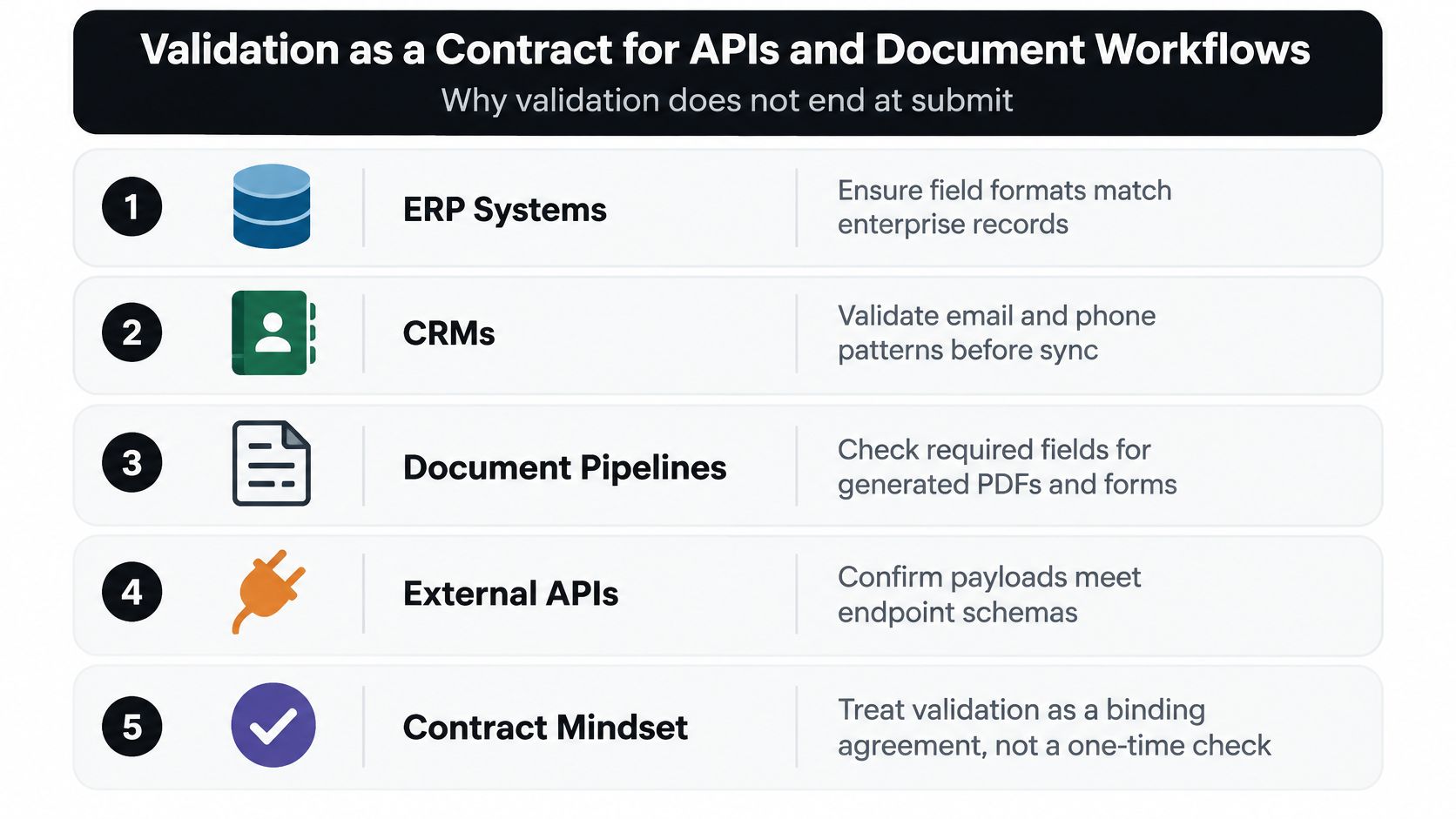
Carry evidence alongside the value
A downstream JSON payload should carry an agreed selection of:
- Field identity and schema version: Identify the meaning of the field and the contract applied.
- Original and normalized values: Preserve relevant evidence and the transformation result.
- Validation status and rule identifier: Distinguish accepted, rejected, and review-required states.
- Source reference: Point authorized reviewers to the document or originating record.
- Correction history: Record approved changes and their provenance.
Keep sensitive source values in access-controlled business storage, not routine telemetry. Traceability doesn't justify copying personal information into every integration log.
Apply the contract to actual document work
| Workflow | Problem | Contract-based solution | Intended result |
|---|---|---|---|
| Invoices | Extracted amounts disagree | Reconcile totals before payment routing | Route exceptions for review |
| Payslips | Amounts lack period context | Validate pay period and field relationships | Produce interpretable payroll records |
| KYC | Readable identity fields appear trustworthy | Separate extraction from authenticity and authorization checks | Avoid treating transcription as verification |
| Logistics | Quantities lack shipment context | Match document references and quantity fields | Produce records suitable for reconciliation |
These are implementation patterns, not customer case studies. The European Commission's e-invoicing guidance supports structured electronic processing as a way to remove manual entry and reduce entry errors; it doesn't establish equivalent results for arbitrary OCR pipelines.
Use API integration best practices to plan acceptance, exception handling, and downstream delivery together. If implementation capacity is the constraint, Up North Media's guide can help you find API development service options; assess providers against these contract requirements rather than endpoint connectivity alone.
Logging, Monitoring, and Testing Validation
A rule can be technically correct and operationally harmful. A newly tightened name validator might reject legitimate international users. A supplier-format change might send otherwise usable invoices into review.
Treat validation as an observable control. Measure how rules behave without turning failed submissions into a secondary repository of personal information.
Log decisions rather than raw submissions
Recommended telemetry includes:
- Rule identifier and version: Make each outcome attributable to a specific acceptance policy.
- Outcome category: Distinguish invalid, unauthorized, unavailable, and review-required results.
- Processing latency: Separate a slow verification dependency from a difficult field.
- Nonidentifying context: Record document category or interface step where appropriate.
- Correlation reference: Connect related events without embedding the submitted value.
Avoid passwords, identity-document contents, bank details, and full request bodies in routine validation logs. Even transformed identifiers need a privacy review if they remain linkable to a person.
Alert on changes relative to normal behavior: a sudden rise in rejected submissions, an unusual concentration of failures in a rule, or a growing review backlog. Don't classify every increase as an attack. It could reflect a broken release, a new document layout, or a legitimate change in users.
Build tests around boundaries and corrections
Synthetic data gives you deliberate coverage of long inputs, Unicode names, unexpected value types, and adversarial strings. Curated, authorized, minimized real samples can expose layout and workflow cases that synthetic fixtures miss. Keep their purpose and retention explicit.
| Regression scenario | Expected behavior |
|---|---|
| Browser checks are bypassed | The endpoint enforces its contract independently |
| A valid international name is entered | Supported characters survive normalization |
| A dependent date changes | Related validation updates consistently |
| An asynchronous response arrives late | It doesn't overwrite newer field state |
| A verification dependency fails | The interface reports unavailability accurately |
| A user corrects a rejected field | Obsolete errors clear without losing other work |
| An invoice is resubmitted | The workflow follows its duplicate-handling policy |
Test output handling separately from acceptance rules. A string accepted as ordinary text must still be handled safely wherever it's displayed or passed downstream.
For every production defect, add a minimized regression fixture and identify which layer should have caught it. That makes the fix reusable rather than another isolated exception.
A Compact Checklist for Shipping Solid Form Validation
A release review should answer more than “Does the form submit?” Review the interface, backend, correction journey, and receiving workflow as separate responsibilities.
Use this compact model as the handoff checklist:
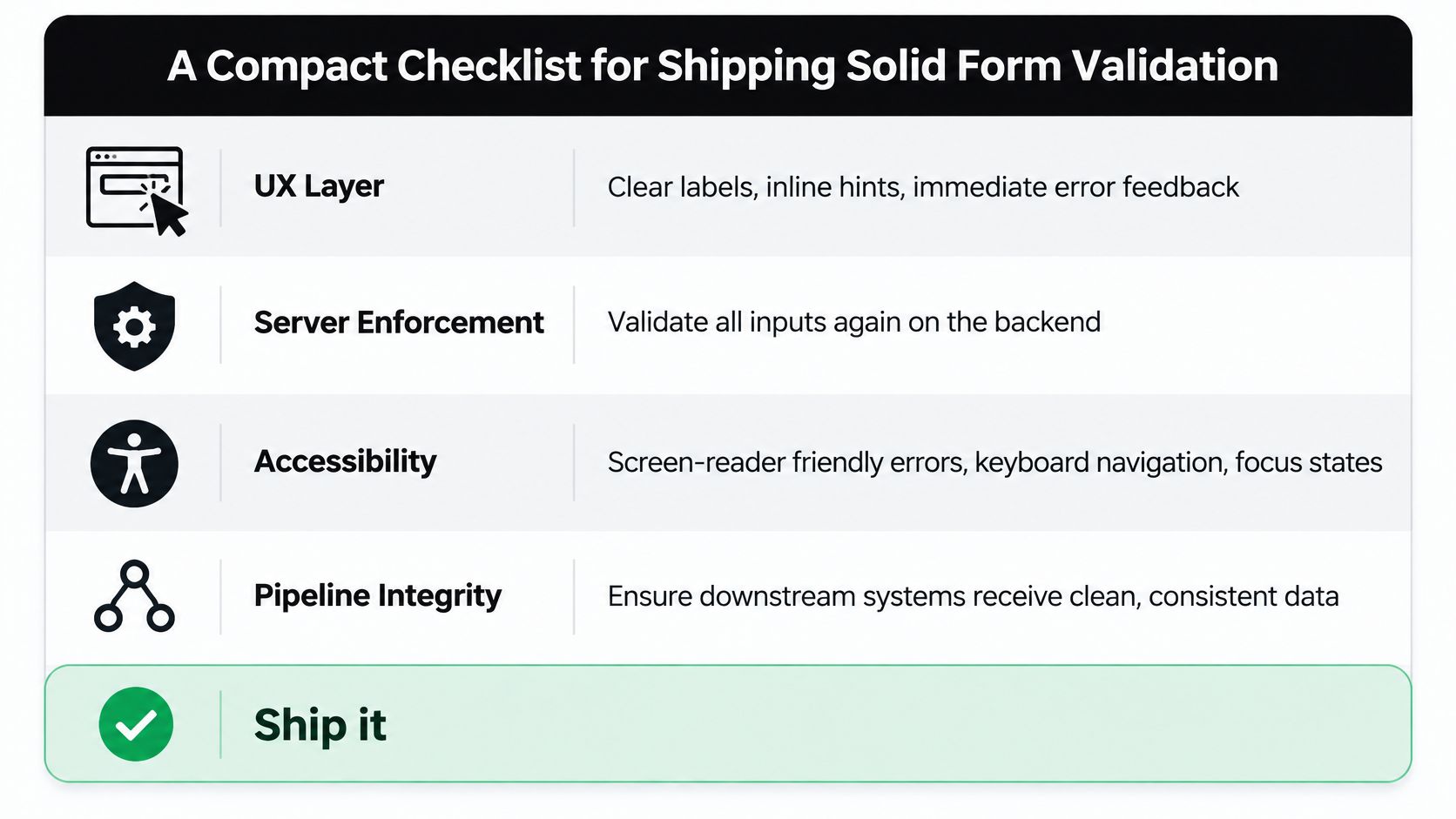
Review each layer against a failure mode
| Layer | Must do | Must avoid |
|---|---|---|
| UX | Choose feedback timing for the field and task | Rejecting unfinished input indiscriminately |
| Server enforcement | Apply the authoritative acceptance and permission contract | Trusting a browser's success state |
| Accessibility | Make each correction understandable and reachable | Depending on color or inaccessible notifications |
| Pipeline integrity | Preserve status, provenance, and exception ownership | Treating extracted text as verified business data |
Agree on exception behavior before release. When a document is incomplete, the system needs a defined outcome: reject it, request missing information, or place it in an authorized review queue. “Someone will fix it” isn't an operational policy.
Roll out in a defensible order
Start with the acceptance contract and server boundary. Then add field guidance, accessible correction behavior, and downstream evidence. Establish tests and telemetry before tightening rules across existing traffic.
For a migration, consider evaluating proposed rules without immediately blocking submissions, where risk permits. Review the rejected examples, identify legitimate exceptions, and make enforcement changes deliberately. Security-critical checks shouldn't wait for a usability experiment.
The business case is broader than cleaner screens. The European Central Bank's explanation of e-invoicing reports estimated staff costs of €5–€15 per paper invoice received and settled, with manual reconciliation contributing to that work. Those estimates describe paper processing, not savings guaranteed by a validator.
The engineering objective is therefore concrete: stop preventable corrections from becoming downstream investigations. Good validation lets users understand what happened, lets reviewers inspect uncertain records, and gives receiving systems an explicit basis for accepting data.
Matil combines OCR, document classification, configurable validation, and workflow orchestration through an API for turning documents into structured records. If you're evaluating document automation, visit Matil and test a representative document set against your field contracts, exception rules, and downstream acceptance criteria.


