How to Automate Repetitive Tasks in 2026
Learn how to automate repetitive tasks: score candidates, build a six-stage workflow, route exceptions, and measure ROI.

Don't automate everything you can. That's the popular advice, and it's how teams end up with fast, wrong postings, broken bots, and reviewers cleaning up work the software was supposed to remove.
If you're learning how to automate repetitive tasks in finance, operations, logistics, legal, or compliance, set a different target. Let high-confidence work run straight through, send borderline cases to structured review, and keep high-risk decisions with a named person. You'll save less theoretical time on paper. You'll keep more of it in production.
Score Repetitive Tasks Before You Automate
Don't try to automate a whole job. Automate activities inside it.
In 2024, desk workers reported spending 41% of their working time on low-value, repetitive, or non-core tasks, according to Slack's Workforce Lab survey of 10,281 workers across six countries. That same year, 76% of surveyed U.S. business owners and managers reported using AI to automate repetitive tasks, according to The Harris Poll survey reported by theHRDIRECTOR. Adoption isn't the hard part. Choosing the right slice of work is.
Score activities, not roles
The McKinsey Global Institute executive summary from 2017 estimated that 49% of activities performed by workers worldwide could technically be automated by adapting technologies that already existed at the time. It examined more than 2,000 individual work activities across approximately 800 occupations. Fewer than 5% of occupations were considered fully automatable, while about 60% contained at least 30% of activities that could be automated.
That distinction still fits a 2026 back office. The strongest potential sat in structured, repetitive work, especially collecting and processing data. McKinsey also estimated automation could increase global productivity growth by approximately 0.8 to 1.4 percentage points annually, provided organizations successfully adopted and integrated it. Extracting fields, checking totals, routing files, and updating systems fit that pattern. Exceptions, approvals, and judgment calls don't.
Score each candidate task from 1 to 5 on four questions:
- Weekly volume: Does it recur often enough to repay setup and maintenance?
- Rule stability: Are the rules written down, and do they stay stable?
- Exception frequency: How often does a case break the rule?
- Wrong-decision cost: What happens if the software posts, pays, or approves incorrectly?
If you're also looking at personal task lists, you can simplify repetitive work with Fluidwave as a lighter-weight starting point. For document-heavy operations, score first and buy later.
Which repetitive tasks to automate first
| Task | Volume signal | Rule stability | Wrong-decision cost | Automate when |
|---|---|---|---|---|
| Invoice capture | Steady weekly volume | Totals, tax IDs, and line items repeat | Payment errors and duplicates | Rules are written and exceptions have an owner |
| Payslips | Every pay cycle | Salary, bases, and deductions repeat | Payroll and labor-law errors | The schema barely changes across cycles |
| Delivery notes | Daily goods receipts | SKU and quantity fields repeat | Stock and matching errors | Layouts are mostly stable |
| KYC identity documents | Onboarding spikes | ID number, photo, and expiry are structured | Regulatory and fraud risk | Low-confidence files always get human approval |
| Bills of lading and customs files | Shipment packets | Parties, ports, and quantities repeat | Delays and compliance misses | Start with one document type |
| Status-chasing email | Daily but uneven | Rules shift by customer | Low, but tone and context vary | Leave it manual or lightly assisted |
| Approvals over a threshold | Lower volume | A policy exists | Financial and audit risk | Automate the handoff, not the decision |
Invoice, payslip, delivery note, and logistics fields repeat in predictable ways, so they're strong first candidates. KYC files and contracts may score high on volume, but regulatory risk changes the design. You can automate capture and checks while keeping approval human.
Status-chasing email looks repetitive until you read it. Tone, history, and commercial context shift by customer. I'd leave it assisted at most. The same logic applies to approvals over a money threshold. Automate the packet, the routing, and the reminder. Don't automate the decision.
Cutoff rule: Pick one process that clears volume and stability and fails no risk test. If a task needs undocumented judgment to finish, it isn't your first automation.
Run a Six-Stage Automation Workflow
Order protects value. The McKinsey guide to avoiding automation execution pitfalls reports that estimated first-year value can fall from 80% initially to below 10% during development, while only a minority of programs achieve their promised impact at scale. A staged workflow stops that slide by forcing evidence before expansion.
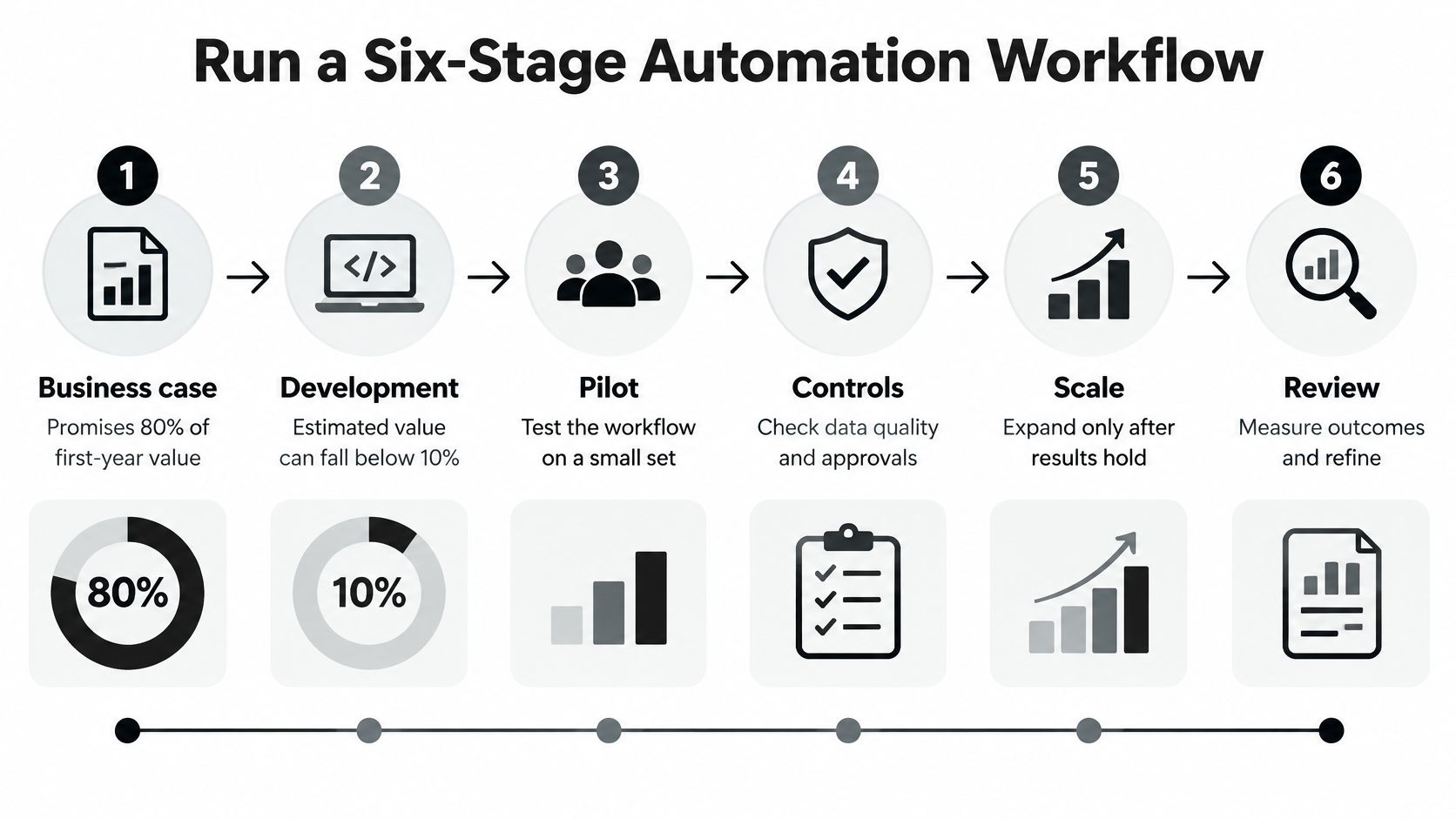
The six stages, in order
Select one mature process. Choose a process that's rule-based, high-volume, and stable from your score, not a wishlist from three departments. One narrow winner beats five half-defined candidates, because ownership, test files, and acceptance thresholds stay clear. If the process changed twice last month, stabilization comes first.
Document before you name a tool. Write down inputs, decision rules, exception paths, controls, and baseline cycle time. Capture who touches each item, where they rekey data, and what makes them stop. This feels slow. It isn't. You'll debug these details now or during production, and production is more expensive.
Pilot a narrow flow. For document work, ingest the file, classify it, extract fields, validate them, then write approved data to the system of record. RPA, OCR, and workflow components can sit inside that pilot, but keep the slice small enough that every failure is traceable. If you want a wider checklist for handoffs and ownership, our guide to workflow automation best practices covers the controls to define before build work starts.
Test abnormal cases on purpose. Run representative normal files, then missing fields, duplicates, mismatched totals, unreadable pages, and rule-breaking cases. A workflow that only handles clean PDFs hasn't been tested. It's been demonstrated. Route low-confidence or rule-breaking items to human review, retain audit logs, and plan random sampling after deployment.
Deploy in short agile sprints. Release to a small user group, collect feedback on every new exception type, and fix the rule, schema, or routing before expanding volume. Short cycles matter because users find edge cases your test set missed. Legal teams face the same sequencing problem with intake and evidence, and ProPlaintiff's guide to law firm automation is a useful sector example of staging controls rather than automating a full case file at once.
Monitor from day one. Track accuracy, exception rate, processing time, rework, and control failures. Don't wait for a monthly review to discover that a new supplier layout is sending half the queue to reviewers. Monitoring tells you whether to tune a threshold, add a validation, or pause scaling.
Three failure modes to name early
- Automating a broken process: Software repeats the defect faster and makes it harder to spot.
- Brittle screen clicks: Unstable interfaces break bots and create maintenance you didn't budget for.
- No maintenance owner: Rules change, layouts change, and access expires, so someone must own upkeep.
RPA works best for well-defined, repetitive, mature processes. Undocumented judgment doesn't belong in any stage. If a reviewer can't explain the rule they apply, write the rule before you automate around it.
Choose Tools by Task Type
Match the tool to the work before you buy anything. Three tool types cover most repetitive tasks, and each fails differently.
RPA bots run fixed steps against screens and rules. They suit stable interfaces where the clicks never move, such as copying approved values between legacy systems. They break when a screen changes, a session times out, or a pop-up appears in the wrong place.
Document extraction reads PDFs, scans, and photos and returns structured fields. It suits invoices, payslips, identity documents, and logistics files, because the input is a document rather than a clean form. It needs validation rules to be safe. Reading a value isn't the same as trusting it.
Workflow orchestration routes items, collects approvals, tracks exceptions, and keeps work moving between people and systems. It suits any process with handoffs. It also depends on clean inputs from the other two types, because routing bad data faster doesn't fix it.
Tool types for repetitive work
| Tool type | Best for | Main limit |
|---|---|---|
| RPA bots | Fixed steps in stable screens | Breaks when interfaces change |
| Document extraction API | Fields from PDFs, scans and photos | Needs validation rules to be safe |
| Workflow orchestration | Routing, approvals and exceptions | Depends on clean inputs |
Most document-heavy processes need extraction and orchestration together. Extraction produces fields and confidence scores. Orchestration decides what posts, what waits, and who reviews. If you're weighing build options for the routing layer, our explainer on what no-code automation is helps you separate simple connectors from tools that can hold approvals and audit history.
Then check integration before features. Confirm the tool can write to your ERP, accounting platform, or case system through an API or supported connector. Confirm it keeps an audit log for each posted value. Avoid any tool that can't return a source page or confidence score for each field, because you can't route uncertain cases without them.
Budget for year-one maintenance. Rule changes, new layouts, access reviews, and reviewer training all need an owner. Test vendors on your own sample files, including ugly ones, and compare results with the manual baseline from your documentation stage. I'd reject a polished demo that only uses the vendor's files.
Automate Document Capture With Validation
Document data extraction is the process that turns PDFs and images into structured fields a system can post. That's more than reading characters. A system can post a field only when it knows what the document is, what the value means, and whether the value passes your rules.
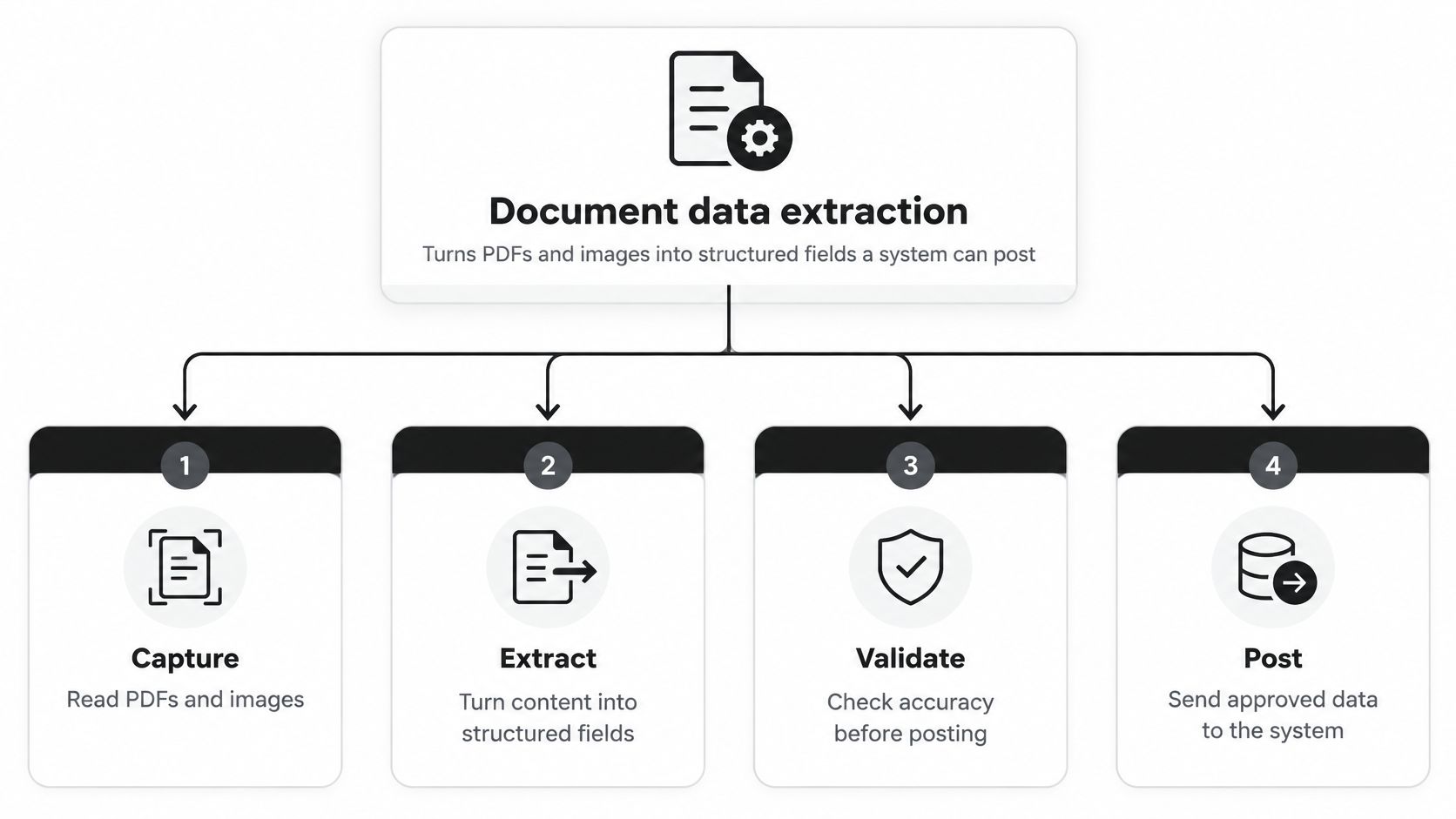
Four moves, in plain language
OCR reads the text. Optical character recognition converts a scan, photo, or PDF page into machine-readable characters. This gives you raw text, not a trusted record.
Classification decides what the file is. The system labels the document as an invoice, payslip, ID, delivery note, or bill of lading, and splits mixed PDFs into separate documents. This avoids staff sorting inboxes and renaming files by hand.
Validation checks whether fields can be trusted. Required fields must be present. Formats must match, totals must reconcile, tax IDs must look valid, and relationships across pages must hold. This is the step that prevents a confident misread from becoming a payment.
Automation routes the result. Clean records move to the ERP, accounting system, or operations queue. Failed checks hold for review with the evidence attached. This avoids the common trap where extraction works, but nobody designed what happens next.
Why traditional OCR disappoints
Traditional OCR returns text, but it doesn't return a trusted JSON record. Staff still classify files, split mixed PDFs, find line items, and rekey values into the right fields. Layout changes break templates. A tax ID read from the wrong block still looks like text, so nobody notices until reconciliation.
That's why teams evaluating invoice automation should look past character recognition alone. Practical guidance on streamlining AP workflows with Cyndra makes the same operational point from the accounts payable side. Capture only pays when validation and routing sit behind it.
Yes, it's possible to extract data from invoices automatically when classification, validation, and human review for exceptions sit behind the read.
Here's where a concrete example helps. Tools like Matil.ai run OCR, classification, validation, and workflow orchestration through one API, with pre-trained models for invoices, payslips, KYC identity documents, bank statements, receipts, and logistics files. Custom schemas can be defined in days rather than long training cycles, which matters when your document set doesn't match a generic template.
State the distinction plainly. Matil is not only OCR. It's OCR plus classification, validation, and automation. Accuracy is above 99% in multiple use cases. The API is simple to integrate. Security includes GDPR, ISO 27001, and AICPA SOC, plus zero data retention.
A developer-shaped flow looks like this. You POST a PDF to the API. You receive JSON with the field name, extracted value, and source page. Your system maps approved fields into the ERP and holds failed validations for review. That source page matters. A reviewer shouldn't have to hunt through a forty-page packet to verify one total.
Operations teams don't always need code to start. No-code upload interfaces and auto-filled Excel or PDF templates let staff submit documents and receive structured outputs in formats they already use. I'd still keep the same validation rules behind that simpler front door. Convenience shouldn't lower the control standard.
Route Uncertain Cases to People
A wrong automatic decision can cost more than the manual work it replaced. In finance, operations, KYC, and compliance, one bad posting can trigger a duplicate payment, a failed audit, a delayed shipment, or a regulatory problem. That's why maximum automation is the wrong target.
The reviewer's desk isn't a failure state. It's part of the control design.

Worker research supports that caution. The Stanford News report on what workers want from AI found that 45% of respondents doubt AI accuracy and reliability, 35.6% want human oversight at critical points, and only 16% prefer fully autonomous handling of work. Staff aren't resisting automation. They're asking where a person checks the machine.
Use three tiers, not one switch
- Post automatically: High-confidence fields pass every validation and policy check, so the record moves straight through with a full audit log.
- Send to structured review: Borderline confidence or a failed rule sends the item to a queue showing the original page, extracted value, and failed check side by side.
- Require named approval: Identity mismatches, amounts above your set threshold, first-time suppliers, and other high-risk cases need a specific approver before posting.
Set the confidence cutoff before launch, not after reviewers complain. Keep the source file with every item. Log the model output, validation result, and reviewer action, so an auditor can reconstruct the decision without interviewing the team.
Watch the override rate, the share of items where reviewers change the automated value. A rising override rate usually means your threshold is too loose, your schema misses a layout variant, or a validation rule doesn't match policy. It doesn't automatically mean staff are slow. Blaming reviewers for catching errors teaches them to stop catching errors.
The short walkthrough below is useful when you're showing operations staff how a review queue should feel in practice, with evidence visible before anyone approves a value.
Measure the review path as carefully as the straight-through path. Track false positives, false negatives, review time, and override rate by document type and field. A queue that receives the wrong items wastes the time you saved elsewhere. A queue that receives too few items may be letting bad values post.
If you can't show the evidence behind a posted value, the case wasn't safe to automate.
Test Accuracy and Keep Data Compliant
Benchmark against a fully specified manual baseline, not bot runtime. An empirical RPA study published in Human Behavior and Emerging Technologies reduced processing 100 requests from 1,000 manual minutes to 135 minutes, approximately 7.5 times faster, while still requiring human review for abnormal events and periodic quality sampling. Speed didn't remove the need for checks. It changed where people spent their time.
Set acceptance thresholds before launch
Define these gates before the pilot starts:
- Field-level precision and recall: Precision tells you how many extracted values were correct. Recall tells you how many values that should've been found were found.
- Straight-through rate: The share of items that post without human touch, measured against your baseline rather than a vendor target.
- False positives and false negatives: A false positive passes a bad value. A false negative holds or rejects a good one. Both create cost, but they don't create the same cost.
- Review workload: Minutes reviewers spend per item and per day, including searching for evidence.
- Control failures: Any posted value that breaks policy should block release until the cause is fixed.
Run a ground-truth set with known correct answers. Include normal files and difficult ones, such as skewed phone photos, multi-document PDFs, missing tax IDs, faded scans, and mismatched totals. Block release if any critical field regresses. A total, tax ID, account number, or identity number can't be treated like a low-risk label.
After launch, track exception rate, rework, processing time, and override rate weekly. Name one owner for rules, access, and exceptions. If nobody owns a new supplier layout, reviewers absorb it until the queue becomes the process again.
Write retention as a rule, not a default
Personal data doesn't stop being regulated because it arrived on paper. The European Data Protection Board FAQ states that manually handled personal data also falls under the GDPR once paper files are organized systematically, such as alphabetically in a filing cabinet. Your automated pipeline needs the same discipline, with controlled access and traceability built in.
The European Commission guide to GDPR principles explains the storage-limitation principle, which requires organizations to keep personal data for no longer than necessary for the purpose for which it was collected. Retention must also account for legal obligations, including national labor, tax, or anti-fraud rules. Invoices, payslips, identity documents, and contracts each need documented retention logic based on purpose and applicable law.
Limit access to authorized staff. Keep an audit trail from source page to posted value to reviewer action. Delete or anonymize personal data when the purpose ends and no legal duty requires you to keep it.
Before scaling, confirm five items in writing. Baseline captured. Thresholds signed. Exception owner named. Retention period written. Sampling scheduled. If any item is missing, you're not ready to expand volume.
Prove the Payoff Then Pick One Flow
Use benchmarks to judge payback before you commit, then correct them with your own review time. Benchmarks summarized by Plooto report manual invoice processing costs of approximately $10 to $15 per invoice, compared with $2.78 for best-in-class automated teams, more than a 70% reduction. The same source reports manual error rates between 2% and 10%, while fully automated workflows can reduce errors to below 1%.
Ardent Partners benchmarks cited by the Sun Herald put the average invoice-processing cost at $9.84 per invoice, the average straight-through-processing rate at 32.6%, and the invoice-exception rate at 18.4%. That means most invoices need at least one manual intervention, and nearly one in five needs investigation or rework.
Invoice processing cost and quality benchmarks
| Metric | Manual baseline | Automated benchmark |
|---|---|---|
| Cost per invoice | $10-$15 (Plooto); average $9.84 (Ardent Partners) | $2.78 for best-in-class automated teams |
| Error rate | 2%-10% in manual environments | Below 1% in fully automated workflows |
| Straight-through processing | 32.6% average | Pilot should beat 32.6% |
| Exception rate | 18.4% need investigation or rework | Measure in pilot against your baseline |
Calculate net savings per document. Start with baseline minutes and cost. Subtract remaining review time, integration upkeep, training, and exception handling. Check the result at 90 days and again at 12 months. Teams trying to understand the wider payoff should connect that math to operational efficiency, because saved keystrokes only matter when cycle time, rework, and control quality improve together.
Four flows worth piloting
Invoices. Problem: staff rekey totals and tax IDs, and duplicates slip through. Solution: extract line items and validate totals, tax IDs, and supplier data before posting. Result: clean invoices post sooner, and reviewers see only mismatches.
Payslips. Problem: payroll teams repeat the same field checks every cycle. Solution: extract salary, contribution bases, and deductions against a stable schema. Result: recurring fields post each cycle, and only changed employee data goes to review.
KYC. Problem: onboarding teams copy ID, NIE, and passport fields under regulatory pressure. Solution: extract structured identity fields and route low-confidence files to a mandatory approver. Result: routine capture speeds up without weakening the approval control.
Logistics. Problem: bills of lading and customs files arrive as packets with parties, ports, and quantities buried in mixed layouts. Solution: classify each document, split the packet, and extract fields for the operations system. Result: staff stop hunting through PDFs before they can act on a shipment.
These designs produce four practical consequences. Fewer hours go to entry. Fewer keying errors reach downstream systems. Volume grows without adding headcount at the same rate. An auditor can open the trail behind a posted value. That's the business case, not an automation percentage on a slide.
If you're evaluating how to automate repetitive tasks for a document-heavy team, start with one document type and a measured pilot. Our compositor chains classification first, then routes each category to its own extraction schema in a single API call. We offer synchronous Normal mode for real-time integrations, Async results by webhook, and Batch mode for hundreds of documents in one request. Our evaluation feature tests fields against ground-truth datasets, tracks precision and recall, and detects regressions before production.
If you're ready to replace manual document entry with OCR, classification, validation, and controlled automation in one API, Matil can help you pilot one invoice, payslip, KYC, or logistics flow with evidence behind every posted field. Start with your own sample files, measure the exception rate, and scale only when the review queue and audit trail hold up.


