AI Based Data Extraction: An Enterprise Guide
Learn how AI based data extraction works, how to validate outputs, evaluate vendors, and automate invoices, KYC, and logistics documents.

Your operations queue contains digital invoices, photographs of receipts, multi-page PDFs, and freight documents. Someone still has to open each file, find the right values, and enter them into another system. AI based data extraction can automate that work, but only if you control what happens between reading a document and acting on its contents.
Understanding AI Based Data Extraction
AI based data extraction is the process of converting unstructured documents and images into structured fields that business applications can use. Instead of returning a page of searchable text, an extraction system returns information such as supplier name, invoice date, currency, and total.
The distinction matters. A searchable invoice helps an employee locate information. A validated invoice record can support an accounting workflow without requiring that employee to retype everything.
Consider a representative mixed-document queue. A supplier submits an invoice, a warehouse uploads a delivery note, and an onboarding team receives an identity document. Each file contains text, but each requires a different interpretation and a different set of controls.
Reading is different from understanding
Optical character recognition, or OCR, identifies visible characters. Document extraction determines which characters belong to the fields your process needs.
A system might recognize a company name correctly but assign it to the wrong role. On a freight document, the shipper, consignee, and carrier can all appear on the same page. Correct spelling doesn't establish which party should populate your customer record.
A useful mental model separates the responsibilities:
- Recognition makes document content machine-readable.
- Interpretation connects content to business fields and relationships.
- Control determines whether those fields are safe to use.
Modern extraction combines OCR, classification, layout analysis, language models, validation, and structured output. These components should work together rather than operate as disconnected utilities.
For a complementary explanation of how extraction fits into broader operations, Doczen's guide to automating document workflows with IDP provides useful context.
Treat extracted data as a proposed business record, not as an automatically trustworthy transcription.
That principle applies whether you're processing invoices, payslips, identity records, or transport documentation. The objective isn't to read documents faster. It's to produce usable records while keeping uncertain or unsupported values out of downstream systems.
Why Traditional Document Processing Breaks Down
A PDF isn't necessarily a machine-readable document. It may contain selectable text, scanned images, or a mixture of both. Treating those inputs as equivalent is a common design mistake.
In a study of invoice extraction across 1,000 invoices, text-based PDFs achieved a reported success rate of about 99%, while image-based PDFs averaged approximately 81%. Those results describe that study, not a universal accuracy guarantee, but they demonstrate why input format belongs in every evaluation.
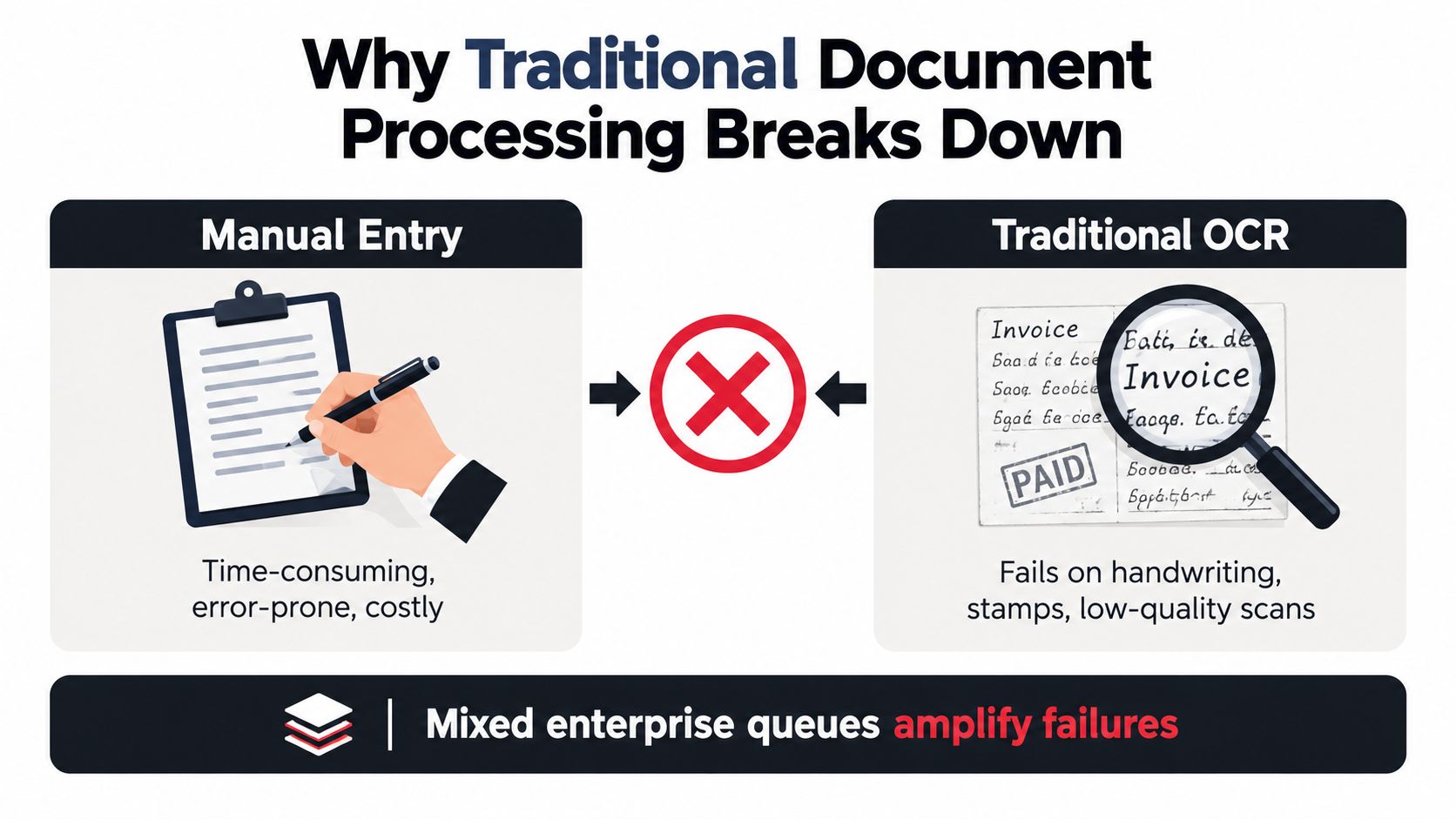
The operational differences are visible in this comparison.
The hidden work after transcription
Suppose an accounts-payable employee receives an invoice alongside a delivery confirmation. Traditional OCR may produce readable text from both. Someone must still decide which file is the invoice, associate line-item descriptions with their amounts, and distinguish the payment reference from the invoice number.
Manual processing has a similar limitation. An experienced employee can interpret unusual layouts, but that knowledge may remain undocumented. When another employee takes over, they may apply different assumptions about missing purchase orders, unfamiliar tax labels, or corrected invoices.
| Processing approach | What it provides | What still needs control |
|---|---|---|
| Manual entry | Human interpretation | Consistency, transfer mistakes, handoffs |
| Standalone OCR | Recognized text | Field meaning, relationships, business checks |
| Controlled extraction | Proposed structured records | Exceptions, approvals, downstream actions |
The cost isn't confined to typing. Teams also spend time finding missing information, correcting records, answering supplier questions, and reconstructing why someone approved a value.
Mixed queues make these weaknesses harder to manage. A photograph can introduce glare or perspective distortion. A stamp can overlap a reference. A table can continue onto another page. A handwritten amendment may contradict printed text.
The practical requirement is a coordinated system, not a better text-recognition component in isolation. Teams need a way to identify the document, interpret its contents, check the resulting record, and stop processing when the evidence doesn't support a reliable answer.
How the Core Technologies Work Together
Think of document extraction as a team with distinct responsibilities. One component reads, another identifies the document, another maps its structure, and another checks the proposed result.
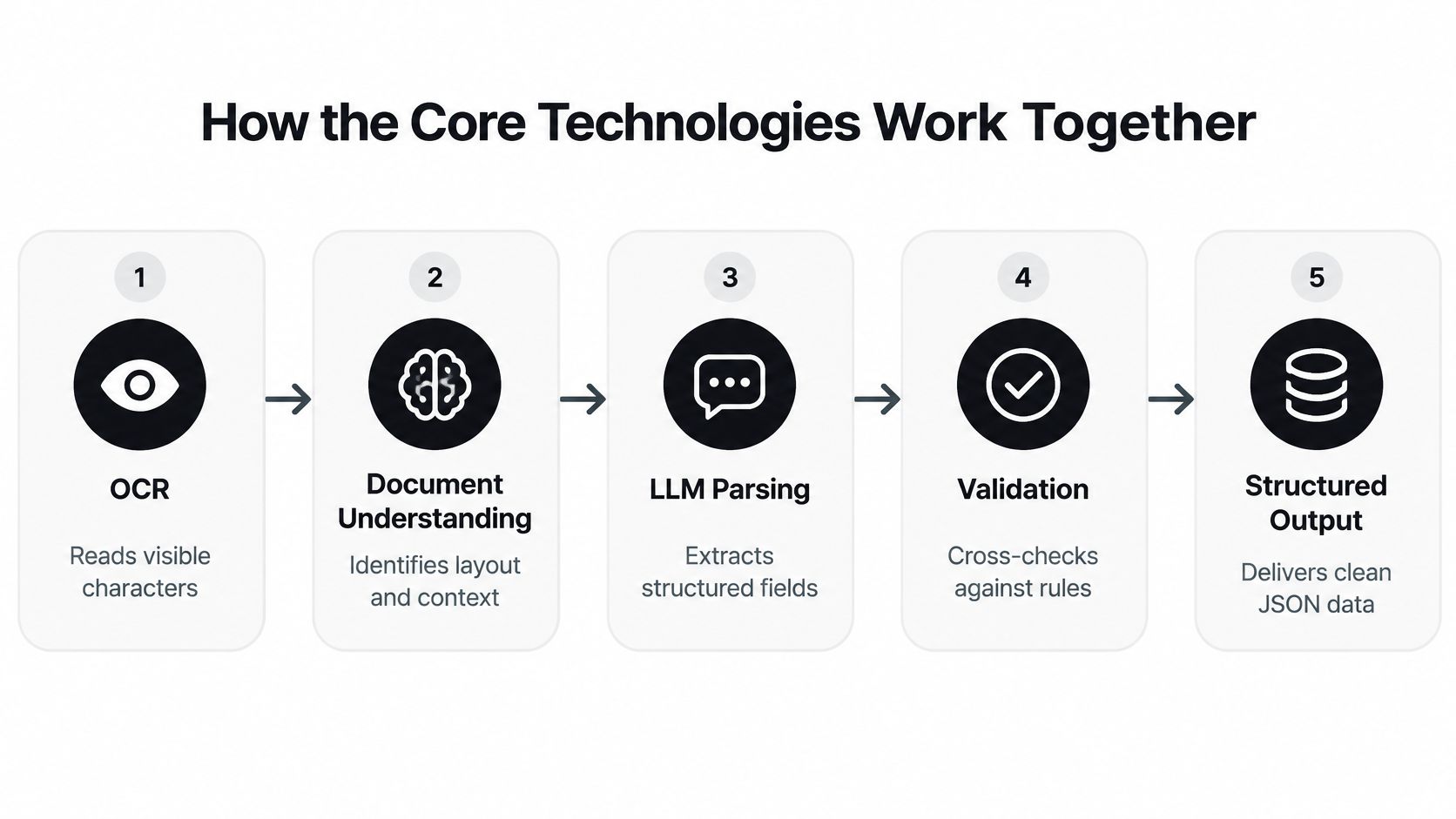
The following flow shows how those responsibilities connect.
From characters to business meaning
Step one is recognition. OCR converts visible text into machine-readable content. For a deeper explanation of that component, see how optical character recognition works.
Classification establishes the document type. An invoice and a bank statement require different fields. Classification helps select the appropriate schema, extraction instructions, and review policy.
Layout analysis preserves spatial relationships. It records where text, tables, headings, and other regions appear. Without that map, a flattened text stream can separate a table heading from the values it describes.
Machine learning and natural language processing, or NLP, help interpret labels and relationships. A field called “amount payable” may serve the same business purpose as “balance due,” depending on context. Interpretation should consider the surrounding evidence rather than match a label mechanically.
Transformer-based language models can model relationships across a document. Vision-language models can also consider visual information. Neither capability removes the need to verify whether the proposed answer is supported by the source.
The distinction between recognition and interpretation is also useful when watching a document-processing demonstration.
From interpretation to a usable record
Field extraction maps evidence into a predefined structure. For an invoice, that structure might contain a supplier object, invoice date, currency, and an array of line items.
Then a validation engine checks the result. It can assess required fields, allowed formats, arithmetic relationships, and consistency with approved reference data.
Finally, typed JSON gives receiving applications a predictable interface. Amounts should have an agreed representation, dates should follow a defined format, and missing values should be distinguishable from empty strings.
- Missing means the required information wasn't found.
- Ambiguous means the document supports competing interpretations.
- Invalid means a proposed value failed a defined check.
Don't collapse these conditions into the same blank field. Each requires a different response, and preserving the distinction makes both debugging and human review more effective.
Designing a Production Extraction Workflow
A production workflow starts before the model receives a prompt and continues after it returns a field. The architecture should follow the document from arrival to an authorized downstream action.
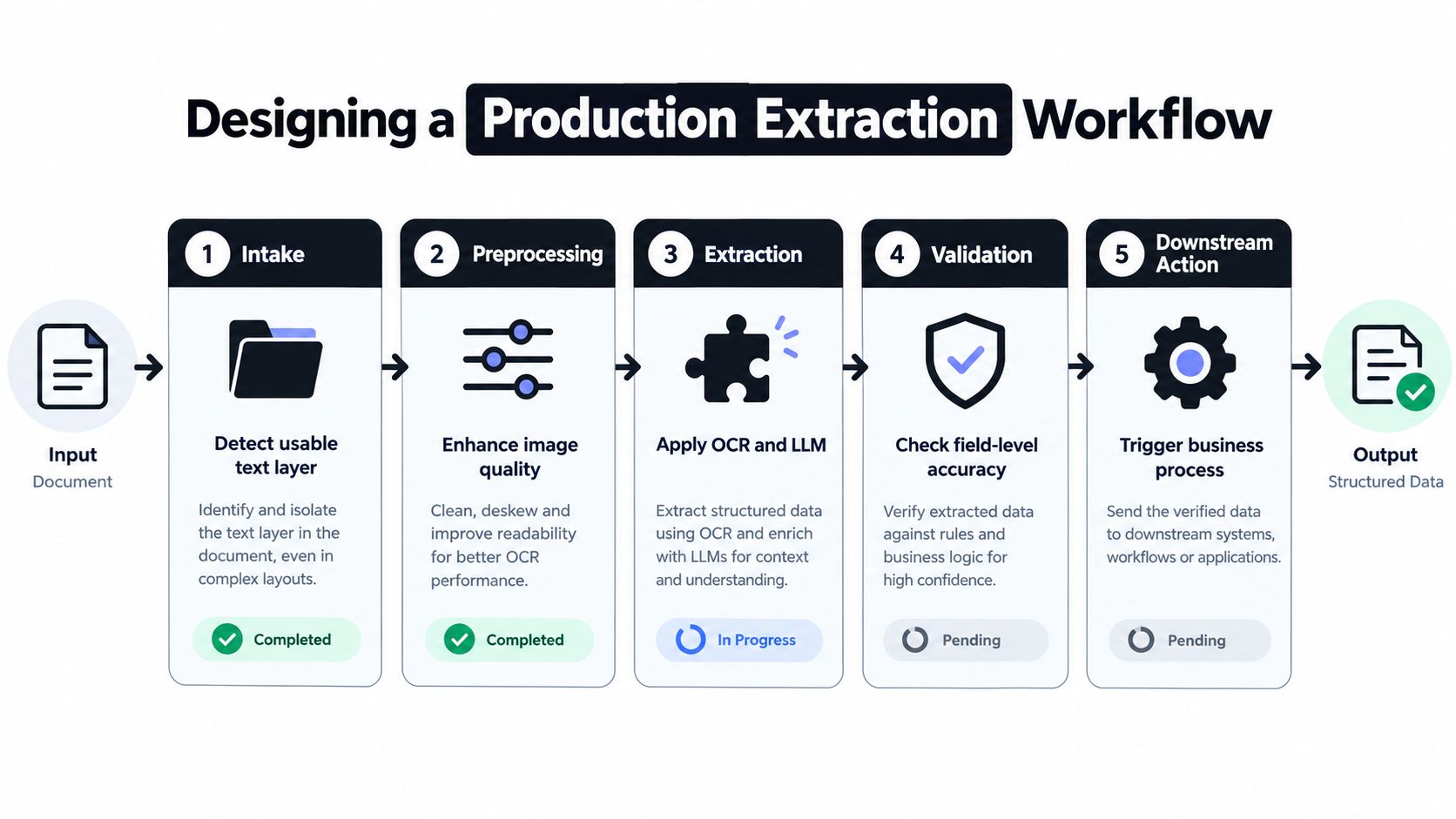
Use the workflow below as a reference for those handoffs.
Route by the evidence available
At intake, assign a source identifier and determine whether the file contains a usable text layer. Route image-only pages through OCR and appropriate preprocessing. Keep the original file so reviewers can distinguish source content from processing artifacts.
Don't assume every page needs the same treatment. A text-native report may contain an image-only appendix or a scanned signature page.
The Document Haystack benchmark evaluated documents ranging from 5 to 200 pages using 8,250 questions. Models exceeded 90% accuracy on textual extraction from 200-page documents, while performance fell to around 40% when answers required combined text-and-image reasoning.
That finding supports a practical architectural choice: preserve each modality rather than forcing every document into a plain-text representation.
After intake:
- Classify and split mixed files into the document units your process expects.
- Locate relevant regions such as tables, address blocks, and supporting notes.
- Retrieve evidence for each target field before constructing the record.
- Validate and route the result according to field risk and business rules.
Make every handoff inspectable
Keep source-file identifiers, page numbers, and region coordinates alongside extracted values. A reviewer should be able to open the relevant evidence directly, rather than search the entire file.
Region-aware retrieval can be useful when evidence is scattered. The VisDoM study on multimodal document retrieval reported a 12–20% improvement over unimodal and long-context language-model baselines on end-to-end multimodal document question answering. That result isn't an invoice-processing guarantee, but it supports testing retrieval-based architectures for visually rich documents.
Apply field-specific acceptance policies. A clearly printed reference can proceed while an unreadable bank-account field remains blocked. Failed arithmetic, inconsistent dates, or unsupported identifiers should trigger explicit review paths.
For the surrounding operational design, a document process workflow should also define ownership, retry behavior, duplicate handling, and approval states.
Production rule: A successful API response means processing completed. It doesn't necessarily mean the document is approved for business use.
Applying Extraction to Enterprise Documents
The following scenarios are illustrative workflow designs, not customer performance claims. Each connects a document problem to a structured output and a controlled operational result.
Invoices and payslips
Invoices combine supplier details, invoice numbers, dates, line items, tax, and totals. The main risk isn't misreading a character. It's creating a plausible record with the wrong supplier, duplicated invoice, or mismatched amount.
Extract those fields into an accounting schema, then check supplier identity, duplicate references, purchase-order relationships, and applicable arithmetic. Route discrepancies to accounts payable. The result is a proposed posting record with an explicit approval status, rather than another spreadsheet someone must interpret.
Payslips need a different structure. Capture employee identity, pay period, earnings, deductions, and net pay while preserving the distinction between payroll categories.
Check period consistency and the relationships between relevant amounts according to the payroll format. Limit access to authorized staff and avoid exposing unnecessary personal information in review screens or logs. The output should support a defined payroll or verification task, not create an unrestricted copy of sensitive employee data.
Identity and freight documentation
For KYC documents, classify the identity-document type before mapping names, dates, identifiers, and other required attributes. If a photograph obscures a character or the document is incomplete, escalate it rather than guessing.
Extraction supplies evidence for review. It doesn't, by itself, establish document authenticity or complete a compliance decision. The structured record should distinguish extracted attributes from verification outcomes.
Logistics records introduce relationships across parties, shipments, tables, and pages. Bills of Lading, customs declarations such as DUA forms, and delivery notes can contain related references expressed differently.
| Document family | Important output | Review trigger |
|---|---|---|
| Invoice | Proposed accounting record | Amount or supplier mismatch |
| Payslip | Restricted payroll fields | Inconsistent period or amounts |
| Identity document | Attributes with evidence | Unreadable or conflicting details |
| Freight documentation | Shipment and goods records | Party, quantity, or reference mismatch |
For logistics, preserve line-item associations and compare extracted quantities and references with the relevant order or shipment record. The operational result is a reconciliation task or an authorized update, depending on the checks passed.
For an implementation example to investigate separately, Applied's NRI case study on document automation offers additional context. Evaluate such examples against your own documents rather than assuming another organization's workflow will transfer unchanged.
Measuring Accuracy and Validation Quality
Field accuracy and document correctness answer different questions. A system can perform well across individual fields while still producing many documents that need correction.
If 40 fields each have 99% independent accuracy, the probability that every field is correct is approximately 0.99^40, or 67%, an illustration discussed in this enterprise document-processing analysis. Independence is an assumption, not a description of every production system, but the arithmetic explains why a headline field score can mislead buyers.
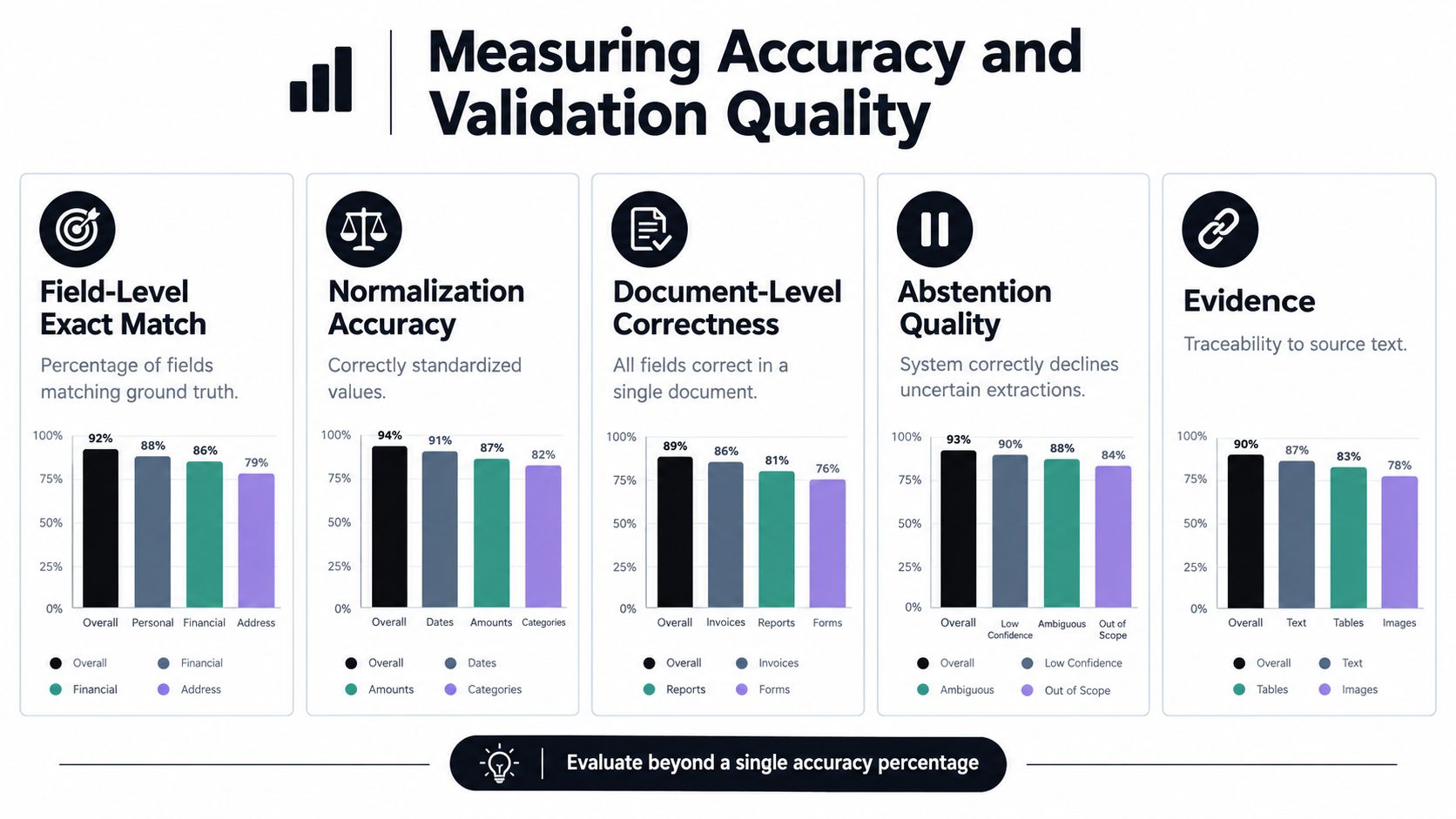
Use the metric categories below, not any illustrative chart values, to design an evaluation.
Separate recognition from downstream quality
A study of historical university records reported an OCR character error rate of 1.08%, but structured extraction accuracy averaged 63% on OCR text. Record-linkage accuracy reached 81% with JSON derived from OCR, compared with 94% using annotated JSON.
These are results from a particular research setting, not expected enterprise performance. Their significance is that quality can change at every stage, even when recognition looks strong.
A practical scorecard should include:
- Field-level exact match against reviewed reference answers.
- Normalization accuracy for standardized dates, currencies, and identifiers.
- Document-level correctness across all required fields.
- Abstention quality when evidence is missing or ambiguous.
- Evidence localization showing whether the cited region supports the value.
- Operational measures covering latency, throughput, review effort, and downstream corrections.
Weight errors by business impact
A formatting difference isn't equivalent to a wrong payment destination. Define critical fields before testing, and report their results separately.
Use representative scans, photographs, layouts, languages, and document conditions. Keep a holdout set that wasn't used to refine extraction instructions. A clear method for calculating error rates helps teams compare results consistently.
A system that flags uncertainty can be safer than one that always returns a complete-looking answer.
During a proof of concept, ask vendors to show incorrect outputs as well as successful ones. Review whether confidence tracks actual correctness, whether reviewers can resolve exceptions efficiently, and whether corrected records remain connected to their original evidence.
Choosing and Integrating an Enterprise Solution
Choose the integration boundary before comparing features. A raw OCR API leaves your team responsible for interpretation and workflow control. A managed extraction platform may handle more of that pipeline. A document-management suite may provide broader storage and case-management functions.
Neither breadth nor simplicity automatically makes a product suitable. The right choice depends on which responsibilities your organization wants to own.
Compare capabilities against operating requirements
| Decision area | What to inspect |
|---|---|
| Integration | API behavior, authentication, retries, callbacks, no-code options |
| Document handling | Supported inputs, classification, splitting, table handling |
| Adaptation | Pre-trained models, custom schemas, validation design, configuration effort |
| Operations | Availability terms, processing behavior, support, exception ownership |
| Evidence | Source regions, model versions, validation outcomes, reviewer history |
| Security | Access controls, retention, residency, subprocessors, deletion behavior |
Matil.ai is one option to evaluate alongside standalone OCR APIs and broader document platforms. It combines OCR, classification, validation, and workflow orchestration through an API, with pre-trained models, configurable structures, custom extraction, and structured JSON output.
Assess whether its API is simple for your integration team and whether customization is quick for your document changes. Don't treat either quality as an abstract feature. Demonstrate it by adding a field, changing a validation rule, and processing an unfamiliar layout.
Likewise, test precision on your own critical fields. A broad accuracy statement doesn't establish acceptance quality for your invoice totals, identity attributes, or shipment references.
Require governance evidence
The Capgemini study on generative AI in organizations found that 93% were exploring or enabling generative AI, while 46% had governance policies in place. That gap makes operational evidence an important procurement concern.
Ask about GDPR, the scope of ISO 27001 certification, and the relevant AICPA SOC report. Examine which services, environments, and subprocessors those materials cover.
Clarify zero data retention separately from operational logging. Determine whether the policy covers source files, extracted content, backups, temporary storage, and support access. Also establish how you can retain an appropriate audit trail in your own environment.
Bring concrete questions to the demonstration:
- Replayability: Can we reconstruct how a value was produced?
- Change control: Can we identify model and rule versions?
- Human decisions: Are corrections and approvals recorded?
- Drift monitoring: How will we detect failures on new suppliers or layouts?
Certifications support due diligence. They don't replace evidence that your actual workflow follows its controls.
A Practical Path to Reliable Automation
Start with a bounded workflow whose owner can define success. Invoice intake, delivery-note reconciliation, or identity-document capture is more manageable than an organization-wide promise to automate every document.
Write the target schema before selecting a model. Identify which fields are mandatory, which errors can cause harm, and which actions require approval. That gives business and technical teams a shared acceptance standard.
Turn the pilot into an operating process
- Assemble representative inputs. Include clean PDFs, scans, photographs, unusual layouts, and known failure cases. Use documents you're authorized to process.
- Establish reviewed reference answers. Resolve ambiguous labels and business rules before treating them as evaluation targets.
- Test complete records. Measure field results, document correctness, unsupported answers, and review effort.
- Define release conditions. Decide what passes automatically, what needs review, and what must stop.
- Connect the destination. Map approved output into the ERP, CRM, accounting, or case-management system, including duplicate protection and retry handling.
- Assign ongoing ownership. Monitor changing inputs, review failures, and approve updates to extraction and validation behavior.
Don't expand the rollout solely because a demonstration looks convincing. Expand when the team can explain failures, recover safely, and show that the receiving process works as intended.
For a procurement meeting, retain these questions: Which records can proceed without review? What evidence supports each critical field? Who owns exceptions? How will changes be detected and controlled?
AI based data extraction is useful when it turns document handling into a dependable business process. Speed matters, but the acceptance decision must also account for accuracy, traceability, security, and operational responsibility.
Matil offers document extraction through an API that combines OCR, classification, validation, and workflow orchestration. If you're evaluating automation, visit Matil and bring a representative document set, your target schema, and your critical-field acceptance rules to discuss a focused proof of concept.


