PDF Table Extractor Guide: Accurate Data from Any Document
Master the PDF table extractor with our complete guide. Learn AI techniques, OCR challenges, and how to automate document workflows efficiently.

A PDF table extractor must combine layout detection, OCR, and semantic validation to turn unstructured pages into clean JSON, not merely select visible text. In a 2023 benchmark, the strongest table-extraction F1 score was 0.47, compared with 0.30 for Camelot and 0.28 for Tabula.
You've probably seen the failure firsthand. You open a scanned invoice, financial statement, Bill of Lading, or research report, copy a table into Excel, and find shifted columns, broken rows, and numbers attached to the wrong labels. The page looks structured to a person, but the PDF often stores it as positioned text, lines, and images rather than as a real data table.
That gap is why businesses still spend hours checking invoices, payslips, KYC documents, customs declarations, tickets, contracts, and logistics records by hand. A reliable extraction workflow needs to preserve relationships between cells, validate meaning, and deliver data that downstream systems can use.
Why Extracting Tables from PDFs Feels Like a Losing Battle
A finance analyst selects an invoice table, pastes it into a spreadsheet, and expects clean columns for product, quantity, unit price, tax, and total. Instead, the supplier name may appear in the first row, a line item may be split across several columns, and the final amount may land beside the wrong label. The analyst then repairs the output manually, often while comparing it with the original PDF.
The problem isn't user error. PDFs are designed to preserve visual presentation, not to expose the logical structure behind that presentation. A table that looks like a grid may be stored as individual text fragments at page coordinates. A scanned page may contain only pixels. A borderless table may have no visible lines at all.
A basic text extractor sees words. It doesn't automatically know that a number belongs to the third column, that two header cells form a hierarchy, or that a row continues on the next page.
Why copy and paste breaks
Traditional workflows fail for predictable reasons:
- Position replaces structure: The PDF records where text appears, but not necessarily which cells belong together.
- Scans contain images: A bitmap invoice has no native text layer for a standard parser to read.
- Merged cells create ambiguity: A heading can span several columns, while the parser treats it as one ordinary text block.
- Borderless tables hide boundaries: The system must infer columns from spacing, alignment, and repeated patterns.
- Multi-page tables lose context: Repeated headers, page footers, and continuing rows can be mistaken for new data.
Historical comparisons show that older rule-based and template-based methods were fragile. A comparison of six tools found ABBYY FineReader performed best in 2017, while a 2023 comparison of five tools found Adobe Extract performed best, which shows progress but also that no single extraction strategy has solved every PDF layout. The broader background on this evolution is documented in the history of PDF table extraction methods.
The hidden cost of manual correction
Manual entry turns every document into a small reconciliation project. Someone must locate the source value, decide where it belongs, enter it, and check the result against totals or business rules. That work becomes a bottleneck when document volume rises or when formats change across suppliers.
One secondary compilation cites 39% of manually processed invoices as containing at least one error, while accounts payable sources estimate that correcting a manual invoice error can cost up to $53. Those figures are reported in the invoice accuracy and billing error compilation.
Practical rule: If a table matters to a payment, shipment, compliance decision, or customer record, text capture alone isn't enough. You need structure and validation.
How PDF Table Extraction Actually Works Under the Hood
A capable PDF table extractor performs two separate jobs. First, it must detect where the table begins and ends. Second, it must reconstruct the rows, columns, cells, spans, and relationships inside that region.
Those stages are easy to describe and hard to execute. If detection trims the first column or includes a paragraph next to the table, structure recognition receives the wrong input. No later formatting step can reliably recover information that was never detected.
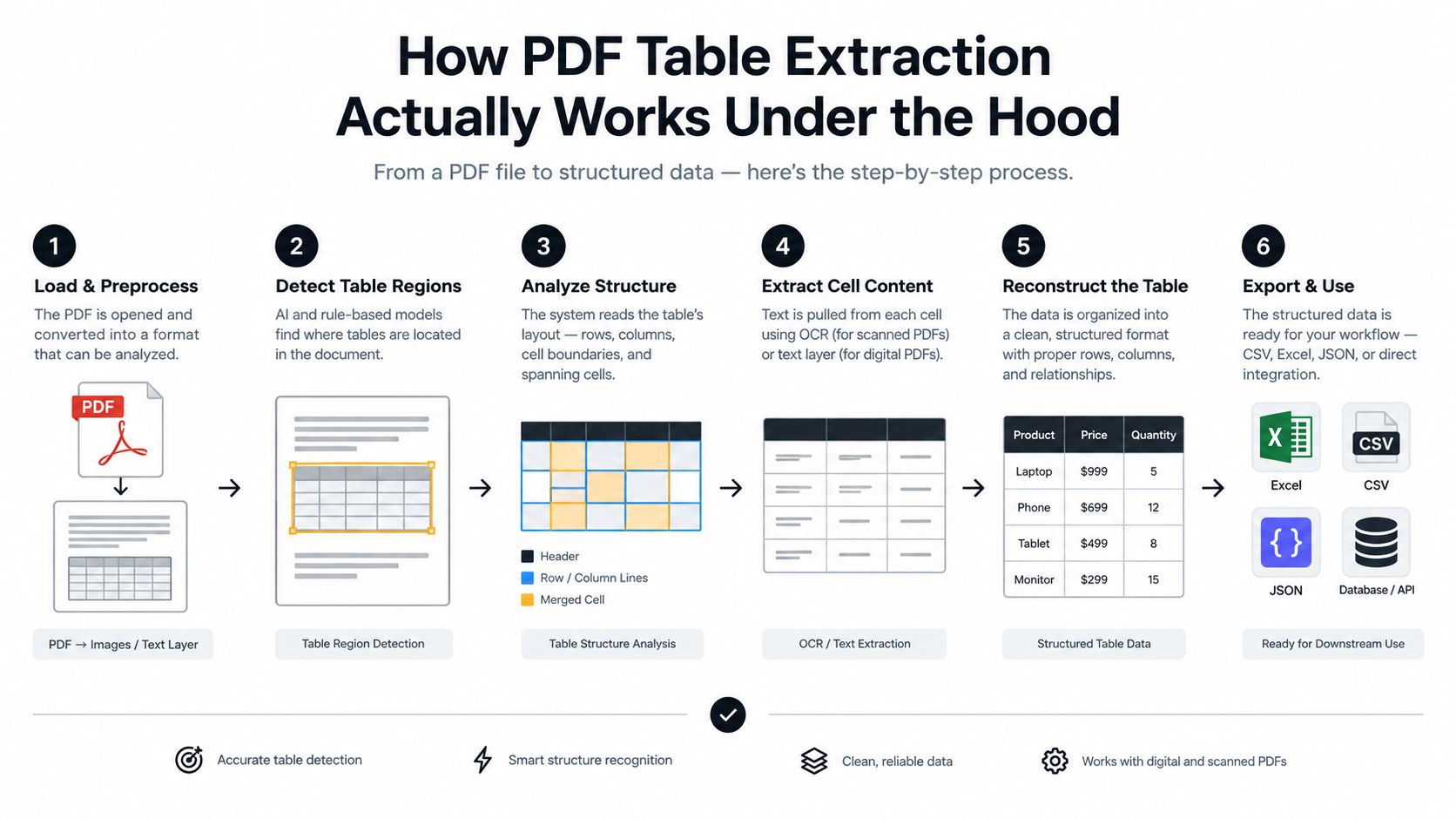
The extraction pipeline
A production workflow usually follows this sequence:
- Render the document: The system reads the native PDF layer or converts each page into an image when necessary.
- Detect layout regions: A layout model separates paragraphs, tables, headers, footers, figures, and forms.
- Run OCR where needed: The system recognizes characters in scans, photographs, and image-based pages.
- Find cell boundaries: It uses lines, spacing, alignment, font changes, and visual regions to estimate cells.
- Recognize structure: It maps cells to rows and columns, including merged and nested areas.
- Validate output: It checks types, totals, required fields, page continuity, and the expected JSON schema.
Simple OCR handles the third step. It doesn't automatically solve the others.
Why benchmark scores matter
The 2023 benchmark of freely available PDF extraction tools illustrates the difficulty. Adobe Extract achieved the highest table-extraction F1 at 0.47, while Camelot scored 0.30, Tabula 0.28, GROBID 0.23, and PdfAct 0.00 for table extraction. The full comparison is available in the 2023 PDF extraction benchmark.
An F1 score below one means the system misses part of the relevant structure or adds incorrect structure. The practical implication is important: even a specialized parser may require post-processing, confidence checks, and human review for academic PDFs with mixed layouts.
Where structure recognition fails
Independent work on heterogeneous PDF tables identifies recurring failure modes, including nested tables, borderless tables, multi-table pages, color-separated columns, merged cells, skewed pages, rotated content, and OCR noise. Detection and structure recognition must work together, because a model can't repair a table boundary it never found. These failure modes are discussed in the research on heterogeneous table extraction.
A modern system therefore needs layout awareness rather than a simple “find text and export CSV” routine. It must understand that a table is a visual and semantic object.
The Modern AI Approach to Document Automation
Older extraction systems often rely on fixed coordinates, keywords, or templates created for a known supplier. That can work for a stable document format. It becomes brittle when a vendor changes its logo, moves a column, adds a page, removes borders, or sends a scanned version instead of a native PDF.
The modern approach treats extraction as a document pipeline. OCR is only the first layer. Classification identifies what the document is, structure models identify how information is arranged, and validation checks whether the result makes business sense.
Step 1 OCR captures the page
Advanced OCR reads native text and image content, including scans, photographs, handwriting where supported, rotated pages, and low-contrast areas. It should retain positional information because coordinates help distinguish a value in a table from a similar value in surrounding prose.
OCR output alone is not a finished dataset. It's a set of recognized tokens and locations that another layer must organize.
Step 2 Classification identifies document intent
Classification answers a different question: What kind of document is this, and which extraction schema applies?
A mixed upload might contain an invoice, a delivery note, a bank statement, and an identity document. A classifier routes each item to the appropriate fields and rules. It can also split multi-document PDFs before extraction, preventing a footer from one document from being attached to the next document's table.
Step 3 Structure models rebuild relationships
A layout-aware model looks for row alignment, column spacing, visual separators, repeated headers, merged cells, and continuation patterns across pages. It can distinguish a table from a paragraph with aligned numbers and preserve the relationship between a parent heading and its subcolumns.
Here is where AI differs from rigid templates. The model can adapt to a new layout without requiring an engineer to redraw every coordinate region.
For teams learning how structured models are trained and refined, Kagool's step-by-step AI training approach provides useful context on defining tabular data and improving model behavior.
Step 4 Validation turns extraction into automation
Validation checks whether the output is usable:
- Field types: Dates, currencies, quantities, tax rates, and identifiers follow expected formats.
- Business rules: Invoice totals, tax calculations, quantities, and references are consistent.
- Required fields: Missing supplier IDs, document numbers, or shipment references are flagged.
- Confidence routing: Uncertain cells go to review instead of entering an ERP unverified.
- Traceability: Each value can be connected to its source page or region.
Matil combines OCR, classification, validation, and automation through an API. It includes pre-trained models, flexible data structures, rapid customization, an API designed for structured JSON, and enterprise controls including GDPR, ISO 27001, SOC compliance, and zero data retention. Its stated extraction precision is above 99% in multiple use cases.
The important distinction is that this is not just OCR. It is a complete document-processing workflow that moves from page recognition to validated output.
Evaluating Accuracy Beyond Basic Metrics
A tool can produce a neat-looking table and still deliver the wrong data. A misplaced decimal, duplicated value, or incorrect header may pass a structural comparison while failing the business question that the table was meant to answer.
That's why tool selection shouldn't rely on a single benchmark score. Evaluate whether the extracted result preserves semantic correctness, not only cell coordinates.
Structure is not the same as meaning
Traditional metrics such as TEDS and GriTS compare predicted table structures with reference structures. They're useful for measuring layout similarity, but they may not reflect whether a human reviewer considers the output correct.
For example, a parser might place every cell in a plausible grid while assigning a value to the wrong financial category. A structure metric may penalize or reward that result differently from a human who understands the table's meaning.
A study covering 1,500+ human quality judgments found that LLM-based evaluation correlated more closely with human judgments, with Pearson r=0.93, than TEDS at r=0.68 or GriTS at r=0.70. The findings are detailed in the research on semantic evaluation of document parsing.
Test the documents you actually process
A vendor's demonstration PDF rarely represents the messiest files in a finance or logistics queue. Build an evaluation set from your own documents and include:
- Native PDFs with clean borders
- Scanned pages and rotated images
- Borderless financial tables
- Tables with merged headers
- Multi-page statements
- Mixed documents with tables beside paragraphs
- Documents from several suppliers or carriers
- Tables containing currencies, dates, identifiers, and negative values
Compare not just extracted cells, but the decisions your workflow makes from them. Can the system identify the invoice total? Does it preserve every shipment line? Does it flag a missing customs reference? Can a reviewer locate the source value quickly?
Measure operational accuracy
A useful evaluation includes more than recognition quality. Track:
| Evaluation area | What to check |
|---|---|
| Field correctness | Whether values match the source document |
| Table continuity | Whether rows remain aligned across page breaks |
| Schema compliance | Whether JSON fields have the expected names and types |
| Exception handling | Whether uncertain results are routed for review |
| Traceability | Whether users can verify a value against its source |
| Integration reliability | Whether downstream systems receive complete, usable data |
The best PDF table extractor for a laboratory benchmark may not be the best fit for your supplier invoices. Choose the system that performs consistently on your document distribution and supports review when confidence drops.
Real-World Applications for Finance and Logistics
A text-only parser may capture the words on a document while losing the relationships that make those words useful. Finance and logistics teams usually need line-level records, not a paragraph containing all the same text.

Invoices and accounts payable
Problem: An invoice may contain several line items, tax rows, discounts, payment terms, and totals. Copying text into an ERP can separate quantities from products or place tax values in the wrong field.
Solution: A document pipeline classifies the invoice, extracts supplier details and line-item tables, validates totals, and sends exceptions to an accounts payable queue.
Result: The finance system receives structured invoice data instead of a block of OCR text. Reviewers focus on unusual or incomplete documents rather than retyping every line.
Accounts payable benchmarks report an average invoice processing cost of $9.84, a 32.6% straight-through processing rate, and an 18.4% invoice exception rate. Those figures appear in the accounts payable automation benchmark. The exception rate is a reminder that automation needs validation and escalation, not just extraction.
Payslips and bank statements
Problem: Payslips and statements combine repeated headers, grouped categories, deductions, credits, debits, balances, and dates. A flat export can lose whether a value represents gross pay, tax, a deduction, or a closing balance.
Solution: The extractor preserves row and column relationships, maps values to a defined schema, and applies checks for dates, amounts, currencies, and account references.
Result: Payroll, reconciliation, and compliance teams can work with structured records and retain the original document for audit support.
KYC and legal documents
Problem: Identity documents, contracts, and insurance policies often mix fields, paragraphs, tables, stamps, and signatures. The challenge isn't only reading text. It's identifying document type, extracting the correct fields, and recording missing or inconsistent information.
Solution: Classification routes the file, OCR reads the page, and validation checks names, identifiers, dates, policy numbers, or contractual fields against the required schema.
Result: Compliance teams receive a consistent review package, while incomplete documents are flagged instead of disappearing into a manual queue.
Bills of Lading and customs documents
Problem: Logistics documents contain shipment references, packages, weights, ports, container details, product lines, and parties. A small column shift can attach a quantity to the wrong SKU or confuse consignee and notify-party details.
Solution: Layout-aware extraction preserves the table, identifies the document type, and outputs shipment data for a transport management system, ERP, or customs workflow.
Result: Operations teams can validate shipment records and trigger follow-up actions without manually transcribing every line.
A logistics workflow should treat table structure as business data. A value without its row, column, and document context may be worse than a missing value because it looks complete.
Integrating an API-Based Extraction Solution
A desktop PDF table extractor helps one person solve one document. An API-based service connects extraction to the systems that already run the business, including ERPs, CRMs, accounting platforms, storage systems, ticketing tools, and review queues.
The integration pattern is straightforward:
- Upload a PDF or image.
- Identify the document type and requested schema.
- Receive structured JSON with extracted values, validation results, and traceability.
- Route accepted records to the next system.
- Send exceptions to a human review step.
This design removes manual download, copy, paste, and re-upload steps. It also lets engineering teams standardize extraction across departments instead of maintaining separate desktop processes.
Security belongs in the architecture
Enterprise document processing involves invoices, identity documents, bank information, contracts, and shipment records. Accuracy isn't enough if the workflow can't satisfy internal security and compliance requirements.
Enterprise OCR demand increasingly includes SOC 2, ISO 27001:2022, and documented GDPR processing agreements. Document fidelity also means preserving the visual and structural layout of columns, tables, numbering, and formatting in the output, as described in the enterprise OCR benchmark discussion.
Check how a provider handles retention, access control, encryption, regional processing, audit trails, and deletion. A zero-retention policy can be particularly relevant when documents contain sensitive customer or financial data.
Keep the developer experience simple
An API should expose clear endpoints, predictable schemas, useful error messages, and support for asynchronous processing when documents are large or numerous. It should also make it easy to version extraction structures as business requirements change.
Teams planning broader integrations can review guidance on how to scale automation across your stack. For a practical implementation pattern, see how to use an API to get data.
The goal isn't to create another isolated tool. It's to make document processing an invisible step inside the workflow that already receives, validates, and acts on business data.
Building a Future-Proof Document Workflow
Reliable PDF table extraction starts with a simple decision: don't treat a table as text. Treat it as a visual structure with semantic relationships, validation rules, and a destination system.
A future-proof workflow has four characteristics:
- Layout awareness to detect tables, cells, merged headers, and page boundaries.
- Semantic validation to check whether values make sense in their business context.
- Flexible schemas to support invoices, payslips, KYC files, contracts, and logistics records.
- API-based delivery to connect extraction with the ERP, CRM, review queue, or data warehouse.
Before deployment, test representative documents, define exception rules, preserve traceability, and measure field correctness rather than relying only on structural scores. A workflow that produces JSON quickly but misplaces values without warning will create more rework, not less.
For teams moving from PDF files to structured records, converting PDF to JSON is a useful implementation pattern. The practical target is not a perfect result on one sample. It's dependable processing across the document variation your operation sees every day.
Matil combines advanced OCR, classification, validation, document splitting, workflow automation, and structured JSON extraction through an API, with pre-trained models, fast customization, enterprise security, and zero data retention. If you're evaluating a PDF table extractor for invoices, statements, KYC files, or logistics documents, visit Matil to explore an automated workflow built for production use.


