Intelligent Document Processing for Insurance Explained
Intelligent document processing for insurance explained: how OCR, classification and validation speed up claims, policy admin and intake, with use cases.

A claim lands in the queue on Tuesday morning. Inside the package: a first notice of loss exported as a PDF, four photos of a damaged kitchen, a scanned repair estimate with a faint total, and an invoice from an emergency plumber. Someone has to read all of it, find the claim number, the policy number, the date of loss and three amounts, and type them into a claims system that was designed long before any of these documents arrived by email.
That gap between the documents and the system is where insurance operations lose the most time. Intelligent document processing for insurance closes it, but only when the work is designed around validation and traceability instead of a single accuracy number.
Why Insurance Teams Still Retype Documents
Picture the same file arriving at a desk with no automation. The handler opens each attachment, reads the policy number off the declarations page, checks the date of loss against the incident description, reads the repair estimate total, and keys every value into the claims system by hand. Then a supervisor opens the same package to confirm the numbers.
That keying step is where intelligent document processing for insurance earns its place first. Not in the pricing model, not in a fraud score, but in the plain transfer of values from a document into a field a downstream system can act on. A report from The CLM on AI in insurance claims states that approximately 60% of insurance claims still involve manual entry, an industry estimate from a professional insurance organization rather than a regulator-published statistic. The same workflows cover first-notice-of-loss forms, damage reports, medical bills, repair estimates and supporting evidence, all of which have to be read and verified before anyone decides anything.
Three costs hide inside that routine.
- Staff hours spent on transcription and checking. The same claim number gets read twice, once entering and once verifying, and neither pass produces a decision.
- Duplicate entry across systems. A claim record, a finance system and a reserve spreadsheet each get the amount typed again, so one misread digit propagates three times.
- Queue time before anyone looks. Files wait for a person rather than for a decision, and the claimant experiences the wait as service quality.
Teams usually try OCR first and hit the same wall. It reads the characters on the page but has no idea which number is the policy number, which date is the date of loss, or which of four amounts is the estimate total. Add a new insurer's layout and the template breaks. If your intake starts at first notice of loss, the way you capture that opening document shapes everything downstream.
Start with a baseline you can defend later. List the five document types your team retypes most often, then count the hours per week spent keying and re-checking them. That number becomes the reference point for every later decision.
Why Basic OCR Fails on Claims and Policy Files
A misread claim number sends a file to the wrong adjuster. A misread coverage date can flip an eligibility decision. A misread monetary amount distorts a reserve, and the reserve is the figure the finance team plans against. Analysis of claims document processing errors uses exactly these examples, and the reason they matter is that claims data feeds eligibility, routing, reserves and payments, not a report nobody reads.
These errors pass unnoticed because basic OCR returns plausible text. It does not say which token is a policy number, it does not know what a valid date of loss looks like for that policy, and it does not compare anything against your claim records. The output looks clean, so it gets accepted.
Here's the comparison worth holding next to any vendor demo.
| Capability | Basic OCR | Intelligent document processing |
|---|---|---|
| Text capture | Reads characters from a page | Reads characters and locates each field on the page |
| Document type | Needs a template for each layout | Classifies mixed packets by document type |
| Field meaning | Returns raw text | Maps values to named fields such as claim number or date of loss |
| Validation | Left to staff | Checks values against policy or claim records |
| Exceptions | Errors found after they reach the system | Low-confidence fields flagged for review |
| Output | Plain text | Structured JSON with the source of each value |
Practical rule: OCR alone is enough for a single fixed-layout form that a person checks every time. Insurance packets are mixed, vary by insurer and arrive in volume, so field-level validation stops being optional.
The high-impact fields are a short list, and they deserve individual attention: policy numbers, dates of loss, coverage limits, deductibles, claimant identity, bank details and invoice totals. Everything else can tolerate a lower confidence score.
When you evaluate a tool, hand it a packet rather than a sample page. Include a scanned repair bill with a faint total or a photographed form with a shadow across the amount. A system built for this work will flag the field and route it for review. A basic OCR engine will return a number that looks right.
How Intelligent Document Processing Works in Three Stages
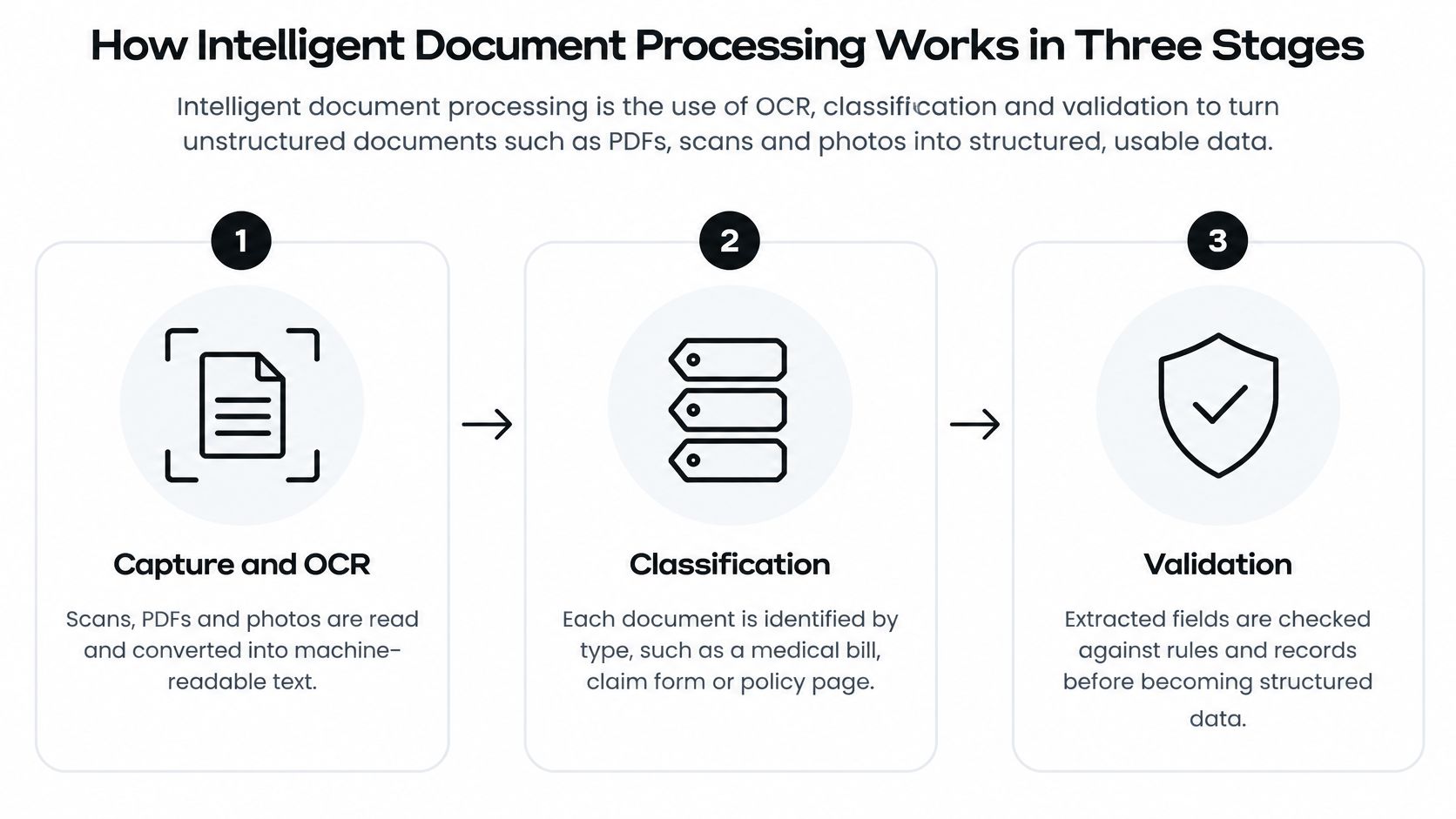
Intelligent document processing is the use of OCR, classification and validation to turn unstructured documents such as PDFs, scans and photos into structured data that business systems can use.
Take one motor claim package: a claim form, a repair bill, a photograph of a driving licence and a scanned accident report. The three stages run as a single pipeline, not as three tools bolted together.
- Capture and OCR. The system reads every page and records where each word sits on the page. That positional data is what later lets a reviewer see which line an amount came from.
- Classification. Each page gets a type, so the bundle splits into a claim form, a repair bill, a licence and an accident report, and each type goes to its own extraction schema. Mixed uploads stop being a problem for the person receiving them.
- Validation. Extracted fields meet rules and reference data. The claim number has to match an open file, the repair total has to equal the sum of its line items, and the date of loss has to fall inside the policy period.
What comes out the other end is a structured record in which every field carries its value, the page it came from and a validation status. That last part is what makes the record usable by a claims system rather than by a person with a spreadsheet.
What to test in any vendor demo
Ask three questions and watch what happens. Does the system classify documents before it extracts anything, or does it assume a layout? Does it validate against your business data, or does it only return text? Can it show the source of each value, down to the page and coordinates? A tool that answers yes to all three is doing document understanding. A tool that answers only the last question halfway is doing OCR with better marketing. If you're also weighing how document automation sits against the broader market of customer-facing AI tools, this compare AI platforms for CX maps the categories side by side.
What a Production Document Pipeline Adds Beyond OCR
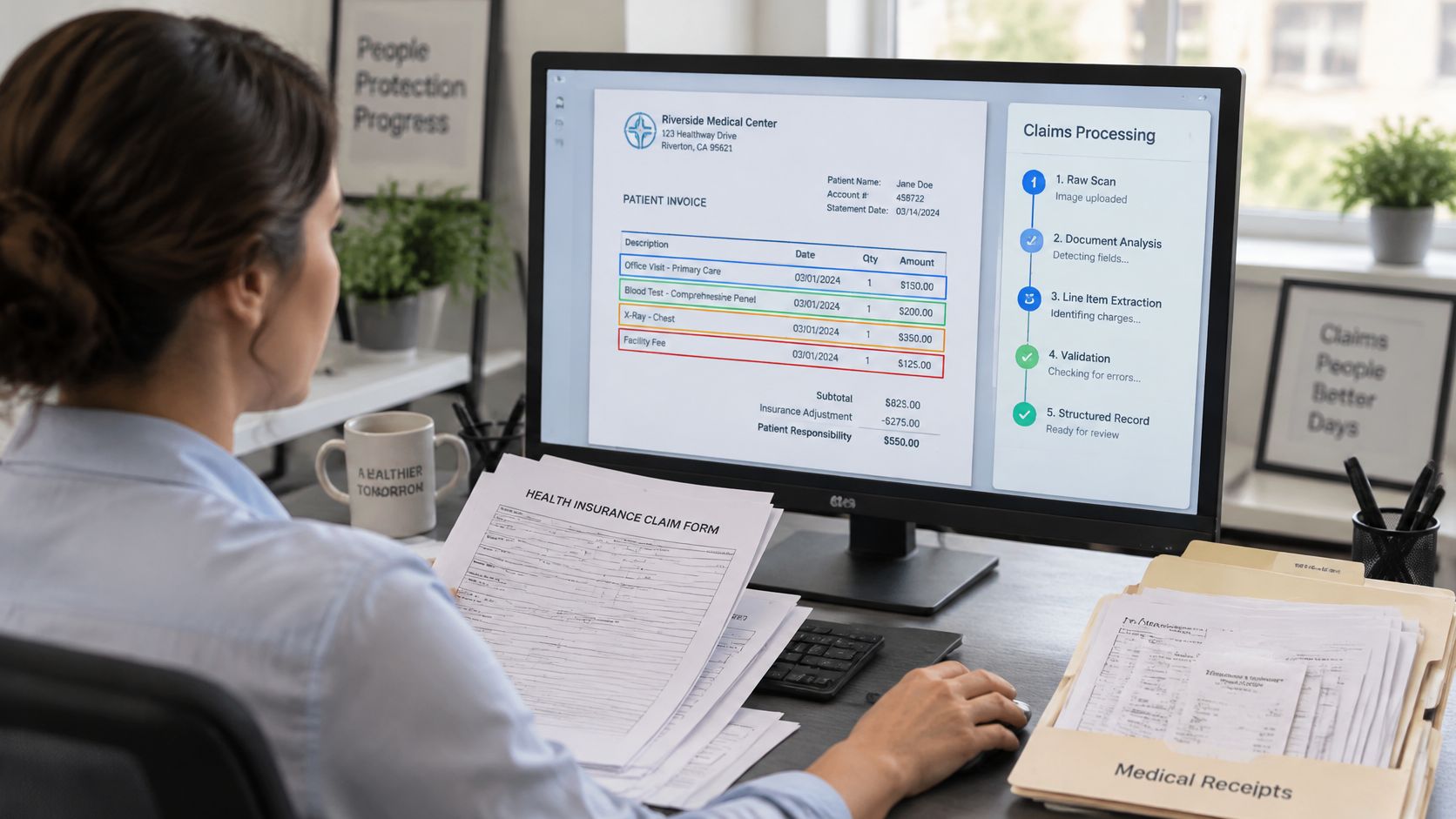
The clearest lesson comes from a medical claims workflow documented in research on AI document processing for insurance claims. An enhanced YOLOv8-based document detector achieved 99% recognition accuracy for locating and reading medical bills. That number did not decide the payment. NLP extracted diagnoses and prescription information, and a rule engine matched those facts against insurance terms and database cost records. Recognition was the entry ticket, not the verdict.
The distinction matters because an invoice can be read perfectly and still be wrong to pay. The amount is valid, the treatment is excluded, or it duplicates a line already settled, or it contradicts the diagnosis on the clinical document. Field-level confidence tells you how well the characters were read. It does not tell you whether the claim should be paid.
A production pipeline therefore checks amounts, dates, provider identifiers, procedure codes, coverage limits and deductibles against independent reference data, then routes exceptions to human examiners. Tools such as Matil.ai run that pattern as one API, combining OCR, classification, validation and workflow orchestration, with pre-trained models for common insurance documents, new data structures and validations defined quickly without long training cycles, and JSON output carrying source coordinates, normalised values, validation status and rule outcomes. Accuracy above 99% should always be read per field and per document type, never as one company-wide figure.
{{VIDEO}}
Three architecture questions separate a pipeline from a demo. Does the output carry source coordinates and rule outcomes, so a reviewer can see why a value was accepted? Can a new document schema be defined without retraining a model from scratch? And can an exception route to a named reviewer rather than a shared inbox? Teams comparing document orchestration with wider automation patterns will find useful parallels in AI Tool Seekers' guide to workflow automation.
Insurance Use Cases From Claims to Policy Administration
Adoption is uneven, and the claims figures are the ones to quote internally. NAIC survey data on AI in insurance found claims adoption highest among automobile insurers at 80%, followed by homeowners insurers at 60% and health insurers at 54%, while 88% of responding personal automobile insurers were using, planning to use, or exploring AI and machine learning.
The homeowners picture shows how fast this moved. Of 194 participating companies in the NAIC homeowners insurance survey, 136 were using, planning to use or exploring AI or machine learning, and 104 reported use in claims operations, with another 13 at proof-of-concept or prototype stage. Subrogation and claims triage were each cited by 44 companies, and image-based loss evaluation by 36.
Claims intake is where many insurers start, because the documents arrive together and share identifying fields. In motor claims the data is spread across a driver's licence, a vehicle registration, a repair bill and an accident report, and a review of AI document-intake systems makes the point that relationships between those documents matter as much as the text inside each one. A package of PDFs, photos and forms gets split, classified and extracted so the claim number and date of loss reach the file in the same working session instead of after manual keying. The result to track is hours saved per file and the share of files that need no rework.
Three more journeys follow the same shape, with different documents and different checks.
- Policy administration. Schedules and endorsements are read, then limits and deductibles are checked against the underwriting record. Problem: renewal packets arrive with revised limits buried on page nine. Solution: extract the coverage table and compare it field by field. Result: exceptions surface as a list instead of a dispute.
- Onboarding and KYC. A national ID card, passport or foreigner identification number is read and matched against the applicant record. Problem: identity fields get retyped and occasionally transposed. Solution: extract name, number, date of birth and expiry, then validate against the onboarding file. Result: fewer failed verifications and a clean audit entry.
- Marine and cargo cover. Bills of lading and customs declarations are checked against the declared shipment. Problem: quantities and reference numbers disagree across three documents. Solution: extract shipper, consignee, quantities and references, then compare totals. Result: discrepancies found at underwriting, not at claim time.
For a closer look at how these workflows connect end to end, this guide to insurance claims processing walks through the intake-to-payment path.
| Document | Key fields extracted | Validation check | Where the output goes |
|---|---|---|---|
| Claim forms and first notice of loss | Claim number, date of loss, claimant identity | Claim number matches an open file | Claims intake and assignment |
| Repair bills and estimates | Provider, line items, totals | Line items sum to the stated total | Reserve calculation and payment |
| Medical bills | Provider identifier, procedure codes, diagnosis | Procedure is covered and consistent with the diagnosis | Medical claims review |
| Policy schedules and endorsements | Policy number, coverage limits, deductibles, dates | Limits and dates match the underwriting record | Policy administration system |
| Identity documents for KYC | Name, ID number, date of birth, expiry date | Identity fields match the onboarding record | Onboarding and compliance checks |
| Bills of lading and customs declarations | Shipper, consignee, quantities, reference numbers | Quantities match the declared shipment | Cargo cover underwriting and claims |
Checking Fit for Your Volume and Existing Systems
The honest position first. A 2026 survey of 400 global insurance executives reported that only 23% of insurers use AI for claims processing and 18% for policy issuance, and industry analysis names integration with older technology, inaccurate customer records and regulatory compliance as the continuing obstacles. EIOPA, cited in the same reporting, finds many insurers use AI mainly for operational assistance such as document summarisation rather than for core decisions. Adoption headlines and operating reality are two different things.
So document automation earns its place where volume is high, layouts repeat and errors are measurable. It does not replace a policy administration system, and it should not try.
Before any pilot, settle four volume questions.
- How many documents arrive each month, and how many on the peak day? The peak, not the average, determines whether you need asynchronous handling.
- Which integration shape do you need? A synchronous call inside an existing screen, asynchronous results delivered to a queue, or a nightly batch.
- What share of fields currently falls below the confidence threshold and lands on a person? That share is the workload remaining after automation.
- How does the vendor price it, per page, per document or per seat, and what review cost remains once the easy documents pass through untouched?
Then check the systems. Which downstream platforms receive the data, can a policy or claims record be read to validate against, and who owns the exception queue on a Monday morning.
Keeping Extraction Accurate, Auditable and Compliant
One headline accuracy score hides the errors that matter. A system can score well overall while being weakest on the fields that move money, and the aggregate number tells you nothing about which document types failed.
Govern the full chain instead. Where did each value come from? How confident is the system in that specific field? Which validation rules ran, and which model version produced the result? Who overrode a value, and when? EIOPA's analysis of AI in insurance identifies privacy, regulatory compliance and skills shortages as major barriers to adoption while documenting claims use cases that extract data from invoices and medical reports. The barriers are governance questions, not OCR questions.
Report these metrics separately, never blended: document detection accuracy, field-level precision and recall, validation failure rate, and straight-through processing rate. A single combined figure conceals exactly the downstream errors a compliance reviewer needs to see.
Review rule: any high-impact field, such as a policy number, date of loss, coverage limit, deductible or bank detail, that falls below the confidence threshold goes to a human examiner. Low-impact narrative text passes through.
Data handling deserves the same specificity. When processing documents containing personal data, Matil acts as data processor under the GDPR and follows only the client's instructions as data controller. Matil does not use clients' personal or confidential document data to train public generative AI models or models shared with other clients. The platform aligns with ISO 27001 and AICPA SOC standards, and a zero data retention policy is available. Under default terms, processed documents and results are kept for 12 months for audit and support before automatic deletion, so confirm which terms apply to your contract.
The audit trail is testable, and document traceability explains what a complete one contains. Ask a vendor to show you one extracted field from source page to output value, including the rule that accepted it. If they can't produce it for a field you choose, the governance story is unfinished.
Measuring Savings Before You Scale Automation
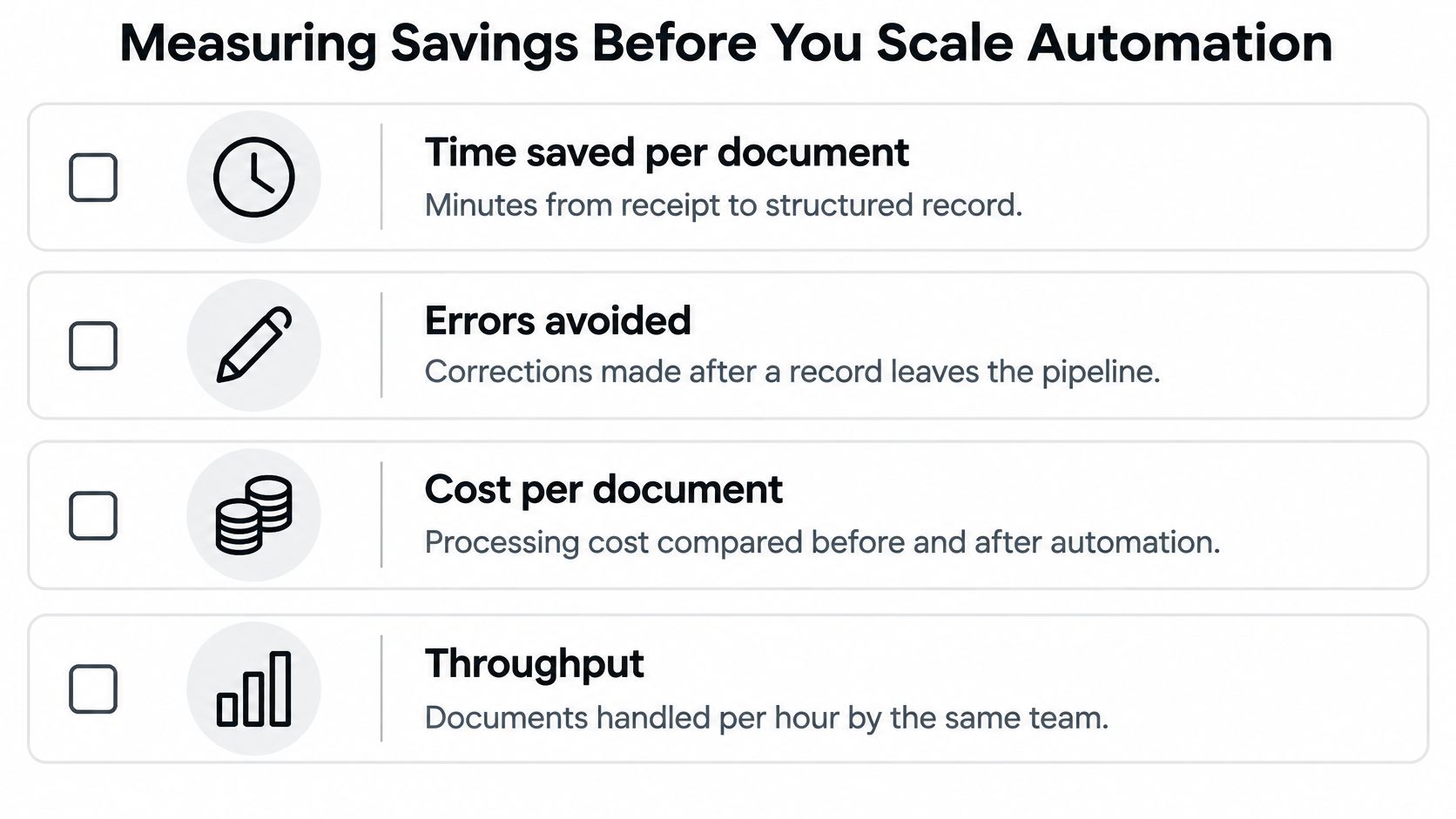
Name the four benefits and make each one a number you can check.
- Time saved per document, measured in minutes from receipt to structured record.
- Errors avoided, measured as corrections made after a record leaves intake.
- Cost per document, compared before and after automation on the same document type.
- Throughput, measured as documents handled per person per day, before and after.
Cycle time needs a caveat. Faster intake does not guarantee faster settlement, because repairs and third parties add delay you don't control. A 2026 claims automation report cites an average of 40.7 days from first notice of loss to final payment for a U.S. homeowners claim, based on a J.D. Power study, with repairs averaging 29.6 days. No U.S. regulator publishes a single national average across all property and casualty lines, so treat that figure as a line-specific benchmark and build your own.
Then run the sequence.
- Record a baseline for two weeks. Documents in, minutes per document, corrections out.
- Pick three metrics. One for speed, one for quality, one for cost.
- Pilot one document type. Not five. The highest-volume, lowest-ambiguity one.
- Compare exception rate and rework cost against the baseline, not against a vendor claim.
- Widen scope only when the metrics hold for a full month.
Pick One Document Journey and Pilot It
Automate high-volume, low-ambiguity documents first: invoices, repair estimates, identity records and policy schedules. Keep legally contested or high-severity claims with people, because judgement matters more there than extraction speed. The point where automation should stop is the point where a wrong value changes a person's entitlement.
The summary fits in four sentences. OCR reads the document. Classification sorts it. Validation checks the fields. Together they produce structured data with an audit trail attached to every value.
Your next step is narrow on purpose. Choose one journey, list the fields that must be validated, set the confidence threshold that triggers review, and run a pilot on real documents from your own archive rather than a vendor sample set.
Integration shape should follow the workflow, not the other way round. Matil offers three processing modes through one API: Normal, synchronous for real-time integrations; Async, where you submit a document and receive results by webhook; and Batch, for hundreds of documents in a single request, which suits nightly imports and migrations. For a bespoke layout, you send sample documents and Matil's team analyses the structure and trains an optimised model in under a week, and the technical documentation lives at docs.matil.ai. If you're evaluating this for your insurance operation, testing a platform such as Matil on your own sample documents is a low-risk way to see the results before you commit.
Insurance documents are messy by nature, and no platform changes that. What a platform can change is whether every value that leaves a document arrives with its source page, a validation status and a rule outcome attached, so your examiners spend their time on the fields that move money rather than on retyping a policy number. Matil builds that into one API for mixed insurance packets, with pre-trained models for policies, claims and identity documents, custom models trained in under a week, and data handling that answers the questions compliance will ask. Send a sample of the documents your team retypes most often through Matil and compare the output against your own baseline.


