How to Convert a Text Document to JSON in 2026
Learn how to convert a text document to JSON: extract fields, map them to a schema, validate results, measure accuracy and automate the pipeline.

Your team has supplier invoices open beside the ERP, copying totals, correcting dates and chasing missing purchase-order references. Converting a text document to JSON should remove that retyping, but a neatly formatted response can still contain the wrong supplier, a shifted quantity or an invented value. The job is preserving what the document means, then proving that the resulting record is safe to use.
How a Text Document Becomes JSON, Stage by Stage
Text-to-JSON conversion turns document content into a structured JSON object with named, typed fields that software can check and use. It isn't just OCR followed by a formatting instruction.
The operational need is clear. A 2026 invoice-processing summary from Docsumo, citing IFOL, reports that 77% of organizations still enter invoice data manually; drawing on Ardent Partners' work, it also reports an average processing time of 8.2 days and an 18.4% exception rate.
The visual below summarizes the journey from intake to export. Production systems need more explicit gates within that journey.
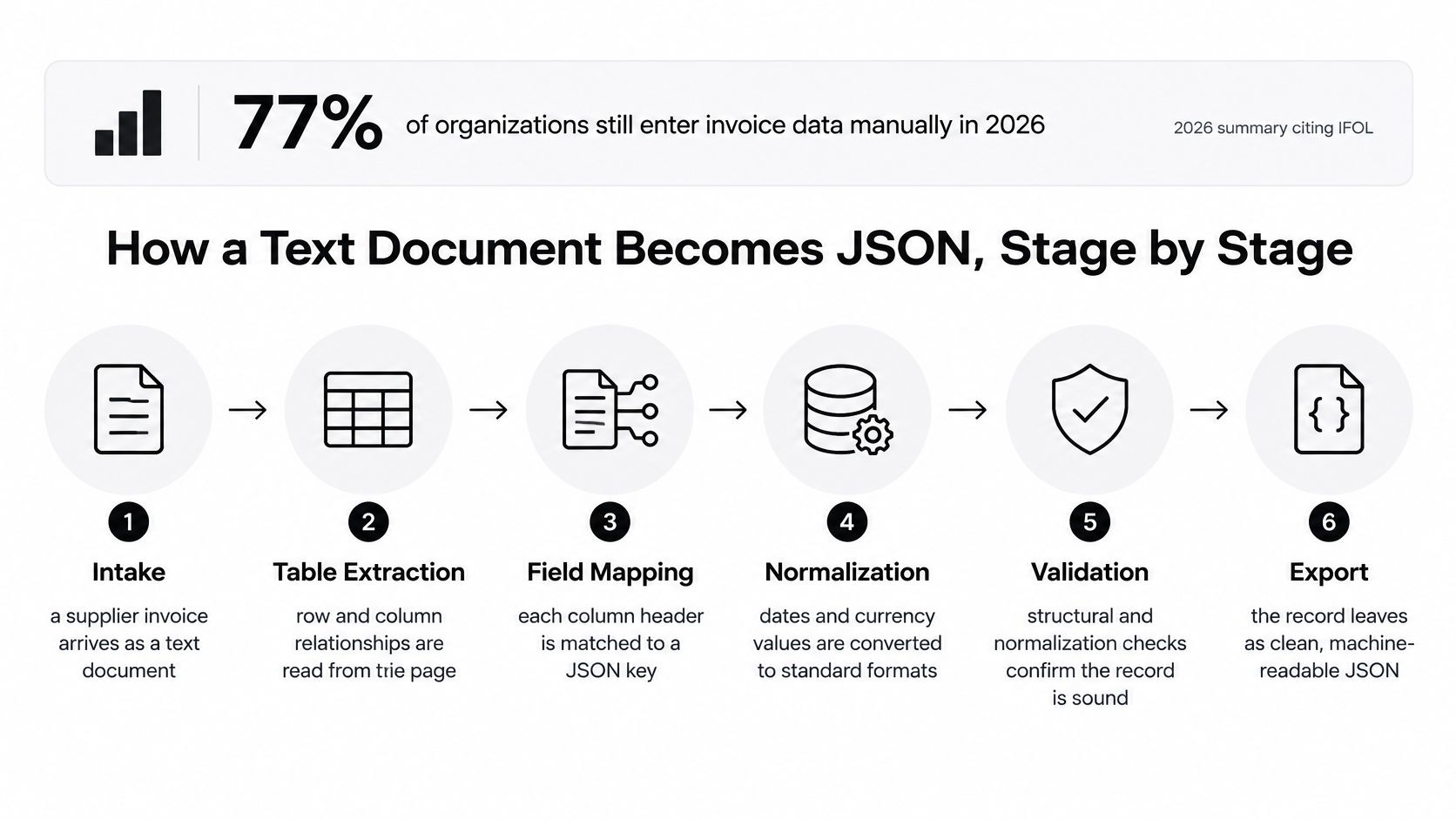
Pipeline stages for text-to-JSON conversion
| Stage | What happens | Output | Pass condition |
|---|---|---|---|
| 1. Normalize text | Clean text; keep page, paragraph, table and character offsets | Normalized text with offsets | Source text preserved and linked |
| 2. Classify and select schema | Identify document type; select a versioned schema | Document type and schema version | Type matches a known schema |
| 3. Extract candidates | Find candidate values for each field | Candidate values with evidence | Every value has a source span |
| 4. Coerce and normalize | Standardize dates, currencies, units and IDs | Typed values | Types and formats are valid |
| 5. Structural validation | Check output against JSON Schema | Schema-valid or invalid record | Schema passes with required fields |
| 6. Semantic checks | Test relationships, including subtotal plus tax equaling total | Rule results | All applicable cross-field rules pass |
| 7. Human review | Route uncertain or failed records to a reviewer | Approved or corrected record | Reviewer confirms or fixes the record |
A document-extraction benchmark reported about 90% valid JSON output but only a 12.5% end-to-end pass rate. That gap is why structural validation belongs inside the pipeline, not at its finish.
Parsing checks JSON syntax. Schema validation also checks the expected shape and types. Neither proves that the values match the source.
Practical starting point: Sketch these stages for a document type you already process, and name the person responsible for each failed gate.
Extracting Text From PDFs, Scans and Photos
The same invoice needs different handling when it arrives as an electronic PDF, a scanned attachment or a phone photograph. Don't flatten those inputs into a single OCR performance category.
An electronic PDF may expose selectable characters without exposing their logical reading order. A parser can read a quantity from one column beside a price from another, producing plausible text with the wrong business meaning.
A Springer invoice-recognition study reported accuracy of 0.96 on its Electronic Ticket dataset and 0.82 on its Paper Ticket dataset. Those are results for the evaluated datasets, not universal expectations for your documents.
Common issues by input type and how to handle them
| Input type | Typical issue | Handling step |
|---|---|---|
| Electronic PDF with text layer | Broken multi-column reading order; tables split across pages | Keep page and table positions; check column order on a sample |
| Scanned PDF | Skew, low resolution, OCR character errors | Deskew; request a higher-resolution source where possible; measure field accuracy separately |
| Phone photo of a receipt | Perspective distortion, glare, uneven lighting | Crop and correct perspective; route uncertain totals to review |
| Handwritten or annotated field | Unreliable recognition of handwriting and stamps | Flag uncertainty by default and send the field to review |
Upscaling a blurry scan doesn't restore missing characters. Keep the original untouched, apply preprocessing to a working copy and retain the transformation history. For implementation choices, the guide to OCR for scanned documents addresses this input-specific work.
Choose extraction by source condition
Use native text extraction when the text layer is usable. Apply layout-aware OCR when the page image contains relationships that the text layer doesn't preserve. Doczen's extraction method comparison provides useful context for choosing between extraction approaches rather than applying the same method to everything.
Test representative files before enabling unattended processing. Include faint scans, rotated pages, cropped receipts and handwritten corrections, not just clean supplier templates.
Set review eligibility by source condition and field risk. A clear electronic invoice may qualify for automatic processing after validation; an obscured bank-account field shouldn't qualify merely because the rest of the page reads well.
Designing a JSON Schema and Mapping Fields
Start with the fields your downstream system needs, not every label printed on the page. Your ERP may need a supplier identifier, invoice reference, currency and payable amount, while a reviewer also needs evidence references.
JSON provides a stable interchange syntax. The JSON Internet Standard, RFC 8259, describes it as language-independent and explains its alignment with ECMA-404. The syntax supports interoperability, but your schema supplies the business contract.
Define the contract before extraction
- Name fields consistently. Use stable lowercase names such as
invoice_number, rather than supplier-specific labels. - Assign explicit types. Distinguish strings, numbers, Boolean values, objects and arrays.
- Specify absence. Decide whether missing information blocks processing or permits
null. - Document transformations. Define date, currency and identifier normalization.
- Require evidence references. Associate populated fields with their source locations.
A Document Structure is a predefined extraction schema, such as Electricity Invoice, that determines what information is obtained. Our custom extraction schemas let users specify field names, types and descriptions and receive structured JSON following that definition.
Example field mapping for an invoice
| Source label | JSON field | Type | Normalization rule |
|---|---|---|---|
| Invoice No. | invoice_number |
string | Trim spaces; keep leading zeros |
| Issue date | issue_date |
string with date format | Convert unambiguous dates to YYYY-MM-DD |
| Total (incl. VAT) | total_amount |
number | Strip currency symbol; use a dot as decimal separator |
| Currency | currency |
string | Use an uppercase ISO currency code supported by source evidence |
| Supplier tax ID | supplier.tax_id |
string | Uppercase; remove spaces and hyphens where valid for the jurisdiction |
| Line items | line_items[] |
array | One object per row with description, quantity, unit_price and amount |
| Purchase order reference | purchase_order |
string or null | Null if absent; never guessed |
For a hypothetical invoice, the compact output could be:
{"invoice_number":"00421","issue_date":"2026-03-14","total_amount":1210.50,"currency":"EUR","supplier":{"tax_id":"ESB12345678"},"purchase_order":null,"line_items":[{"description":"Server rack 42U","quantity":1,"unit_price":1210.50,"amount":1210.50}]}
The invoice reference remains a string because its leading zeros matter. The date is also a string: JSON has no native date type, so the schema and validator must enforce its date format.
A null purchase-order reference is correct output when the source contains no reference. It becomes an exception only if your workflow requires that reference.
Keep line items as objects within an array, not parallel lists of descriptions and prices. A total without a currency is ambiguous. Before implementation, ask someone outside the project to interpret a sample output without opening the source document.
Validating Records and Measuring Pipeline Quality
Apply separate structural, normalization and semantic checks before a record reaches the ERP. Each answers a different question: is the record shaped correctly, are its representations valid, and do its values make business sense?
Use the checklist below as a release gate, not just a debugging aid.
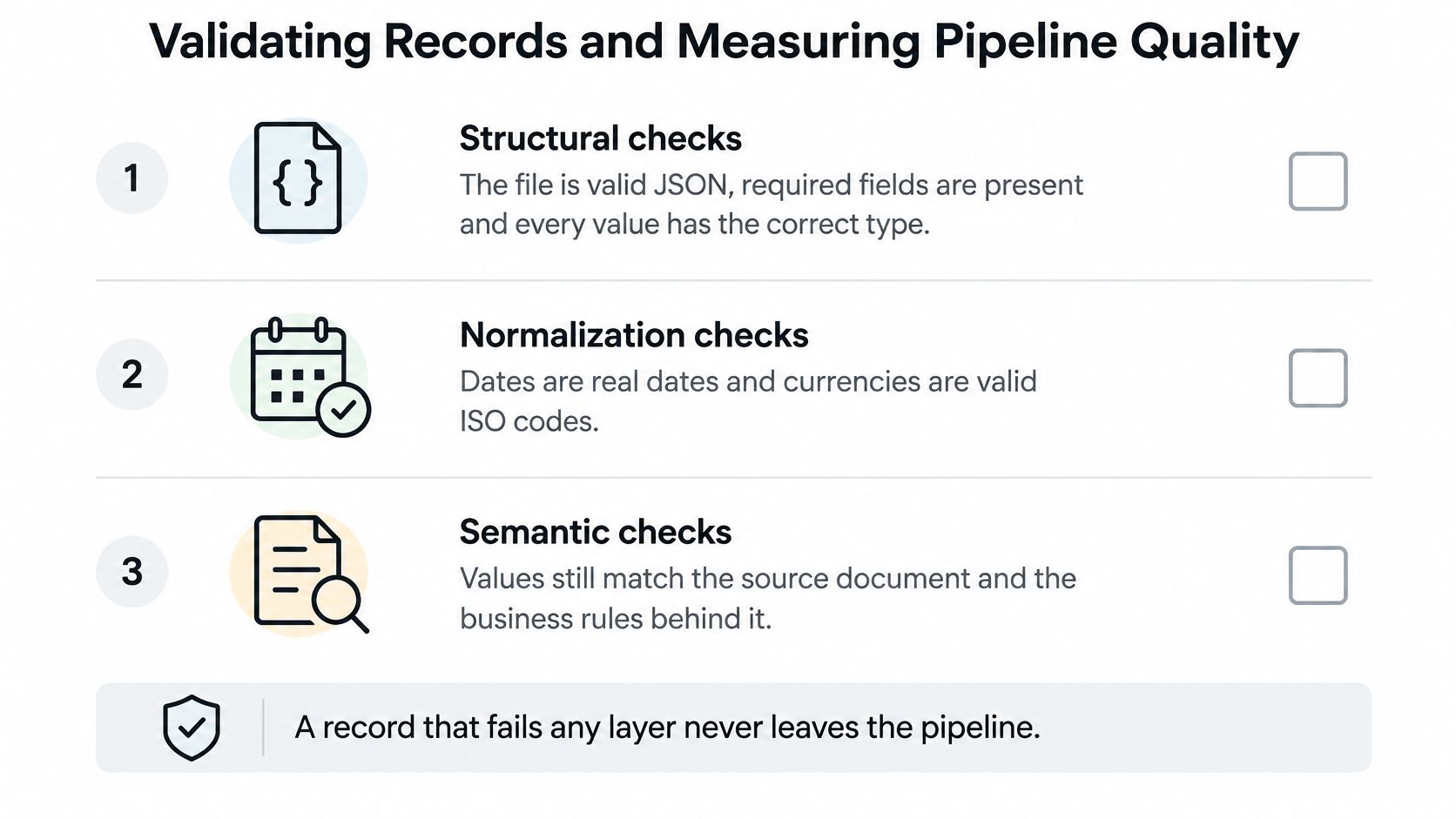
Define acceptance before tuning confidence
- Structural checks: Require a passing schema, mandatory fields and correct types. The explanation of schema validation helps separate these checks from business rules.
- Normalization checks: Validate calendar dates, ISO currency codes and jurisdiction-specific identifier patterns.
- Semantic checks: Reconcile subtotal, tax and total; check invoice and due-date order; reconcile line items with header amounts.
- Evidence checks: Require a source reference for every populated value.
Handle rounding through an explicit currency-aware tolerance, not an arbitrary adjustment. Credit notes need signed-amount rules, while documents containing multiple currencies need separate currency associations for the relevant amounts.
Reject unsupported values. Use null with a reason and route the record to review rather than replacing uncertainty with a plausible guess.
Metrics to track for a text-to-JSON pipeline
| Metric | What it measures | Why it matters |
|---|---|---|
| JSON validity | Share of outputs that parse and satisfy the schema | Shows format health, not factual correctness |
| Field accuracy | Share of values matching verified answers | Shows extraction quality per field |
| Business-rule pass rate | Share passing cross-field checks | Detects inconsistent totals and references |
| End-to-end document success | Share with every field correct and valid | Shows records usable without correction |
| Straight-through processing rate | Share processed without human touch | Measures automation gain |
| Manual-review rate | Share sent to reviewers | Supports staffing decisions |
| False auto-approval rate | Share of wrong records passed without review | Measures unseen business risk |
A structured invoice-extraction study reported 94% extraction accuracy while identifying straight-through processing, manual review and false auto-approval as operational metrics. A high field score isn't permission to remove review.
Set a false auto-approval target first. Then tune confidence thresholds against a hand-verified test set stratified by supplier, input type, multi-page layout and missing fields. Publish the denominator for every metric so teams don't compare incompatible rates.
The principle behind validating scraped data before publishing also applies here: downstream users shouldn't become your quality-control system.
Use the following video as an additional walkthrough alongside your validation checklist.
Keeping Tables, Provenance and Review Auditable
A finance lead asks which schema version produced a supplier tax ID in March, and why the system approved it. A JSON value alone can't answer that question.
The source document, transformation history and approval decision must remain connected. This workspace illustrates the relationship between a physical source and its structured representation.

Preserve relationships as well as characters
Store row and column relationships, merged-cell spans, repeated-header markers and page boundaries when they carry meaning. Otherwise, an item quantity can migrate to the wrong product even when OCR recognizes every character correctly.
OCR research on downstream document processing identifies reading order, tables and layout preservation as important failure points. For tables crossing page boundaries, distinguish repeated headers from actual item rows and preserve continuation links.
Record how each decision happened
Keep the following metadata with the record or in an associated audit store:
- Source identity: Document identifier and, where appropriate, a digest of the original.
- Location: Page, bounding box or text-span reference.
- Processing history: Extraction timestamp, schema version and model or rule version.
- Decision history: Validation outcomes, reviewer identity where appropriate and review state.
An IETF draft on traceable data records proposes source digests, typed checks and provenance trails. It's a draft, not a certification or a substitute for your compliance requirements.
Use explicit states: auto-approved, corrected by reviewer, rejected and escalated. Preserve the original extraction separately from the correction so an audit can reconstruct the decision.
Store references instead of duplicating personal text wherever possible. An audit trail shouldn't become an uncontrolled copy of payroll or identity data.
Retention terms matter. Our default policy keeps processed documents and results for 12 months for audit, traceability and technical support, then deletes them automatically. Don't assume a zero-retention arrangement applies to that default.
Before production, add review_state and schema_version to the record contract. Those fields make approval decisions interpretable rather than implicit.
Use Cases by Document Type
Yes, invoice data extraction can be automated using OCR, document classification, schema-directed extraction and validation. The appropriate checks change with the document and the consequence of accepting an incorrect record.
These are implementation scenarios, not claims of measured customer outcomes.
Invoices
Accounts payable teams retype supplier details and chase references before posting. Extract the supplier, invoice number, currency, purchase-order reference and item rows, then reconcile them against purchasing and accounting records.
The intended result is fewer posting corrections and earlier exception detection. Keep extraction separate from payment authorization: reading a bank account correctly doesn't establish that the supplier authorized a change.
Payslips
Payroll teams need earnings, deductions and net pay mapped consistently across different layouts. A pretrained payslip model can populate typed fields, while reconciliation rules flag figures that don't balance.
Treat employee identifiers and pay periods as critical matching fields. A mathematically correct payslip attached to the wrong employee is still an incorrect record.
The operational benefit is less re-keying during payroll reconciliation, with reviewers focused on discrepancies rather than every printed amount.
KYC documents
Onboarding teams capture identity information from passports and proof-of-address documents. Extract required identity fields, test document readability and route uncertain associations to a reviewer.
Extraction isn't identity verification. It supplies structured evidence to the verification process; it doesn't independently establish authenticity, ownership or customer eligibility.
Keep approval decisions distinct from extracted attributes. That separation gives compliance teams a clearer explanation of what the automation established.
Logistics documents
Bills of lading, delivery notes and customs declarations contain parties, ports, goods, weights and references that operators transfer between systems. Map shipper and consignee separately, retain units beside weights and preserve goods-row associations.
Check that delivery quantities refer to the correct SKU and that routing fields belong to the correct transport leg. The expected result is less re-keying and faster discrepancy checks, without hiding ambiguous shipment details.
Across these workflows, automate the repetitive transfer first. Keep accountable owners for the decisions that affect payment, employment, onboarding or shipment release.
Automating the Pipeline and Choosing Your Next Step
Building in-house gives your team control over schemas, storage and validation logic. It also makes your engineers responsible for OCR maintenance, extraction prompts, retries, queues, monitoring and reviewer tooling. That trade-off only makes sense when document interpretation is a core product capability, or when your rules are too specific to outsource cleanly.
Buying an extraction API reduces infrastructure work but introduces dependencies on processing modes, service behavior and contractual data terms. A hybrid approach can keep business rules and approval decisions in your systems while outsourcing document interpretation. In practice, that means the API produces structured fields, while your own system still owns thresholds, exceptions and final decisions.
Match integration mode to the workflow
| Processing pattern | Best fit | Integration requirement |
|---|---|---|
| Synchronous | Real-time document submission | Handle response timeouts and safe retries |
| Asynchronous | Longer-running processing | Receive authenticated callbacks and deduplicate results |
| Batch | Nightly imports and migrations | Reconcile submitted files with completed records |
Choose the mode from the operational moment, not from API preference. Real-time submission needs clear timeout handling and retries that cannot create duplicate records. Async fits work that can continue after submission, provided webhook handling is authenticated and idempotent. Batch fits imports and migrations, where reconciliation between submitted files and completed records matters more than instant responses.
Matil isn't just OCR. Its API combines OCR, classification, validation and workflow orchestration, with pretrained models for purchase receipts, payslips, KYC identity documents, delivery notes, bills of lading and customs declarations, plus rapid customization from example documents. Custom schemas define field names, types and descriptions, so the returned JSON follows the structure your downstream systems expect.
Through one API, Normal returns structured data synchronously, Async delivers results by webhook and Batch accepts hundreds of documents in a request. A single endpoint can handle all supported document types, while a classifier can separate mixed inputs by type and a partitioner can split a PDF containing several documents. A compositor can chain classification and schema-specific extraction in one call. Reported precision above 99% should be tested against your own field definitions and document mix, not treated as a guarantee for every input.
Data controls need the same attention as extraction quality. The client keeps rights over uploaded documents and structured JSON results. By default, processed documents and results are kept for 12 months for audit, traceability and technical support, then deleted automatically. Consumption rates for each document structure and its volume scales are published and updated in real time at admin.matil.ai. Confirm the applicable scope and contractual controls before relying on any security or retention statement.
For financial institutions, compliant data pipelines for banks adds useful governance context. Assign operational ownership using a documented document-processing workflow.
Pilot decision: Start with a representative set of real documents, measure incorrect automatic approvals and reviewer effort, then decide whether to build, buy or combine both.
Matil offers schema-defined JSON extraction with classification, validation and processing modes for real-time and batch workflows. Evaluate your own documents against a defined schema and acceptance checklist, so your team can judge usable records rather than JSON formatting alone.


