OCR in Banking: A Practical Guide to Accuracy and Automation
Learn how OCR in banking powers KYC, statements, and invoices, with accuracy targets, GDPR controls, integration patterns, and ROI examples teams can replicate.

If you're dealing with OCR in banking right now, the pain is probably familiar. Ops is keying data from PDFs into core systems, reviewers are fixing avoidable extraction mistakes, and every queue looks manageable until one messy document bundle blocks the whole line. The problem usually isn't whether a tool can read text. It's whether it can produce trusted, auditable data that downstream systems can use.
Banks have used OCR for years as the first digitization layer in document-heavy workflows like loan applications, KYC files, checks, invoices, and regulatory forms. The shift to intelligent document processing happened because simple OCR wasn't enough for unstructured layouts, variable templates, and exception handling at scale, as outlined in IBM's overview of banking automation and document workflows.
The Monday-Morning Reality Behind OCR in Banking
At 8:47 a.m. on a Monday, the backlog is already visible.
Overnight KYC packets landed from digital onboarding. A corporate borrower uploaded a loan pack just before midnight. Supplier invoices came in through a portal and now need to flow into AP. None of these queues care that it's still early. They all expect same-day movement.

What breaks first
Manual keying fails in predictable ways. Someone transposes an account number. A reviewer misses a signature block buried on page seven. A scanned bank statement turns into flat text that a lending or compliance system can't map cleanly into fields.
Those aren't edge cases. That's production.
A lot of teams still think OCR in banking is a recognition problem. It isn't. It's a control problem. The bank doesn't need characters off a page. It needs reliable fields, tied to document evidence, validated against rules, and delivered fast enough that queues clear before lunch.
Why the old approach runs out of road
Traditional back-office handling gets expensive fast. In banking operations, manual handling is often estimated at 20 to 30% of total operational spend, which helps explain why OCR-based automation became a foundational modernization layer in major banking markets, according to IBM's discussion of banking automation economics.
And the risk compounds when teams rush. One industry benchmark says normal data-entry error rates average around 1%, but under time pressure they can spike to 18 to 40%, which is exactly the kind of condition Monday morning creates in KYC and lending ops, as noted in KlearStack's review of intelligent document processing for banking.
Practical rule: If your process depends on people re-keying fields from documents during peak periods, you've already accepted silent errors as part of the operating model.
The real job to be done
The useful definition is simple.
Document data extraction in banking is the process of turning scanned or digital documents into structured, validated fields that can be routed into banking systems with traceability.
That means:
- Read the document
- Understand what type it is
- Extract the right fields
- Validate those fields against business rules
- Send them into the next workflow with an audit trail
If any one of those steps is weak, OCR becomes cleanup work disguised as automation.
How OCR and Intelligent Document Processing Actually Work
Most teams buy OCR expecting magic. What they really need is a pipeline.
OCR converts images or PDFs into machine-readable text. Intelligent document processing adds the layers that make that output usable in banking: classification, extraction logic, normalization, validation, and exception handling. If you want a deeper product view of that stack, this breakdown of intelligent document processing for banking is a useful reference.
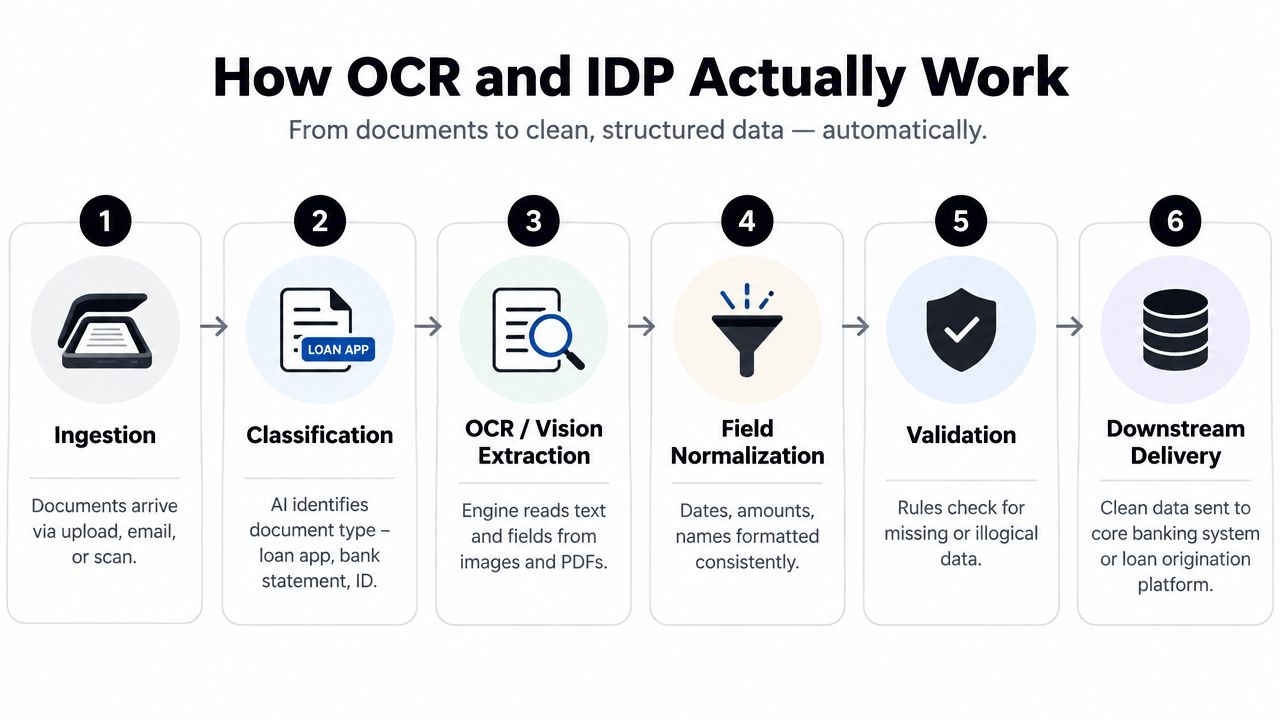
The six stages that matter
Take a loan file. A customer uploads a payslip, bank statements, an ID document, and a signed application form.
Ingestion
The files arrive through upload, email, scan, branch capture, or SFTP. This step sounds trivial, but bad ingestion creates duplicate files, missing pages, and weak metadata.Classification
The system identifies each document type. That's how the pipeline knows whether a page is a passport, a payslip, or a bank statement. Without classification, extraction rules fire on the wrong pages.OCR or vision extraction
This is the reading step. The engine pulls text, key-value pairs, tables, and sometimes handwriting. Classical OCR works on clean, structured pages. Layout-aware or generative models help when files are mixed, multi-page, or visually inconsistent.Field normalization
Raw extraction isn't enough. Dates need one format. Currency fields need one decimal convention. Names, addresses, and account identifiers need consistent output.Validation
Real banking automation begins. The system checks for missing values, impossible dates, mismatched totals, invalid IDs, or broken cross-field logic.Downstream delivery
Clean fields move into the loan origination system, case management queue, AP workflow, or compliance stack.
What poor scans do to good systems
Banks don't receive perfect documents. They get shadowed scans, mobile photos, rotated pages, compressed PDFs, and stitched statements from customer portals.
Pre-processing decides whether extraction succeeds:
- Deskewing fixes rotated pages.
- Denoising removes visual noise.
- Language detection helps multilingual flows.
- Page splitting separates mixed bundles.
- Image enhancement improves low-quality captures.
OCR in banking fails less often because of reading errors than because the pipeline never correctly identifies what it was looking at.
Where the jump from OCR to IDP pays off
A plain OCR engine may read a payslip as text. An IDP pipeline extracts gross pay, employer name, pay period, and net income, then maps those values into the lending workflow.
That distinction matters because traditional OCR often lands at only 76 to 82% accuracy on structured documents and drops to 45 to 58% on semi-structured or unstructured financial documents, based on a review of OCR accuracy in financial document processing. That's why production systems combine OCR with classification, extraction rules, and post-processing instead of trusting recognition alone.
Where Banks Deploy OCR Across the Document Lifecycle
Banks don't run one OCR workflow. They run several, each with different risk, field requirements, and failure modes. That's why copying a single architecture across KYC, statements, checks, and AP usually backfires.
Four deployment patterns that show up again and again
KYC and identity verification needs exact identity fields and clear exception routing. The extraction task isn't just reading a passport or ID. It has to capture document number, name, date of birth, expiry, and supporting proof-of-address data in a form compliance teams can defend.
A 2026 banking OCR guide notes that even a 99% character-level OCR system can still produce five wrong characters on a KYC page, and one wrong passport digit can create a compliance failure with no useful audit explanation. The same guide reports published banking deployments where automated eKYC reduced processing time from 45 minutes per file to under 5 minutes, which is why this use case gets budget first in many programs, according to this overview of OCR for banking and eKYC workflows.
Bank statement ingestion is where many vendors get exposed. Reading statement text is easy enough. Extracting opening balance, closing balance, transaction rows, dates, descriptions, and running balances without breaking table structure is harder. Banks then need normalized output that can feed categorization, affordability checks, reconciliation, or AML review.
Cheque processing remains a throughput play. For standardized, high-volume items, OCR can be very fast. One benchmarked deployment reported average API response times of around 4.2 seconds in cloud mode and 0.8 seconds on-premises, with peak capacities ranging from 3,600 checks per hour in standard cloud to 15,000+ per hour on-premises cluster mode, based on Veryfi's comparison of cloud versus on-premise bank check OCR.
Invoice and remittance processing sits closer to finance ops than classic retail banking, but it matters. Banks still process supplier invoices, payment instructions, and remittance documents. Here the risk isn't just a wrong total. It's broken line items, VAT handling, duplicate invoice numbers, and failed matching against internal approvals or purchase orders.
For teams comparing document workflows more broadly, it also helps to look at adjacent orchestration patterns such as an AI agent for banking operations, especially when OCR output triggers follow-up actions in servicing or back-office queues.
Banking OCR use cases compared
| Use Case | Critical Fields | Primary Risk | Typical Accuracy Target |
|---|---|---|---|
| KYC and identity verification | Name, document number, DOB, expiry, address | Compliance failure from one incorrect field | Very high field-level accuracy with human review on exceptions |
| Bank statement ingestion | Account details, statement period, transaction rows, balances | Broken tables that corrupt downstream analysis | Very high field completeness and table integrity |
| Cheque processing | MICR line, amount, date, payee, signature presence | Misread amount or fraudulent item passing intake | High speed on standard items, strict controls on exceptions |
| Invoice and remittance processing | Supplier, invoice number, totals, VAT, line items | Payment errors and failed matching | High header accuracy plus controlled line-item validation |
The common mistake
Teams often rank these use cases by volume alone. That's the wrong order.
Pick by control sensitivity first, then by volume. A medium-volume KYC flow with weak auditability is more dangerous than a high-volume invoice queue with a reliable reviewer loop.
Why Field-Level Accuracy Matters More Than Character Accuracy
Character accuracy is the favorite metric in OCR demos because it sounds clean. In banking, it's the wrong headline KPI.
A document can look excellent at the character level and still fail the business task. One transposed digit in a balance field, one misplaced decimal in an invoice total, or one swapped account identifier can move bad data into reconciliation, underwriting, or compliance without throwing an obvious error.
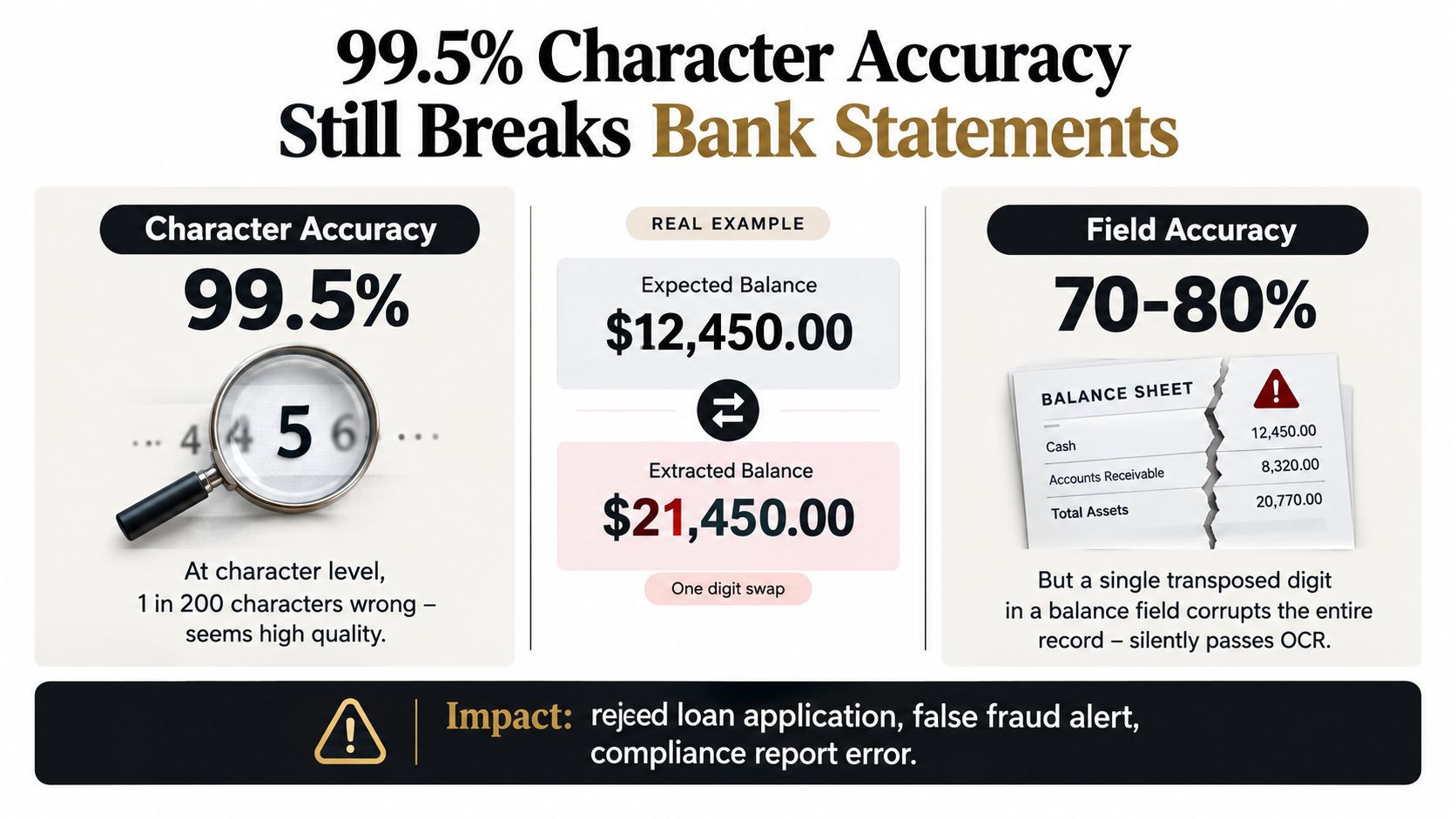
What field-level accuracy actually means
Field-level accuracy is the share of business-critical fields that match the ground truth after validation. That's what matters. Not whether the OCR engine got most characters right.
A bank statement parser can score well on raw text recognition and still mangle line items, continuations, or running balances. That's one reason independent industry commentary keeps coming back to the gap between OCR text extraction and business-grade statement parsing in finance document workflows.
For a practical framework, this guide to field-level validation gets at the right operating principle: extracted values need rule-based checks before they enter production systems.
Silent failures are the expensive ones
Common examples show up everywhere:
- A decimal point disappears on an invoice total.
- Account number and sort code fields get swapped in a statement or form.
- Dates stay ambiguous between DD/MM and MM/DD.
- A forged MICR line gets read successfully but shouldn't pass control review.
- A transaction table loses row structure across page breaks.
Here's where the problem sharpens. Traditional OCR can perform acceptably on clean printed documents, but degraded layouts and mixed structures still create rework. That same independent review cited earlier reports roughly 76 to 82% accuracy on structured financial documents and only 45 to 58% on semi-structured or unstructured ones, summarized in Infrrd's analysis of OCR in finance and field-level correctness.
This short video illustrates the gap well in practical terms.
What catches what OCR misses
You need three layers:
- Confidence thresholds to route uncertain fields.
- Deterministic validators such as totals checks, checksum logic, and cross-field consistency.
- Human-in-the-loop review for suspicious or low-confidence cases.
Report both metrics on the same dashboard. Character accuracy tells you how well the engine reads. Field-level accuracy tells you whether the bank can trust the output.
If a vendor only reports character recognition quality, they're hiding the part that hurts in production.
Compliance, Auditability, and Data Protection by Design
In regulated banking workflows, document processing is part of the control environment. Treat it that way.
The mistake I still see is teams evaluating OCR as if they're buying a utility API. They're not. They're introducing a system that touches personal data, financial data, and decision inputs. That means legal, compliance, security, and model governance all need to be designed into the workflow.
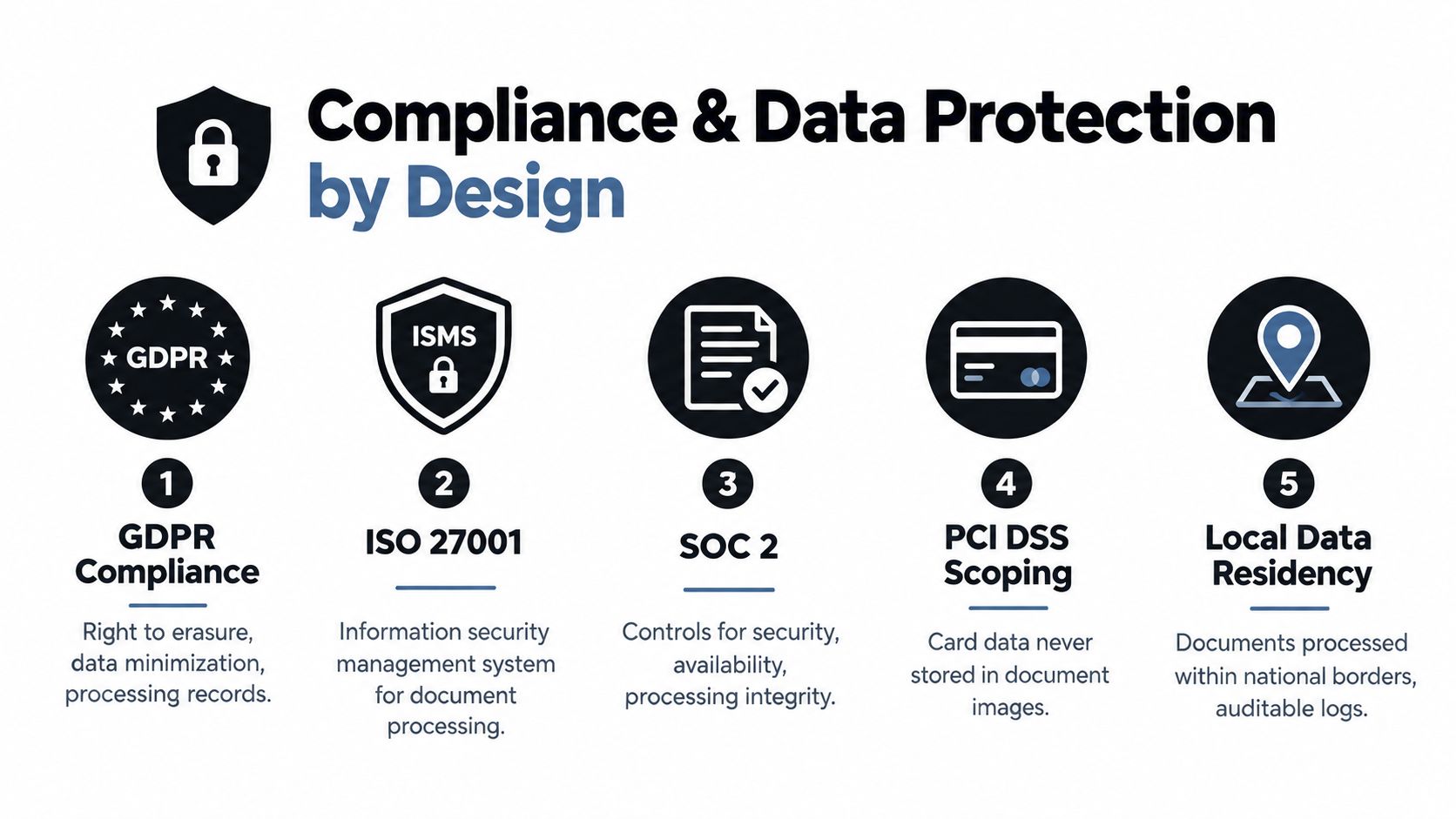
The minimum control package
A defensible setup usually includes:
- GDPR mapping for document categories, lawful basis, retention, and reviewer access.
- ISO 27001-aligned controls around access, change management, and incident handling.
- SOC-oriented evidence for security, availability, and processing integrity.
- PCI DSS scoping discipline so card data isn't casually retained in document images or logs.
- Data residency controls where local processing or regional hosting is required.
The better operating model is simple. Treat extracted document data as regulated data from the moment it enters the pipeline. Not as raw image content someone can move around later.
Auditability has to be built in
If a reviewer edits a field, you need a record of it. If a model version changes, you need traceability. If a compliance officer asks who accessed a document, you need that answer without reconstructing it from scattered logs.
A useful audit trail captures:
- Who accessed the document
- Which fields were extracted
- Which fields were edited
- What model or ruleset produced the output
- When data moved downstream
- How long the evidence is retained
For teams thinking through that layer specifically, this overview of document traceability is aligned with how banks should frame the issue.
If you can't explain why a field changed, who changed it, and what source image supported it, you don't have bank-grade automation.
Fraud and authenticity now sit inside the OCR problem
This is the under-discussed shift. Banks aren't only reading PDFs anymore. They're deciding whether those PDFs can be trusted.
Recent industry commentary on AI in AML and PDF fraud detection highlights the growing need to verify whether a scan or PDF has been tampered with, not merely parsed. That's the next bottleneck. Not more throughput. Trustworthy extraction with auditability, data-localization controls, and review paths for suspicious cases.
Choosing the Right Deployment and Integration Pattern
There isn't one correct deployment model for OCR in banking. There is only the model that fits your latency, residency, and throughput constraints.
Deployment patterns compared
| Pattern | Latency | Data residency | Throughput | Best fit |
|---|---|---|---|---|
| Cloud | Usually fastest to pilot | Often the first blocker in regulated regions | Good for variable loads if network path is stable | Banks testing new use cases or non-sensitive document classes |
| On-premises | Can be very low for local processing | Strongest option for strict sovereignty needs | Strong under sustained internal workloads if infra is well-managed | High-control environments with internal platform teams |
| Hybrid | Balanced if routing is designed well | Good when sensitive data stays local | Flexible across standard and long-tail workloads | Banks that need control without giving up model flexibility |
The trade-offs are operational, not theoretical
Cloud is attractive because teams can start quickly. The problem shows up later, usually in legal review or regional rollout, when document egress and third-party processing geography become a blocker.
On-premises solves a lot of that. It can also reduce latency for branch capture, check processing, or internal batch workloads. But then the bank owns more of the MLOps burden: infrastructure, version control, uptime, rollback, and drift monitoring.
Hybrid often wins in practice. A local layer can handle redaction, routing, or standard forms, while a secondary service handles exceptions or harder layouts.
Integration quality decides whether the pilot survives
A decent OCR engine can still fail in production because the integration is sloppy.
Use patterns that support:
- Idempotency, so the same file doesn't create duplicate records after a retry.
- Retry logic, so transient failures don't strand work.
- Dead-letter queues, so bad payloads don't disappear.
- Clear status states, so ops can distinguish queued, processed, failed, and review-required items.
- Human fallback, so unresolved exceptions don't clog the automated path.
For solution selection, I prefer APIs over brittle desktop capture tools. A banking workflow needs predictable interfaces. REST APIs, event-driven services, and controlled file ingestion are easier to govern than ad hoc mailbox parsing and manual exports.
One practical option in this category is Matil.ai. It isn't just OCR. It combines OCR, classification, validation, and automation behind an API, with pretrained models, rapid customization, security controls including GDPR, ISO, and SOC-oriented posture, and zero data retention. That's a more realistic fit for document operations than a raw text-recognition endpoint.
Measuring ROI Without Cherry-Picking the Numbers
Most OCR ROI decks are padded. They use a good pilot, a clean sample, and optimistic straight-through assumptions. That's how banks end up disappointed after rollout.
Build the case from the process you run.
Start with baseline cost, not vendor promises
Pull three baseline measures from your own operation:
- Average handling time per document type
- Loaded cost per document, including review and rework
- Exception rate, meaning anything that needs correction, escalation, or reprocessing
Then model the value of automation in two buckets. First, reduced manual handling. Second, reduced error correction.
For invoice-heavy finance flows inside banks, the economics are blunt. One 2026 benchmark puts manual invoice processing at about $12.88 to $19.83 per invoice, versus about $3 or less for automated processing, as summarized in these accounts payable automation statistics. The same benchmark says roughly 39% of manually handled invoices contain an error, versus under 0.1% for AI-based systems.
Error cost is where weak OCR gets exposed
Teams often count keying time and ignore the cleanup after a mistake. That's backwards.
A 2026 accounts-payable benchmark estimates that the fully loaded staff time for a single AP error costs about $50 to $180, and another benchmark places the average correction cost at about $53 per mistake, according to this summary of accounts payable error-rate economics.
That cost structure matters in banking because AP isn't the only place rework happens. The same logic applies to KYC correction, statement repair, and exception investigation. Every bad field creates more than one task.
OCR ROI inputs by document type
| Document type | Baseline STP rate | Target STP rate | Loaded cost per doc | Typical error cost |
|---|---|---|---|---|
| KYC packet | Measure from your current queue | Set by control tolerance and review design | Include analyst review and compliance rework | Include correction and escalation effort |
| Bank statement | Measure from current ingestion flow | Set by table integrity and validation success | Include parsing review and downstream exception handling | Include reconciliation and underwriting rework |
| Invoice | Measure from AP baseline | Set by header and line-item validation performance | Use current per-invoice cost baseline | Use current correction handling cost baseline |
| Cheque | Measure from item processing queue | Set by low-risk automated path and exception controls | Include review path for suspect items | Include correction and fraud investigation effort |
What to avoid
Don't count savings from a short pilot unless the sample includes the ugly documents your staff hates.
Three traps distort ROI fast:
- Counting only touch time and ignoring exception aging
- Assuming pilot accuracy holds at production mix
- Counting fraud-prevention gains already delivered by other controls
A credible OCR business case is usually strong enough without inflated assumptions.
A Practical Roadmap for Evaluating an OCR Platform
Buy on production evidence. Ignore polished demos.
Six weeks is enough to know
In the first two weeks, lock the scope. Pick two or three document classes that reflect real work, not just clean PDFs. Build a labeled sample from production files and freeze the test set so nobody can move the goalposts during tuning.
In weeks three and four, run a paid proof of concept. Measure field-level accuracy, latency, exception rates, and reviewer effort. Also test the ugly parts that sales engineers skip: audit logs, retention behavior, failure handling, and permission boundaries.
What must be true before go-live
By weeks five and six, integration matters more than extraction screenshots.
The shortlist should prove:
- Stable API or ingestion behavior under load
- Clear fallback to human review
- Deterministic handling of retries and duplicates
- Contracted data protection controls that behave as promised
- A documented operating model for exception ownership
Close with a shadow run before cutover. Let the platform process live traffic in parallel, compare output to current operations, and inspect the misses.
If you're evaluating vendors, keep the standard high. OCR in banking isn't a search problem. It's a control-design problem with operational consequences.
If you're evaluating this seriously, Matil is worth a look for workflows that need more than raw OCR. It gives teams a single pipeline for document extraction, classification, validation, and traceability, which is exactly what banking operations need when accuracy, controls, and automation all have to work together.


