Document Classification Machine Learning: A Practical Guide
Learn how document classification machine learning works, from OCR and embeddings to transformers, training, evaluation, and enterprise deployment.

Your finance team receives invoices by email, KYC documents through a portal, and logistics paperwork as scanned PDF packets. Someone still opens each file, decides what it is, checks whether the scan is usable, and routes it to the right workflow. That manual queue creates delays and makes every downstream extraction step depend on an earlier classification decision.
Document classification machine learning treats this as an operational pipeline, not just a model-training exercise. The reliable path combines OCR documents, layout signals, classification, validation, and workflow automation, with monitoring for the cases that fixed benchmarks tend to hide.
Why Document Classification Is Harder Than It Looks
A document classifier doesn't only read words. It identifies what a complete page or document represents, often using text, visual structure, layout, and document context at the same time.
An invoice may contain the word “payment,” but so might a receipt, a purchase order, or a credit note. The position of the supplier name, the tax table, the total, and the invoice number can be more informative than any single token. Checkboxes, signatures, stamps, headers, and table geometry also carry meaning that a text-only model loses.
The input quality makes the task harder. Scanned documents can contain skew, blur, compression artifacts, handwriting, unusual fonts, and incomplete characters. OCR must turn those pixels into usable text before later stages can reason about them. A document may also mix languages, page templates, and reading directions, which creates additional variation without changing its business category.
Why text-only classification breaks
Traditional natural language processing often represents a document as a sequence of tokens. That approach works well when the category depends mainly on vocabulary. It becomes weaker when the class signal lives in where information appears on the page.
A model that sees “account holder,” “date of birth,” and “document number” may still struggle to distinguish an identity card from a form if it can't use image structure. Similarly, extracting text from a table without preserving row and column relationships can make a delivery note look like an unrelated document.
The history of document classification shows this shift clearly. The 20 Newsgroups benchmark contains about 20,000 news items, evenly split across 20 topics, with a vocabulary of 26,214 unique words. Later, the RVL-CDIP benchmark moved evaluation toward page images, with 400,000 document images across 16 categories. This change reflects a move from sparse text features toward visual, OCR, and layout-aware modeling, as described in this benchmark history of document classification.
Practical rule: If the class depends on page appearance, reading order, or table structure, “just fine-tune BERT” isn't a complete solution.
The production cases benchmarks miss
Real document streams aren't closed collections. Vendors redesign invoices, scanners change settings, and new document types enter the queue. A single PDF can also contain several related identities, such as an invoice with an attached receipt or a KYC packet containing multiple forms.
That creates three operational failure modes:
- Layout drift: familiar suppliers change templates or move fields.
- Open-set input: the system receives a type it wasn't trained to recognize.
- Mixed-quality scans: one packet contains clear digital pages and barely readable images.
Teams evaluating enterprise document processing automation should therefore assess routing, rejection, and review behavior, not only the classifier's score on a fixed test set.
The Document Classification Pipeline from Pixels to Predictions
A production system usually has five connected stages. Each stage can be implemented with a separate model, service, or vendor, so each one adds its own cost, latency, and failure surface.
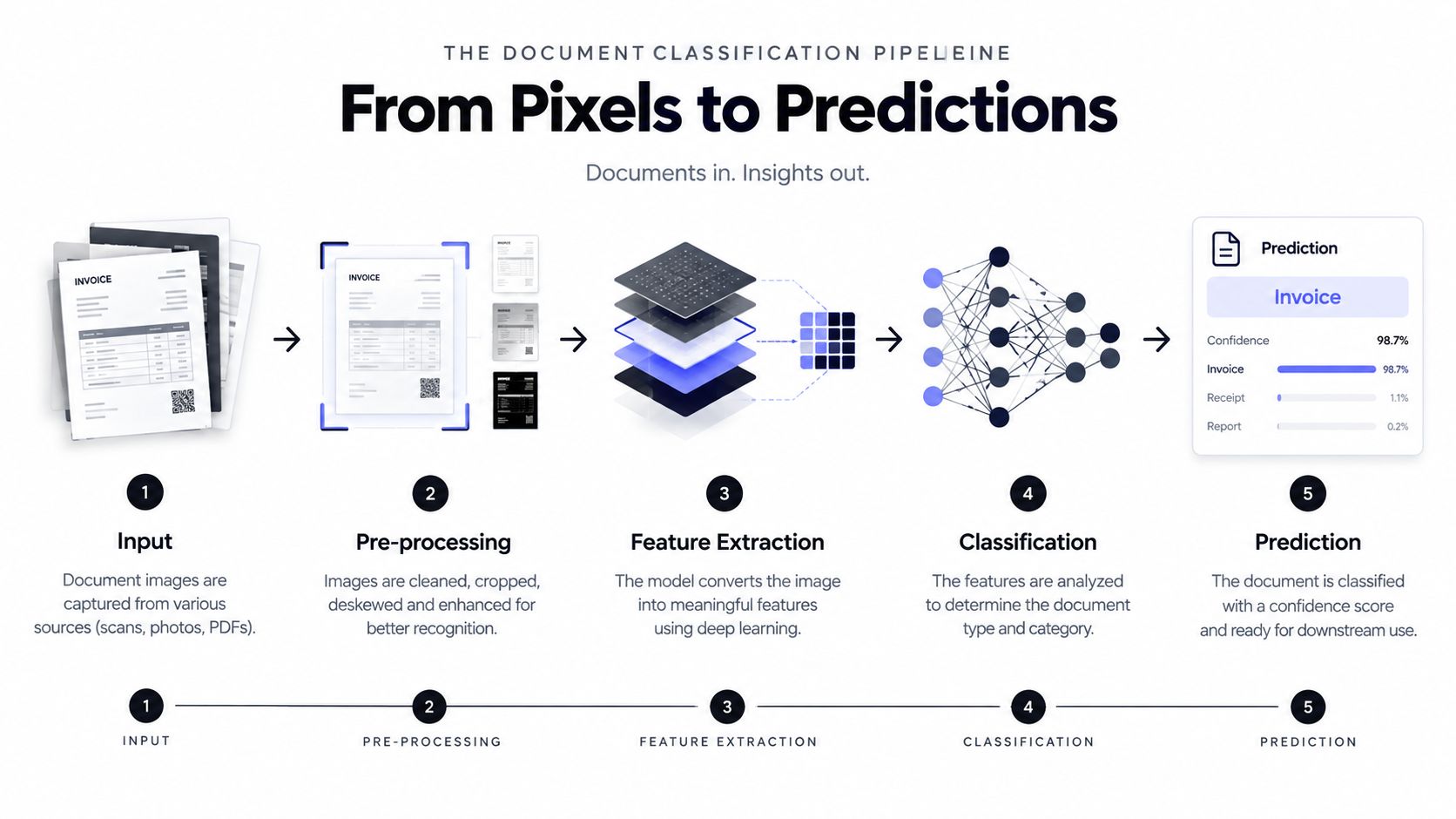
Step 1, ingest and normalize
The system receives a PDF, image, email attachment, or multi-page upload. Ingestion should record the file identifier, source, page count, format, and processing status. It should also reject corrupt files before sending them to OCR.
Normalization can include rendering PDF pages, correcting orientation, removing excessive borders, and standardizing image resolution. These steps don't classify the document, but they determine whether later components receive a usable input.
Step 2, run OCR and parse layout
OCR produces text, while layout parsing associates text with page coordinates, blocks, lines, tables, and sometimes form elements. The useful output isn't just a text string. It is closer to:
- normalized text,
- bounding boxes,
- reading order,
- page-level metadata,
- OCR confidence indicators.
Poor OCR can contaminate every downstream representation. If a supplier name is misread, the resulting embedding may place the page near the wrong class even when the visual layout is obvious.
Teams building document processing use cases should treat OCR quality and layout preservation as first-class evaluation areas, not hidden infrastructure.
Step 3, create features
The feature layer converts OCR text and page structure into a representation the classifier can use. That might be a TF-IDF vector, handcrafted layout measurements, or a dense multimodal embedding.
This handoff is where engineers should decide whether to retain page-level features, document-level aggregation, or both. A long packet may need page representations for splitting and a combined representation for document classification.
Step 4, infer a class
The model returns a label and a confidence score. Possible labels might include invoice, payslip, identity document, Bill of Lading, or customs declaration.
The confidence score shouldn't be treated as truth. A softmax model can produce a high score even when every available class is wrong, especially for an unseen document type.
Step 5, apply business logic
Post-processing converts predictions into actions:
- accept the label when confidence and validation checks pass,
- send the item to a specialist when confidence is ambiguous,
- reject or quarantine unknown inputs,
- split mixed packets before routing individual documents,
- record evidence for audit and later review.
The image preprocessing guidance for Python is relevant when normalization is part of your own pipeline rather than a managed service.
Monitor every handoff. Track ingestion failures, OCR quality, processing latency, class distribution, confidence patterns, and human corrections. A classifier can remain unchanged while upstream scan quality deteriorates and business accuracy falls.
Feature Extraction with OCR Layout and Embeddings
Feature extraction determines what the model can see. The right choice depends on the document's structure, the quality of available labels, the latency target, and the infrastructure your team wants to operate.
OCR text plus classical features remains a sensible baseline. TF-IDF or bag-of-words vectors are cheap, fast, and easy to inspect. A compliance team can review which terms influence a Logistic Regression or SVM decision. The trade-off is substantial: these features largely discard spatial relationships, so “total” in a financial table looks similar to “total” elsewhere.
Layout-aware features preserve coordinates and reading order. They can represent whether a checkbox is marked, whether a signature sits below a declaration, or whether a value appears in a right-aligned total column. These methods depend on OCR that includes reliable positions. Rotated pages and low-resolution scans can weaken the layout representation before the classifier sees it.
Dense embeddings from models such as LayoutLM, DiT, and Donut can combine text, page structure, and image information. They offer a stronger representation for varied layouts, but page-level inference requires more compute and often benefits from GPU infrastructure. End-to-end vision-language models can reduce the need for a separate OCR stage in some workflows, while explicit OCR remains easier to audit and reuse for extraction.
Choosing a representation
| Approach | Signal Captured | Compute Cost | OCR Dependency | Best Fit |
|---|---|---|---|---|
| TF-IDF or bag-of-words | Vocabulary and term frequency | Low | High for scanned files | Small, text-driven taxonomies |
| Layout features | Coordinates, reading order, tables, forms | Moderate | High | Structured forms and layout-sensitive routing |
| Multimodal embeddings | Text, visual appearance, and structure | Higher | Variable | Diverse enterprise documents |
Use OCR first when you need traceable text, bounding boxes, searchable evidence, or a reusable extraction layer. Consider an end-to-end vision-language model when the page is visually complex, OCR is unreliable, or the workflow already supports image-grounded inference.
For rotated documents, correct orientation before extracting features. For low-DPI scans, preserve the original image for review while creating a normalized version for inference. If the same document is classified, split, and extracted repeatedly, cache its embeddings. Recomputing them wastes resources and can produce inconsistent results when model versions change.
A practical explanation of the first stage is available in this guide to what OCR is used for. OCR isn't the classification decision. It's one input to the decision, and its limitations must remain visible in the system design.
Model Families from Classical ML to Transformers
Model selection should follow the information available in the document, not the popularity of the architecture. A small, well-labeled collection of text-heavy documents may favor a classical baseline. A varied collection of scans, tables, and forms may justify a multimodal model.
| Model Family | Accuracy on Layout-Rich Docs | Data Needed | Latency | Interpretability |
|---|---|---|---|---|
| Classical ML | Limited when geometry matters | Low to moderate | Low | High |
| CNNs and sequence models | Useful for visual or token patterns | Moderate | Moderate | Moderate |
| Multimodal transformers | Stronger when text and layout interact | Moderate to high | Higher | Lower |
Classical baselines
Naive Bayes, Logistic Regression, and SVM models over TF-IDF remain valuable because they're quick to train, inexpensive to run, and relatively easy to audit. They can establish whether the taxonomy is coherent and whether OCR text contains enough signal.
They also expose data problems early. If a simple model confuses two categories, the issue may be ambiguous labels or overlapping business definitions rather than insufficient model capacity.
Deep learning for visual and sequential signal
CNNs operating on page images can learn visual patterns such as logos, form geometry, and recurring templates. They don't automatically understand extracted text, so they can struggle when two classes look alike but differ in wording.
BiLSTM and CNN hybrids over OCR tokens can model sequence information more effectively than bag-of-words approaches. They still depend on OCR quality and often lose page geometry unless coordinates are added explicitly.
Transformers and multimodal APIs
LayoutLM, DiT, and Donut represent stronger options when text, coordinates, and image patches interact. GPT-4V-class APIs can be useful for prototypes or difficult long-tail cases, but teams must evaluate data governance, variable latency, vendor dependence, and per-document cost before committing.
Decision rubric: Start with a classical baseline. Move to deep learning when visual patterns separate the classes. Choose transformers when layout interactions justify their operational and infrastructure cost.
A useful benchmark milestone arrived with RVL-CDIP, introduced in 2015 as BigTobacco by Harley and colleagues. It contains 400,000 document images across 16 categories and became a widely used reference point for document classifiers, as documented in this RVL-CDIP research overview.
Training Data Labeling Strategy and Few-Shot Realities
Model architecture rarely compensates for a weak taxonomy. A classifier trained on rushed labels, incomplete vendor coverage, or unrealistic class proportions will learn the wrong boundary with impressive confidence.
Start by defining what each class means operationally. “Invoice” might exclude credit notes, or it might include them under a broader finance category. The decision must match the routing action that follows. If two labels trigger the same workflow, separating them may add annotation cost without adding business value.
Build a representative sample
Sample documents across the conditions that affect production:
- Source variation: suppliers, customers, portals, email channels, and scanners.
- Time variation: older templates and recent documents.
- Quality variation: digital PDFs, clear scans, skewed pages, and handwritten marks.
- Language variation: supported languages and mixed-language packets.
- Business variation: common classes plus rare but consequential document types.
Class imbalance matters because a model can favor frequent categories while neglecting a long tail. Fixed, balanced test sets can hide that behavior. The validation set should resemble the traffic the business expects, including unknown or ambiguous inputs.
Active learning and low-label methods
An active learning loop sends low-confidence or contradictory documents to reviewers first. Their corrections improve the training set where the model is weakest, rather than spending equal annotation effort on pages it already handles reliably.
Few-shot options include prompt-based classification with an LLM, prototypical networks over document embeddings, and centroid classifiers that compare a new embedding with labeled examples. These approaches can work for narrow taxonomies, but they don't remove the need for clear class definitions, representative examples, and human review.
A survey of long-document classification highlights the difficulty of combining long context, sparse labels, and document structure. Related industrial literature indicates that realistic deployments may require around one thousand annotated documents per class, depending on complexity and reliability requirements, as discussed in this survey of long-document classification.
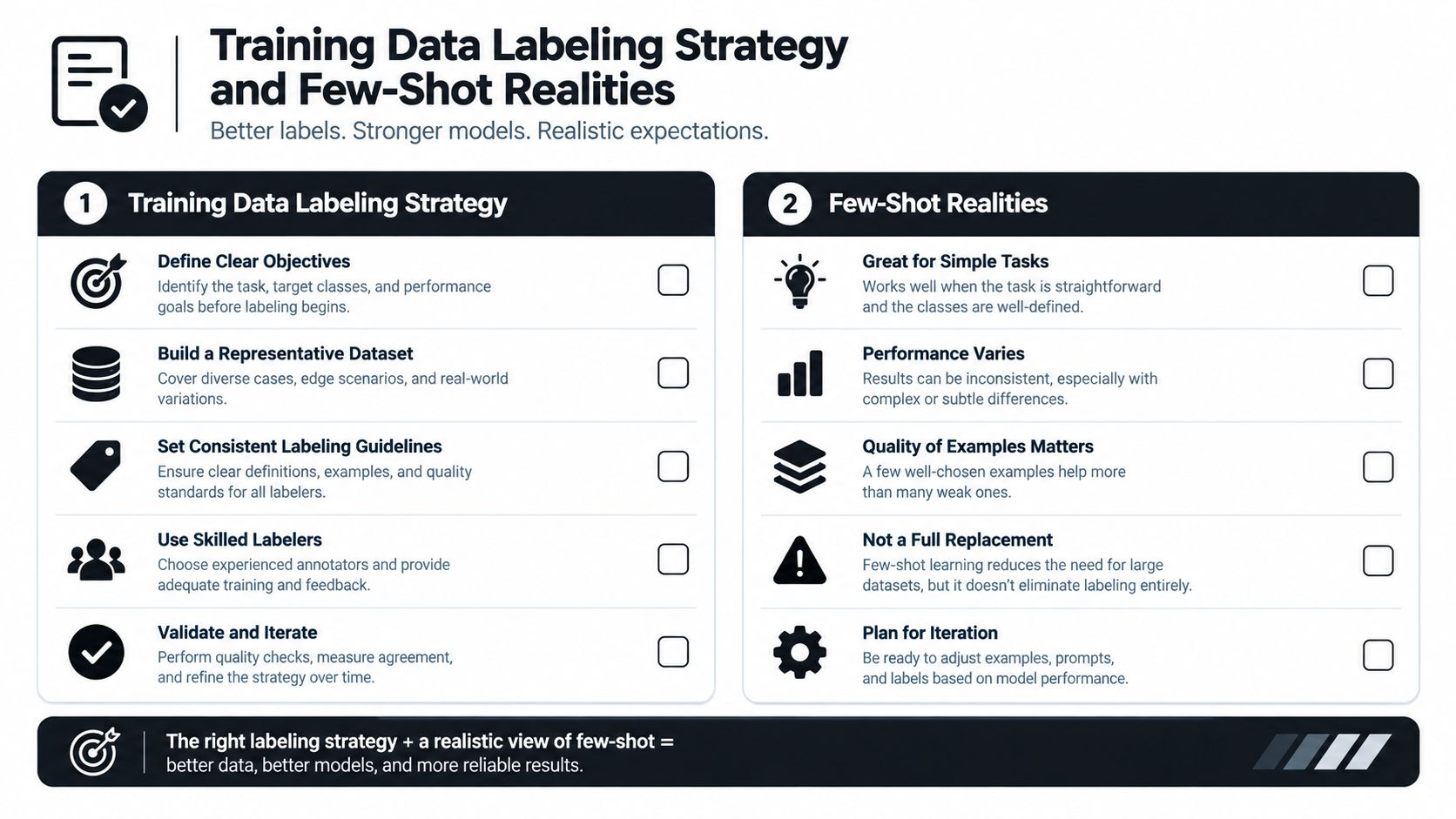
For the first labeled batch, establish the taxonomy, freeze annotation guidelines, measure agreement between annotators, and reserve a validation set that reflects production drift. Don't train on every labeled document. Keep an unseen sample for decisions about deployment.
Evaluation Metrics and the Open-Set Problem
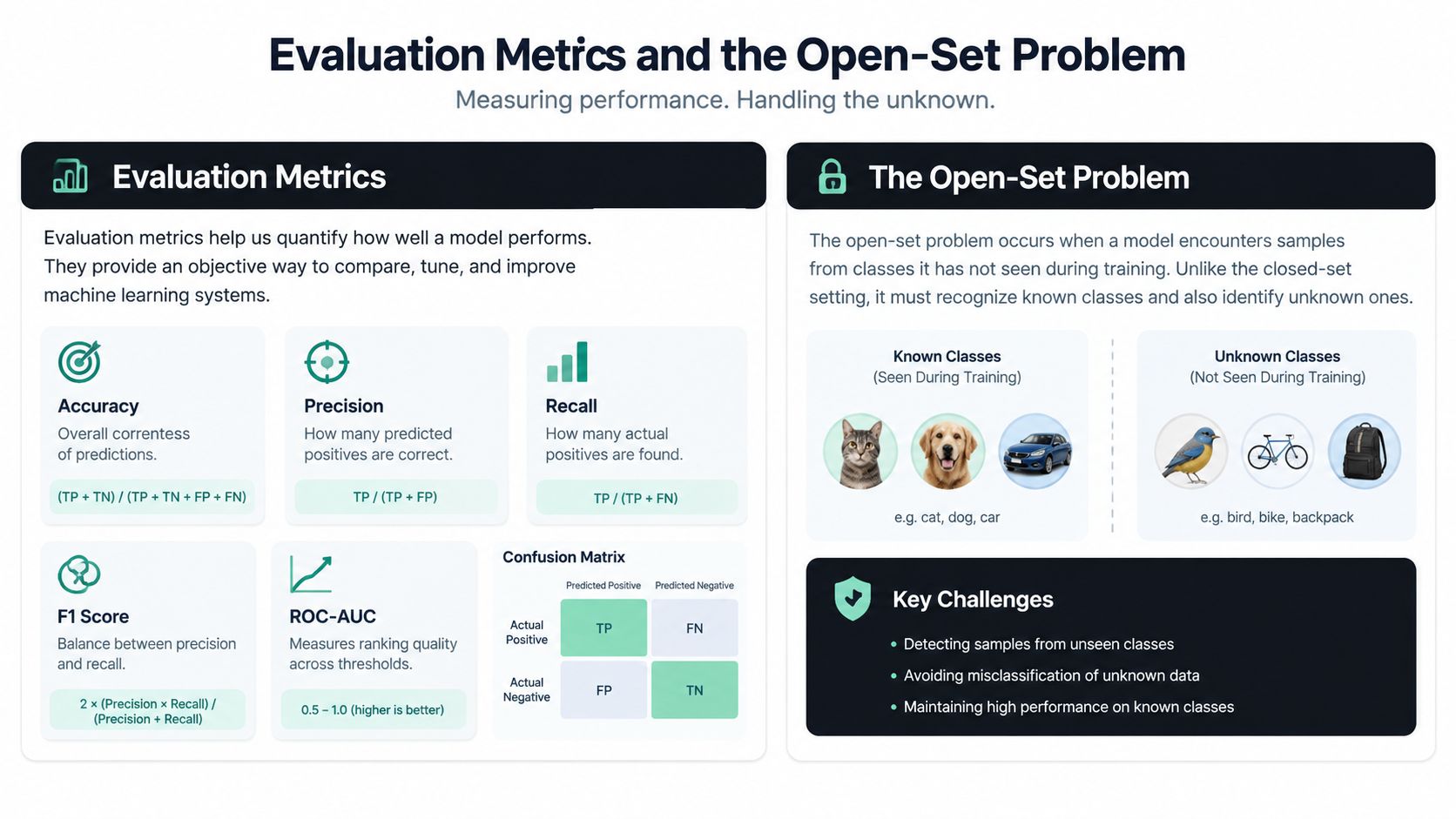
A single accuracy or F1 score can't tell a product manager whether automated routing is safe. Evaluation must show which classes fail, how confidence behaves, and what happens when the system receives something outside its training taxonomy.
Per-class precision answers whether a predicted label is usually correct. Macro-F1 gives every class equal weight, which makes it useful when rare categories matter. A confusion matrix keyed by document type can reveal that invoices route well while credit notes or identity documents are regularly confused.
Useful evaluation views include:
- Per-class recall: Shows which document types the system misses.
- Top-k accuracy: Indicates whether the correct category appears among several candidates.
- Calibration: Tests whether confidence scores correspond to actual correctness.
- Reject rate: Measures how often the system chooses review instead of forcing a label.
- Packet-level success: Captures whether the complete upload was routed correctly.
Unknown inputs need an explicit path
Enterprise streams are open-world systems. New layouts and categories appear, while existing classes change over time. Survey work on shifting class distributions describes background-class learning, zero-shot classification, and open-set classification as practical responses to this problem. The central question isn't only “which model has the best accuracy?” It's whether the system knows when it shouldn't decide, as outlined in this research on classification under shifting distributions.
A standard softmax model chooses the highest available class even when none fits. Add a reject option based on confidence, embedding distance, energy scores, or business rules. Tune thresholds per class when the cost of a false accept differs from the cost of a false reject. In KYC or claims workflows, routing an unknown document for review may be safer than assigning it a plausible but incorrect label.
Drift monitoring should compare current inputs with the training population. Watch OCR quality, class frequencies, confidence histograms, and the appearance of new layouts. Evaluation becomes a continuous operating discipline rather than a one-time model launch.
A short visual explanation can help teams align on the distinction between classification quality and production risk.
Multi-Page Documents and Mixed Document Sets
A multi-page upload isn't always one document. It may be a packet containing an invoice, a receipt, a contract, and an identity card. Classifying the entire file with one label forces unrelated pages into the same workflow.
The correct unit of work is often a boundary-delimited document inside the packet. First detect where one document ends and another begins. Then classify each segment and expose both segment-level and packet-level confidence to downstream automation.
A practical packet workflow
- Inspect page signals. Use headers, footers, page numbering, repeated logos, layout changes, and document titles.
- Detect boundaries. Mark likely start pages, end pages, and inner pages.
- Classify segments. Apply the document classifier to each candidate segment, not the whole upload.
- Validate continuity. Check whether page numbers, names, dates, and visual structure support the proposed grouping.
- Route uncertainty. Send ambiguous boundaries or unfamiliar combinations to human review.
A benchmark description for packet splitting explicitly requires page-level boundary detection and distinguishes start, end, and inner pages. It also warns against merging separate documents of the same type into one segment, which is a common failure when two invoices appear consecutively in one scan, as described in this document packet splitting benchmark.
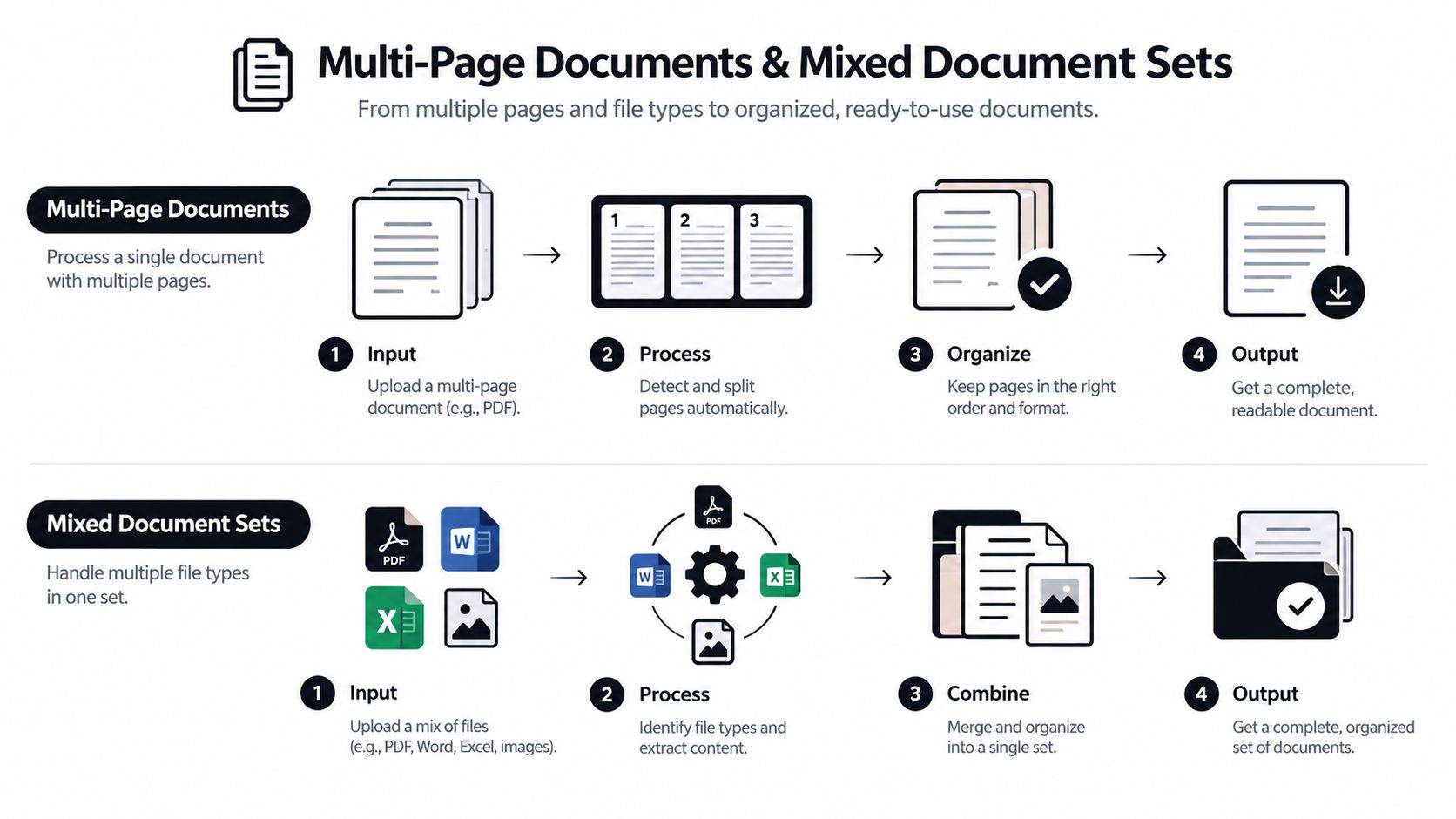
Labeling strategy must reflect this design. Annotators should mark both page boundaries and segment labels, while evaluation should measure whether the packet was split and routed correctly. A page classifier alone can't answer whether the packet-level workflow is safe.
Deployment Monitoring and the Build vs Buy Decision
A prototype proves that a model can classify examples. Production requires predictable throughput, traceable decisions, controlled failure handling, and a plan for changes.
Separate real-time and batch requirements. An interactive upload may need quick feedback, while overnight invoice processing can tolerate queued work. Measure the complete path, including file ingestion, image rendering, OCR, layout parsing, inference, post-processing, storage, and human review.
| Criterion | Build In-House | IDP Platform | Foundation-Model API |
|---|---|---|---|
| Customization | Maximum control | Configurable within platform limits | Prompt and schema driven |
| Data sensitivity | Fully controlled by your team | Depends on provider controls | Requires careful governance |
| Maintenance | Highest engineering burden | Shared with vendor | Model and API behavior can change |
| Time to value | Slower | Faster | Fast for prototypes |
| Best fit | Strategic, stable, specialized workflows | Broad document operations | Variable or reasoning-heavy cases |
A build decision should include more than model accuracy. Compare annotation effort, OCR operations, GPU or API costs, integration work, security review, monitoring, and the cost of maintaining new document classes. For many teams, a managed intelligent document processing platform reduces the amount of infrastructure they must own, while an internal build makes sense when document logic is a core differentiator or data cannot leave controlled systems.
Monitor the silent failures
Create dashboards for:
- Confidence histograms: Detect shifts toward unjustifiably high or low scores.
- OCR quality: Track recognition errors and unreadable-page patterns.
- Class distribution: Identify unexpected changes in document mix.
- Misrouted samples: Review real errors by supplier, language, and layout.
- Boundary corrections: Measure packet-splitting failures separately.
- Retraining triggers: Define conditions that start relabeling or model evaluation.
The wider intelligent document processing explanation is useful for framing classification as one component of an end-to-end workflow. A managed option such as Matil.ai combines OCR, classification, validation, and automation through an API, with pre-trained models, quick customization, structured JSON output, and enterprise controls including GDPR, ISO 27001, AICPA SOC, and zero data retention. Teams should verify the exact security, accuracy, retention, and service commitments against their own procurement requirements.
The right build-vs-buy choice follows the workflow, not the demo. If you process invoices, payslips, KYC documents, delivery notes, contracts, or logistics files, test the complete path on representative packets, including poor scans and unknown document types, before selecting a classifier.
Matil provides an API for document extraction, classification, validation, PDF splitting, and workflow orchestration, so teams can route mixed documents before sending structured data into finance, operations, logistics, legal, or compliance systems. If you're evaluating document classification machine learning for a production workflow, visit Matil to explore an integration path based on your document types and review requirements.


