PDF Invoice Data Extraction: Step-by-Step Guide for 2026
Learn PDF invoice data extraction step by step: preprocessing, field mapping, validation, error handling and batch API processing.

Your inbox has the usual mix this morning. One supplier sent a clean PDF from its accounting system. Another sent a tilted phone photo saved as PDF. A third bundled an invoice, a delivery note, and a remittance into one file. You're copying totals into your ERP by hand, checking each one twice, and still finding errors at month end. PDF invoice data extraction should remove that copying, but only if the result is safe to post. I would judge any pipeline by one question. Can this invoice reach the ledger without human review, and can you prove why?
Seven Steps From PDF to Validated Invoice Data
PDF invoice data extraction is the process of reading an invoice PDF and returning named fields such as supplier, invoice number, dates, tax, total, and line items as structured data, usually JSON, that a system can check and post. It's not one OCR pass. It's a staged decision pipeline.
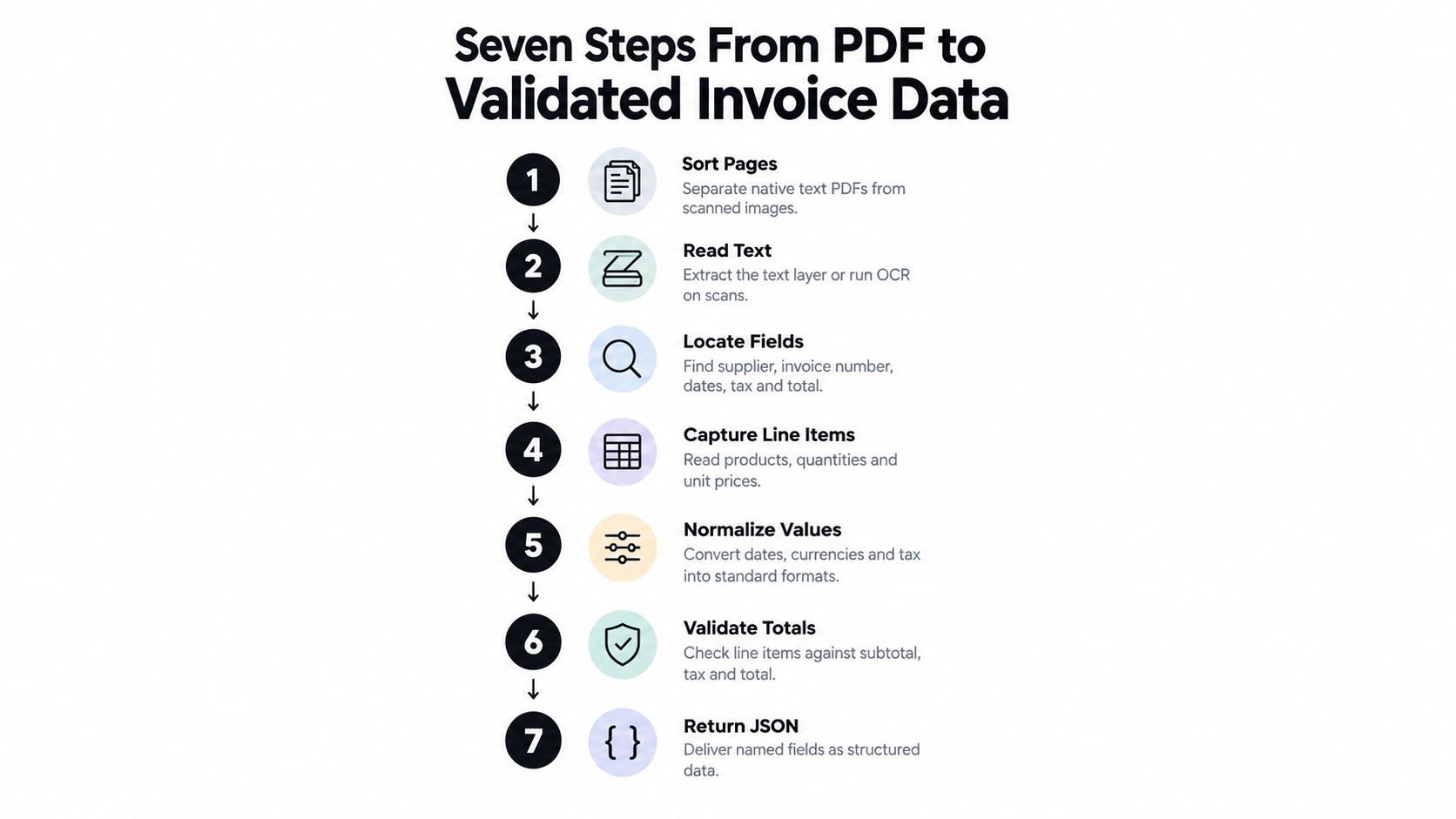
- Detect the page type: Check whether each page has a text layer or is an image-only scan.
- Split combined files: Separate files that hold several invoices, or an invoice plus other documents.
- Run OCR where needed: Read scanned pages only, and keep page coordinates for every value.
- Classify the document: Confirm it's an invoice, not a credit note, statement, or remittance, so it gets the right schema.
- Map blocks to fields: Assign text and table cells to named fields in your schema.
- Validate arithmetic and rules: Recalculate lines, tax, and totals. Check mandatory fields and supplier identity.
- Route and store the trail: Post clean invoices, send exceptions to review, and save source text, confidence, and transformations.
Staging matters because a single score hides weak fields. In a recent study of 102 digital and scanned invoices, overall extraction accuracy was 94%, but line-item extraction reached only 91%. That gap is exactly what a document-level average conceals.
A visually correct value can still be semantically wrong. A number read perfectly and assigned to the wrong label is a posting error, not a success.
For smaller teams weighing where to start, small business invoice automation with Truespeak is a useful companion on scoping a first rollout. Map your current process against these seven stages and mark every stage your team still does by hand. That's your build list.
Preparing Native, Scanned and Multi-Page PDFs
Say an email arrives with one attachment. Inside are an invoice on pages one and two, a delivery note on page three, and a payment remittance on page four. If you send that file straight to extraction, the remittance total can be read as an invoice total. Split first. Classify each part. Extract second.
Mixed files like this aren't an edge case. A 2025 Institute of Financial Operations and Leadership survey found that 66% of organizations still manually key invoice data into an ERP or finance system, while 63% spend more than 10 hours per week processing invoices. At that scale, preparation decides a large share of accuracy before any model runs.
Here's the workspace reality for most AP teams, printed pages next to digital ones.

Test Each Page Before You OCR It
A native PDF carries a text layer. Characters can be read directly, with coordinates. A scanned PDF or phone photo is a picture of text and needs OCR. Test each page, not each file, because files mix both. If text extraction returns no characters, treat that page as a scan.
For scanned pages, I use four preparation rules:
- Render at around 300 dpi: Lower resolution makes small digits, decimal points, and tax IDs unreliable.
- Deskew and auto-rotate: A few degrees of tilt breaks table rows. Sideways pages break everything.
- Keep grayscale or light compression: Heavy JPEG artifacts blur the difference between 5 and 6, or 1 and 7.
- Split on document signals: A new supplier name, a new invoice number, or a page marked 1 of N usually starts a new document.
Our partitioner separates a PDF containing multiple documents into each document automatically, using page-level detection to find where each one starts and ends. Our classifier then sorts each part into types such as Invoice (totals, tax IDs, and line items), Contract, Payroll, or ID Document before fields are extracted. If you're diagnosing poor results on scans, our guide to OCR for scanned documents covers the image side in more depth.
The short walkthrough below shows what clean preparation looks like in practice.
Check the result on a sample from each source you receive. A supplier's scanner settings often matter more than your extraction settings.
Mapping Invoice Fields and Line Items to a Schema
A schema is a list of field names, types, and plain-language descriptions that tells the extractor what to return. Descriptions do real work here. "Total payable including VAT" performs better than "total", because one page often shows subtotal, tax, and total within a few lines of each other. Vague descriptions produce confident, wrong assignments.
Core Fields, Formats and Common Misreads
| Field | Expected format | Common misread |
|---|---|---|
| Supplier name | Text, matched to vendor master | Logo or header text read as supplier |
| Supplier tax ID | Country-specific format, such as a VAT number | Customer's tax ID read instead of the supplier's |
| Invoice number | Alphanumeric, unique per supplier | Reference or PO number read as invoice number |
| Invoice date | ISO date, YYYY-MM-DD | Due date or delivery date read instead |
| Due date | ISO date, YYYY-MM-DD | Payment terms text read instead of a date |
| Currency | Three-letter ISO code, such as EUR or USD | Bare symbol such as $ read as one currency |
| Taxable base and tax rate | Decimal and percentage per rate group | Several rate groups merged into one |
| Tax amount | Decimal | Tax total read from a summary row |
| Total payable | Decimal | Subtotal read instead of total |
| Purchase order reference | Alphanumeric | Customer reference mistaken for PO |
| Line item description | Text, may wrap across rows | Wrapped text split into two rows |
| Quantity, unit price and line amount | Decimal | Columns shifted in a borderless table |
Tax fields deserve extra care because formats and retention duties differ by jurisdiction. If you handle Gulf suppliers, the VAT invoice and recordkeeping rules from Smart Classic Business Hub are a practical reference for what a compliant record must contain. Whatever your region, keep each rate group separate in the schema. Merging two VAT rates into one field makes later recalculation impossible.
Line Items Are a Table, Not a Field
Define line items as repeating rows with fixed columns: description, quantity, unit price, tax rate, and line amount. Then handle the three cases that break naive extraction. Rows continue across pages, so the schema must not reset at a page break. Headers often repeat on each page, so repeated header rows must be dropped, not read as products. The totals block closes the table, so subtotal and tax summary rows must never become line items.
Wrapped descriptions cause the most silent damage. A two-line product name becomes two rows, the second with no price, and your line count no longer matches the supplier's. Anchor rows on the numeric columns instead. A row exists where quantity and amount align, and description text attaches to that row.
Pre-Trained Models Versus Custom Schemas
You have two starting points. A pre-trained model fits common document types with stable structures. We offer one for electricity and gas bills that extracts CUPS codes, power capacity, and detailed consumption, because those fields follow regulated layouts. A Document Structure is a predefined extraction schema, such as "Electricity Invoice", that determines what information is obtained from a document.
For everything else, build a custom schema. You specify field names, types, and descriptions, and receive structured JSON that follows that definition. If you're new to this layer, our explainer on what schema validation does shows how type and format rules reject bad values early.
Practical rule: Test any new schema on three real invoices from different suppliers before you build on it. Confirm every field appears, in the right format, on all three.
I would not scale a schema that only works on your largest supplier. Layout diversity is the whole problem.
Checks That Stop Wrong Numbers Reaching Your ERP
Line items are where extraction fails without warning. In a study of 10,425 invoices, product-category recognition was approximately 80% correct, but line-level price extraction was only approximately 40% correct, with 60% of values deviating by more than €1. Header fields looked fine. The money was wrong.
That finding should change how you measure. Don't report one average accuracy. Track precision, recall, and exact match separately for invoice number, dates, supplier, tax amount, total, and each line-item attribute. A pipeline can score well overall while mispricing most lines, and you'll only see it if prices have their own metric.
Validation Checks and What Happens When Each Fails
| Check | Rule | Action when it fails |
|---|---|---|
| Line arithmetic | Quantity × unit price = line amount | Targeted review of that line |
| Line sum to subtotal | Sum of line amounts = subtotal | Review line items against the page |
| Tax recalculation | Taxable base × rate = tax, per rate group | Targeted review of tax cells |
| Grand total | Subtotal + tax − discounts + shipping = total payable | Hold invoice for full review |
| Supplier identity | Tax ID format valid and matches vendor record | Hold until the vendor is confirmed |
| Mandatory fields | Invoice number, date, supplier and total present | Route to review for missing fields |
| Date plausibility | Date valid and within the expected window | Flag for review |
| Purchase order match | PO exists, is open, and amount is within your set tolerance | Hold for buyer approval |
| Duplicate check | Supplier, invoice number and total not already posted | Hold as possible duplicate |
| Field confidence | Each field above your set threshold | Review that field only |
| OCR and layout agreement | Text-based and layout-based extraction return the same value | Review the disagreeing field |
Run the duplicate check before any line-level review. A duplicate payment is the costliest failure in this table, and it's cheap to catch. Match supplier, invoice number, and total against posted invoices, and hold any match before it reaches payment. Supplier identity checks hit a similar problem when vendor records disagree between your ERP and other tools, and Rite NRG's notes on resolving conflicting customer records across systems describe the same reconciliation pain from the integration side.
Route by Failure, Not by Document
Confidence scores alone aren't enough. A value can be read correctly and still sit under the wrong label, with high OCR confidence. That's why disagreement between text-based and layout-based extraction should trigger review on its own. Two methods returning different values means at least one is wrong, whatever either score says.
Use thresholded routing with three lanes:
- Automatic posting: Every check passes and totals reconcile. No human touches it.
- Targeted review: Arithmetic fails or specific cells are uncertain. A reviewer sees only those cells, with the page region highlighted.
- Full review: The layout is unseen, mandatory fields are missing, or the grand total doesn't reconcile.
Say line amounts sum to 1,980.00 against a printed subtotal of 1,890.00. Don't bounce the whole invoice back for manual keying. Send only the line items to review. The supplier, dates, and tax ID already passed. One line is probably misread, and the reviewer finds it in seconds against the page.
Normalize before you compare, or you'll drown in false failures. Convert decimal and thousands separators by supplier locale, so 1.234,56 and 1,234.56 both become the same number. Allow a small rounding tolerance on tax recalculation, since suppliers round per line or per invoice. But never silently coerce an ambiguous currency or date. Flag it. A guessed currency posts real money in the wrong unit.
Handling Errors and Exceptions Without Stalling the Queue
The most common production symptom is small. Totals are off by a few cents, reviewers shrug, and someone adjusts the posting by hand. That habit hides a separator or rounding bug that will eventually hit a large invoice. Errors have a direct cost, too. A European Commission thematic report on e-invoicing found that incorrect information was a reason for delay for 15.1% of invoices transacted in Europe. A wrong total or supplier doesn't just need fixing. It holds up payment.
Common Extraction Errors, Causes and Fixes
| Symptom | Likely cause | Fix |
|---|---|---|
| Totals off by a few cents | Rounding per line, or decimal separator misread by locale | Normalize by supplier locale and keep the raw text |
| Value read from the wrong page | Header or footer repeated on every page | Use layout zones and page-level anchors |
| Empty line items | Borderless table or rotated scan | Deskew, rotate and re-run OCR at higher resolution |
| Currency missing | Symbol only, or multi-currency supplier | Require an explicit ISO code; route to review |
| Credit note read as positive | Negative shown in parentheses or as CR | Add a sign normalization rule for credit notes |
| Same result arrives twice | Webhook retry delivery | Deduplicate by document ID before posting |
Most rows in this table are fixable once, at the rule level. Fix the sign rule for credit notes and every future credit note posts correctly. Fixing individual documents by hand fixes nothing. I would review this table weekly against your exception log and promote any repeated manual correction into a rule.
Recovery Rules That Protect the Queue
Extraction failures and delivery failures need different handling. For timeouts and 429 or 5xx responses, retry with exponential backoff. Cap the retries. A stuck document that retries forever blocks the queue behind it and can hammer the API you're calling.
Use a document ID or file hash to ignore duplicate webhook deliveries. Webhooks retry by design, so the same result arriving twice is normal behavior, not a bug. Deduplicate before posting, or you'll pay an invoice twice because a network hiccuped.
Never post a partial result. If line items fail but header fields succeed, mark the document as failed or partial, keep the original file, and reprocess only that item. A half-posted invoice in your ERP is harder to unwind than a queued one.
Ambiguous dates get one simple rule. If 03/04/2026 can't be resolved from the supplier's country, flag it rather than guess. March 4 and April 3 produce different payment runs and different late fees.
Log the error type, document, and time for every failure. A weekly review of that log shows repeat causes fast, usually one supplier's new layout or one scanner's settings.
Batching and API Integration for High Throughput
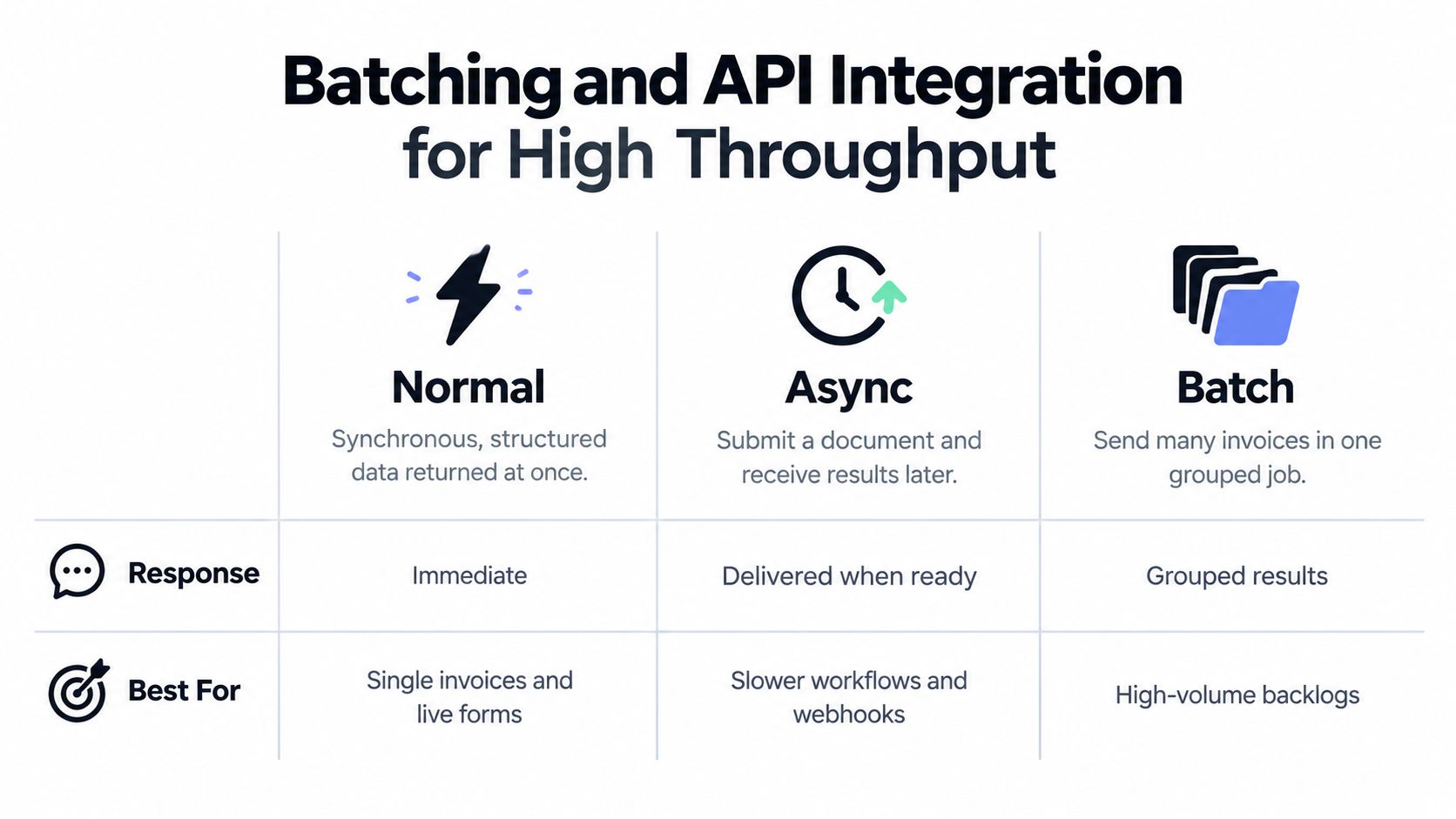
Start by choosing how results return, because that choice shapes your whole integration. We offer three processing modes through one API, and each fits a different volume pattern.
| Mode | Best for | How results return | Volume pattern |
|---|---|---|---|
| Normal (synchronous) | Real-time integrations and upload forms | Structured data in the same response | One document at a time |
| Async | Apps where users should not wait on extraction | Webhook when processing finishes | Steady flow of documents |
| Batch | Nightly imports, historical migrations, month-end backlogs | Per-document results when the batch job finishes (confirm delivery method in the API docs) | Hundreds of documents in one request |
Mixed files don't need three integrations. Our compositor chains operations in one pipeline. It classifies documents first, then routes each category to its own extraction schema, all in a single API call. An inbox containing invoices, payroll documents, and contracts goes through one endpoint, and each document gets the schema built for its type.
Do the Throughput Math Before You Build
Say you process 5,000 invoices a month. That's roughly 170 a day, which a single synchronous flow handles without strain. Volume isn't your problem at that level. Spikes are. Month-end close can deliver a week's invoices in two days, and supplier statement runs arrive in bursts. Design for the spike, not the average.
Working rules that hold up under load:
- Chunk large batches: Split submissions into groups of a few hundred documents, so one failure doesn't void a giant job.
- Cap concurrent requests: Unlimited parallelism just moves the bottleneck to rate limits and retries.
- Retry failed items individually: Resubmitting a whole batch because three documents failed wastes processing and risks duplicates.
- Schedule heavy imports off-peak: Run nightly migrations outside close, when reviewers aren't competing for the same queue.
If you're designing this layer from scratch, our overview of an API for data extraction covers endpoint and payload decisions in more detail.
A Short Integration Pattern
This Python sketch shows the async shape: upload a file, store the returned ID, and handle the webhook callback. Take endpoint paths from our API documentation. Treat this as a pattern, not a copy-paste integration.
import requests

API = "https://api.example.com"  # use paths from the API docs
headers = {"Authorization": "Bearer YOUR_KEY"}

with open("invoice.pdf", "rb") as f:
    r = requests.post(f"{API}/documents",
                      files={"file": f}, headers=headers, timeout=60)
r.raise_for_status()
doc_id = r.json()["id"]  # store this against your invoice record

# Webhook handler (framework of your choice):
# 1. Read doc_id from the callback payload.
# 2. If doc_id already processed, return 200 and stop.
# 3. Validate fields, then post or route to review.
Two details matter more than the code. Store the document ID the moment you receive it, because it's your deduplication key and your support reference. And make the webhook handler idempotent, so a redelivered result returns success without posting again.
Throughput problems are usually queue design problems. Extraction takes seconds. Bad retry and batching logic takes hours.
Confirm Your Pipeline Before Going Live
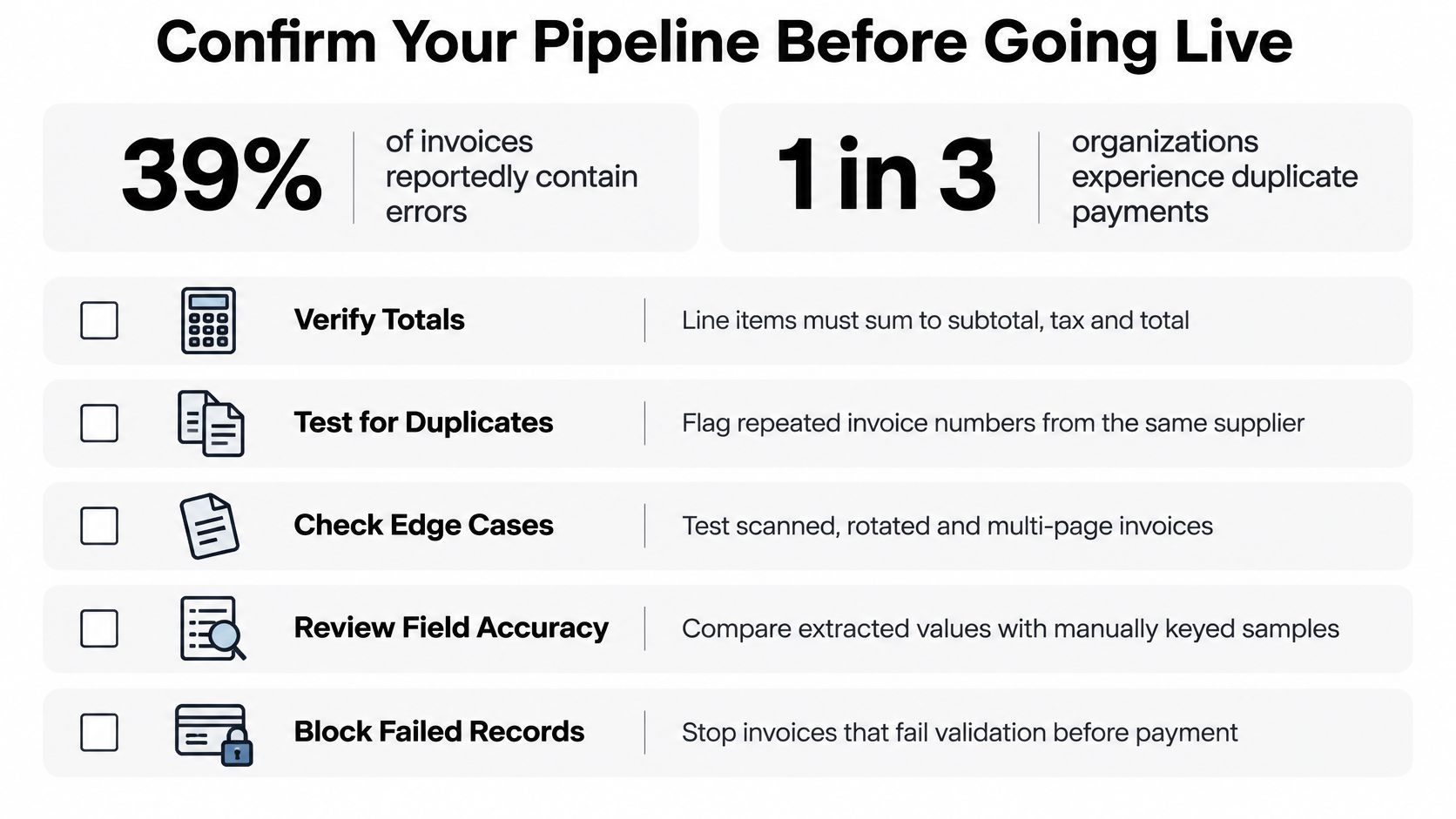
Skipping validation testing has a measurable price. According to U.S. Bank's guidance on manual AP process risks, 39% of invoices reportedly contain errors and roughly one-third of organizations experience duplicate payments. A pipeline that captures text accurately can still propagate both problems straight into your ledger. Extraction isn't the goal. Usable, trustworthy invoices are.
Measure Outcomes, Not OCR Scores
Track four numbers from day one. Straight-through processing rate is the share of invoices posted without human touch, and it's the metric that pays for the project. Exception rate by field tells you which field sends invoices to review, so you fix causes instead of adding reviewers. Duplicate-payment prevention counts holds from your duplicate check before payment. Audit completeness means every posted field traces back to a page and bounding box, so an auditor can verify any value against its source.
Run a shadow test before go-live. Process 200 to 300 real invoices alongside your current method, compare outputs field by field, and manually check at least 20 invoices your pipeline would have posted automatically. Those 20 matter most. They're the ones nobody would have reviewed.
Include awkward cases on purpose. Test invoices with no purchase order, multiple tax rates, credit amounts, and handwritten annotations. If your test set only contains clean, single-page invoices from big suppliers, you'll certify a pipeline that fails on your actual inbox.
Sort Data Governance Before Production Traffic
Invoices contain personal data more often than teams expect, in contact names, sole-trader tax IDs, and bank details. Check the processor role before go-live. When processing documents containing personal data, we act as data processor under the GDPR and follow only your instructions as data controller. Confirm the data processing agreement and retention rules with any provider before real documents flow.
If you're evaluating automation for this process, test on your own invoices first, including the ugly ones. That's the only benchmark that predicts your straight-through rate.
Matil combines OCR, classification, validation, and batch processing in one API, so PDF invoices move from upload to checked, structured JSON without manual keying or template upkeep. If you're evaluating how to automate this process, you can explore the platform and test it on your own invoices at Matil.


