Purchase Order Processing Explained: Steps and Automation
Learn how purchase order processing works, where it stalls, which KPIs to track and how OCR and document AI automate PO data extraction.

$411 per purchase order was the overall average in a historical CAPS Research benchmark, summarized by the Institute for Supply Management. That wasn't the cost of typing an order. Purchase order processing includes the approvals, supplier communication, reconciliation, and exceptions that finance teams must manage before an order is closed.
What Purchase Order Processing Is and What It Costs
Purchase order processing is the controlled workflow that takes a purchasing need through authorization, ordering, receipt, invoice matching, payment, and reconciliation. The purchase order, or PO, records the authorized supplier, items, quantities, and prices. It's a control document, not evidence that everything was delivered correctly.
Think of it as a restaurant's order ticket. The kitchen uses the ticket to prepare the meal. The waiter checks what reaches the table. The cashier checks what should be charged. Each person needs the same reference, but the ticket alone doesn't prove that the customer received the right meal.
The same distinction matters in procurement. A requisition asks for permission to buy. A PO communicates the authorized purchase to the supplier. An invoice requests payment.
What the historical benchmark measures
The benchmark cited above covers the wider procure-to-pay workflow, including personnel, infrastructure, transaction handling, approvals, reconciliation, and exception management. Its industry results are historical reference points, not current price quotes or universal automation targets.
Average cost per purchase order by industry, from the cited CAPS Research benchmark
| Industry | Average cost per PO (USD) | Versus overall average |
|---|---|---|
| Chemical manufacturing | $117 | $294 below |
| Utilities | $289 | Below average |
| Industrial manufacturing | $294 | $117 below |
| Financial services | $316 | $95 below |
| U.S. Department of Energy and NNSA contractors | $336 | $75 below |
| Aerospace and defense | $483 | Above average |
| Petroleum | $716 | Above average |
| Engineering and construction | $1,226 | Above average |
| All industries | $411 | Overall average |
These are the industry figures from the ISM benchmark linked in the introduction. The spread reflects differences in document complexity, control requirements, organizational structure, and manual handoffs.
Practical rule: Compare workflows before comparing costs. A complex construction order and a routine replenishment order don't require the same work.
For your own baseline, include the people who chase receipts, investigate mismatches, and answer supplier queries. Divide the relevant processing cost by the POs issued during the same period. Otherwise, you'll measure document creation while overlooking the work that makes an order payable.
The Purchase Order Workflow Stage by Stage
Treat each stage as a change in status supported by evidence. An order shouldn't become “received” because someone expects a delivery. An invoice shouldn't become “approved” because its total looks familiar.
The sequence below shows where each handoff belongs.
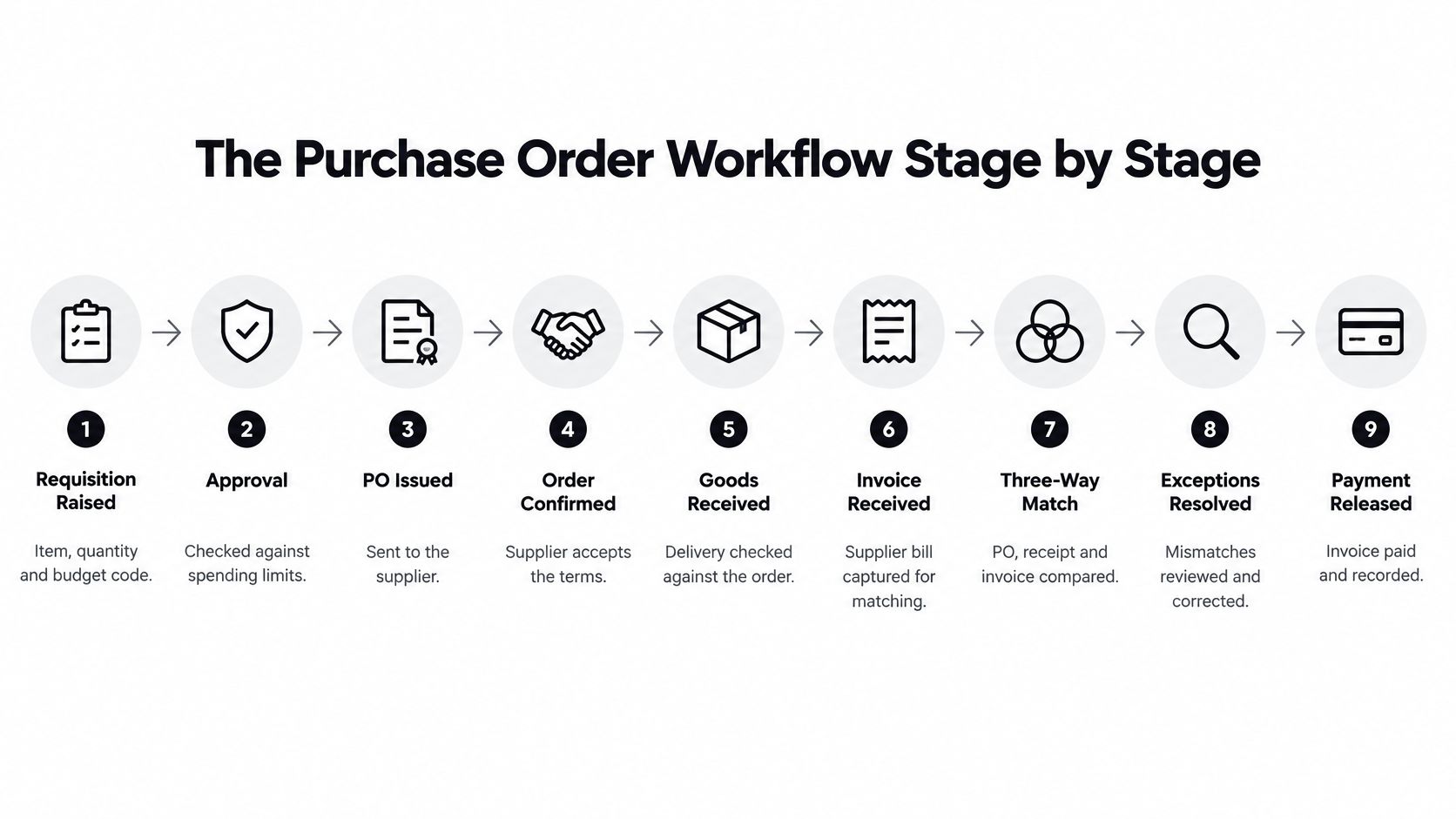
- Raise the requisition. The requester specifies the item, quantity, business need, and budget code. Clear specifications prevent the buyer from guessing.
- Approve the purchase. The budget holder checks spending authority and policy requirements. Assign a substitute so an absent approver doesn't stop the process.
- Issue the PO. Procurement sends the approved order to the supplier. The issued version becomes the reference for subsequent checks.
- Capture supplier confirmation. The supplier acknowledges price, quantity, and delivery commitments. Proposed changes need approval rather than a silent update.
- Record goods receipt. Receiving staff record what arrived, including shortages, damage, or rejected items.
- Capture the invoice. Accounts payable, or AP, receives the supplier's PDF, scan, or electronic document and captures its header and line items.
- Run the match. The system compares the authorized order, receipt evidence, and invoice under the organization's matching rules.
- Resolve exceptions. The buyer, receiver, or AP investigates the discrepancy. Each exception needs an owner and a documented decision.
- Release payment and file evidence. Finance pays the approved liability and retains the supporting records together.
Documents and common stopping points
Use this as a diagnostic map, not a requirement to replace your existing systems.
| Stage | Document or record produced | Where it commonly stalls |
|---|---|---|
| Requisition | Purchase requisition | Vague descriptions or missing budget codes |
| Approval | Approval record | Absent approvers or growing queues |
| PO issuance | Purchase order | Incorrect supplier master data or unclear lines |
| Supplier confirmation | Order acknowledgement | Changed prices or dates aren't recorded |
| Goods receipt | Delivery note or goods-receipt record | Late or missing receipt evidence |
| Invoice capture | Captured supplier invoice | Manual entry of headers and line items |
| Matching | Match result | Quantity, price, or tax differences |
| Exception resolution | Approved amendment or credit note | Unclear ownership and slow correspondence |
| Payment and filing | Payment record and audit file | Duplicate-payment risk or missing evidence |
For a walkthrough, use the video alongside your own process map.
Pay particular attention to receipt capture, invoice capture, matching, and exception resolution. These are the handoffs where evidence from different parties must agree. An invoice can be captured immediately yet remain unpaid because nobody recorded the delivery.
Mark where each transaction spends its waiting time. Separate time spent doing work from time spent waiting for evidence or a decision. That distinction tells you whether to improve extraction, receiving discipline, approval ownership, or matching policy.
Matching and Exception Rules That Keep Orders Moving
Three-way matching compares the authorized purchase order, evidence of receipt, and supplier invoice. It checks whether the supplier, items, quantities, and prices align. The rules around mismatches determine whether an order can proceed or needs a person to review it.
Across 470 organizations, the median PO-to-invoice match rate was 85%, according to Spendesk's purchase order process guide. That figure describes the median match rate, not the share of invoices that require investigation. Exception handling still needs clear owners and rules, because the cases that do not match can hold up payment.
Separate commercial permission from extraction confidence
Suppose a supplier delivers more units than the PO authorizes and charges a higher unit price. These are separate decisions. Receiving determines whether to accept the extra goods. The buyer decides whether the price change is authorized.
A legible invoice does not authorize either change. Likewise, an acceptable variance should not pass automatically if the quantity captured from the document is uncertain. Automation can compare reliable evidence against approved rules. A person must resolve unclear evidence or decide whether an unauthorized change is acceptable.
Set rules for quantity, price, tax, currency, and materiality. Let a transaction progress automatically only when it meets those rules and the evidence is reliable enough to support the match.
| Exception | Example | Handling rule | Owner |
|---|---|---|---|
| Price variance | Invoice price exceeds the PO price | Auto-approve inside an authorized tolerance; otherwise seek buyer approval | Buyer |
| Over-delivery | More units arrive than ordered | Hold the excess pending acceptance or return | Receiving and buyer |
| Partial delivery | Only part of the order arrives | Pay eligible received quantities and keep the balance open | AP |
| Missing goods receipt | Invoice arrives without a receipt record | Hold until receiving captures evidence | Receiving |
| Duplicate invoice number | Same supplier invoice is submitted again | Block the suspected duplicate and investigate | AP |
| Unauthorized substitution | Invoiced SKU differs from the ordered SKU | Escalate; amend the PO only after approval | Buyer and procurement |
| Freight or tax not on PO | Invoice includes an unplanned freight charge | Check contractual terms before approving or rejecting | AP |
| Unit-of-measure mismatch | Invoice uses cases while the PO uses units | Apply an approved supplier-specific conversion | AP |
These ownership rules are a starting point. Adapt them to your approval structure, and name an owner for every exception.
Decide which evidence governs each field
Each document answers a different question. The PO records what was authorized. A receipt records what arrived. A supplier acknowledgement records proposed or accepted commitments, depending on your approval process.
Document how approved amendments, partial deliveries, substitutions, backorders, freight, tax, and unit conversions affect payment eligibility. The vendor invoice processing workflow should apply those decisions consistently, so similar exceptions receive similar treatment.
Small variances may qualify for automatic approval. Uncertain evidence and unauthorized changes need human review.
Match at line-item level. Matching totals alone can hide the wrong SKU, a missing item, or price and quantity differences that cancel each other out. Keep each item identifiable across the PO, receipt, invoice, and any approved amendments.
How OCR and Document AI Extract Purchase Order Data
OCR can turn a scanned purchase order into text, but readable text is only the first step. The system must also identify which text is a supplier name, PO number, quantity, or price, then connect each field to the right value. That distinction matters: a page can be transcribed accurately while its line items are assigned incorrectly.
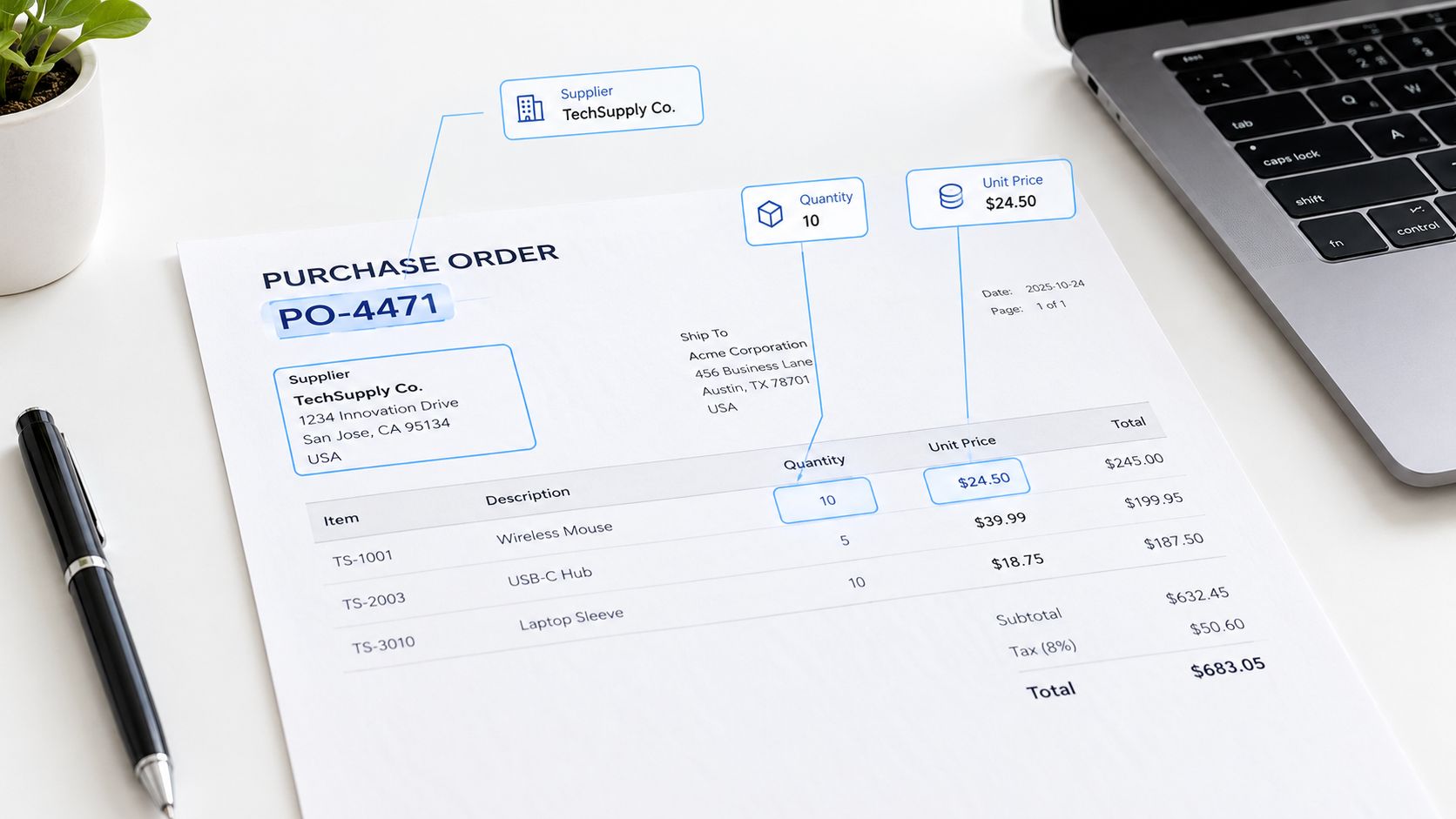
From an incoming file to a usable record
- Ingest the documents. Accept PDFs, scans, or photographs. Split mixed files when needed, while retaining each page's relationship to the original document.
- Read text and layout. OCR detects characters and their positions. Layout analysis helps distinguish headings, tables, and separate sections.
- Classify the document. Determine whether each page belongs to a PO, delivery note, invoice, or another document type.
- Extract structured fields. A document model links labels, such as “quantity” or “ship to,” with nearby values. It can also associate each item description with its quantity and unit price.
- Validate the record. Check extracted values against business rules and enterprise resource planning (ERP) records.
- Route the result. Send records that pass defined checks downstream. Send low-confidence fields or mismatches to a person, with the source page available for review.
Confidence scores help set that review boundary. A high score can support automatic processing when the field also passes validation. A low score, or a value that conflicts with an approved record, should prompt human review. Automation reads and organizes evidence; it does not decide whether an unauthorized change is acceptable.
Accuracy needs a defined test
A published OCR evaluation reports results across document datasets. Scores from different datasets should not be used to rank vendors: document types and evaluation conditions differ, and a benchmark score does not establish accuracy on your purchase orders. F1 balances precision and recall, but it cannot guarantee that each financially important field is correct.
Test the fields that affect payment and fulfillment, including complete item rows, decimal separators, currencies, and supplier identifiers. A correct grand total can still hide an incorrect unit price or a line linked to the wrong item.
Matil describes its AI-based data extraction approach as combining OCR with data extraction and workflow steps.
For procurement, the measure is usable, validated data, not PO coverage alone. Exception handling remains the bottleneck: review uncertain fields and mismatches before they reach payment or fulfillment, then assess compliance by what happens after the order. Keep financial authorization in the controlled workflow, even when extraction and routing are automated.
Manual, Semi-Automated and Fully Automated Processing Compared
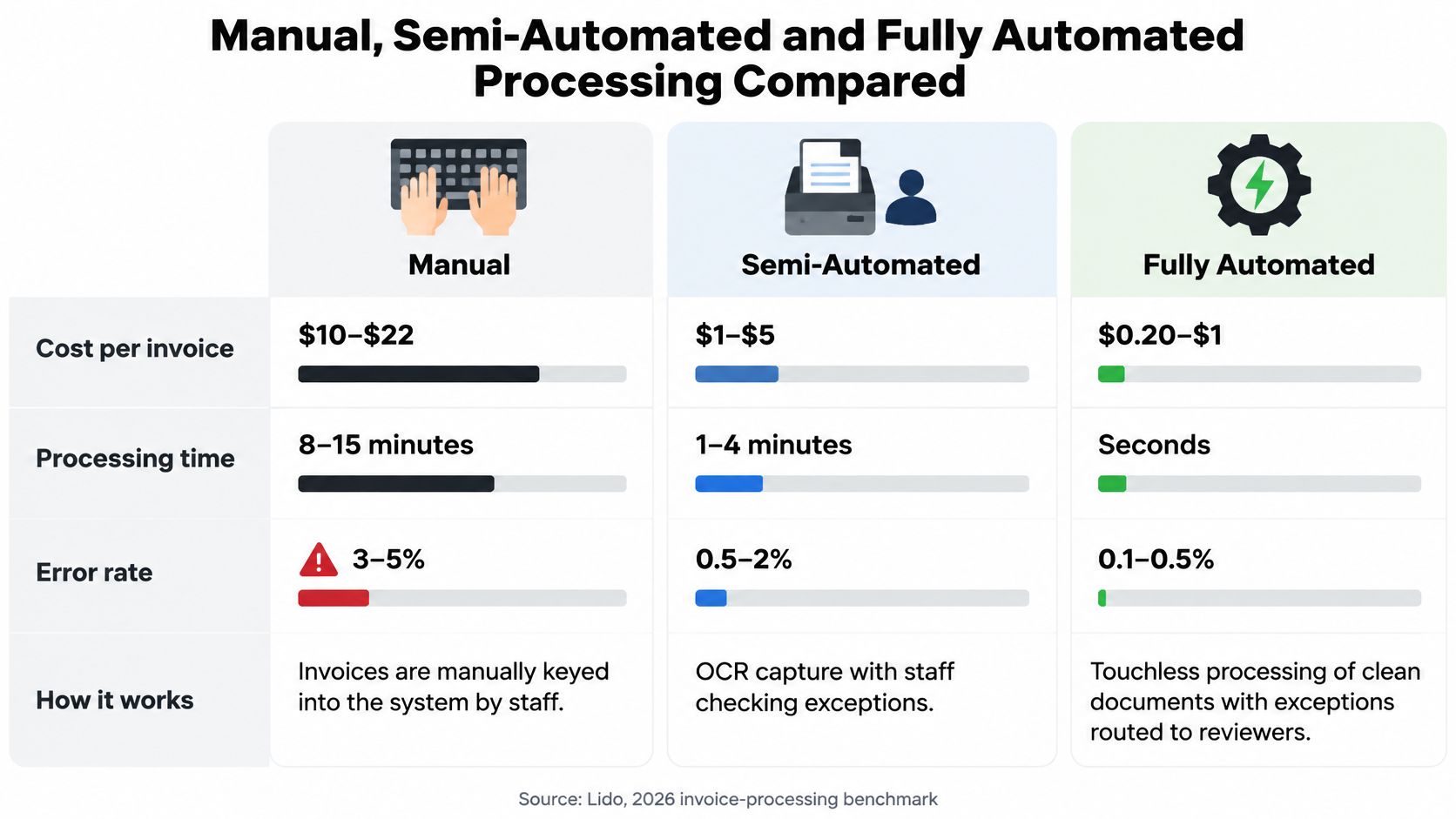
| Level | Cost per invoice | Processing time | Error rate | What still needs people |
|---|---|---|---|---|
| Manual keying | $10–$22 | 8–15 minutes | 3–5% | Every field and every approval step |
| Semi-automated extraction | $3–$5 | 3–6 minutes | 1–2% | Flagged fields and exceptions |
| Full automation with AI extraction | Less than $1 | 10–30 seconds | Below 0.5% | Exceptions outside tolerance and rule changes |
These estimates come from Lido's 2026 invoice-processing benchmark summary. They describe invoice processing, not the full purchase order lifecycle measured by the historical benchmark in the opening section.
The comparison includes data entry, validation, approval routing, exception handling, and filing. It excludes downstream rework, such as correcting a miskeyed ERP amount or reconciling a payment discrepancy. Treat the figures as a comparison framework, not a guaranteed operating result.
The visual below summarizes the processing levels.
Handling time isn't elapsed time
Ardent Partners data reported by Medius puts touchless processing of PO invoices at 38.3%, with average processing time of 11.6 days, compared with 96.3% and 1.4 days for best-in-class organizations in its invoice-processing cost analysis. These elapsed-time measures aren't interchangeable with the task-processing times in the table.
A system can extract an invoice quickly while the transaction waits for a receipt or commercial decision. Faster capture won't remove that waiting time unless the organization also changes the relevant handoff.
Choose the processing level by document volume, supplier variability, and exception mix. Semi-automation may fit a process with complex human decisions. Broader automation becomes useful when clean transactions can follow stable rules without review.
Decision test: Ask which manual action disappears, what control replaces it, and who handles the records that don't qualify.
Controls and Practices for Automated Purchase Orders
Start with the possibility that a plausible-looking extraction is wrong. Your controls should detect consequential errors before the ERP accepts a record or finance releases payment.
A peer-reviewed comparison of OCR systems found that performance differed across systems and document conditions, particularly noisy documents. That supports representative testing rather than relying on a vendor's headline accuracy claim.
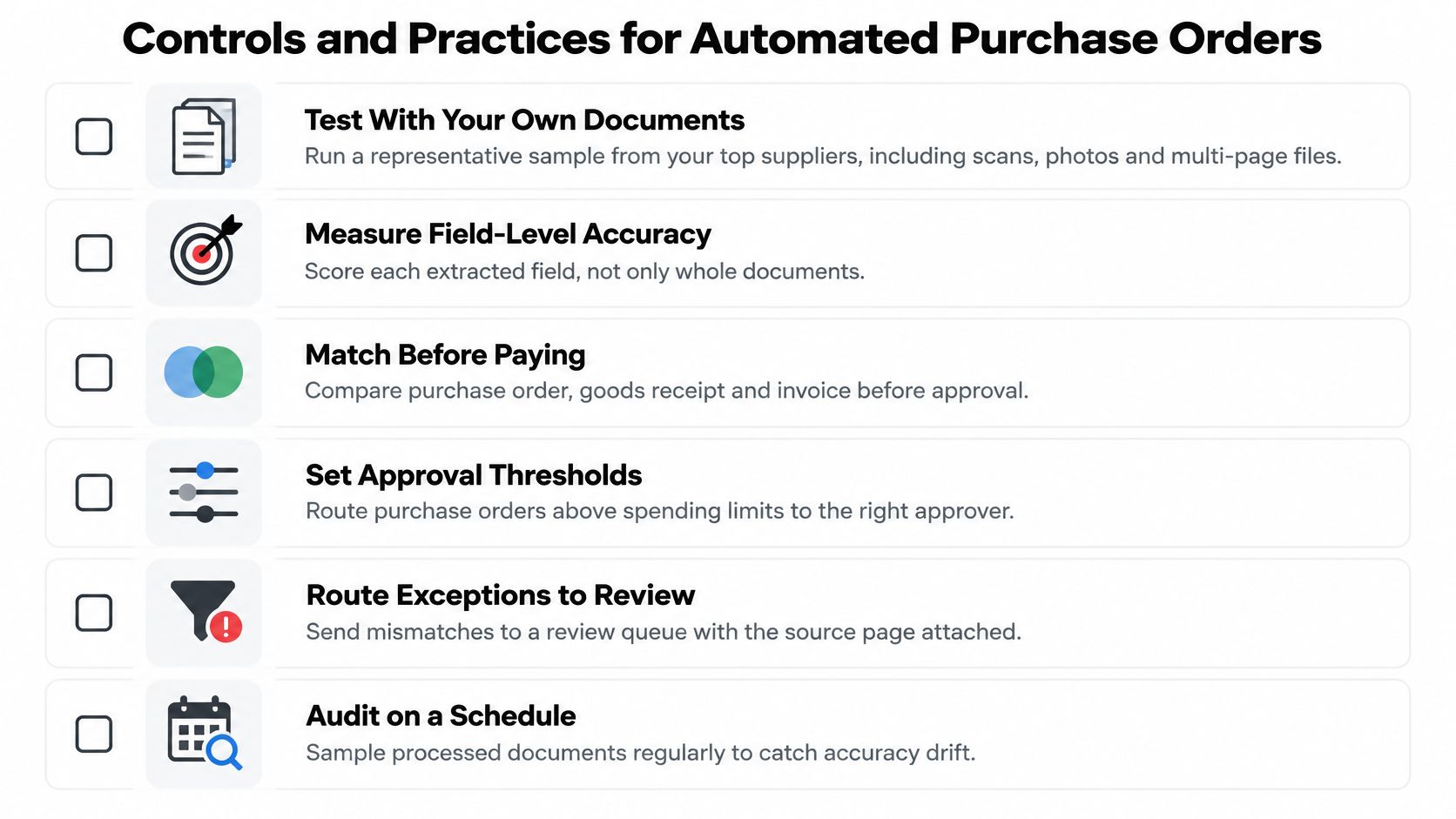
A production-readiness checklist
- Test representative inputs. Include supplier scans, photographs, attachments, and multi-page files so the pilot reflects actual operating conditions.
- Score fields and complete lines. Evaluate supplier identity, quantities, prices, and item relationships separately, because their financial consequences differ.
- Set field-specific thresholds. A clearly read description shouldn't hide uncertainty in a currency or unit-price field.
- Validate before posting. Check supplier IDs, currencies, and open PO lines against ERP master data.
- Retain decision evidence. Store the original file, extracted values, applied rule, approver, and timestamp so reviewers can reconstruct the decision.
- Separate duties. Don't let someone change matching tolerances and approve the payments affected by those changes.
- Control rule changes. Review tolerances on a schedule and log every amendment, including its owner and approval.
Use the checklist below as an operational review aid.
Verify security and retention separately
For EU personal data, assess GDPR obligations and request relevant ISO certification and AICPA SOC reports. The publisher states GDPR, ISO, and SOC compliance, alongside zero data retention; verify the scope, supporting evidence, contractual terms, and availability commitments in writing.
Zero data retention by an extraction provider doesn't replace your organization's recordkeeping obligations. Decide where original documents and audit evidence will reside, who can access them, and how long your legal retention schedule requires you to keep them.
Measure KPIs, Set a Baseline and Roll Out Automation
| KPI | How to calculate | Better when |
|---|---|---|
| PO coverage | POs issued ÷ eligible spend transactions | Higher |
| Touchless rate | Invoices processed without manual touch ÷ invoices received | Higher |
| Exception rate | Invoices routed to an exception queue ÷ invoices received | Lower |
| First-pass match rate | Invoices matched on the first attempt ÷ invoices matched | Higher |
| Exception aging | Average days open per exception, split by type | Lower |
| PO cycle time | Days from PO issue to approved payment | Lower |
| Supplier confirmation accuracy | Confirmations matching PO price, quantity, and date ÷ confirmations received | Higher |
| Unauthorized changes | Amendments without approval ÷ total amendments | Lower |
| Cost per PO | Total processing cost ÷ POs issued | Lower |
PO coverage alone doesn't prove purchasing control. An order can exist while the supplier, price, quantity, or contract terms are wrong. Pair coverage with evidence that the authorized purchase really happened.
That distinction also matters as procurement adopts AI. EY reported that 80% of surveyed global chief procurement officers planned to deploy generative AI within three years, making governance relevant to implementation rather than a later addition, according to its 2025 CPO outlook report.
Establish the baseline before choosing the target
Pull a representative period of PO, receipt, invoice, and payment records. Use consistent start and end points, then segment results by supplier, document format, and exception type.
Record cycle time, touchless rate, exception rate, exception aging, and cost per PO. Add post-order outcomes such as receipt accuracy and disputes raised after payment. A lower review rate isn't an improvement if incorrect transactions reach payment.
In a survey of 210 U.S. procurement executives and directors, 50.5% reported using automated purchase-order processing management, according to Zip's 2025 procurement study. The practical question is how to implement it with measurable controls.
Roll out through evidence-based gates
| Phase | Work | Exit criterion |
|---|---|---|
| Baseline | Map records, costs, delays, and ownership | Agreed metric definitions and reliable starting data |
| Extraction pilot | Test representative supplier documents | Field and line-item results meet agreed acceptance criteria |
| Validation and routing | Configure ERP checks and exception ownership | Test cases reach the correct destination |
| Controlled go-live | Process a limited supplier group with oversight | Reviewers can explain decisions and recover failed transactions |
| Scale | Expand document and supplier coverage | Controls remain effective as the mix changes |
Use acceptance criteria rather than an arbitrary launch date. If scanned or mixed documents cause the exceptions, start with extraction for those suppliers. If unclear commercial policy causes them, fix the matching rules first.
Build the investment case around work you can actually remove. An accounts payable automation ROI assessment should include implementation, ongoing review, and exception-handling costs, not just avoided typing.
Real-World Use Cases and Key Takeaways
Purchase order processing is tested most sharply when an order and its supporting records disagree. These workflow examples are not customer case studies or promises of measured results. Each shows where software can extract and compare information, and where a person must review an exception.
Where PO processing handles exceptions
- Partial or over-deliveries. A supplier invoice may cover more units than the receiving team recorded, or an order may arrive in separate shipments. Compare ordered, received, and invoiced quantities. Hold the discrepancy for the buyer or receiving owner to resolve before payment.
- Unit-of-measure mismatches. A PO may specify cases while an invoice lists individual units. Check the item description and conversion rules before matching quantities. Route unclear conversions for review rather than treating different units as a valid match.
- Missing receipts. An invoice can arrive before staff record delivery in the system. Keep it on hold until the receipt is confirmed or the responsible team resolves the gap. Extraction can flag the missing record, but it cannot confirm that goods arrived.
- Changes to order terms. If an invoice reflects a price or quantity different from the approved PO, compare it with authorized amendments. Send unexplained differences to the buyer instead of allowing document capture to decide whether the change is acceptable.
What finance should retain
Extraction starts the process; controls determine whether it can proceed. A PO is not proof of compliance by itself. Review the outcome after ordering, including whether goods were received, exceptions were resolved, and payment was authorized.
Key takeaways:
- Follow the PO from request and approval through ordering, receipt, matching, and payment.
- Set matching rules for quantities, units, prices, and receipt evidence. Assign each exception to a clear owner.
- Record baseline performance, test representative documents, and expand automation only when results meet agreed criteria.
Matil offers OCR, document classification, validation, and workflow orchestration through an API, with no-code options for document intake. Visit Matil to explore testing a representative sample of your purchase orders, delivery notes, and invoices before committing to a wider rollout.


