Accounts Payable Invoice Processing Guide
Accounts payable invoice processing guide with costs, nine steps, matching rules and touchless KPIs.

Advanced AP departments process invoices in fewer than five days at an average cost of $2.36, while fully manual operations can take up to nine times longer and cost six times as much, according to research cited by Basware. The opportunity in accounts payable invoice processing isn't just faster reading. It's getting a valid invoice approved and posted without someone repairing the data or chasing the next handoff.
What Manual Invoice Processing Really Costs
The gap between measured cost and perceived cost is substantial. The Medius invoice-cost benchmark summary reports approximately $20 to process and pay an invoice in a 2020 study of 1,301 respondents, against a median respondent estimate of $2, about 90% below the measured average.
Invoice processing cost by what the figure includes
| Figure | Cost per invoice | What it reflects | Scale check |
|---|---|---|---|
| 2020 study average, 1,301 respondents | About $20 | Full cycle through payment, including hidden touches | Baseline for a loaded cost |
| Median self-estimate in that study | $2 | What respondents guessed, about 90% below the average | Shows omitted work |
| 2025 survey average, 212 professionals | $9.40 | Narrower operational scope than the $20 figure | Don't treat as a contradiction |
| 2025 best-in-class | $2.78 | Stronger AP operations in the same survey | $20 versus $2.78 is a theoretical $1.722 million annual spread at 100,000 invoices |
The table's operational benchmarks and theoretical spread come from the same Medius summary. They aren't interchangeable price tags or a guaranteed savings forecast: the broader figure includes more of the work required to finish payment, while the narrower benchmark measures a smaller operational scope.
Invoice volume isn't a complete cost model. An invoice that needs a supplier correction, a missing receipt and an approval reminder consumes more capacity than one that passes configured controls immediately. Counting both as one processed invoice hides the difference.
Build the cost model around actual work
Start with the activities people perform, not the accounting software subscription. Include the time buyers, receiving teams and budget owners spend resolving AP questions, even when those employees don't report to finance.
- Intake and preparation: Downloading attachments, separating documents, sorting scans and locating missing pages.
- Entry and correction: Keying fields, repairing transcription errors and resolving supplier identities.
- Approval and investigation: Finding the right owner, obtaining receipts and chasing unanswered requests.
- Payment protection and records: Reviewing duplicate alerts, retaining evidence and investigating late-payment charges.
Separate active handling time from elapsed waiting time. An invoice can require little keyboard work but remain unpaid because nobody owns its exception. That delay affects supplier communication and payment scheduling even when it doesn't appear in an AP clerk's timesheet.
Lucentive's recommendations to streamline accounts payable processing provide a useful process checklist for mapping those handoffs. Pair that exercise with an accounts payable automation ROI model that includes implementation, integration, review effort and ongoing operating costs.
Practical rule: Treat saved staff capacity, avoided expenditure and prevented payment losses as separate benefits. Don't count the same improvement twice.
A cheaper capture tool can still leave the expensive work untouched. Define success as fewer manual touches per invoice, with payment controls intact, rather than a lower software line item.
How to Run the Invoice Workflow
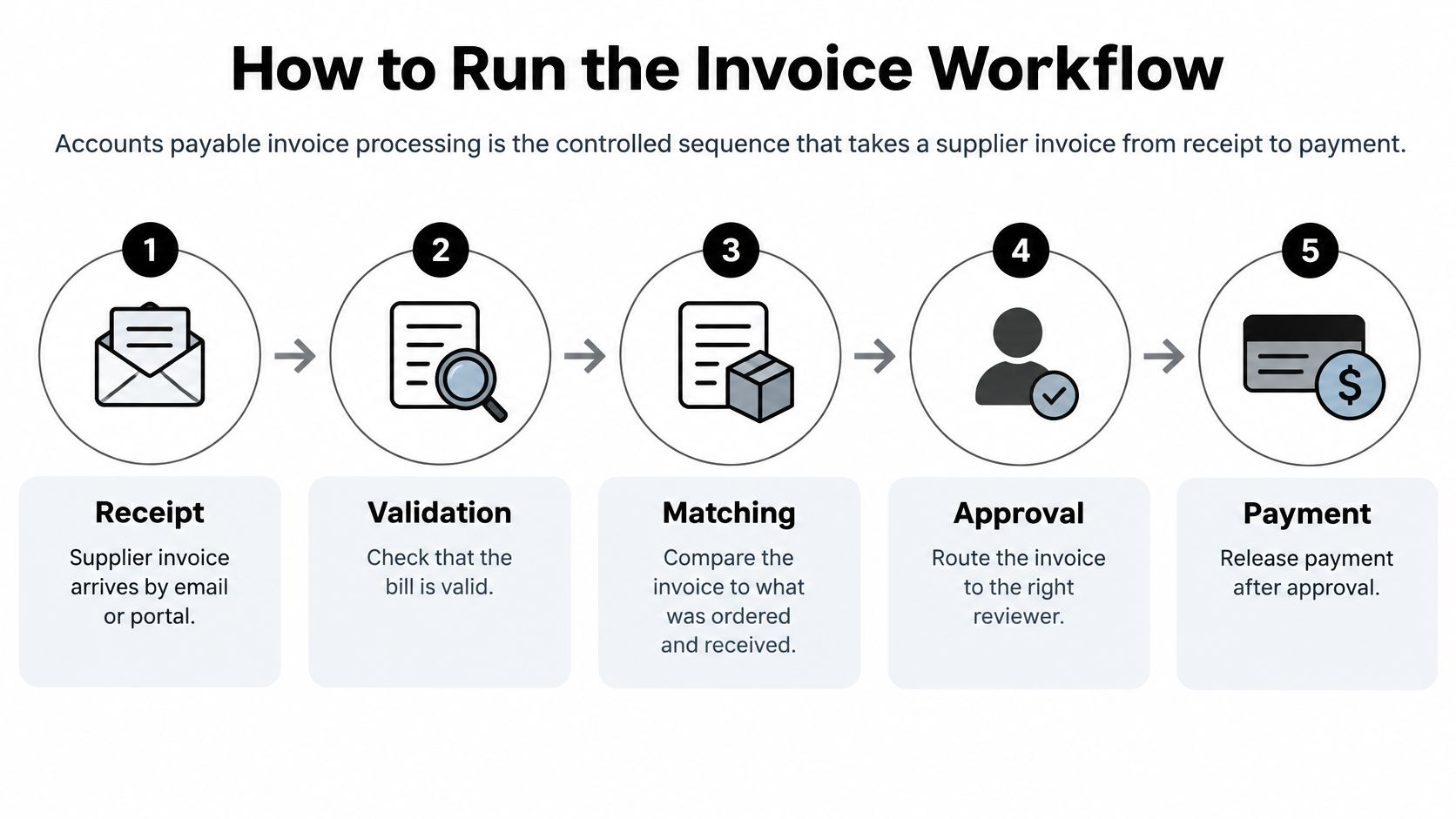
Accounts payable invoice processing is the controlled sequence that takes a supplier invoice from receipt to payment, checking that the bill is valid, matches what was ordered and received, and has the necessary approval before money moves.
OCR reads text from a scan. Classification identifies the document type, and extraction turns its contents into fields such as supplier, totals and purchase-order number. Document data extraction creates usable information; it doesn't establish that a payment is authorized.
The high-level flow separates those responsibilities:
Give every action a durable record
Capture the original. Accept invoices from email, supplier portals, EDI and scans. Save the raw file with its source and receipt timestamp so later reviewers can establish what arrived and when.
Classify and split the documents. Separate invoices from delivery notes, statements and supporting pages. Record the document type and page range without breaking a multi-page invoice into unrelated transactions.
Extract the business fields. Capture supplier identity, tax, currency, payment terms, PO reference, header totals and line items. Store structured values with field confidence scores where supported.
Normalize without destroying evidence. Standardize names, invoice identifiers, dates, amounts and tax codes. Keep normalized values beside the originals, preserving meaningful leading zeros.
Validate before routing. Check arithmetic, mandatory fields, supplier master data, applicable tax rules and duplicate risk. Write a pass result or a specific hold reason, not a generic processing failure.
Match the purchase records. Apply the appropriate comparison against the purchase order and goods receipt. Record results per invoice line so a partial delivery doesn't disappear behind a matching header total.
Assign exceptions to their owners. Route a missing receipt to receiving, a price discrepancy to the buyer and an accounting question to finance. Record the owner, supporting evidence and decision.
Post approved invoices to the ERP. Save the ERP document number and posting status. If the integration times out, check whether the ERP accepted the transaction before retrying it.
Release payment under separate authority. Apply segregation of duties between invoice processing and payment release. Retain the payment-run reference and approver identity.
These records make the workflow recoverable. Without them, a failed integration becomes an email investigation, and a reviewer can't distinguish a rejected invoice from one that posted successfully but returned no confirmation.
Measure the line, not just the document
The APQC benchmarking measures list identifies invoice line items processed error free the first time and the share of invoices processed electronically or automatically as core measures. A correct total doesn't prove that freight, tax, quantities or expense allocations are correct.
For workflow design beyond invoice capture, Wistec's guide to automating accounting workflows is a useful companion for planning routing and system handoffs. Make the transition between systems explicit, including who owns failures and how unresolved transactions return to a queue.
Use this video as a companion to the workflow map:
A clean read can still produce a wrong posting if the supplier, PO, tax treatment, account coding or duplicate status is wrong. Field accuracy is an input to workflow accuracy, not a substitute for it.
Matching Rules and Duplicate Holds
Three-way matching checks that invoice quantity and price agree with the purchase order and that a receipt confirms delivery. Use two-way matching only where policy permits payment against the order without a separate receipt, such as certain services supported by an appropriate approval.
Don't make AP compensate for missing receiving records by widening tolerances. The buyer should resolve an incorrect price, and receiving should confirm what arrived. A tolerance should represent an approved business rule, not a workaround for an incomplete process.
Run duplicate prevention in a fixed order
Begin with deterministic comparisons before introducing similarity scores. Otherwise, reviewers spend time investigating alerts that consistent identifiers could have resolved automatically.
- Canonicalize supplier and invoice identifiers. Remove punctuation and excess whitespace from comparison keys, standardize case and resolve legal-entity aliases. Preserve leading zeros and retain the original identifiers.
- Compare the transaction context. Use invoice number, supplier, currency, gross amount, invoice date, PO and bank or payment context together.
- Search open and paid records. Check the current intake queue as well as historical transactions. A duplicate might arrive through a different channel after the original has already been paid.
- Hold near matches for review. Record the decision and supporting evidence, then use confirmed duplicates to improve supplier records and comparison rules.
The City of Richmond duplicate-payment audit cites published estimates of duplicate or erroneous payments representing 0.08%–2% of annual disbursements, finds that approximately 26% of identified duplicates lacked purchase orders, and discusses a federal analysis attributing 75% of duplicates to inconsistent invoice coding.
Duplicate and match traps to hold for review
| Situation | Why it breaks a simple check | Hold to apply |
|---|---|---|
| PO bypass | About 26% of identified duplicates in the City of Richmond audit had no purchase order | Require a buyer code or non-PO approval before posting |
| Inconsistent invoice coding | The federal analysis tied 75% of duplicates to coding differences | Normalize number, case and punctuation while preserving leading zeros before comparison |
| Split invoices | One receipt is covered by several bills | Match remaining quantity; don't reject on amount alone |
| Credit note read as an invoice | Sign and document type differ from a supplier bill | Classify first, then net against the original |
| Recurring invoice with a repeated number | A legitimate repeat can resemble a duplicate | Allow a documented supplier-level exception and compare the billing period |
| Multi-entity supplier or currency conversion | The same legal group can use different entities or FX amounts | Resolve entity aliases and currency before fuzzy matching |
| ERP migration clones | Vendor or payment records can appear twice | Check paid history across old and new vendor IDs |
A duplicate alert isn't a confirmed duplicate. Keep the invoice visible, block payment while it is reviewed, and preserve the reason for release or rejection.
Measure alert quality as well as prevented value. Track false-positive review effort, confirmed duplicates missed by the rules and recovery time when an erroneous payment escapes. Generating more alerts isn't progress if reviewers learn to dismiss them.
E-Invoicing Rules and Payment Fraud
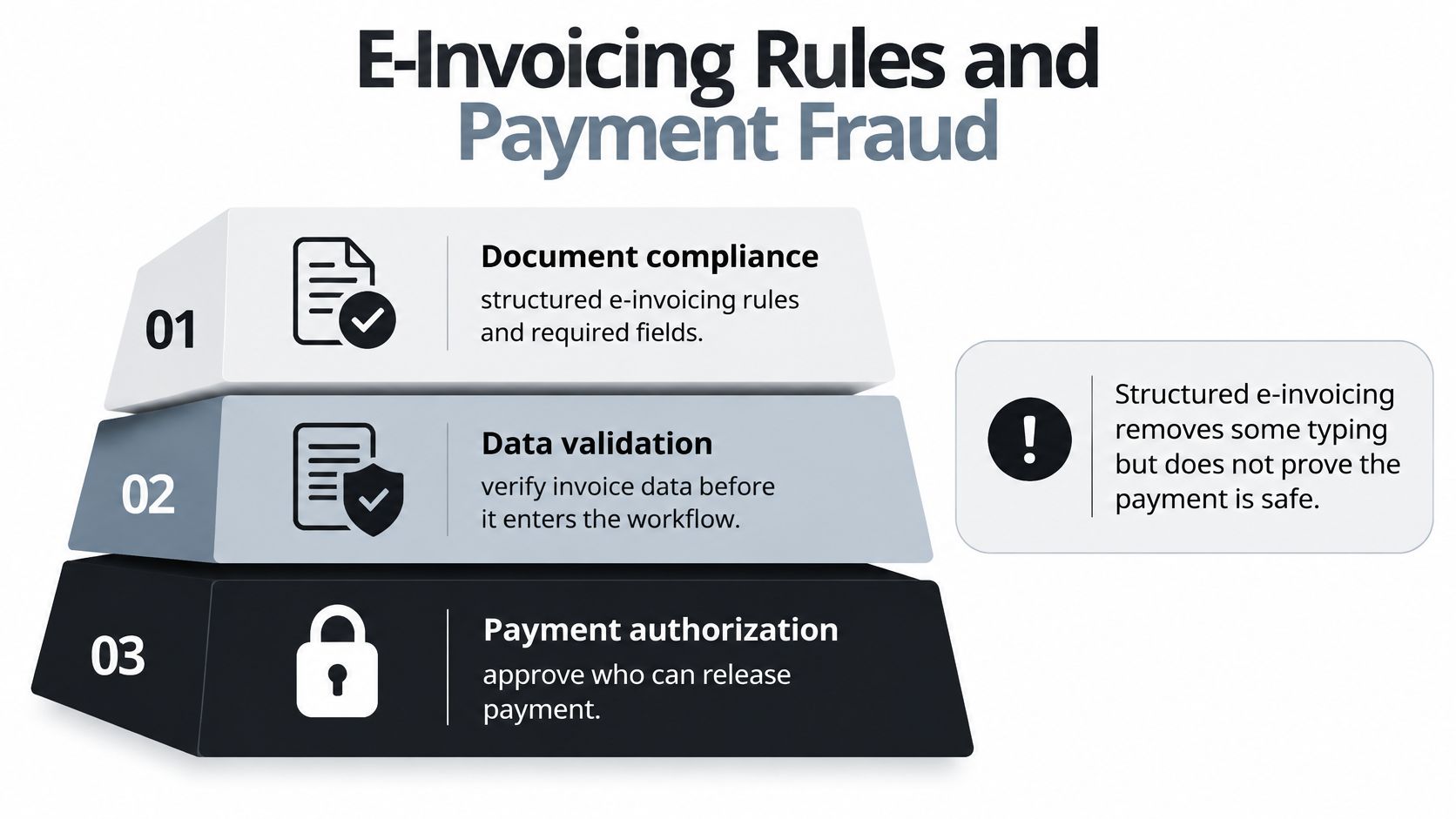
A correctly extracted invoice can still trigger a bad payment. Keep three controls distinct: document compliance, data validation and authorization to pay.
Document compliance isn't payment permission
Structured e-invoices support automatic processing; a PDF image alone does not provide the structured data those workflows require. The invoice should include details such as its issue date and sequential number, supplier and customer VAT identifiers, quantities and descriptions, supply or payment dates, and unit prices or rates net of VAT.
The European Commission's VAT in the Digital Age (ViDA) proposal sets out a timetable for structured e-invoicing and digital reporting. Issuer deadlines and domestic requirements depend on the applicable rules, so configure country-specific checks rather than assuming one workflow covers every jurisdiction. Receiving systems should flag missing identifiers and inconsistent dates for review.
Compliance checks confirm that an invoice meets defined requirements. They do not confirm that the supplier or bank account is genuine, and they do not authorize payment.
Verify the payee outside the invoice
Electronic invoices can still carry manipulated payment details. The European Payments Council's report on payment threats and fraud identifies invoice fraud, including changes to supplier payment details, as a risk.
- Verify bank changes independently. Call a previously verified supplier contact using a trusted number, not contact details in the change request.
- Separate responsibilities. The person who changes bank details should not independently authorize the resulting payment.
- Retain evidence. Keep the original document, validation results and bank-change verification record.
- Apply relevant screening. Include sanctions and tax checks when the transaction and jurisdiction require them.
Use document fraud detection controls alongside supplier verification, not as a replacement. An invoice anomaly can justify a hold. A clean extraction cannot establish that the beneficiary is legitimate.
A compliant file can still direct payment to the wrong account.
Pick the Capture Layer and Pilot It
The capture layer turns PDFs, scans and supporting documents into structured information for approval and ERP posting. Its value depends on what happens after extraction: how many invoices reach posting without human intervention, and where exceptions still begin.
Before choosing a layer, map the ERP invoice and vendor endpoints, purchase-order and goods-receipt data, supplier master records and audit archive. Assign a system of record to each field so extracted supplier details cannot overwrite approved master data.
Evaluate the handoffs, not the demo
Test representative files, including poor scans, multi-page invoices and attachments with different document types. Clean supplier PDFs alone won't show whether the integration can classify documents, route exceptions and handle rejected transactions.
- Document boundaries: Can it classify and split files before extracting fields?
- Review signals: Can it show field-level confidence and validation failures for sensitive values?
- Schema changes: Can your team adjust required fields and output structures without a lengthy training project?
- Delivery modes: Can it support real-time requests, webhook delivery and scheduled imports?
- Security terms: What do the GDPR processing terms, ISO 27001 and AICPA SOC evidence, access controls and retention policy cover?
Matil combines OCR, classification, extraction, validation and workflow orchestration in one API. Its reported accuracy is above 99% in multiple use cases, but extraction accuracy alone does not establish touchless posting. Measure whether validated data passes your matching and approval rules, and identify the exceptions that still require review. The invoice data capture guide explains how to define structured output for an AP integration.
Matil offers three processing modes through one API: Normal returns structured data immediately for real-time integrations; Async sends results by webhook when ready; and Batch accepts hundreds of documents in a single request for nightly imports and migrations. Pre-trained models also support payslips, identity documents for KYC and delivery notes. Set acceptance rules for each document family.
Make retention an explicit acceptance criterion
For documents containing personal data, Matil acts as a GDPR processor and follows the client's instructions as data controller. Matil's default terms retain processed documents and results for 12 months for audit, traceability and technical support, then delete them automatically. Include that retention period in the pilot's data-handling review.
Pilot one invoice family from high-volume suppliers. Include unusual layouts and known exceptions, then test the full path to ERP posting, including retries and rejected transactions. Expand only when the pilot reduces human handling without weakening the evidence trail.
KPIs and a Practical Rollout Order
Touchless-processing rate is the outcome to defend. Define it as the share of invoices approved under configured policy and posted without rekeying or a manual match. Track payment release separately so the metric doesn't encourage teams to remove necessary authorization.
The 2025 IFOL Accounts Payable Automation Trends survey found that 66% of AP teams still manually enter invoice data into ERP systems, 63% spend more than 10 hours weekly processing invoices, and 73% aren't fully automated. Buying extraction doesn't establish straight-through processing.
Build a dashboard finance can defend
Keep the denominator stable. Report results for all invoices received, then segment by supplier, PO status, document format and business unit so a clean pilot population doesn't conceal difficult work.
| Measure | Operational definition |
|---|---|
| Cycle time | Receipt to approval and posting, with waiting time visible |
| Cost per invoice | Agreed operating costs divided by completed invoices |
| First-pass match rate | Eligible invoices or lines that match without correction |
| Exception rate by reason | Holds categorized by supplier, receipt, price, tax, coding or document issue |
| Touchless-processing rate | Policy-approved and posted invoices with no rekeying or manual matching |
| Duplicate holds | Suspected duplicates, confirmed outcomes and review effort |
| Approval aging | Time pending with each responsible approver |
| On-time payment | Payments completed within agreed supplier terms |
| Discount capture | Eligible discounts realized rather than merely offered |
Use exception-resolution time to distinguish a capture problem from a workflow problem. A missing tax identifier needs different action from a buyer who hasn't confirmed a service.
Set confidence thresholds by field risk and document family. Low-confidence tax, bank and total fields should stop for review, while high-confidence PO invoices can continue only when business validations also pass. A confident extraction result must never override a failed control.
Roll out in the order that removes dependencies
- Clean supplier master data and bank-change policy. Resolve duplicate vendor records, ownership gaps and unverified payment details before accelerating intake.
- Automate one high-volume invoice family. Establish a controlled population and keep a comparable baseline for handling effort.
- Add three-way matching and duplicate holds. Test partial receipts, mismatched units and near-duplicate identifiers, not just successful matches.
- Integrate ERP posting. Require transaction confirmation, safe retries and visible failure ownership.
- Expand to supporting documents. Add statements, receipts and delivery notes once the invoice route is dependable.
Rollout decision: Expand when the existing population needs less intervention and exceptions reach the right owner with enough evidence to decide.
The benefits follow from those operating changes: less rekeying saves handling time, validated handoffs reduce correction work, and consistent queues help teams absorb volume without recreating manual routing. Poor master data, email-based approvals and an unfinished ERP connection will cap returns even when extraction looks excellent.
Matil combines document extraction, classification and validation through an API that can feed your accounts payable workflow. If you're evaluating automation, visit Matil and start with a representative invoice pilot, measuring approved ERP postings without human intervention rather than extraction accuracy alone.


