Classified Document Template Guide for OCR Automation
Build a classified document template with OCR, classification, validation, JSON schemas, and audit-ready fields for automated extraction workflows.

A classified document can look complete in a PDF viewer and still fail the moment someone splits the file, runs OCR, or exports its contents to another system. The banner may survive while a portion marking, classification authority, or declassification instruction disappears.
A dependable classified document template treats those markings as structured, traceable data, not decoration. That distinction matters whether your team handles government records, legal files, KYC evidence, invoices, payslips, or logistics documents.
Why Classified Document Templates Fail
A mixed-document PDF arrives with a prominent classification banner. The intake process captures the banner and reads the main text, but a page is split out for review and the paragraph-level marking is lost. The extracted text now lacks the context needed to determine how it should be handled. A similar failure occurs when an OCR system captures a declassification date as ordinary text without linking it to the document or authority that governs it.
A visual template alone can't prevent these failures. It may define where markings appear on a page, but it doesn't ensure that the markings remain connected to the right page, text portion, attachment, or exported record. When a file is converted, redacted, or divided, the system needs more than a familiar banner. It needs stable identifiers and explicit relationships between the document, its pages, its portions, and its security metadata.
Under Executive Order 13526, originally classified documents must identify their classification level, original classification authority, originating agency and office, declassification instructions, and a concise reason for classification. The order also addresses classification of individual portions. A template that captures only the overall marking therefore leaves critical information outside the processing contract.
Practical rule: OCR can detect a marking or flag an inconsistency. It must not decide, assign, or silently downgrade classification. An authorized classifier or the organization's responsible process owner remains accountable for that decision.
The operational problem isn't just poor OCR. It's a governance gap between what a document displays and what downstream systems can preserve, validate, and audit.
Define the Core Template Layers
A classified document template is a reusable structure that captures visible security markings, their associated metadata, records-management context, and rules for validating extracted information. Its job is to keep classification understandable to people and reliably represented in systems throughout a document's lifecycle.
Executive Order 13526 requires originally classified documents to identify Top Secret, Secret, or Confidential status, the original classification authority, originating agency and office, declassification instructions, and a concise classification reason. It also addresses classification markings on individual portions. In practice, that means a template needs distinct fields for the document's overall marking and the markings attached to its contents.
The overall classification reflects the highest classification of any portion. Official marking guidance says it should appear conspicuously at the top and bottom of every page, along with applicable covers and title pages (classification marking guidance). A template should not treat a cover banner as a substitute for page-level or portion-level markings.
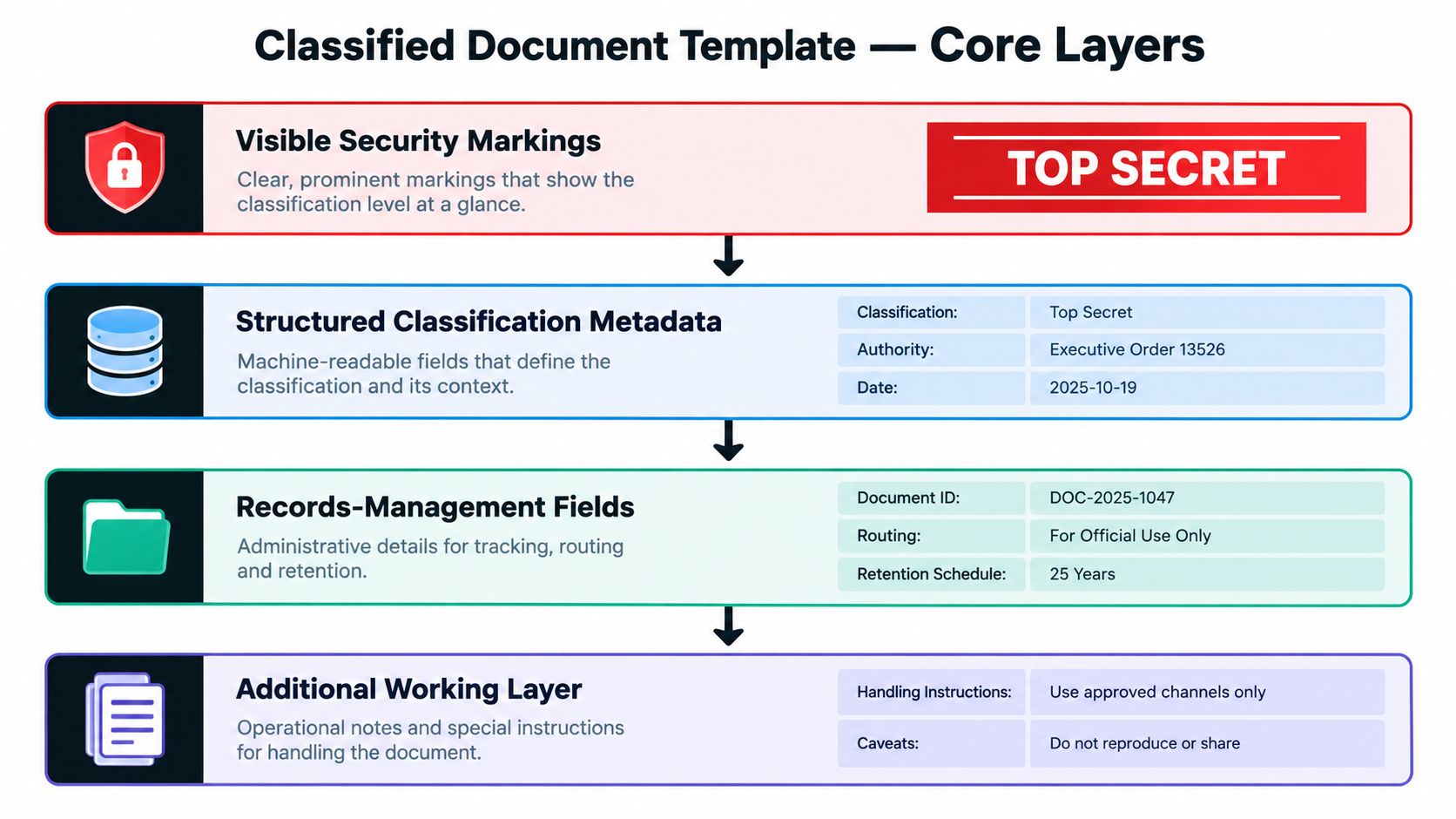
A working template has four layers:
- Visible security markings: Banners, portion annotations, and other markings readers can see on each relevant page or content element.
- Structured classification metadata: Fields such as
classification_level,classified_by,office_of_origin,reason_or_derived_from, anddeclassify_on. - Records-management fields: Document identity, version, responsible agents, retention rules, handling controls, and audit history.
- Extraction and validation rules: Checks that compare detected fields with expected markings and route exceptions to accountable reviewers.
These layers solve different problems. The canonical layout below defines where fields belong. The category entries show how the same controls can be adapted for business documents. The JSON section maps visible markings and extracted content into a consistent data contract, while the validation checklist defines what should happen when the record is incomplete or inconsistent.
Choose the Right Classification Template
A template should match how the document will be read, processed, and reused. A cover-only pattern can be easy to create, but it offers little protection when pages are separated or a file contains portions with different markings. For automation, choose a design that preserves the relationships between the document, its pages, and its individual portions.
The highest classification of any portion governs the overall document marking, which should appear at the top and bottom of each page (official marking guidance). Use the following comparison to select a starting pattern. It's a design guide, not a substitute for the organization's governing classification policy.
| Template Type | Marking Scope | Machine-Readable Fields | Best Fit | Main Limitation |
|---|---|---|---|---|
| Top-level | Document or cover label | Overall classification, authority, document ID | Files that are reviewed and retained as complete units | Doesn't describe mixed markings within pages |
| Page-level | Overall marking repeated on each page | Page ID, page marking, document ID | Scanned files, PDF splitting, page-by-page review | May not distinguish differently marked portions |
| Portion-level | Individual paragraphs, tables, graphics, or other elements | Portion ID, marking, page reference | Mixed classified and unclassified content | Requires reliable mapping between each portion and its source |
| Mixed-document | Document, page, and portion context | Parent-child references, handling controls, page and portion IDs | Files assembled from multiple sources or types | Needs stronger validation and exception handling |
Use a top-level layout only when your workflow preserves the complete file and its context. Choose page-level marking if pages may be extracted or routed separately. Add portion-level fields when a page contains content with different markings. For mixed files, retain both the source document identity and each component's identity.
A practical decision rule is simple: the more likely a document is to be split, transformed, or reused, the more explicit its page and portion references need to be. Teams designing an end-to-end approach can compare these options with document classification techniques before selecting a template pattern.
Build the Canonical Page Layout
A reusable page layout should make security context visible to readers and capture it in fields that OCR and document-processing systems can validate. Keep the layout consistent across supported file types, but adapt the policy-specific wording and fields to your organization's governing rules.
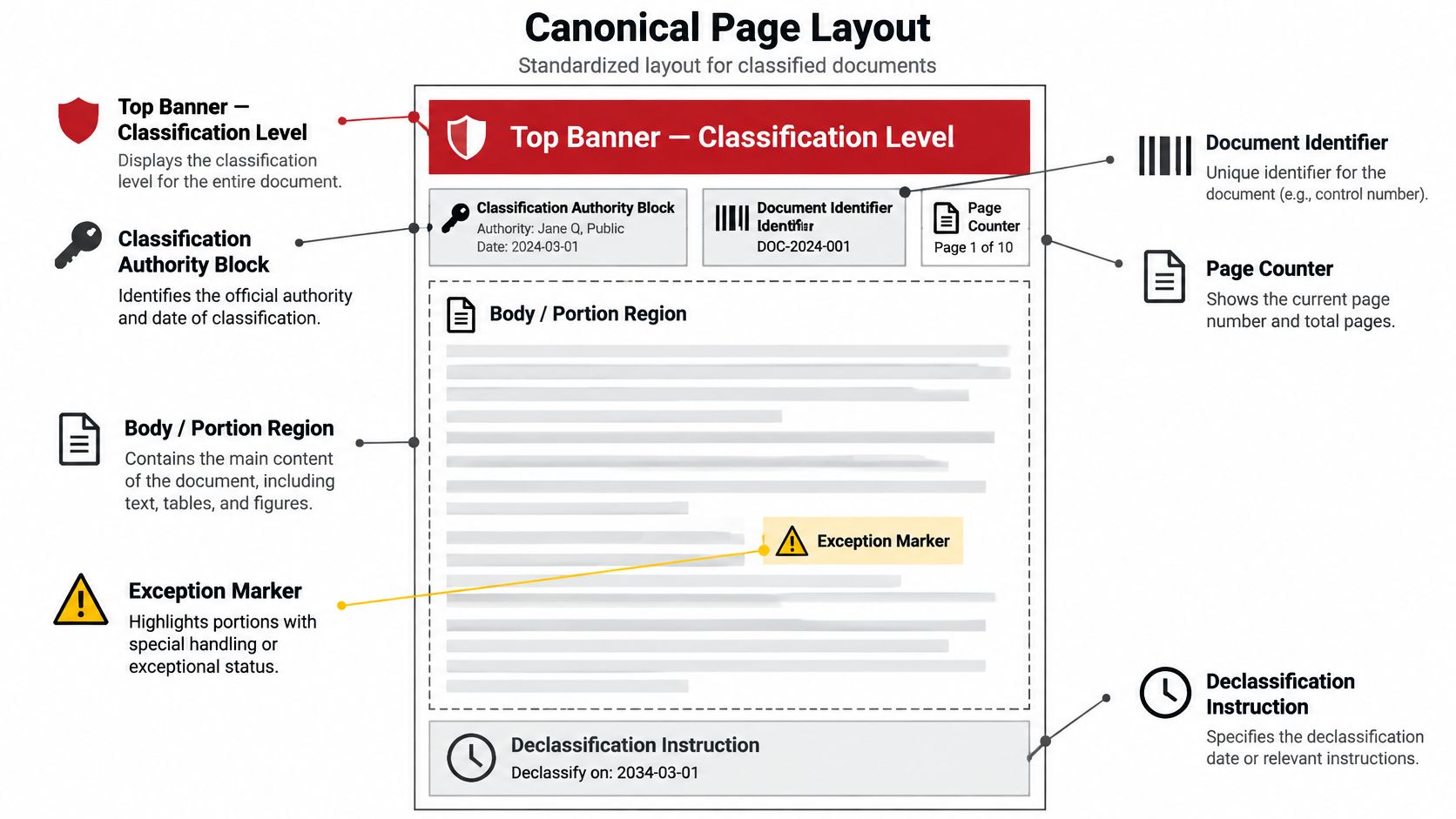
Reserve fixed areas for repeatable information
A canonical page can use this order:
- Top banner: Overall classification, fixed in a consistent position and repeated on every page.
- Authority block:
classified_by,office_of_origin, classification date, andreason_or_derived_from. - Document and page identifiers: Stable
document_id, version, page number, and total page count when known. - Body and portion region: Content with a marking attached to each relevant paragraph, table, graphic, or other element.
- Exception marker: A clearly defined field or annotation for special handling or an unresolved marking issue.
- Declassification instruction:
declassify_onwith the applicable date or event, captured as a structured value. - Bottom banner: The same overall marking as the top banner.
The authority block shouldn't be free-floating text. Give each element a named field so that OCR can extract and validation rules can check it independently. Keep the banner and required layout zones locked in controlled production templates; allow authorized users to enter or update policy-approved values in the appropriate fields.
For a mixed page, the body region should distinguish each portion and link it to its page and document identifiers. A paragraph, table, or image that lacks an expected marking should trigger a review path rather than inheriting a classification by guesswork. Likewise, a page counter must identify its position in the file, not merely repeat a printed number that could conflict with the source.
If your legal team also needs a separate discovery-request layout, an annotated discovery template for law firms can help with document-request structure. It serves a different purpose from classification controls, so keep its legal workflow separate from the security-marking logic. Treat any sample layout as a starting point, then have the responsible authority approve the actual markings and required wording.
Adapt Templates by Document Category
Business documents can contain confidential or sensitive information, but an extraction model doesn't determine whether a record is formally classified. Keep the document's governing security decision separate from category-specific extraction. Then map each document type to its own content fields, while carrying forward the same document, page, portion, and handling context.
Invoices
An invoice template typically needs supplier and customer details, invoice number, invoice date, currency, line items, tax fields, and totals. For multipage files, link each extracted line item to its source page and preserve any applicable handling controls. A validation exception should flag missing totals, inconsistent invoice identifiers, or a conflict between the extracted amount and the document's own summary. Matil's invoice extraction use case can process invoice fields, but any classification or access decision must come from the organization's authorized policy process.
Payslips
For payroll documents, define fields for the employee identifier, pay period, earnings, deductions, tax information, and net pay. Limit access to the extracted output as well as the source PDF, and make the page or portion reference available to reviewers. Route a record for review if key totals don't reconcile or if the employee identifier is unreadable. Extraction should support payroll processing, not turn an OCR result into an access authorization.
KYC records
Identity-document templates can map the document type, name, date of birth, identifier, and expiration date, with provenance linking each value to its source image or page. FATF Recommendation 10(a) requires regulated firms onboarding customers to identify them and verify identity using reliable, independent source documents, data, or information (FATF digital identity guidance). Extracting passport or identity-card data is only one part of that control. Verification still needs risk-based review of the evidence and its suitability.
Logistics documents
A Bill of Lading, customs declaration such as a DUA, or freight record can use fields for shipper, consignee, goods description, references, dates, quantities, and transport details. Tie every extracted field to the source page, especially when a shipment file combines multiple forms. Flag mismatched references, missing pages, or conflicting quantities for review. Keep operational fields distinct from classification metadata so that a routing exception doesn't overwrite a security marking.
Map Template Fields to JSON
A stable JSON contract lets different document families share the same controls without forcing their business fields into one shape. Use a common wrapper for identity, classification, source references, provenance, and review status. Add invoice, payroll, KYC, or logistics fields within a category-specific object.
ISO 15489 guidance covers metadata for a record's content, structure and format, business context, relationships to other records and systems, responsible agents, applied controls, and when those controls were applied (ISO 15489 guidance). That's a useful basis for treating the template as a record-management contract, not just an OCR field list.
A compact shared structure might look like this:
{
  "document_id": "assigned-by-workflow",
  "version": "assigned-by-workflow",
  "overall_marking": "from-authorized-source",
  "classification_authority": {
    "classified_by": "extracted-or-verified-value",
    "office_of_origin": "extracted-or-verified-value",
    "reason_or_derived_from": "extracted-or-verified-value",
    "declassify_on": "extracted-or-verified-value"
  },
  "pages": [
    {
      "page_id": "assigned-by-workflow",
      "portion_references": [
        {
          "portion_id": "assigned-by-workflow",
          "portion_marking": "detected-value",
          "source_text": "extracted-content"
        }
      ]
    }
  ],
  "handling_controls": [],
  "provenance": {
    "source_file": "workflow-reference",
    "extraction_method": "workflow-value",
    "confidence": "workflow-value"
  },
  "validation_status": "workflow-value"
}
Values labelled as workflow-assigned or workflow-derived must come from the live processing system. Don't hard-code timestamps, confidence scores, document IDs, or validation results into a production schema. The words above are placeholders that describe the contract, not actual record data.
Category-specific objects can then map business content without discarding shared context:
- Invoice:
invoice_number,supplier,invoice_date,currency,line_items,tax,total. - Payslip:
employee_id,pay_period,earnings,deductions,net_pay. - KYC:
document_type,name,date_of_birth,document_number,expiry_date,verification_reference. - Logistics:
document_type,shipper,consignee,shipment_reference,goods,quantity.
For a broader schema-design reference, see schema definition. Keep business data and classification controls as distinct objects, but bind both to the same document and source-page references. For correspondence fields, an IRS mailing address guide for your LLC can help teams understand the kind of address details that may appear in business records; it doesn't define a classification requirement.
Validate Markings and Extracted Fields
A validation layer should turn template requirements into explicit outcomes. Each check should either accept the record, quarantine it from automated processing, or route it to an authorized reviewer. Don't let a failed check disappear into a generic OCR confidence score.
Official marking guidance calls for markings on document elements such as subjects, headers, summaries, graphics, and other media. That makes it important to check more than the first page banner, particularly after conversion, splitting, or OCR.
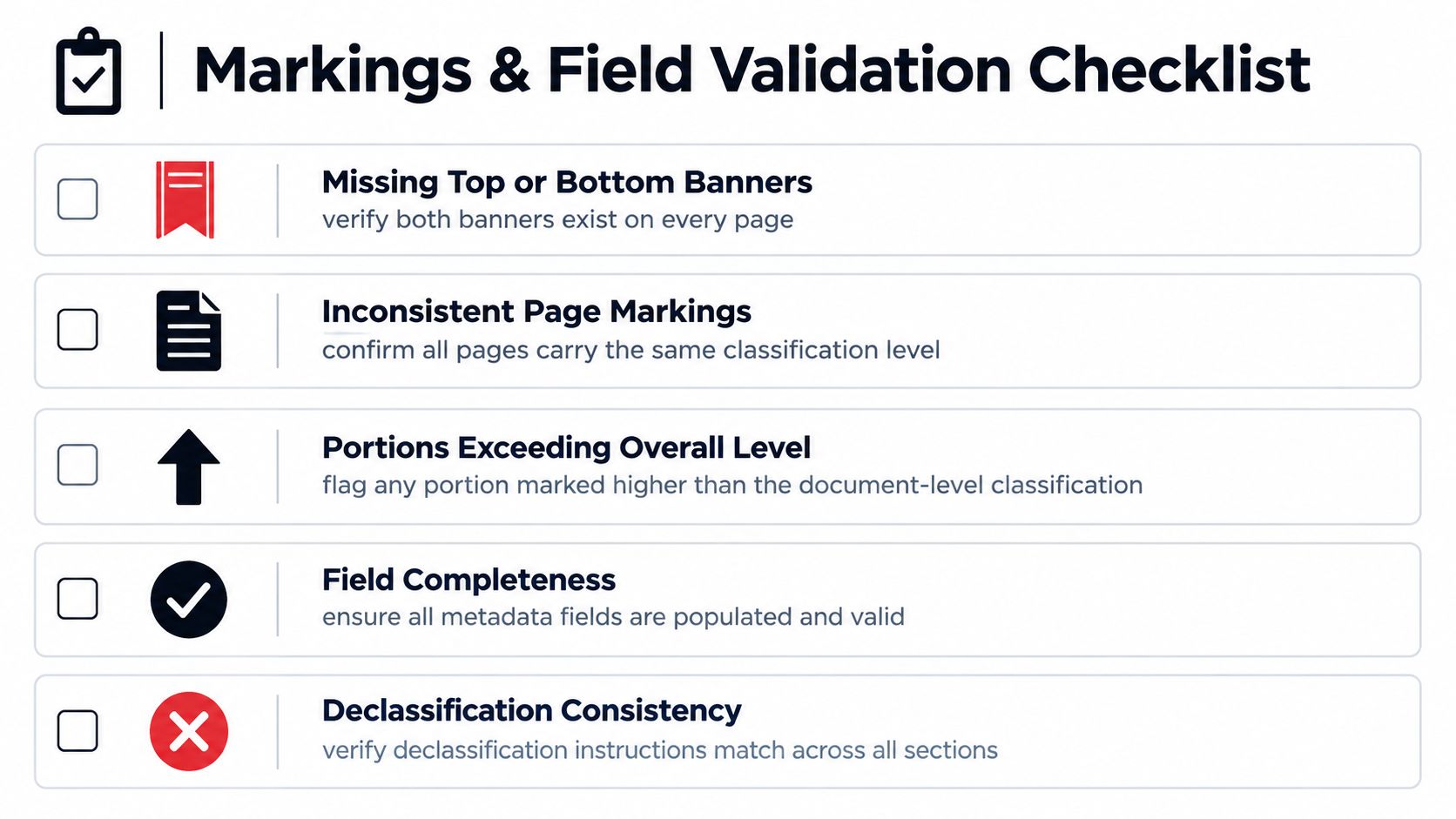
Apply deterministic checks
- Missing top or bottom banner: Quarantine the affected page. Require an authorized correction or review before export.
- Inconsistent page markings: Compare each page with the document-level value. Route conflicts to review rather than normalizing them automatically.
- Portion exceeds overall marking: Flag the document because its overall marking may not reflect its most restrictive portion. An authorized classifier must resolve it.
- Missing authority fields: Reject or quarantine records with required authority, origin, reason, or declassification fields absent.
- Invalid declassification instruction: Route unclear dates, events, or conflicting instructions for human review.
- Unmarked content or identifier conflict: Flag a portion without an expected marking, or a page whose document ID conflicts with its parent record.
- Unlogged classification change: Block export if a changed marking lacks an audit event identifying the actor, time, previous value, new value, and authorization basis.
The system can compare detected values, confirm field presence, and preserve exceptions for review. It cannot infer an absent marking from nearby content, choose a classification level based on OCR, or lower a marking to make a document easier to process. Those are governance decisions, not extraction fallbacks.
Use Templates with an OCR and IDP API
A production OCR or IDP workflow should preserve classification context at every processing stage. An API can extract text and fields, but the surrounding integration must also carry source identity, page and portion references, validation outcomes, and exception history into downstream systems.
A controlled sequence works like this:
- Upload and identify: Record the source file and assign a workflow-managed document identifier.
- Split and classify: Separate mixed files where needed, while preserving each page's relationship to the original. Automatic document classification can suggest document types; it shouldn't assign security levels.
- Run OCR and extract fields: Capture visible markings and category-specific content from PDFs or images.
- Validate: Compare page and portion markings, authority fields, identifiers, and extracted values against the template rules.
- Route exceptions: Send unresolved or conflicting cases to an authorized reviewer. Preserve their decision and its audit context.
- Export with controls: Return structured JSON while maintaining the security metadata and provenance associated with the source.
Tools differ in how much of that workflow they combine. An OCR-only service may read text but leave classification, validation, orchestration, and exception routing to custom systems. A document OCR API integration guide can help technical teams assess the implementation boundary between extraction and the surrounding controls.
Matil.ai combines OCR, document classification, validation, and workflow orchestration in a single API. Its platform supports flexible JSON structures, pre-trained models, custom data structures, PDFs, images, and multi-page processing. Matil reports accuracy above 99% in multiple use cases and an SLA above 99.99% availability (Matil.ai platform details). These figures don't replace acceptance testing on your own documents or policy review of security decisions.
The platform's stated enterprise security posture includes GDPR, ISO 27001, AICPA SOC, and zero data retention. Confirm that any vendor's controls and processing terms fit your organization's data-handling requirements before connecting sensitive records. The important architectural distinction is that Matil is more than OCR: the API supports extraction alongside classification, validation, and workflow orchestration, while authorized people remain responsible for classification decisions and exceptions.
Reuse Shared Fields Across Documents
Invoices, payslips, KYC records, and logistics documents have different business fields, but they can use the same document identity, version, overall marking, authority metadata, page references, handling controls, provenance, and validation status. Keep those shared fields in one maintained schema rather than recreating them independently for every document family.
Use the canonical page layout for visible placement, the JSON contract for system-to-system exchange, and the validation checklist for acceptance and exception rules. Category-specific fields belong in separate objects. That separation makes it easier to update business extraction without changing the meaning of shared security metadata.
A shared field needs one definition, one owner, and a controlled change history.
When a shared field changes, update its schema version, template mapping, validation rule, and export contract together. Keep prior records interpretable under the definitions that applied when they were created. If a new version changes how a marking is represented, record that change explicitly and prevent older exports from being reinterpreted.
This approach turns individual layouts into a maintainable template library. It also gives finance, legal, operations, and compliance teams a common way to trace how a value moved from source document to extracted record.
Quick Reference and Implementation Checklist
Start with the governing policy and authorized classification roles, then configure the template and processing workflow. A template is an implementation aid. It doesn't make the classification decision or replace the organization's approval process.
| Implementation Area | Verify Before Release |
|---|---|
| Policy and authority | Required markings, accountable roles, and approved wording |
| Template | Top and bottom banners, authority block, page and portion identifiers |
| Schema | Shared metadata, category fields, provenance, and version |
| API workflow | Upload, splitting, OCR, extraction, validation, review, and export |
| Controls | Inherited handling restrictions, audit events, and exception routes |
| Testing | Missing banners, conflicting markings, incomplete fields, and export integrity |
Before enabling automated processing, confirm that markings remain attached to page images, OCR text, extracted portions, attachments, and JSON exports. Test the exception route with incomplete authority fields and conflicting page or portion values. Ensure reviewers can see the original source and record the basis for any authorized change.
A useful outcome is not a populated field set. It's an output whose values can be traced to the source and whose security context survives each transformation.
If you're evaluating document automation, Matil combines OCR, classification, validation, and workflow orchestration with flexible structured outputs. Explore whether its API and security controls fit your document types, review process, and integration requirements.


