Encryption at Rest vs in Transit: Do You Need Both?
Encryption at rest vs in transit explained: what each layer protects, where TLS and AES-256 fit, and why document-heavy teams need both plus key management.

Encryption in transit protects data while it moves across networks, and encryption at rest protects data once it is written to storage. Production systems that handle sensitive documents need both, because each layer closes a different exposure.
You're likely in the middle of that problem right now. A clerk has a supplier invoice, a payslip, or a passport scan that has to leave a laptop, hit an API, land in a database, and show up in the ERP before the close. The security page says the platform is "encrypted." That word doesn't tell you whether the file is protected on the wire, on the disk, in last night's snapshot, or only until someone with a valid API key asks for it.
The Two States of Your Data
Say accounts payable drops a multi-page invoice PDF into a web app. The file crosses the internet to an upload endpoint. A processing service runs OCR, classifies the document, and checks the totals. Extracted JSON is written to a database. A nightly job copies that database into backups and cloud snapshots. A webhook then pushes the fields into the ERP. At every step the document is either travelling a network or sitting in storage. There is no third state where encryption is optional.
Encryption in transit protects data while it travels between systems, typically with TLS over HTTPS. Encryption at rest protects data written to disks, databases, object storage, backups, snapshots, and logs, typically with AES-256.
The two are complementary, not alternatives. Transport encryption stops someone intercepting the upload. Storage encryption limits the damage if a disk, snapshot, or backup leaves your control. Skip either one and you have protected only half the life of the file.
A production workflow needs both layers, plus key management and access control. Choosing a cipher without naming who holds the keys is how teams end up with a locked cabinet and the key taped to the door.
The useful comparison is side by side, then each layer on its own, then the key question, the performance cost, and a hop-by-hop check for invoices, KYC files, payslips, and logistics paperwork.
Encryption at Rest vs in Transit at a Glance
The single most important difference is the state of the data: written to storage, or moving across a network.
| Aspect | Encryption at rest | Encryption in transit |
|---|---|---|
| Protects | Stored data on disks, databases, object storage, backups, snapshots, logs, and document repositories | Moving data on network links between clients, APIs, and services |
| Data state | Written to persistent storage | Travelling across a network |
| Typical technology | AES-256 with full-disk, volume, file, or field-level encryption, managed through a KMS | TLS 1.2 or 1.3 over HTTPS, mTLS, SSH, or VPN tunnels |
| Threats mitigated | Stolen disks, leaked backups and snapshots, unauthorized storage access, improper decommissioning | Eavesdropping, man-in-the-middle interception, tampering on network hops |
| Does not protect | Data while it moves, or access through stolen application credentials | The same data after it is written to storage |
| Failure mode if skipped | One leaked backup or snapshot exposes the full document archive | Uploads or internal service calls can be captured in plaintext |
| Key question to ask | Who manages the keys, and are all copies including backups encrypted? | Is every hop encrypted, including internal service-to-service traffic? |
A leaked backup is quiet. One snapshot can hold years of invoices, identity scans, and bank details, and nobody on the network path has to be watching. Intercepted traffic is usually limited to whatever crossed that one link during the capture window. Both failures are serious. They don't look the same in an incident review, and they don't get fixed by the same control.
For personal, financial, or identity documents, both is the default. A platform that advertises HTTPS and leaves object storage or backups in the clear has not finished the job. A platform that encrypts disks and then ships plaintext between an OCR service and a validation service has not finished it either.
Practical rule: In-transit encryption protects the delivery. At-rest encryption protects the warehouse. A locked truck doesn't secure the warehouse, and a locked warehouse doesn't secure the truck.
Read the two columns as separate jobs. The technology in one cell doesn't cover the threats in the other.
How Encryption at Rest Protects Stored Documents
Data at rest is information stored on devices or storage media: uploads sitting in object storage, database volumes, replicas, and the backup bucket nobody opens until an audit. Good practice is to encrypt every copy of it, including backups, snapshots, and replicas, not only the primary database. Storage encryption mainly reduces the impact of stolen disks, leaked snapshots, or media that was never wiped. It does nothing for a file crossing the network, and it does nothing against someone holding a valid login.
Every copy, not just the database
On a document platform the stored surface is wider than the primary database.
- Uploads: original PDFs and images, including scanned invoices and photographed IDs.
- Outputs: extracted JSON, validation results, and anything you export and then keep.
- Scratch: temporary processing files, queues, and local caches on workers.
- Operations: application logs, replicas, snapshots, and backups.
A plaintext nightly dump makes the encryption setting on the live volume a label, not a control. The same applies to a snapshot taken before a migration and left in a bucket nobody reviews. The weakest copy sets the actual exposure, so inventory the copies before you argue about ciphers.
Scope changes what the lock actually covers
Full-disk encryption is comparatively transparent and protects media if a drive is lost or decommissioned without wiping. Once the volume is mounted, an authorized operating-system process reads the data normally, so it does nothing against an attacker already inside the host. Volume or virtual-disk encryption narrows the boundary to a disk you can manage and rotate separately from the host. File, folder, or field-level encryption gives the narrowest exposure. It also pushes key handling into the application, and it can complicate search, indexing, and partial updates. AES-256 is the usual baseline for the stored bytes. The scope you pick decides who can still read them.
Keys decide whether any of this holds. Keep them in a key-management service, separate from the encrypted content, with rotation and revocation procedures written before an incident rather than drafted after a snapshot leaks. Pair that with least-privilege access and short-lived credentials, because an attacker holding a valid application login can ask the service for decrypted fields. For transient artifacts, the stronger answer is not keeping them at all: spell out zero retention in the design, which is the point of a zero data retention policy for AI document pipelines.
How Encryption in Transit Protects Data on the Move
Data in transit is information distributed to authorized participants over a network. TLS does two jobs. Confidentiality means an interceptor sees ciphertext, not the PDF. Endpoint authentication means the client checks the server certificate and confirms it is talking to the authentic API, not a lookalike.
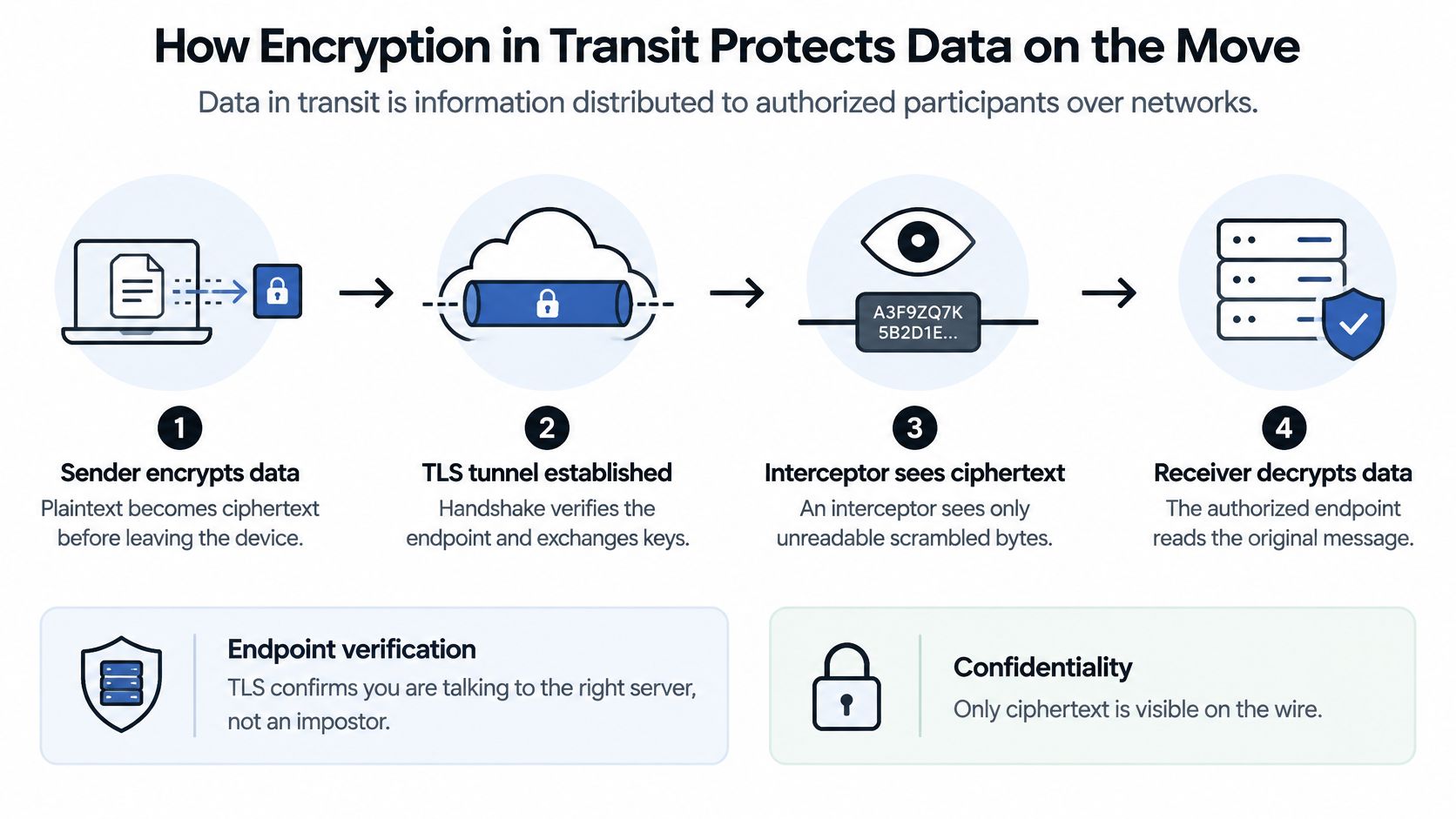
HTTPS is the public face of that pattern, and it is now the expected baseline rather than a differentiator. Google's HTTPS transparency archive shows encrypted traffic across Google rising from approximately 48% in late December 2013 to 96% in July 2024. A padlock on the public site still says nothing about the rest of a document pipeline. For teams that also move files outside an API, the secure data transfer guide Indiana is a plain-language companion to the hop list below.
Hops that have to be encrypted
- Client or scanner to the upload endpoint. The document leaves the user's device.
- Load balancer to the processing service. TLS often terminates here and must be re-established.
- Calls into OCR and AI components. The file is still customer data.
- Internal service-to-service traffic. This is the hop teams forget.
- Webhooks and exports to an ERP or accounting system.
- Cross-region and vendor transfers. A subprocess is still your pipeline.
The baseline is authenticated TLS 1.2 or later, preferably TLS 1.3, with certificate validation on every connection and mutual TLS for internal calls. Termination points matter because each one is a place where plaintext can appear before the next encrypted session begins. Once a PDF, identity document, or bank statement is written to storage, TLS no longer protects it.
Strong public HTTPS plus plaintext internal hops is a common gap, and it is invisible from the browser. The padlock only describes the first hop.
Key Management Decides Whether Encryption Holds
Who controls the keys, and what happens when credentials are stolen? Encryption alone doesn't protect sensitive documents after an attacker gains valid application credentials or key-management access, because the service decrypts data on request.
Plaintext can still exist in memory, logs, temporary files, queues, model inputs, and human-review screens when TLS and disk encryption are configured correctly. The cipher did its job. The application then opened the file so a person or a model could use it.
A 2025 Thales cloud security study of 3,163 professionals across 20 countries found that only 8% of organizations encrypt at least 80% of their cloud data, while 68% identified stolen credentials and secrets as the fastest-growing cloud-infrastructure attack tactic. The same study found that 57% of organizations use five or more enterprise key managers, and 48% still manage keys through cloud-provider consoles. Fragmented key stores are how rotation gets skipped and how an old snapshot key stays valid.
Controls that have to sit beside the cipher
- Centralized key management, with keys separated from encrypted content.
- Rotation and revocation rehearsed before an incident, including the backup keys.
- Least-privilege IAM and short-lived credentials, not long-lived shared secrets in a wiki.
- Audit logs on every decryption and key-use request.
- Tenant isolation, so one customer's documents aren't in another customer's blast radius.
- Zero retention for transient artifacts: scratch files, queues, and model inputs.
When you evaluate a vendor, ask for those controls in writing. Matil, for example, makes zero data retention an explicit policy, which is the commitment to look for on an extraction API. You still own the door key. The client is solely responsible for safeguarding API keys and passwords, and we aren't liable for third parties who get in with valid credentials. Stolen keys aren't an encryption failure. They're an identity failure that encryption won't paper over.
Performance Trade-offs and What to Measure
The trade-off is operational, not a simple "at rest is slow, in transit is fast" penalty. NIST's guide to storage encryption treats full-disk, volume, and file or folder encryption as different deployment choices. Full-disk is mostly transparent to the application and protects lost media, but a mounted volume is readable by authorized processes. File or field encryption narrows exposure and adds key handling that can slow search, indexing, and partial updates. That cost shows up as engineering time and query design, not as a single megabytes-per-second number.
On the wire, TLS adds a handshake and cryptographic work. Connection reuse, session resumption, hardware acceleration, and modern authenticated ciphers cut the recurring per-request cost. A fresh handshake on every small KYC image hurts more than steady encryption of a large scanned PDF on a warm connection.
What to measure, separately
- Upload throughput in MB/s for representative PDFs and images over TLS.
- Handshake rate and handshake latency, not buried inside "API time."
- Share of requests served on reused or resumed sessions.
- CPU share spent on cryptography at peak concurrency.
- Storage read and write latency with encryption on versus off.
- Total time per document across upload, extraction, validation, and export.
Report overhead as a percentage of total request latency and as cost per document. Raw cipher throughput doesn't tell a finance lead whether Tuesday's invoice run slips. Test the mix you run: small KYC images, large multi-page scans, concurrent uploads, retries, backups, and cross-region transfers. Handshakes dominate the small-request segment. Storage I/O dominates large files and backup windows. NIST's position is to encrypt both transmitted and stored sensitive information, including backups, rather than dropping a layer to buy speed.
A Security Checklist for Document Workflows
A 2025 Aviatrix industry survey reported that 81% of organizations encrypt data both at rest and in transit, 15% encrypt only data in transit, and 3% encrypt only data at rest. Strong TLS doesn't compensate for unencrypted cloud storage. Encrypted disks don't compensate for plaintext transfers between services, vendors, workers, or regions.
The same survey is a reminder that "in transit" isn't the browser hop alone. On an extraction API the path runs through the customer app, upload endpoint, load balancer, processing service, OCR or AI component, validation engine, webhook, database, backup system, and the exported Excel or PDF.
What each document is carrying
An accounts-payable invoice carries supplier identity, amounts, tax, and often bank details. A KYC file carries a passport or ID scan. A payslip carries salary. A bill of lading or customs declaration carries shipment and trade data. Each of those files crosses every row below. One unencrypted hop or one plaintext backup exposes that payload, regardless of how careful the public website looks.
| Workflow point | Exposure | What to verify |
|---|---|---|
| Client app or scanner | Document leaves the user's device | TLS 1.2+ to the upload endpoint, certificate validation |
| Upload endpoint and load balancer | Traffic terminates and is forwarded | TLS termination config, re-encryption to backend services |
| Internal service-to-service calls | OCR, AI, and validation services exchange documents | mTLS or an encrypted service mesh on every internal hop |
| Processing and OCR layer | Plaintext exists briefly in memory and temp files | Zero retention for transient artifacts, encrypted scratch space |
| Database and JSON results | Extracted fields persist | AES-256 at rest, field-level encryption for identifiers |
| Backups and snapshots | Full copies leave the primary store | Encrypted backups with separate key management |
| Logs and monitoring | Metadata and errors may capture fragments | Log scrubbing, encrypted log storage, short retention |
| Exports and webhooks | Results travel to ERPs and downstream systems | Encrypted delivery, authenticated webhooks, least-privilege access |
Write the data-flow diagram. Mark encryption status per hop and per storage layer, who owns the keys, which regions the bytes cross, and where plaintext is allowed to exist. That map is more useful than a yes-or-no answer on AES or TLS. For how those controls sit inside a broader program, see this guide to enterprise document security.
Require Both Layers From Every Provider
If you run the infrastructure, turn on TLS 1.2 or later on every hop, including internal calls. Encrypt databases, object storage, backups, and snapshots. Keep key management separate from the data store, and test revocation against a backup, not only against the live volume. A cipher you cannot revoke is a permanent one.
If you buy a SaaS or API, require both layers plus the operational controls: stated key ownership, zero retention for transient artifacts, audit logs, and certifications you can read. GDPR, ISO 27001, and SOC belong in the documents, not only on the homepage. A short primer on what SOC 2 compliance covers is a reasonable filter before you accept a logo.
Encrypt the state you are neglecting first. That is where the breach path runs. Teams with a perfect public certificate and an open backup bucket should fix the bucket. Teams with encrypted disks and plaintext webhooks should fix the webhook.
For document-heavy finance, operations, and compliance teams, the bar is an extraction API that does more than OCR. You want classification, validation, and workflow automation on the same call, pre-trained models for utility bills, payslips, identity documents, and logistics paperwork, and a classifier builder that needs only a label and a short description per category. Accuracy above 99% in multiple use cases only helps if the bytes are protected on the way in and after they land. Client data is processed on Amazon Web Services in the London region (UK), on Google Cloud Platform in Europe, and with OpenAI models under Enterprise privacy clauses. That regional and subprocessor path is part of the hop list, not a footnote.
If you're evaluating document automation, use the checklist above as the vendor questionnaire. Ask where plaintext exists, who holds the keys, and whether backups are in scope. Then decide.
Matil combines OCR, classification, validation, and workflow automation in one API, with GDPR (EU), ISO 27001, and AICPA SOC compliance and a zero data retention policy for the documents you send. If you're comparing providers on encryption at rest vs in transit, use that checklist against our controls and your own hops. Visit Matil when you want to see how a document run is protected from upload through structured JSON.


