Data Validation Rules: Types, Examples and Authoring
Learn the types of data validation rules for document extraction: format, cross-field, lookup and business rules, with examples and JSON schema.

You're looking at an invoice that looks complete, until accounts payable tries to post it and the total doesn't match the lines. Or a date reads 03/04 and nobody can say which month that is. Data validation rules are the checks that decide whether an extracted value is acceptable before any system uses it. A rule tests a value against a format, a meaning, a related field, a reference list, or a company policy. The point isn't to reject everything. It's to stop a bad value from reaching the ERP while you still have the original evidence.
Data Validation Rules at a Glance
A useful rule answers one question: is this value fit for the job you are about to give it?
Data quality work often separates verification from validation. Verification asks whether a value conforms to a syntax, schema, or rule. Validation asks whether it is usable for the decision at hand. A date can be a real date and still fail, for example when an invoice date falls after the payment date. So a rule result is more than pass or fail: keep the original value, the rule version, and the evidence, then send it to a hard block, a soft warning, or human review.
| Rule type | What it checks | Example | Typical failure action |
|---|---|---|---|
| Format | Syntax and pattern of one value | Date stored as 2026-03-14, or a currency as an ISO 4217 code | Re-extract, or block if the field is needed for payment |
| Semantic | Meaning and allowed range within one field | Quantity above zero; VAT rate from an allowed list | Hold for correction |
| Cross-field | Relationships between fields | Total equals line items plus VAT | Recalculate or route to review |
| Lookup and enrichment | Value against reference data | Supplier tax ID exists in the vendor master | Flag no match and keep the original value |
| Business rule | Company policy applied to the record | Invoices above a set amount need a second approver | Route to the approval queue |
Start with format and cross-field rules on your highest-volume document type. They catch many extraction errors early, while the document and the extracted result are still available for checking.
Format Rules That Stop Malformed Values
Format rules are the first gate. They don't judge the business. They stop a value the next check can't even read.
- Required fields. Invoice number, issue date, and total must be present before anything else runs. A blank total isn't a zero.
- Data types. Store amounts as decimals with a fixed number of places. Don't keep "€1,250.00" as text. The currency symbol belongs in its own field.
- Date format. Convert every date to ISO 8601,
YYYY-MM-DD. Flag 03/04/2026 when the document country is unknown. March and April are both plausible. - Separators.
1.234,56and1,234.56aren't the same number. The wrong reading shifts a total by a factor of a thousand and breaks every later sum. - Patterns. A Spanish electricity supply code (CUPS) starts with ES and a fixed-length string. An IBAN has to pass its check digits. An identity number has to match the pattern for that document.
- Code lists. Currency and country values come from ISO lists, not from whatever the model guessed.
Format failures are usually cheap. Re-extract or correct them. Block posting only when the field is needed for payment or legal identification. A missing description can wait. A broken IBAN can't.
Teams that want a wider checklist for messy source files can use the same habit to reduce errors in receipt data before those values enter a ledger.
Pull 50 recent documents of one type. Count which format rule fails most often. Fix that rule first.
Semantic and Cross-Field Rules for Logic Errors
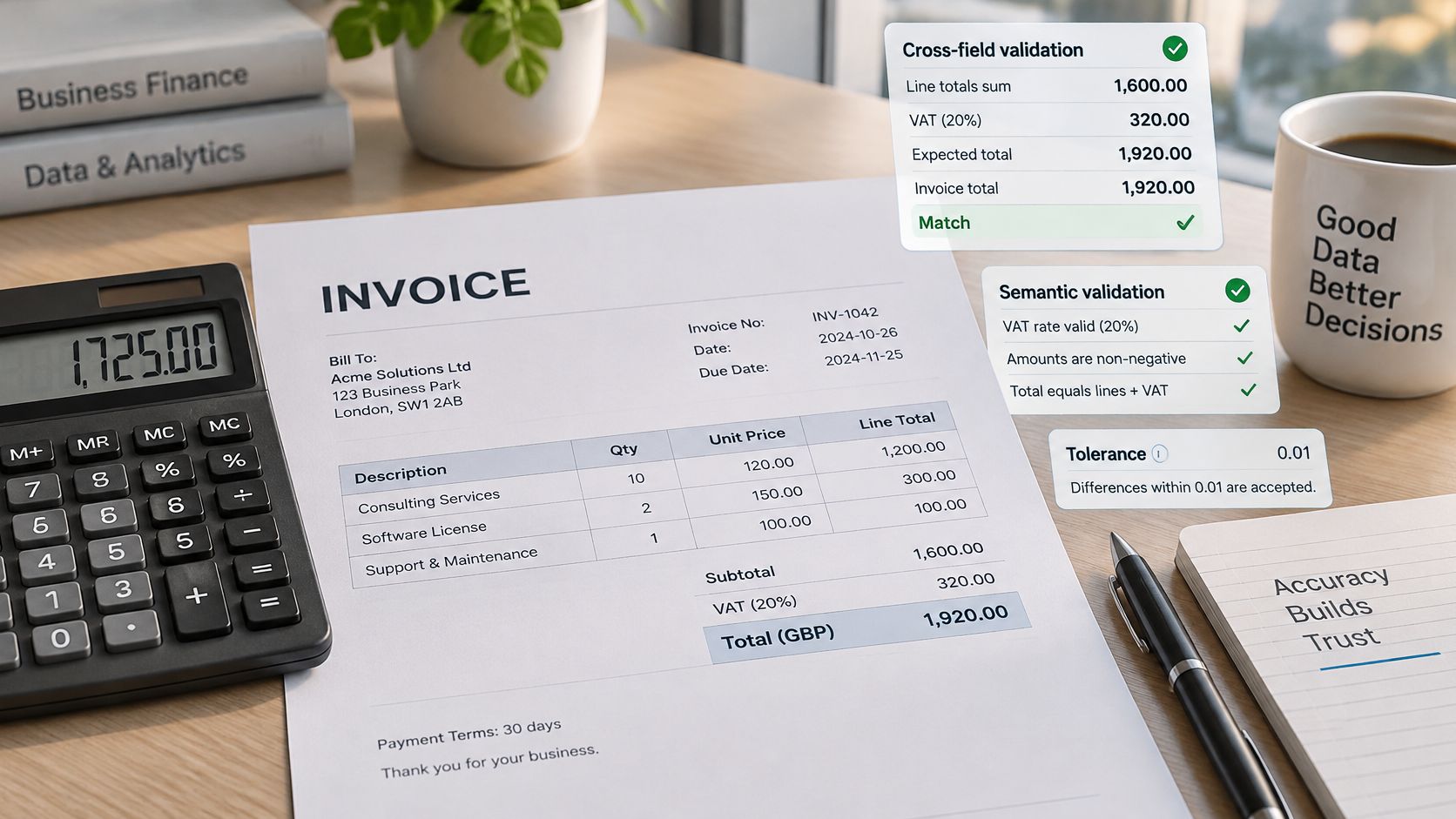
The clearest logic check is the invoice sum. The total must equal the sum of the line totals plus VAT, within a rounding tolerance of 0.01 in the invoice currency. If it doesn't, don't "fix" the total in silence. Recalculate or send the invoice to review, and keep every extracted figure.
Next, the VAT breakdown. Amounts at each rate have to add up to total VAT. A 21% line and a 10% line that don't reconcile are a posting error waiting to happen, even when each line looks tidy on its own.
Then date order. The payment date shouldn't precede the issue date. On a delivery note, the delivery date shouldn't precede the order date. A reversed pair often means the model swapped two nearby dates.
A payslip uses the same idea. Gross pay minus the listed deductions must equal net pay. If it doesn't, the decimal was probably misread, and payroll shouldn't post it.
Conditional rules change what is required. When the customer is in the EU and the deal is business to business, the customer VAT number becomes mandatory. The same invoice for a consumer doesn't need that field.
The European Commission invoicing guidance lists what a full invoice must carry: issue date, a unique sequential invoice number, supplier and customer names and addresses, the customer's VAT identification number where it applies, a description and quantity, unit prices excluding tax, the payment date when it differs from the issue date, the VAT rate and amount, and a VAT breakdown by rate or exemption. Once that information is included, the invoice can support a VAT deduction in an EU Member State. Extraction only proposes values. These checks test them.
Semantic rules sit inside that schema. A quantity must be positive. A rate must appear on the allowed list. A failed arithmetic check triggers recalculation or review, never a silent overwrite. The original extracted values stay on the record.
Lookup and Enrichment Rules Against Reference Data
Lookups compare an extracted value with an outside source of truth. Four cover most finance and logistics files.
Supplier tax ID against the vendor master. No match means you may be about to pay a party you don't know. A practical pattern for that check is covered in tax ID validation.
SKU on a delivery note against the product catalog. A near miss is often one transposed character, not a new product.
Port codes on a bill of lading against UN/LOCODE. "Rotterdam" and a mistyped port name shouldn't both post as different places.
Tariff or customs-office codes on a declaration against the current tariff list. An old code can clear the wrong duty.
Three outcomes follow. An exact match passes. A fuzzy match above a set score, such as a supplier name that differs by one word, goes to review. No match flags the record and keeps the extracted text.
Enrichment fills a gap from that reference. You might add a supplier country from a verified tax ID, or complete a legal name from a registry. Store the filled value with its source and mark it enriched, so a reviewer can tell extracted text from reference data. Tariff and code lists change, so each lookup needs a list version and a last-updated date.
Never overwrite an extracted value silently with a looked-up value. Keep both, and let the rule decide which one posts.
Severity Levels for Data Validation Rules
More rejections don't mean better data. A rule that blocks every unfamiliar address creates a queue people eventually ignore. Severity is a routing decision: each failure either stops the document, posts it with a warning, or parks it for a human.
IES guidance on data errors points to wrong-field entry, transfer errors, and outliers carried forward from source systems as recurring failures, and it recommends logic checks plus an auditable error log. Errors like these tend to come from manual entry, inconsistent system integration, and outdated sources, so set severity by financial impact rather than by how easy a check is to write. A unit-of-measure error that inflates an order deserves a harder response than a date written in an unusual but readable format.
| Severity | Example | Automatic action | Who acts |
|---|---|---|---|
| Hard fail | Invoice total differs from line-item sum | Block posting and keep the original value | Finance operator |
| Soft warning | Unfamiliar supplier address format | Post and create a review task | Data steward |
| Accept with log | Date format variant with clear context | Post and record the rule and evidence | No action unless audited |
| Review route | Same invoice number on two versions | Hold both records and send for review | Operations lead |
Whatever the level, the record keeps the original extracted value, the rule version that fired, and the evidence behind the decision. When two fields, two versions, or two systems disagree, keep every candidate, name the conflict, and route it instead of picking a winner in silence. For each rule, track real errors caught against the false-positive rate and the manual review rate. Matil does not guarantee 100% accuracy, so your team supervises results and accepts them expressly before they drive payments or legal records. Apply hard fails only to fields that move money or confirm identity, run that set for a month, then tune the thresholds.
Rules by Document Type for Common Workflows
One shared rule set fails because a payslip and a passport don't fail in the same way. Read each row as the checks that must pass, the links between fields, and the risk you're blocking.
| Document | Must-have rules | Cross-checks | Risk prevented |
|---|---|---|---|
| Invoice | Invoice number, issue date, supplier and buyer tax IDs, VAT rate and amount | Totals equal line items; VAT breakdown sums to total VAT; payment date after issue date | Duplicate or unbalanced invoices posted |
| Payslip | Employee ID, pay period, gross pay, net pay | Gross minus deductions equals net; contribution bases within configured limits | Misread decimals that shift pay |
| KYC identity document (ID card, NIE, passport) | Document number pattern, expiry date, date of birth | Expiry after issue date; name matches the application | Expired or mismatched identity accepted |
| Bill of Lading | B/L number, shipper, consignee, port of loading, port of discharge | Ports match UN/LOCODE; quantities match the packing list | Port name variants causing routing errors |
| Customs declaration (DUA) | Declaration number, tariff code, customs value | Tariff code exists in the current list; weight matches the transport document | Outdated codes cleared |
| Delivery note | SKU, quantity, order reference | SKU exists in the catalog; delivered quantity within ordered quantity | Partial deliveries misread as errors |
Invoices. Teams often skip the duplicate invoice number across versions. The arithmetic can be perfect and you still pay twice.
Payslips. The skipped check is the contribution base against its configured limit. Net pay can match while the base is off by a decimal.
KYC documents. Expiry after issue date gets written. The name match against the application often doesn't, and that's the mismatch that matters.
Bills of lading. Ports get copied as free text. Without UN/LOCODE, "Rotterdam" and a spelling variant become two destinations.
Customs declarations. Weight against the transport document is the check people drop. An outdated tariff code then clears on a weight that never matched the shipment.
Delivery notes. A quantity above the ordered amount is often a partial-delivery misread, not a new order. Bank statements and purchase receipts need the same date-order and running-balance habit, even if they aren't in the table.
Build a rule set per document type. A KYC set carries retention and access duties an invoice set doesn't.
How Rules Chain Together in One Pipeline
Order matters more than the number of rules. Run them in this sequence.
- Format checks run first and block unreadable values before any calculation.
- Lookups and enrichment run next, so later checks use corrected codes and verified names.
- Cross-field and semantic checks run on those cleaned values.
- Business rules and severity decide the outcome.
- Each record is posted, warned, held, or rejected, and the outcome is logged with the original value.
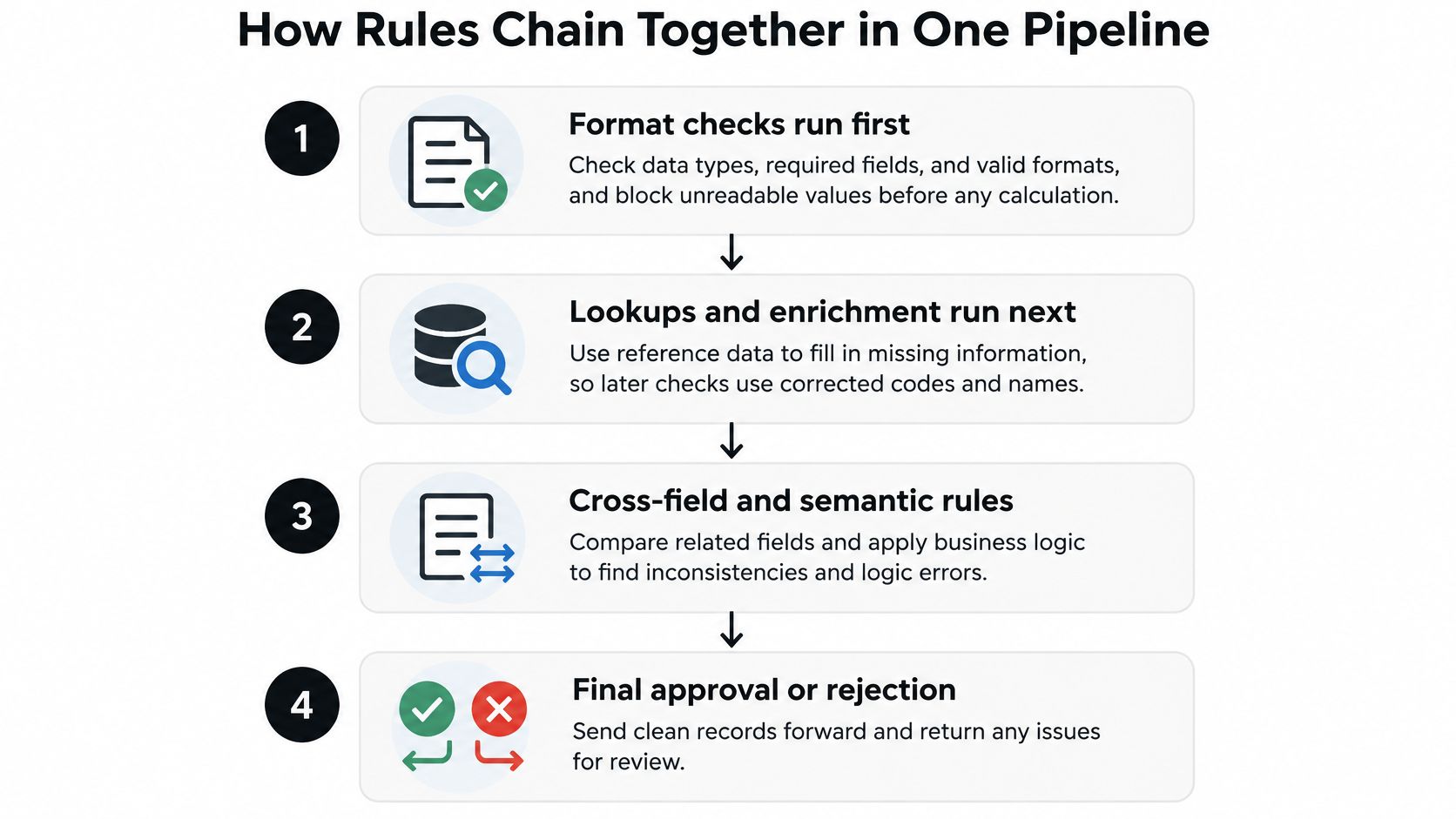
Say a European invoice shows 1.234,56. If you sum first, the parser may read 1.23456, the total fails, and a correct invoice lands in review. The actual fault was the separator. Format has to win that argument before arithmetic starts.
After a person corrects a value, run the whole pipeline again, not only the edited field. A fixed date can break a date-order check you already passed. The review queue should show the failed rule, the extracted value, where it sits on the source image, and a suggested correction.
Count how many records reach review because of an error from an earlier stage. If that share is high, you're calculating on dirty input.
Visual Builders Versus Code for Authoring Rules
Choose a visual builder when rules change weekly and the owners aren't developers. Choose code when rules call external systems or must pass a software review before release.
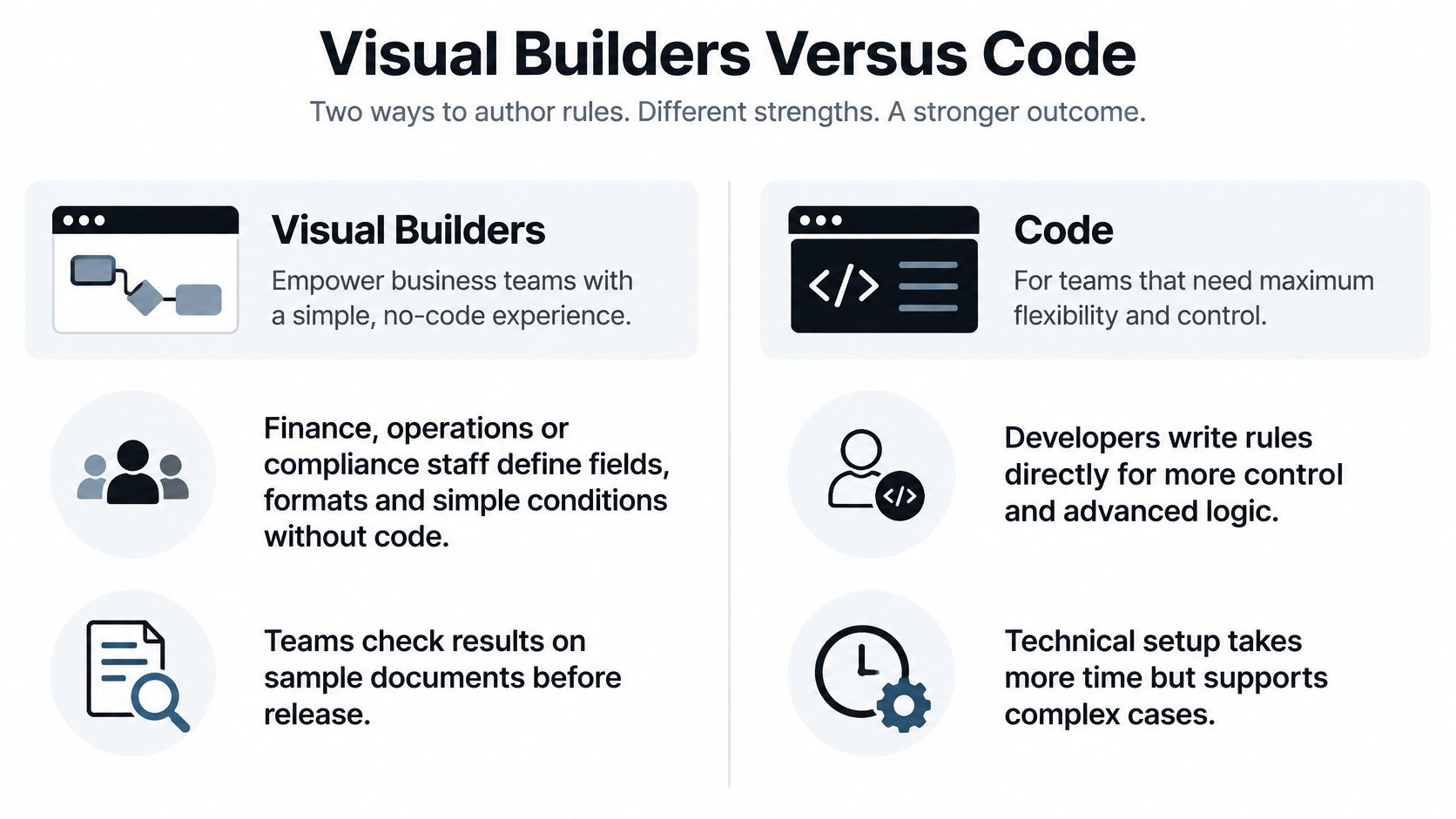
| Criterion | Visual builder | Code |
|---|---|---|
| Who writes the rule | Operations, finance, or compliance staff | Developers |
| Time to first working rule | Minutes to hours on sample documents | Hours to days, including tests |
| Version control | Platform history and effective dates | Repository, branches, and code review |
| Complex logic | Common conditions and comparisons | Any logic, loops, and external calls |
| Testing | Evaluation against sample sets | Unit and regression tests |
| Integration with internal systems | Connectors or API calls configured in the platform | Direct API and database calls |
Teams often land on a hybrid. Domain experts maintain format, severity, and business rules in the builder. Developers own lookups into internal systems and any logic that needs loops or outside calls.
Severity settings belong in the builder too. Whether a failed check blocks posting, raises a warning, or routes the record to human review is a business decision. It should not require a deployment.
Some platforms cover both sides of that split. Matil.ai lets users create custom extraction schemas and classifiers without writing machine learning code, so operations staff define structures and validations visually while developers call the same checks through the API.
Whichever path you use, every rule needs a named owner and a version number. An unowned rule is the one nobody updates when the tariff list changes.
Keeping Validation Traceable and Compliant
An auditor should be able to rebuild the decision from the record. Store these with every validated value.
- Rule identifier and version.
- Effective date.
- Name of the person who approved the rule.
- Source document identifier.
- Extracted value and, if someone changed it, the corrected value.
- Evidence snippet or page reference.
- Final outcome: posted, warned, held, or rejected.
A changed rule applies to new documents first. Re-run it on a saved sample of earlier documents, measure the effect, then decide whether already posted records need another pass. Replayable validation means the same input and the same rule version return the same result.
A 2025 data-protection paper notes that in ESMA's first reporting iteration, five national authorities submitted datasets that didn't fully conform to validation rules, and all supplied validated data in the next cycle after feedback. Validation isn't passed once. You need versions, effective dates, and lineage from the extracted value to the final record. How to keep that chain readable is the subject of document traceability.
Personal data on invoices, payslips, identity documents, and bank statements falls under GDPR. Extract only the fields the process needs, set a retention period by document type and purpose, and delete or anonymise when that period ends. Limit access to the stored JSON to the roles that need it. When we process those documents, Matil acts as processor and follows your instructions as controller. We don't use your personal or confidential document data to train public generative models or models shared with other clients. Processing runs on Amazon Web Services in the London region (UK), Google Cloud Platform in the Europe region, and OpenAI models under Enterprise privacy clauses. Ask any vendor for processor terms, sub-processors, and data location in writing before you send files.
Pick one posted record. You should be able to name its rule version and source page within five minutes.
JSON Schema Examples for Validating Extracted Data
A schema turns the rule set into a contract the API can check on every run. Write the keywords in the same order a developer would read the payload: shape first, then field types, then the conditional rule.
Start with types. invoice_number is a string with a pattern. issue_date is a date string. total is a number with a minimum of zero. currency is an enumeration of ISO 4217 codes. line_items is an array with at least one item. Then close the shape with additionalProperties: false, so an unknown key is rejected before accounting sees it.
{
  "$schema": "https://json-schema.org/draft/2020-12/schema",
  "$id": "urn:invoice-extract:v1",
  "title": "invoice_extract",
  "type": "object",
  "additionalProperties": false,
  "required": ["invoice_number", "issue_date", "total", "currency", "line_items"],
  "properties": {
    "invoice_number": { "type": "string", "pattern": "^[A-Z0-9][A-Z0-9/-]{2,31}$" },
    "issue_date": { "type": "string", "format": "date" },
    "total": { "type": "number", "minimum": 0 },
    "currency": { "type": "string", "enum": ["EUR", "GBP", "USD", "SEK", "PLN"] },
    "customer_country": { "type": "string", "pattern": "^[A-Z]{2}$" },
    "transaction_type": { "type": "string", "enum": ["b2b", "b2c"] },
    "customer_vat_id": { "type": "string", "pattern": "^[A-Z]{2}[A-Z0-9]{8,12}$" },
    "line_items": {
      "type": "array",
      "minItems": 1,
      "items": {
        "type": "object",
        "additionalProperties": false,
        "required": ["sku", "quantity", "unit_price"],
        "properties": {
          "sku": { "type": "string" },
          "quantity": { "type": "number", "minimum": 0 },
          "unit_price": { "type": "number", "minimum": 0 }
        }
      }
    }
  },
  "allOf": [
    {
      "if": {
        "required": ["customer_country", "transaction_type"],
        "properties": {
          "customer_country": {
            "enum": ["AT", "BE", "BG", "HR", "CY", "CZ", "DK", "EE", "FI", "FR", "DE", "GR", "HU", "IE", "IT", "LV", "LT", "LU", "MT", "NL", "PL", "PT", "RO", "SK", "SI", "ES", "SE"]
          },
          "transaction_type": { "const": "b2b" }
        }
      },
      "then": { "required": ["customer_vat_id"] }
    }
  ]
}
The conditional stays narrow. When customer_country is in the EU and transaction_type is b2b, customer_vat_id is required. Other invoices do not grow a fake mandatory field.
Return more than valid: false. Each result should carry the field path, severity, machine-readable error, schema identifier, rule version, source document identifier, original value, confidence, and provenance. That evidence is what lets the integration send one failure to a hard block, another to a soft warning, and a doubtful extraction to human review with the value still attached. No schema can guarantee correctness, so warned and low-confidence records still need explicit acceptance.
If you are wiring this in Java, a worked pattern is in JSON Schema validation in Java. You keep all rights over uploaded documents and the structured JSON obtained from them, so version the schema and export its outputs on your side.
The call itself is four steps.
- Upload the document with the schema identifier.
- Receive structured JSON.
- Validate that JSON against the schema.
- Post valid records and queue the rest, with the original values still attached.
Choose Your Rule Setup and Test It Before Go-Live
A rule set that skips testing fails in one of two directions: it blocks clean invoices, or it lets a wrong total reach the ledger. Scope small, prove it on real files, then widen.
- Pick the document with the highest volume and the highest cost of a wrong posting. For accounts payable teams that is usually the supplier invoice.
- List the must-have checks. Format, cross-field, and lookup, each assigned a severity. Leave the nice-to-have rules for later.
- Choose the authoring path. A visual builder when owners will change rules weekly. Code when the rule calls an external system or needs a release review.
- Build a test set that includes clean files, poor scans, multi-page PDFs, and known edges such as credit notes. A set of only perfect invoices will lie to you.
- Measure before go-live. Precision and recall per field, plus the share of documents that land in review.
The review share is your staffing forecast. Every failure in the test run lands in one of three buckets: a hard block that stops the posting, a soft warning that posts but flags the field, or a human review queue. If review absorbs more documents than one person can clear in a day, tighten the rules or reduce the fields you extract. Whatever tool runs the checks, each failure should carry the original value and the rule that produced it into the queue, so the reviewer sees evidence rather than a bare rejection.
On Matil, the evaluation feature runs tests against ground truth datasets and tracks precision and recall for each field, catching regressions before they reach production. You define a custom extraction schema by naming fields, types, and descriptions, and the platform returns structured JSON that follows that definition. Schemas and classifiers can be built without writing machine learning code.
If the destination is an ERP migration, the same discipline shows up in automated checks for SAP migration data. Matil turns unstructured invoices, payslips, identity documents, and logistics files into structured JSON using the schemas and validations you define, with results supervised and expressly accepted before they count as final. To try that on a document type you already process, visit Matil.


