Data Validation Verification: What Each Check Does
Data validation verification explained: how validation checks format and rules, how verification confirms accuracy, and how both improve document data quality.

It's month-end, and you're looking at a supplier invoice where every field is filled in, the date is formatted correctly, and the total is a clean number. The payment still shouldn't go out, because that total doesn't match the purchase order. That gap is the whole subject of data validation and verification: one check asks whether a value is in the right form, the other asks whether it's true. Teams that treat them as a single pass keep posting plausible, wrong numbers into their ERP.
Data Validation and Verification Defined and Compared
Data validation checks whether a value follows the rules you set for it: required fields, data types, formats, ranges and approved code lists. Data verification checks whether that value matches the source or the business fact it's meant to represent. Validation is a spelling test. Verification is a fact check.
Teams often encounter that distinction at the reconciliation desk rather than in a schema file, with a PDF open on one screen and the ledger on the other.

Think of a passport at a border desk. Validation confirms the document number follows the expected pattern, the expiry date is a real calendar date, and the photo field is present. Verification confirms the photo shows the person holding the booklet, and that the document wasn't reported lost. A perfectly well-formed passport can still belong to someone else.
What a wrong value costs you
The financial case isn't abstract. The UK Government's Central Digital and Data Office reported in 2021 that estimates from the Data Management Body of Knowledge placed the cost of addressing data-quality problems at approximately 10% to 30% of organizational revenue, according to its note on the hidden costs of poor data quality. That range covers finding inaccurate or incomplete records, correcting errors, reconciling conflicting values and cleaning up downstream reporting.
Read it as a historical indicator of scale, not an accounting benchmark for your own P&L. The practical lesson is that a person re-keying a rejected invoice three weeks after payment is the expensive part, and both checks exist to stop that person from being needed.
One invoice date, two different answers
Say an extraction run reads an issue date of 03/04/2025 from a scanned invoice. Validation passes: it's a real date in the agreed format. Verification then compares it with the purchase order and finds the goods were received in a different period, or that the same supplier already billed that order.
The field never broke a rule. It broke a fact. That's why a second pass of the same rules won't catch it, and why verification needs its own evidence and its own thresholds.
| Aspect | Data validation | Data verification |
|---|---|---|
| Question answered | Is this value in the required form and within the rules? | Is this value true to the source or the business reality? |
| What it inspects | Format, data type, range, required fields, approved code lists | Cross-field totals, source documents, trusted reference data, human judgement |
| Invoice example | Total is numeric and the date follows the required format | Total equals the sum of line items and matches the purchase order |
| When it runs | At ingestion, straight after extraction | After validation, and again before posting or payment for high-impact fields |
| Failure it catches | Missing fields, wrong type, value outside the allowed range | Plausible but wrong values, such as a valid tax ID that belongs to another supplier |
| Typical output | Pass, fail or a reason-coded exception | Confirmed, corrected or escalated record with an evidence trail |
Where the definitions come from
The split isn't house style. ISO 8000-8:2015 treats syntactic and semantic quality as things you verify against explicit specifications, such as whether a tax identifier has the correct structure or a currency code exists in an approved reference set. Pragmatic quality is validated against intended use, meaning whether the field supports the accounting or compliance decision it feeds.
The same standard recommends recording the dataset, the applicable criteria, the measurement results and who performed each check. That evidence trail is what makes an exception explainable six months later.
Ask two questions of every extracted field: is it in the right form, and is it true? A pipeline that only answers the first one is half built.
How Extraction Works and Where Matil Fits
Extraction is three stages, and each one can fail independently.
- OCR reads the page. It turns pixels into characters and keeps their position on the page, which is what later lets you trace a total back to the exact block of text it came from.
- Classification names the document. Invoice, payslip, identity document, Bill of Lading or customs declaration (DUA). The type decides which fields and which rules apply, so a payslip isn't judged against invoice logic.
- Validation checks each field. Type, format, range, required fields and cross-field logic run before anything reaches a finance, logistics or compliance system.
Reading a value isn't the same as checking it. The European Commission's eInvoicing guidance describes eInvoicing as the exchange of invoices in a structured, machine-readable format that enables automatic processing between supplier and buyer, which is exactly what a scanned PDF isn't. OCR bridges that gap, and validation makes the output safe to post.
Matil.ai runs those stages behind one API rather than as separate tools: pretrained models for common document types, custom schemas you define by field name, type and description, structured JSON back, precision above 99% on target fields, and GDPR, ISO 27001 and AICPA SOC controls with zero data retention. Above 99% still isn't a licence to post blind, so keep a review path for consequential fields.
The same discipline applies upstream. If your suppliers send the data instead of documents, DPPWare's guide to collecting supplier fields for product passports shows how to define required attributes before they ever reach you, which removes a whole class of completeness failures.
Validation Rules That Catch Structural and Business Errors
Write your requirements as data, not as scattered if-statements. ISO/TS 8000-82 describes data rules as a way to capture integrity and reliability requirements so they can be processed by databases and other information systems, which is what makes them testable, versionable and reviewable by someone who isn't a developer.
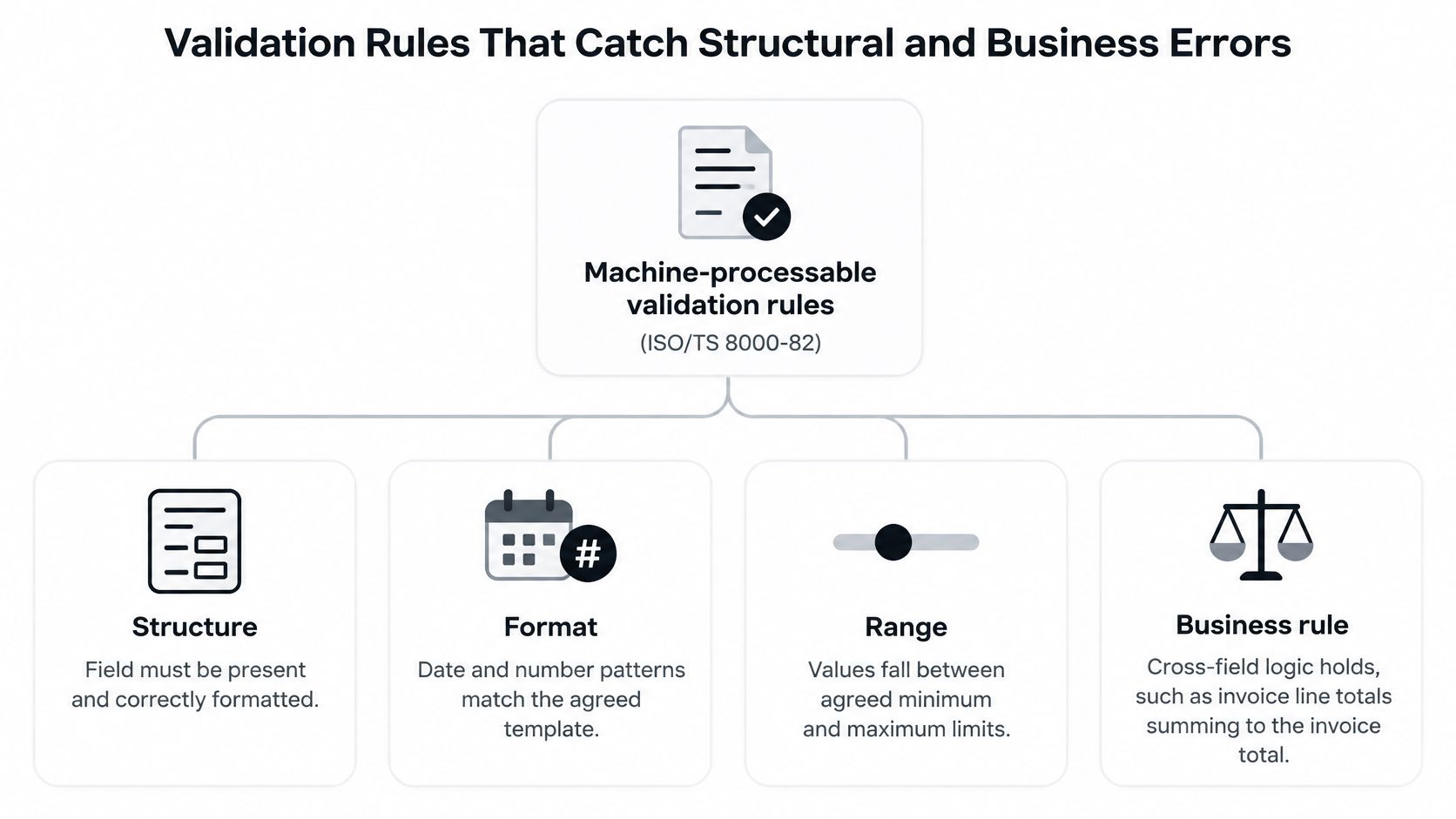
Four failure modes worth covering
Every mandatory field on an invoice can fail in one of four ways, and each deserves its own rule and its own response. Structural problems are cheap to catch and should never reach a human. Relational problems are where the money is, because a total that doesn't reconcile is a payment risk rather than a formatting nuisance.
| Failure mode | What it checks | Invoice example | Action on failure |
|---|---|---|---|
| Structural validity | Type and format of each field | Invoice date is a valid calendar date in the required format | Reject the field and route it for correction |
| Semantic validity | Value belongs to an approved vocabulary | Currency code exists in the approved reference set | Flag for review with a reason code |
| Relational consistency | Values agree with each other | Line items sum to the invoice total within the defined rounding tolerance | Hold the record and show both conflicting values |
| Completeness | Mandatory fields are present | VAT rate breakdown is present | Send to review and do not post automatically |
Set the rounding tolerance explicitly instead of leaving it to floating-point luck. A one-cent difference on a multi-line invoice is arithmetic noise, while a difference of a few percent is a real discrepancy, and the rule should say which is which. If you're new to expressing these constraints formally, our explainer on what schema validation is covers how field types and required flags turn into enforceable contracts.
Log every result, not just the failures
Store each check at field and document level with the rule identifier, input value, outcome, timestamp and source-page coordinates. That log is what lets you calculate precision, recall and false-positive rates separately for each rule and each document class, instead of guessing from a single blended score.
It also protects you from your own strictness. An over-tight date pattern that rejects every supplier using a different separator will bin valid invoices, and you'll only notice when someone asks why volume dropped.
Working rule: a failed validation produces a reason-coded exception and a routing decision, never a deletion.
Two habits keep the rule set healthy. Write one rule per failure mode for each mandatory field, so coverage gaps are visible on a grid rather than buried in code. Then review the exception queue weekly with the finance team, and tune the rules that generate the most false alarms.
Verification That Confirms Values Match Reality
A single accuracy number is a comfortable lie. A pipeline can score brilliantly across hundreds of low-stakes fields while getting bank-account numbers, tax IDs or invoice totals wrong often enough to matter. In 2025, 88% of U.S. business leaders surveyed by Parseur and QuestionPro reported finding errors at least sometimes in document-derived data feeding their analytics and AI systems, as covered in CIO Dive's report on the survey.
Regulators are moving the same way. Article 10 of the EU AI Act requires high-risk systems to use relevant, representative, sufficiently complete and low-error datasets, alongside accuracy, traceability, record-keeping and documentation. Calibrated risk tiers serve that better than a headline percentage.
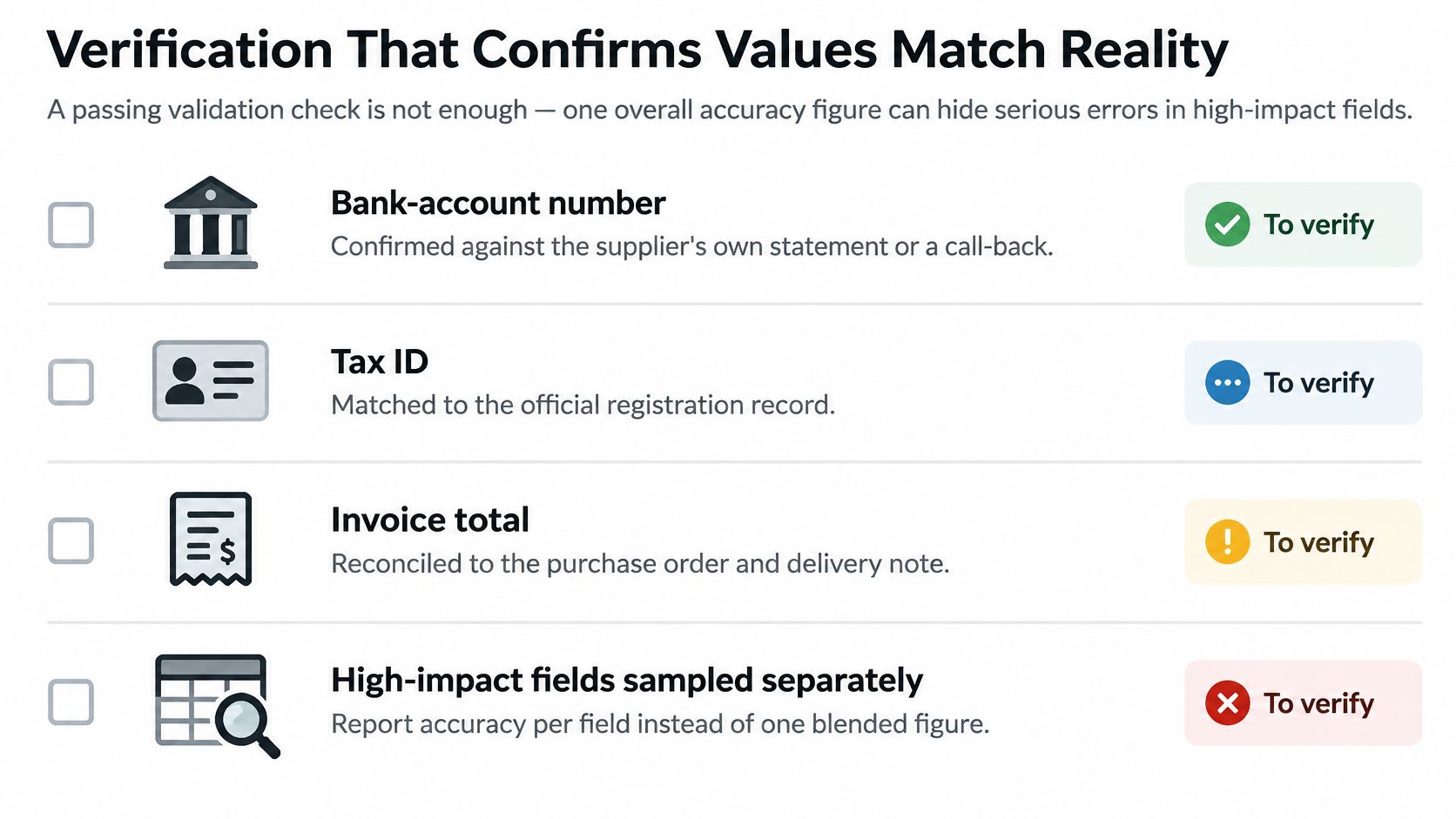
Four methods, in the order they run
Verification isn't one action. It's a sequence, cheapest checks first, with an escalation trigger defined before you need it.
| Method | What it confirms | Invoice example | Escalate when |
|---|---|---|---|
| Cross-field reconciliation | Totals agree with line items and tax | Line items sum to the invoice total | Difference exceeds the rounding tolerance |
| Source check | Value matches a trusted record | Supplier tax ID matches the registry | No match or conflicting registry data |
| Duplicate detection | Record has not already been processed | Same invoice number from the same supplier | A match is found in the ledger |
| Image evidence | Value is linked to its place on the source page | Total traced to its page coordinates | Value cannot be located on the page |
The source check is where a valid-looking tax ID gets caught belonging to a different company. FastCorp's walkthrough of checking VAT numbers before applying reverse charge is a useful reference for how that lookup changes the tax treatment, not just the data quality score.
Tier the risk and measure both error directions
Auto-approve low-risk values that several sources corroborate. Escalate rare or financially consequential mismatches even when the aggregate score looks excellent, because a wrong IBAN costs far more than a wrong description line.
Track false approvals and false rejections separately per field. They pull in opposite directions: tightening a threshold cuts bad postings and grows the review queue, and you can't manage that trade-off with one number. Building a labelled reference set is the prerequisite, which is why ground-truthing your data belongs in the plan before you tune anything.
We don't guarantee 100% accuracy, and results must always be supervised and expressly accepted by you as the client. Treat that as a design constraint, not fine print.
Your working checklist:
- Set a risk tier for each high-impact field, such as bank account, tax ID and invoice total.
- Require at least two corroborating sources before automatic approval.
- Measure false approvals and false rejections separately for each field on every release.
- Record who verified each exception and which evidence was used.
Invoice and Payslip Checks That Stop Bad Data
Two document types show the pattern fastest, because both carry arithmetic that has to balance.

Invoices, where the tax breakdown is the weak point
The problem is manual keying of line items and VAT figures. An operator copies the grand total, skips the per-rate breakdown, and the error surfaces after payment when the VAT return doesn't reconcile.
The solution starts with knowing which fields are legally required. Under the European Commission's VAT invoicing rules, a full invoice must include the issue date, supplier and customer details, a description and quantity of goods or services, the unit price excluding tax, the applicable VAT rate, the VAT amount, and a breakdown of VAT by rate or exemption. Those aren't suggestions, they're your required-field list.
So extraction has to preserve line-item quantities and prices, not just the headline figures, and the checks have to confirm the tax calculation and the rate breakdown are complete. Map the output to a consistent schema rather than raw text, following the model behind EN 16931, named as the European standard for structured electronic invoices in the Commission's eInvoicing guidance for businesses.
The result you can measure: fewer invoices rejected by your ERP or your customer's accounts payable team, and tax exceptions surfaced before the payment run instead of after it.
Here's the pipeline in practice, from upload to validated fields.
Payslips, where gross and net must agree
The problem is salary breakdowns that don't reconcile with contribution bases. A payslip reads perfectly well, every number is numeric, and yet gross pay minus deductions doesn't equal net pay for that month.
The fix is a reconciliation rule that runs before the payroll comparison, not after. Reconcile gross pay, deductions and net pay, then compare contribution bases against the previous period for the same employee and flag movements outside the band you set. An extraction API can pull those fields and apply the checks in one pass, but your finance team still owns the rules and the tolerance.
If you want a parallel from another sector, Clarity's eligibility verification breakdown shows the same discipline applied to coverage data: confirm the record against an authoritative source before acting on it, rather than trusting a well-formed field.
Identity and Logistics Documents Under Compliance Rules
KYC is the clearest case of a document being read correctly while the identity behind it stays unconfirmed. The scan is legible, the fields are complete, and nobody has checked that the person exists as one unique individual.
FATF Recommendation 10 requires regulated entities establishing a business relationship to identify customers and verify their identities using reliable, independent source documents, data or information. FATF's digital-identity guidance sets out a practical sequence:
- Obtain the attributes. Name, date of birth and identification number.
- Obtain evidence for each attribute. The document or record that supports it.
- Validate and verify that evidence. Check quality and consistency, then compare against trusted data or authentication results.
- Resolve to one person. A single, identity-proofed individual, not three near-duplicate records.
The guidance recommends a risk-based approach rather than treating every customer identically, so route unresolved or high-risk cases to a reviewer instead of forcing a decision. Our guide to what identity verification involves goes deeper on the evidence side of that sequence.
The result is an audit trail per decision: which attributes were captured, which evidence supported them, who reviewed the exception and why. That's what a supervisor asks for, and a confidence score alone won't satisfy them.
Logistics documents that must agree with each other
A Bill of Lading and a customs declaration (DUA) describe the same shipment, and they have to agree on consignee, port codes, package counts, weights and container numbers. Validation checks the form of each code and number: container check digits, port code vocabularies, numeric weights.
Verification compares those values across documents and against the shipping instructions and packing list. A container number can be perfectly formatted and still be the wrong box, which is a customs problem rather than a data-entry one. Hold the shipment record and show both conflicting values side by side so the operator resolves it in one look.
One contractual point before you send identity documents anywhere. When processing documents containing personal data, we act as data processor under the GDPR and follow only your instructions as data controller. Read the data-processing terms with that split in mind, because the controller obligations stay with you.
Confirm Your Validation Plan Before You Choose a Tool
Choose the tool after you've written the rules, not before. Six decisions, in order:
- Write the rules for your three highest-impact fields. Invoice total, tax ID and identity number are the usual candidates. One rule per failure mode, expressed so a machine can run it.
- Set a risk tier and an acceptance threshold per field. Name a human owner for each exception queue, otherwise escalations pile up with nobody accountable.
- Build a test set of real documents with known correct values. Include the awkward ones: rotated scans, mixed document sets, suppliers with unusual layouts.
- Measure precision and recall for every field, release by release. Our evaluation feature runs tests against ground truth datasets, tracks precision and recall for each field, and detects regressions before they reach production, which is the only reliable way to notice a quiet drop after a model change.
- Define the output schema before you integrate. You can create custom extraction schemas with us by specifying field names, types and descriptions, and receive structured JSON that follows that definition, so your ERP mapping doesn't shift underneath you.
- Pick the processing mode that matches the workflow. We offer three through one API: Normal (synchronous, returns structured data instantly, for real-time integrations), Async (submit a document and receive results via webhook when ready) and Batch (submit hundreds of documents in a single request, for nightly imports and migrations).
A tool can't tell you what "correct" means for your business. Write that down first, and the evaluation becomes a comparison instead of a demo.
If you're evaluating automation for this process, start with the rules and the test set. Then judge platforms such as Matil.ai against them, field by field, rather than against a single headline accuracy figure.
We combine OCR, classification, validation and workflow orchestration in one API, so the fields you receive have already been checked against the rules you defined and can be traced back to their place on the page. Bring your three highest-impact fields and a handful of real documents, and test whether our validation and evidence trail hold up against your own acceptance thresholds. Visit Matil to see the schemas, processing modes and evaluation results for your document types.


