Legal Document Data Extraction: A 2026 Guide
Legal document data extraction turns contracts, NDAs and filings into validated fields with source evidence, review rules and an audit trail.

Legal document data extraction is turning contracts, NDAs and filings into named, source-linked fields, such as parties, dates, amounts and case identifiers, each tied to its page and supporting text. It isn't running OCR and hoping the text is usable. OCR gives you searchable characters. Extraction gives you a renewal date you can sort, filter and act on, plus the evidence that proves it's correct.
That distinction matters because a searchable PDF still leaves a person hunting for the clause that changes a deadline. A governed extraction workflow classifies the document, pulls the fields you defined, checks them against rules, and routes the uncertain ones to a reviewer. Speed comes second. Traceability comes first.
Legal Document Data Extraction by Document Type
Legal document data extraction is the conversion of contracts, NDAs, court filings and related compliance records into named fields, each tied to a page and a text span. A field isn't just a value in a spreadsheet cell. It's a value with a source, so a paralegal can click from termination notice period back to the exact paragraph that sets it.
A searchable PDF doesn't do that work for you. You can search for the word "renewal" and still find five mentions, two definitions and no clear date. Traditional OCR reads characters, while extraction classifies the document, pulls fields and checks them. That's the gap felt when a shared drive full of PDFs still requires someone to open every file.
Start With the Field List, Not the Model
Different document families need different schemas. A commercial contract needs parties, term and liability language. A court filing needs case identifiers and deadlines. An identity record used for a KYC check needs far less, and copying every visible field creates risk you don't need.
If you're scoping work that sits near public contracts, it helps to compare federal pricing models with FederalPipeline before you decide which commercial terms deserve their own fields. The point is practical. Fields you never report on shouldn't be extracted just because they're visible on the page.
Fields to extract by legal document type
| Document type | Fields to capture | Layout trap |
|---|---|---|
| Commercial contract | Parties, effective date, term, renewal, termination notice, liability cap, governing law, signature block | Long text, defined terms, cross-references |
| NDA | Parties, confidential-information definition, exclusions, term, survival, governing law | Short form but highly variable clause wording |
| Court filing | Court, case number, parties, filing date, title, claims or relief, deadlines, exhibits | Captions, stamps, scanned pages, attachments |
| KYC identity or policy record | Name, document number, expiry or coverage limit, and only other purpose-required fields | Personal data that must not be copied wholesale |
How to Read the Table
Treat each row as a starting schema, then cut it down to what a named workflow uses. If nobody tracks survival after an NDA ends, don't extract it. If operations renews vendor agreements from a report, renewal and notice period are mandatory, and they need stricter review than a clause title.
- Name the owner: One person decides what each field means, including edge cases.
- Define the format: Dates, currencies and party names need one normalized form.
- Mark decisive fields: Flag values that can change rights, money or deadlines for closer review.
- Limit personal data: Capture only what the stated purpose requires.
Freeze the field list before you choose a model. Every validation rule, test set and review queue depends on it.
You can browse document types and schemas in the legal marketplace to see how field lists differ by use case. Don't copy a schema blindly. Your contracts, filing types and reporting needs should set the fields, and the tool should adapt to that list.
One more confusion is worth clearing up. A clause title tells you a section exists. It doesn't tell you what the section says. If you extract "Limitation of Liability" as a heading but not the cap inside it, you've built an index, not a dataset. Decide for each clause whether you need the heading, the full text, a normalized value, or all three.
Why Manual Review and Plain OCR Fail at Filing Volume
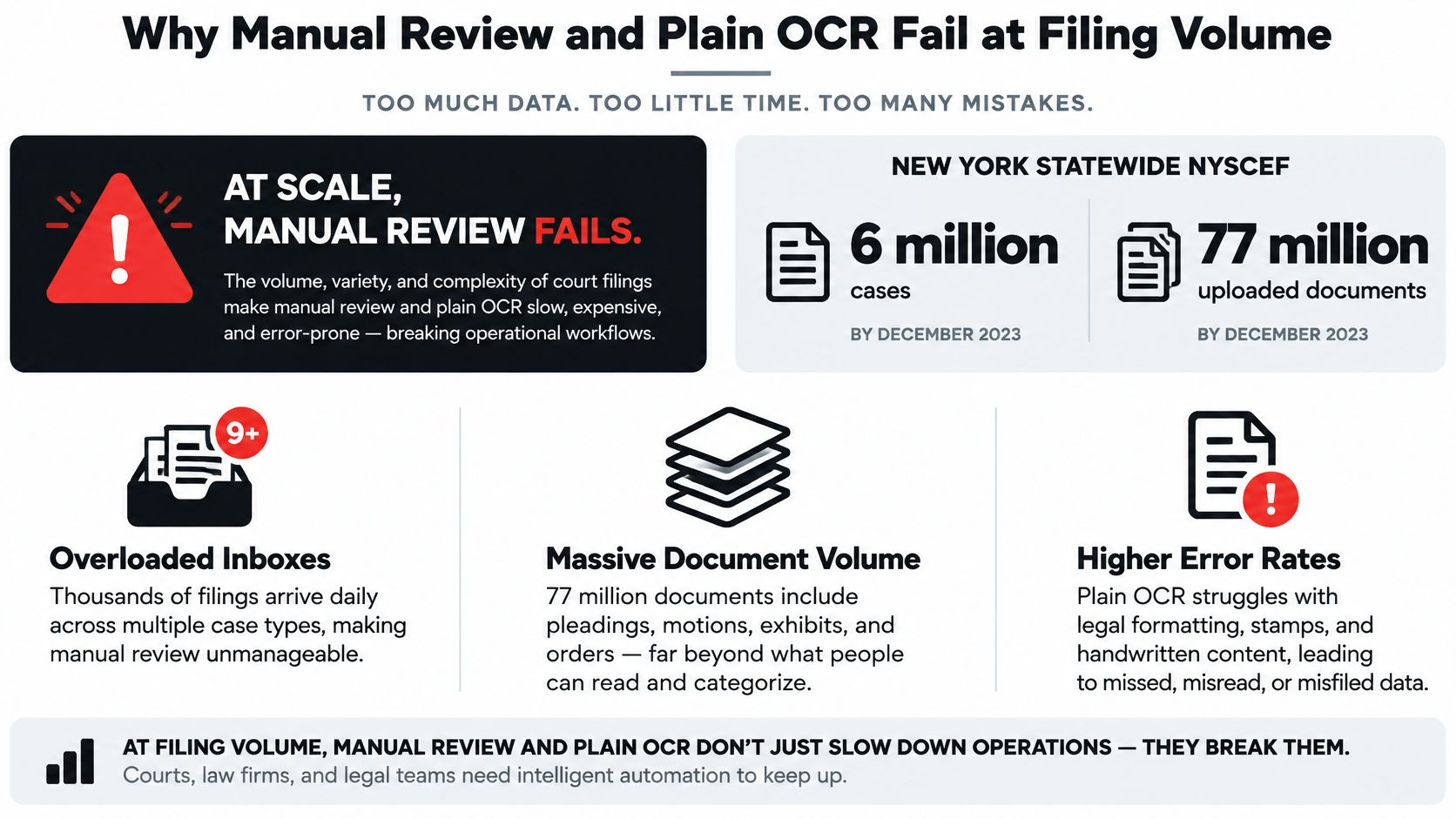
Manual review doesn't fail because reviewers are careless. It fails because volume rises faster than headcount. The New York e-filing report states that the statewide NYSCEF system had electronically processed more than 6 million cases and approximately 77 million uploaded documents by December 2023. More than 42 million documents were uploaded during the four years preceding the report. In 2023 alone, 446,347 cases were e-filed in New York Supreme Court, almost 500% higher than the number e-filed in 2010.
Those are court system totals, not your inbox. They still show the pattern your team feels. Digital filing removed the paper trip, but it didn't remove the reading.
The scale problem is easier to see as a workload picture than as a paragraph of totals.
Digital Doesn't Mean Structured
An e-filed document can still be a scan, an image-based PDF, a stamped caption page or a table pasted sideways. Plain OCR returns a text blob. It loses reading order on multi-column pages, breaks tables into loose lines, and can't tell that "Termination" is a clause heading rather than an ordinary word in a sentence.
That leaves a person to rebuild meaning by eye. If you're comparing OCR quality across tools, a side-by-side OCR accuracy comparison helps, but character accuracy alone won't tell you whether fields land in the right columns.
The hidden costs show up in predictable places:
- Rekeying time: Someone types the same case number, party and date into a tracker for every document.
- Missed renewals and deadlines: A date buried on page 18 isn't in any report until someone reads page 18.
- Review hours tied to headcount: Twice the filings means roughly twice the reading, with no reuse.
- Inconsistent fields: Two reviewers record the same counterparty differently, so matters can't be searched together.
Finance teams hit the same wall with approvals, which is why guidance to build auditable invoice approval workflows stresses traceable fields rather than faster typing. Legal operations needs the same discipline. You need classification, OCR for scanned pages, field checks, and a trace from every value back to its page. Without that trace, you've only moved the manual work downstream.
How Legal Document Data Extraction Works
Follow one mixed PDF through the pipeline. It contains a vendor contract, a signed NDA and two exhibits. If you treat that file as one document, every later step gets harder.
The six stages below show where structure is created and where it breaks.
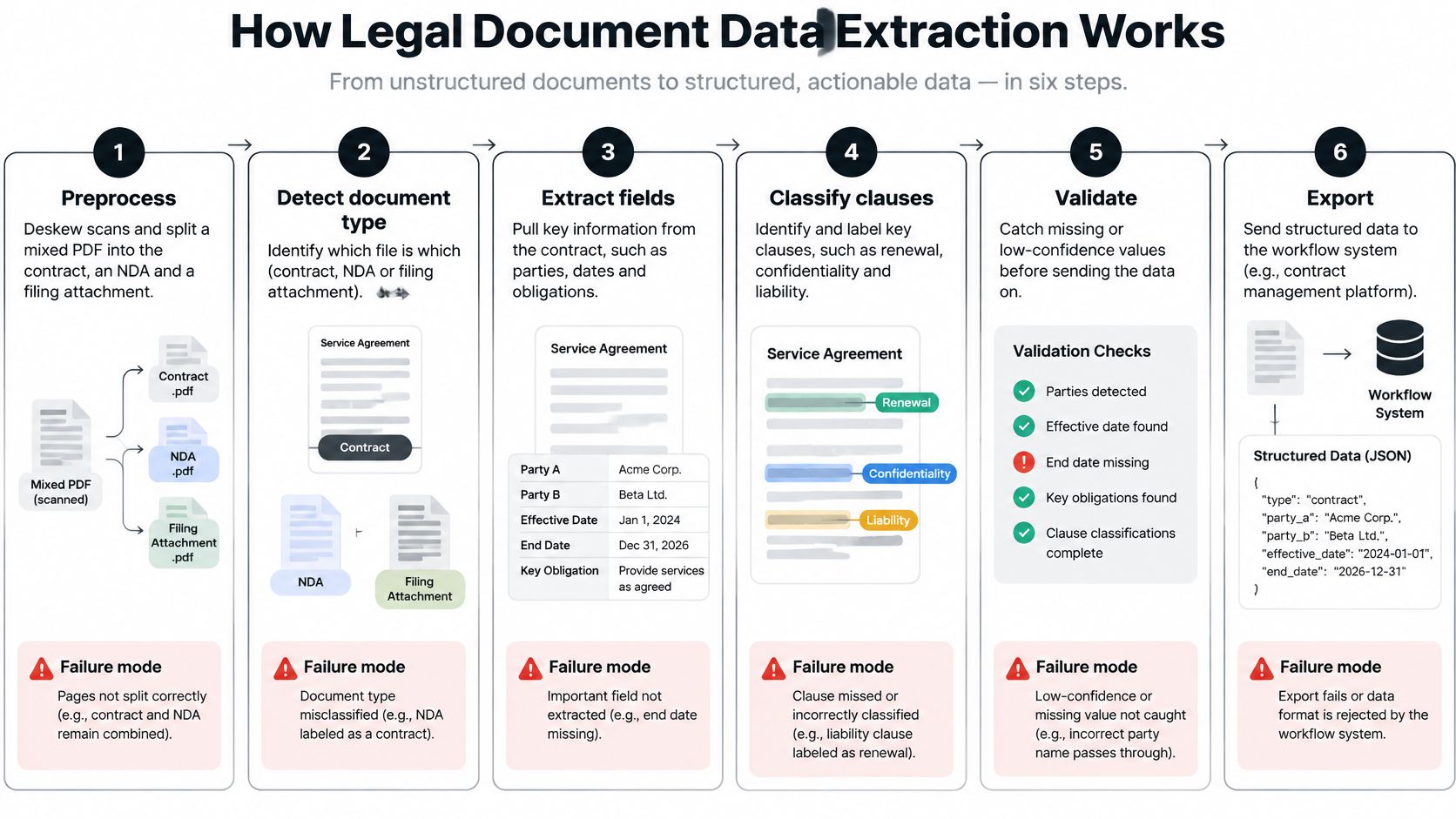
Six Stages, Six Failure Modes
- Preprocess: Deskew scans and split the mixed PDF into the contract, the NDA and the exhibits, keeping original page numbers. Failure mode: one schema is applied to everything in the file, so exhibit data pollutes contract fields.
- Run OCR: Convert image pages into text with bounding boxes, not a flat string. Failure mode: a value has no coordinates, so nobody can trace it back to the page.
- Segment the layout: Identify headers, clauses, tables, signature blocks and reading order. Failure mode: a table row is read across columns and the wrong amount attaches to the wrong party.
- Classify the document type: Decide whether each split piece is a contract, NDA, filing or exhibit before extraction starts. Failure mode: a filing is parsed with a contract schema and returns confident, useless fields.
- Extract fields: Fill a fixed JSON structure with each value, a confidence score, and the page plus text span behind it. Failure mode: a value arrives with no supporting span, so it can't be checked.
- Validate: Check date formats, currency amounts, party-name consistency and allowed values, such as a governing-law list. Failure mode: the pipeline guesses instead of blocking a field that fails a rule.
Why Layout Can't Be an Afterthought
Research on the CUAD benchmark described in the CUAD contract study, built on 510 public-domain English contracts, found that incorporating visual cues from OCR improved contract-understanding performance, while performance declined sharply as document length increased. That's why long contracts should be split into semantically coherent sections before inference, with overlap between chunks. Without overlap, a definition introduced in one chunk disappears from the clause that uses it in the next.
Keep the evidence with the value at every stage:
- Page number and bounding box: Where the value sits on the page.
- Section heading and reading order: Which clause it belongs to.
- Table-cell coordinates: Which row and column produced an amount.
- Supporting text span: The exact words the value came from.
Working rule: If a field can't point to its evidence, it isn't extracted. It's guessed.
Errors compound across stages. A skewed scan hurts OCR, weak OCR hurts segmentation, and bad segmentation sends the model the wrong clause. Validation should compare each value against nearby textual evidence and flag fields whose supporting span is missing or inconsistent. The final step is quieter but just as important. Link entities across documents so one counterparty appears as one record in every matter, not as three spelling variants that never match in a report.
Pre-Trained Versus Custom Extraction Models
You've got three ways to get a schema running. They differ in setup time and in how much evidence you need before you trust them.
A pre-trained schema covers common legal fields such as parties, dates, amounts, governing law and termination terms. You don't need a labeled set to start. The limit is the field list. It only covers what it covers, so you add fields by name, type and description when your workflow needs something extra.
Few-shot or one-shot prompting sits in the middle. You give the model a few worked examples per field instead of building a full training set. That's faster, but it isn't free of risk. The legal-term extraction results covered later show why a handful of examples still needs field-level checks before production use.
A custom model fits clause types or document families outside the standard schema, such as a niche lease portfolio or a regional filing form with its own stamps and captions. It needs labeled examples and a held-out test set. Skip the test set and you're measuring how well the model remembers your examples, not how it handles next month's files.
Extraction approach by fit and trade-off
| Approach | Best fit | Trade-off |
|---|---|---|
| Pre-trained schema | Standard contract, NDA and filing fields | Fixed field list; add fields by name, type and description |
| Few-shot or one-shot prompting | A small set of new fields with a few worked examples | Reduces labeling; F1 of 0.690 in legal-term study, so measure per field |
| Custom model | Niche clause types or unusual document families | Needs labeled examples and a test set; build time under one week with supplied examples |
The sequencing rule is simple. Start with a pre-trained schema. Measure each field on a sample of real files that includes your worst scans, not just clean born-digital PDFs. Build a custom model only for the fields that fail. That order keeps you from paying custom-model effort for a filing date that a standard schema already reads well, and it focuses labeling work where errors cost you something.
Which Extracted Fields Need Human Review
A single accuracy percentage is the wrong score. A system can read party names and dates beautifully across hundreds of contracts while mangling the one liability cap that matters. Common fields dominate the average. Rare, decisive clauses hide inside it.
The cautionary numbers come from limited-annotation extraction. In a study of legal-term extraction using limited annotation, GPT-4 achieved a 0.690 F1 score under one-shot/zero-shot conditions, with approximately 0.676 precision and 0.704 recall under one-shot prompting. The evaluation corpus contained 973 legal terms, of which 270 were extracted with an exact match. An F1 near 0.69 means substantial false positives and false negatives. That's a research result, not a vendor verdict, but it shows why confidence scores, source spans and a review queue aren't optional extras.
The checklist below turns that caution into a routing habit.
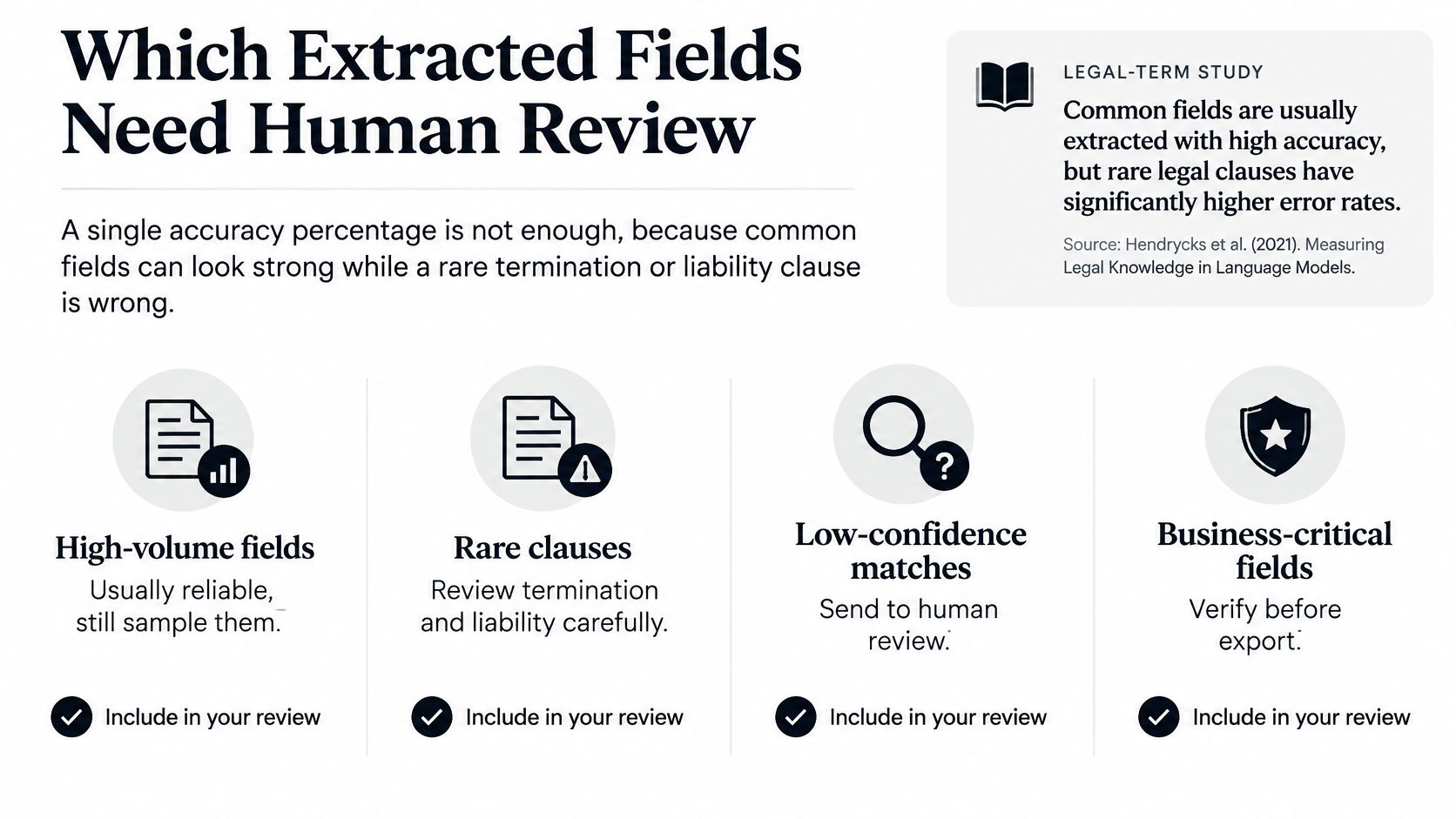
Route by Risk, Not by Document
Don't ask whether a document passed. Ask whether each field passed. One contract can produce an auto-accepted effective date and a liability cap that needs a lawyer's eyes.
Auto-accept versus human review by field risk
| Field examples | Risk | Accept rule |
|---|---|---|
| Dates, party names, clause titles, amounts, governing law | Low, grounded in the text | Auto-accept only with high confidence and a source span |
| Termination, renewal, notice period, liability cap | Medium, small errors change rights | Paralegal review unless an exact pattern matches |
| Privilege, relevance, legal effect, liability interpretation | High, this is legal judgment | Always attorney review; never auto-decide |
| Handwriting, stamps, tables, multilingual or unusual clauses | Quality varies by page | Measure precision and recall on a sample before any auto-accept |
Low-risk fields are document-grounded. The answer is printed on the page and the span either matches or it doesn't. Medium-risk fields are also printed, but a small error changes what your company can do. Reading a 90-day notice period as 30 days isn't a typo. It's a missed exit. High-risk fields aren't extraction at all. Deciding whether a document is privileged or what legal effect a clause has is judgment, and the model's job ends at surfacing the text.
Measure Each Field on Its Own
Calculate precision and recall separately for every field. Precision tells you how often an extracted value is right. Recall tells you how often a value that exists gets found at all. A renewal field with high precision and poor recall looks accurate in a report while dropping contracts from your renewal calendar.
Test separately on scans, handwritten annotations, tables, multilingual text and unusual layouts. A field that performs well on clean PDFs may collapse on stamped filings, and a blended score won't show you where.
- Route with evidence: Show the reviewer the page image beside the extracted value, not just the value.
- Record the override: Log who accepted or corrected each field.
- Feed corrections back: Recurring reviewer fixes point to a schema or model problem worth solving once.
Auto-accept only low-risk fields above a tested confidence cutoff with a source span attached. Everything else waits for a person.
That starting threshold will feel conservative in week one. It's supposed to. Loosen it field by field as your own test results earn the change, and tighten it again when a new document family arrives.
Contracts NDAs and Filings in Practice
The pattern is easier to judge in daily work than in pipeline diagrams. Each case below follows the same shape. Here's the problem a team starts with, what extraction changes, and what they get.
This first view shows contract handling as a sequence, from mixed intake to structured fields.
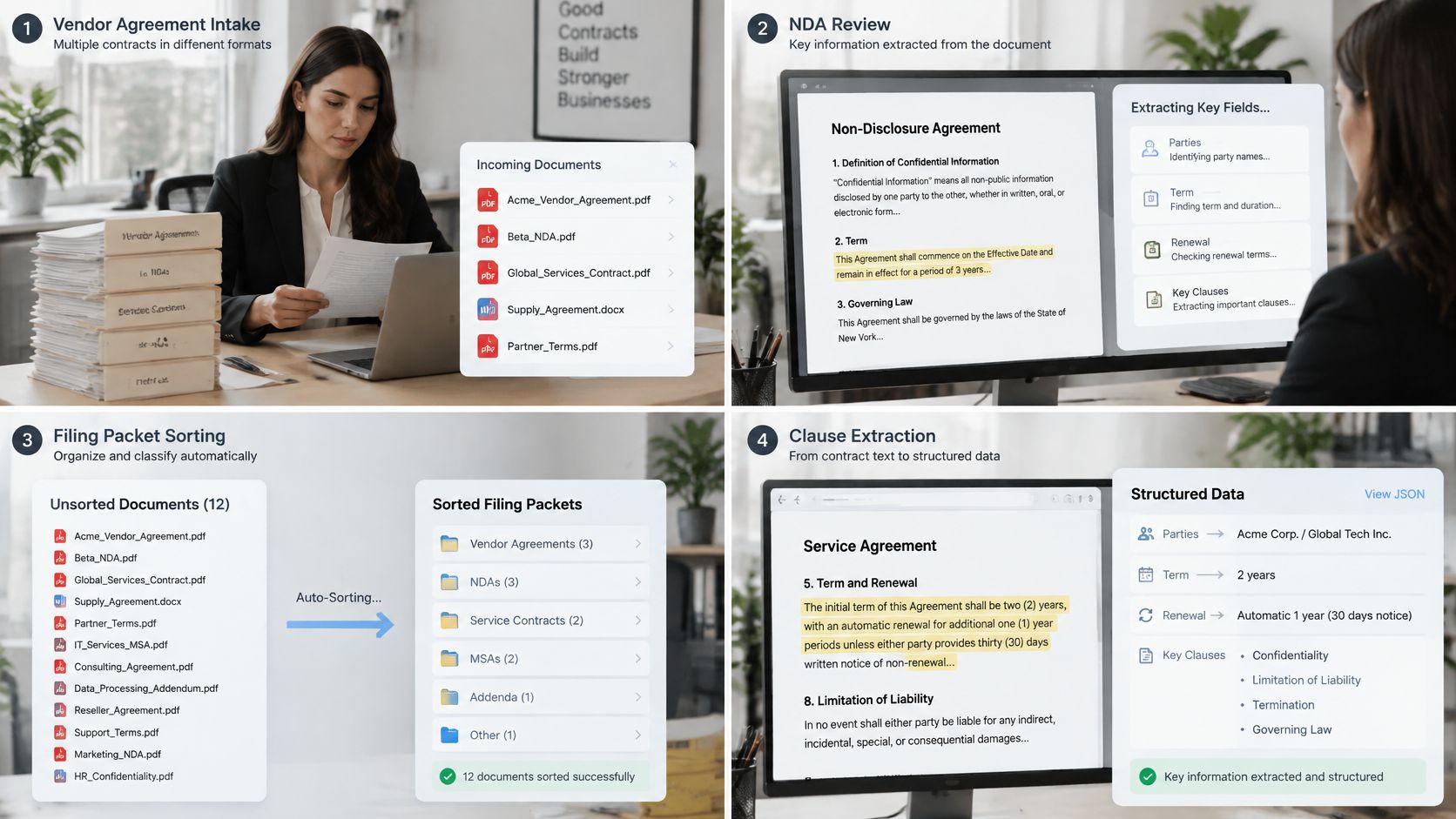
Contract Intake
Counsel receives vendor agreements as mixed PDFs. The signature copy sits with an order form, a data processing addendum and an old amendment. Someone opens the file, scrolls to find the term, and types key dates into a tracker if time allows.
Extraction splits the packet first, then fills parties, term, renewal and liability cap into the contract record. Low-confidence caps go to a reviewer with the clause on screen. The result isn't that lawyers stop reading contracts. It's that renewals stop being discovered the week they lapse, because the dates land in a report on the day the contract arrives. Teams preparing bids face a similar evidence problem, and practical guidance on writing a government contract proposal makes the same point from the other side. Structured, checkable terms beat a well-organized inbox.
NDA Triage
Business teams send one-off NDAs from every direction, each on the other side's paper. Classification separates NDAs from contracts so they don't enter the wrong queue. A short schema then pulls term, exclusions and survival.
The reviewer checks exceptions instead of retyping a standard two-page document. Most NDAs clear quickly. The odd one with an unusual residuals clause gets the attention, which is exactly where human time should go.
The short walkthrough below shows how a mixed legal packet moves through splitting and extraction in practice.
Court Filing Monitoring
A docket packet mixes a motion, a certificate of service and exhibits in one file. A splitter separates the documents. Fields such as case number, filing date and relief sought then feed a matter tracker, with deadlines routed for confirmation before anyone relies on them.
The gain is fewer missed deadlines and a matter list that stays current without a paralegal re-reading every packet. Exhibits still get read by people. They just stop burying the scheduling information.
Adjacent Compliance Packets
A KYC identity page or an insurance policy shouldn't run through a contract schema. Each gets its own narrow field list, limited to the stated purpose. Payroll and invoice packets work the same way, with finance fields kept apart from legal review.
Across all four cases, the result reads the same. Fewer retypes. A queue of exceptions instead of a full read of everything. Fields that downstream systems can store, search and report on.
Traceability and Personal Data After Extraction
Extraction doesn't end the risk. In some ways it concentrates it. A PDF is awkward to misuse at scale. A clean JSON record isn't. Once names, pay details, identity numbers and litigation facts sit in named fields, they're easy to search, copy, aggregate and reuse far from the document they came from.
Legal teams already sense this. The ACEDS summary of the 2025 ACEDS and Secretariat findings reports that data privacy and confidentiality concerns were cited by 56% of respondents as a Legal-AI adoption barrier, ahead of hallucination concerns at 31%. Upload security gets the attention. What happens to the output deserves the same scrutiny.
What the GDPR Asks of Your Schema
Under the GDPR, personal data includes information relating to an identified or identifiable living individual, and organizing it by predefined fields is still processing. Turning a contract into JSON isn't a technical side step outside the rules.
Two principles shape the schema directly:
- Purpose limitation: Each field needs a reason tied to the purpose you stated when you collected the document.
- Data minimization: If nobody uses a field, leave it out of the schema rather than extracting it because you can.
Article 24 expects controllers to show that their measures match the risk. Article 25 says that, by default, only necessary data should be processed. Identity documents collected to verify identity shouldn't be kept longer than that purpose needs. When we process documents containing personal data, we act as data processor under the GDPR and follow only the client's instructions as data controller. We also don't use clients' personal or confidential document data to train public generative AI models or models shared with other clients. Where a field must be hidden from some viewers, data masking explained covers how to limit exposure without deleting the record.
Questions to Settle Before Go-Live
A retention slogan isn't a control. Settle these points in writing before the first production file runs. Where do extracted fields, prompts, logs and reviewer corrections reside? Can customer data train any model? Who is controller and who is processor? How do deletion and data-subject access requests work? How is cross-border processing handled, and how is matter-level access logged?
The same trail must cover human reviewers and every system that receives the export, including your document manager and matter system. Require one exportable record per accepted value showing page, span, model version and reviewer. If you can't produce that record during an audit, your traceability is a promise, not a process.
Start a Governed Extraction Workflow
Start smaller than feels ambitious. One document family, one schema, one measurable result. Vendor contracts or a single filing type both work well because the fields repeat and errors are easy to spot.
Five Steps in Order
- Lock the schema: Pick one document family and freeze the field list with a named owner.
- Score a real sample: Test 30 to 50 files, including scans and odd layouts, and measure precision and recall per field.
- Set the accept rule: Auto-accept only fields that earn it, and route everything else to a named reviewer.
- Turn on the audit record: Every accepted value carries its page, span, model version and reviewer from day one.
- Connect downstream last: Send JSON to your matter or contract system only after the sample passes.
If you're evaluating platforms, tools like Matil.ai let you run this sequence through one API that combines OCR, classification, validation and routing, with synchronous calls for live checks, webhooks for slower jobs and batch processing for backlogs. For custom documents, you send examples of your document and our team analyzes the structure and trains an optimized model in under a week.
Hold every vendor to the same written checks. Confirm who is controller and who is processor. Confirm whether client documents are used to train any shared model. Confirm how long documents and results are retained, and which certifications cover the service, including GDPR, ISO 27001 and SOC. Don't assume zero retention unless the contract states it.
Test any vendor against a sample of your own contracts, including the scans you'd rather not show anyone. That's the sample that tells the truth.
You'll know the workflow is working when reviewers stop reading whole documents to find one date, and start clearing a short queue of fields that need judgment. That's the honest trade. Automation handles the volume. People keep the decisions.
If you're evaluating legal document data extraction for contracts, NDAs or filings, Matil gives you an API that classifies documents, extracts source-linked fields and validates them before they reach your systems. Start with one document family and a sample of your own files, measure each field on its own, and keep human review where legal judgment belongs.


